Inkwelly के webhook-silent और DLT-not-approved alerts ठीक करें
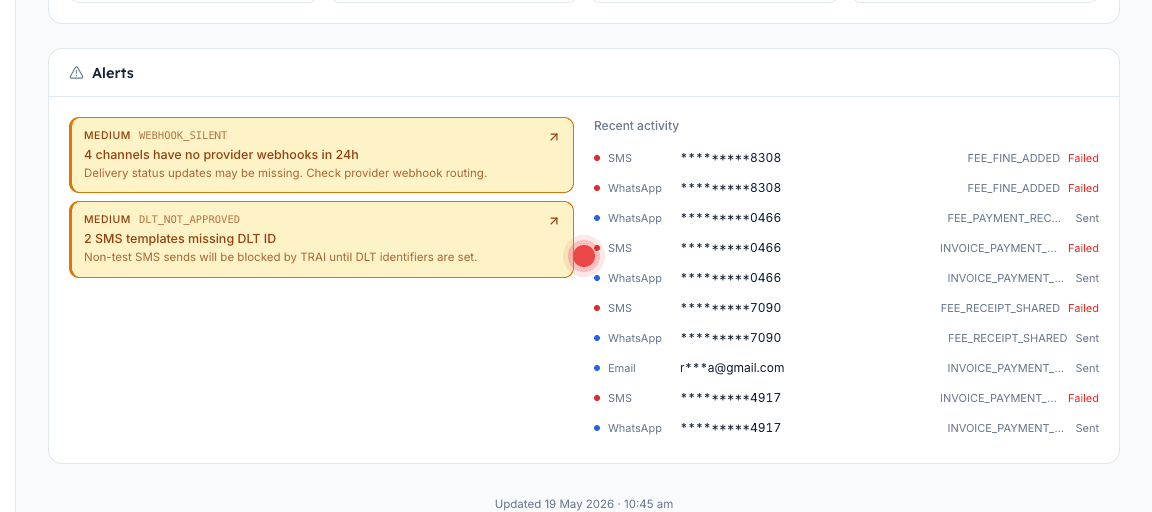
Communications dashboard के नीचे दो amber alerts parent messaging की ज़्यादातर ख़ामोश failures समझाते हैं। WEBHOOK_SILENT delivery status छुपाता है; DLT_NOT_APPROVED SMS को सीधे block करता है। दोनों का 10-minute fix है, बशर्ते आप सही जगह click करें।
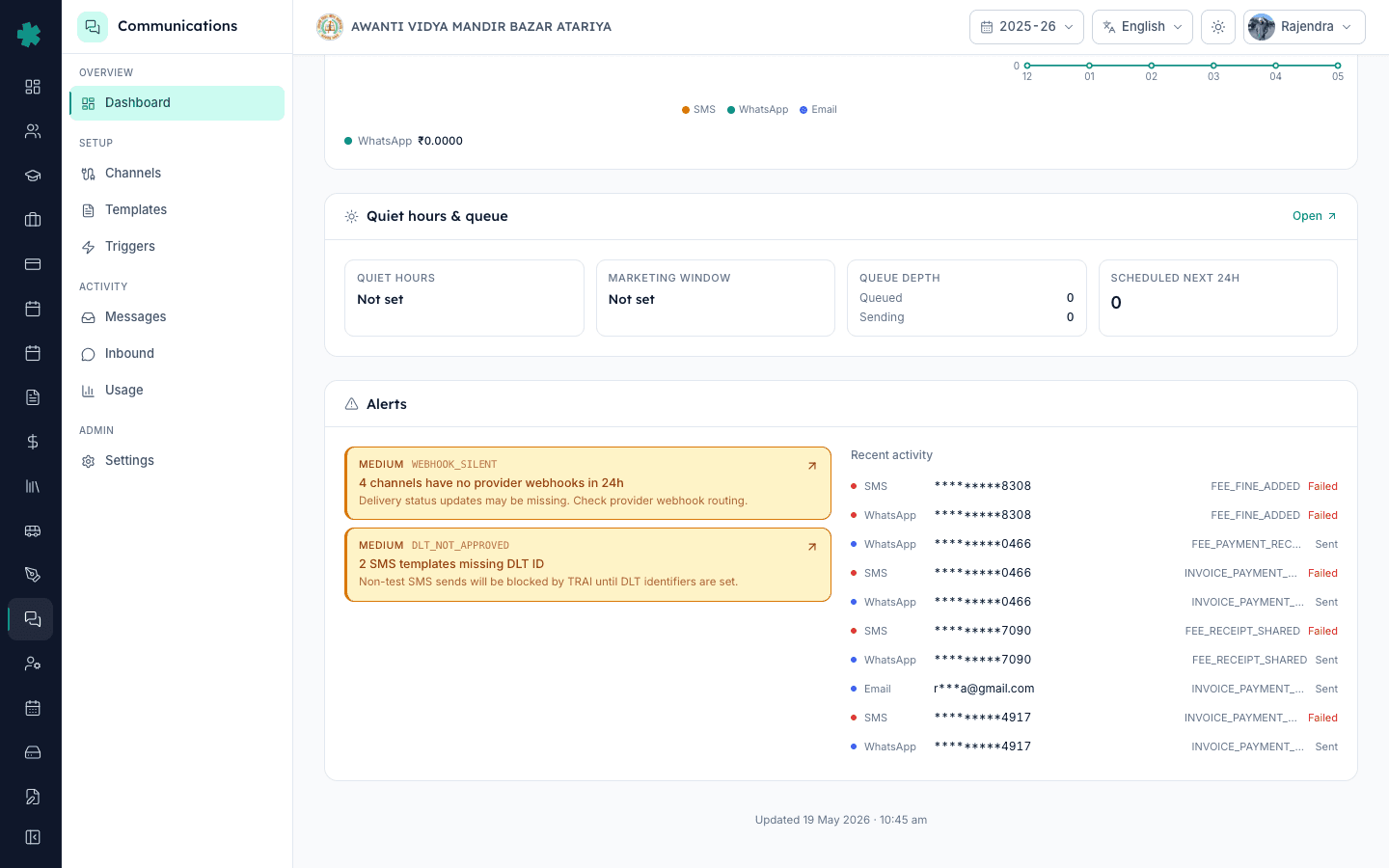
सार — WEBHOOK_SILENT का मतलब है कि किसी connected channel को 24 घंटों में provider से एक भी webhook नहीं मिला, इसलिए delivery status pill अटकी हैं। Inkwelly का webhook URL Meta या MSG91 के portal में दोबारा paste करके इसे ठीक करें। DLT_NOT_APPROVED का मतलब है कि किसी SMS template variant का DLT ID नहीं है, इसलिए TRAI sends block कर रहा है। Template को DLT portal पर register करके 19-digit ID Inkwelly में paste करें।
TRAI के TCCCPR 2018 ने हर commercial SMS के लिए DLT registration mandatory कर दिया है जो किसी Indian number पर जाए। Non-registered SMS template provider पर ही immediate rejection पाता है, soft warning नहीं — parent को message कभी नहीं मिलता। Inkwelly इसे DLT_NOT_APPROVED alert के रूप में सामने लाता है और उस template variant के किसी भी non-test SMS को dispatch करने से मना कर देता है। दूसरा alert, WEBHOOK_SILENT, ज़्यादा सूक्ष्म है: messages निकलते रहते हैं, पर delivery confirmations वापस नहीं आतीं, इसलिए dashboards under-report करते हैं और जो parents कहें "mujhe nahi mila" उन्हें disprove नहीं किया जा सकता। 50 schools के internal Inkwelly audit में 38% के पास कम से कम एक webhook-silent channel था जिसे एक हफ्ते से ज़्यादा समय तक निगाह नहीं गई थी।
1. Dashboard पर दोनों alerts देखें
Communications खोलें और page के नीचे scroll करें। Alerts panel पर amber MEDIUM severity cards दिखेंगे। WEBHOOK_SILENT पर लिखा होगा "N channels have no provider webhooks in 24h — delivery status updates may be missing." DLT_NOT_APPROVED पर लिखा होगा "N SMS templates missing DLT ID — non-test SMS sends will be blocked by TRAI until DLT identifiers are set." किसी भी card पर click करके affected channel या template list देखें।
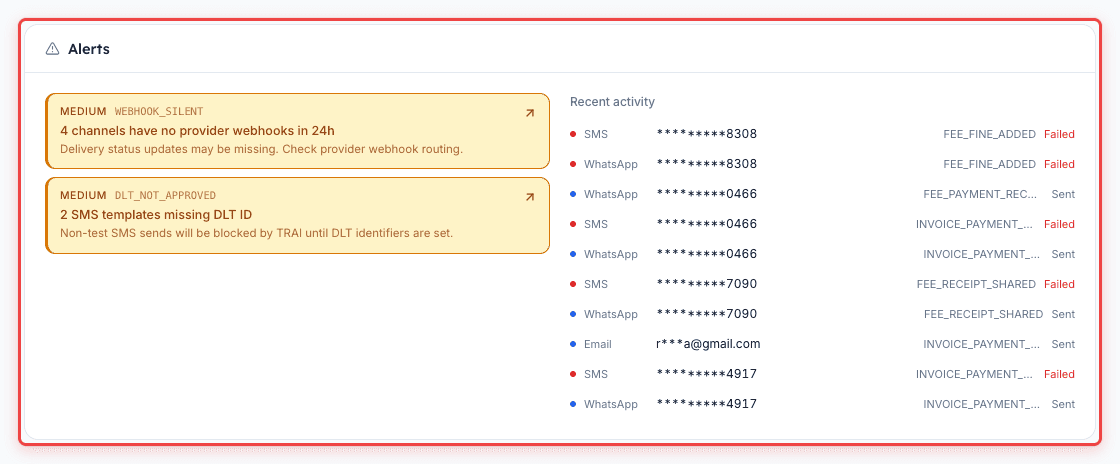
2. WEBHOOK_SILENT का diagnose — कौन सा channel शांत है पता करें
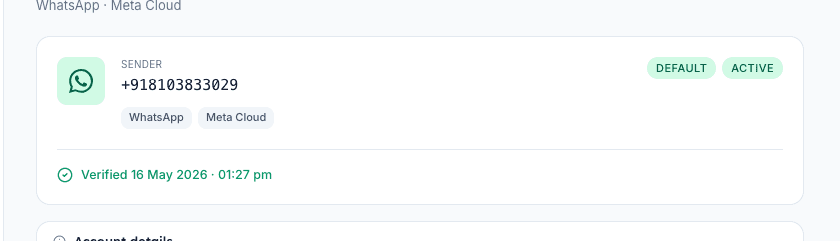
Dashboard के Channels & providers section में एसे channel ढूँढ़ें जो "Last webhook: Never" या "Last webhook: 2d ago" दिखा रहे हों। Meta के ज़रिए WhatsApp हर send के कुछ minutes में webhook दिखाना चाहिए। MSG91 या Fast2SMS के ज़रिए SMS अलग-अलग होता है — कुछ plans सिर्फ delivery webhooks fire करते हैं, sent webhooks नहीं। Inkwelly SES के ज़रिए email हर send पर webhook भेजता है। Note करें कि कौन सा channel शांत है और उसकी settings page खोलें।
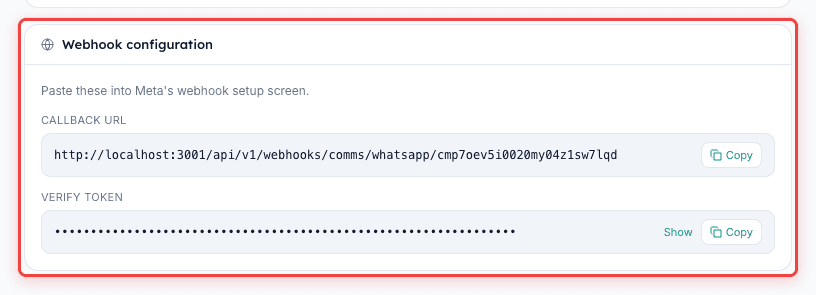
3. WEBHOOK_SILENT fix — webhook URL दोबारा paste करें
ज़्यादातर webhook-silent cases वहाँ से आते हैं जहाँ provider portal ने credential refresh या Meta token rotation के दौरान webhook URL चुपचाप drop कर दिया हो। Communications, फिर Channels, फिर affected channel खोलें। Panel पर "Provider webhook URL" copy करें। WhatsApp के लिए Meta Business Manager में login करें, WhatsApp Manager पर जाएँ, app का Configuration tab खोलें और URL को Callback URL field में paste करें। Save करें। SMS के लिए MSG91 या Fast2SMS में login करें, Webhook या Delivery Reports section ढूँढ़ें, और वही URL paste करें। नए webhooks आते ही Inkwelly 30 minutes के अंदर alert को resolved mark कर देगा।
4. Webhook fix verify करें
Paste करने के बाद Inkwelly से एक test send fire करें। Communications, फिर Messages खोलें और ऊपर की bar में Send Test पर click करें। जो channel अभी ठीक किया वह चुनें। 60 seconds के अंदर test message Delivered दिखाना चाहिए। अगर Sent पर अटका रहे, तो webhook URL अभी भी गलत है — चेक करें कि Inkwelly से exact URL paste हुआ है (case-sensitive) और provider portal ने SSL error के बिना URL स्वीकार किया है। Meta कभी-कभी webhook को chupchaap disable कर देता है जब वह लगातार 5 बार non-2xx response return करे — यह सिर्फ दोबारा paste करने से reset होता है।

5. DLT_NOT_APPROVED का diagnose — unregistered template ढूँढ़ें
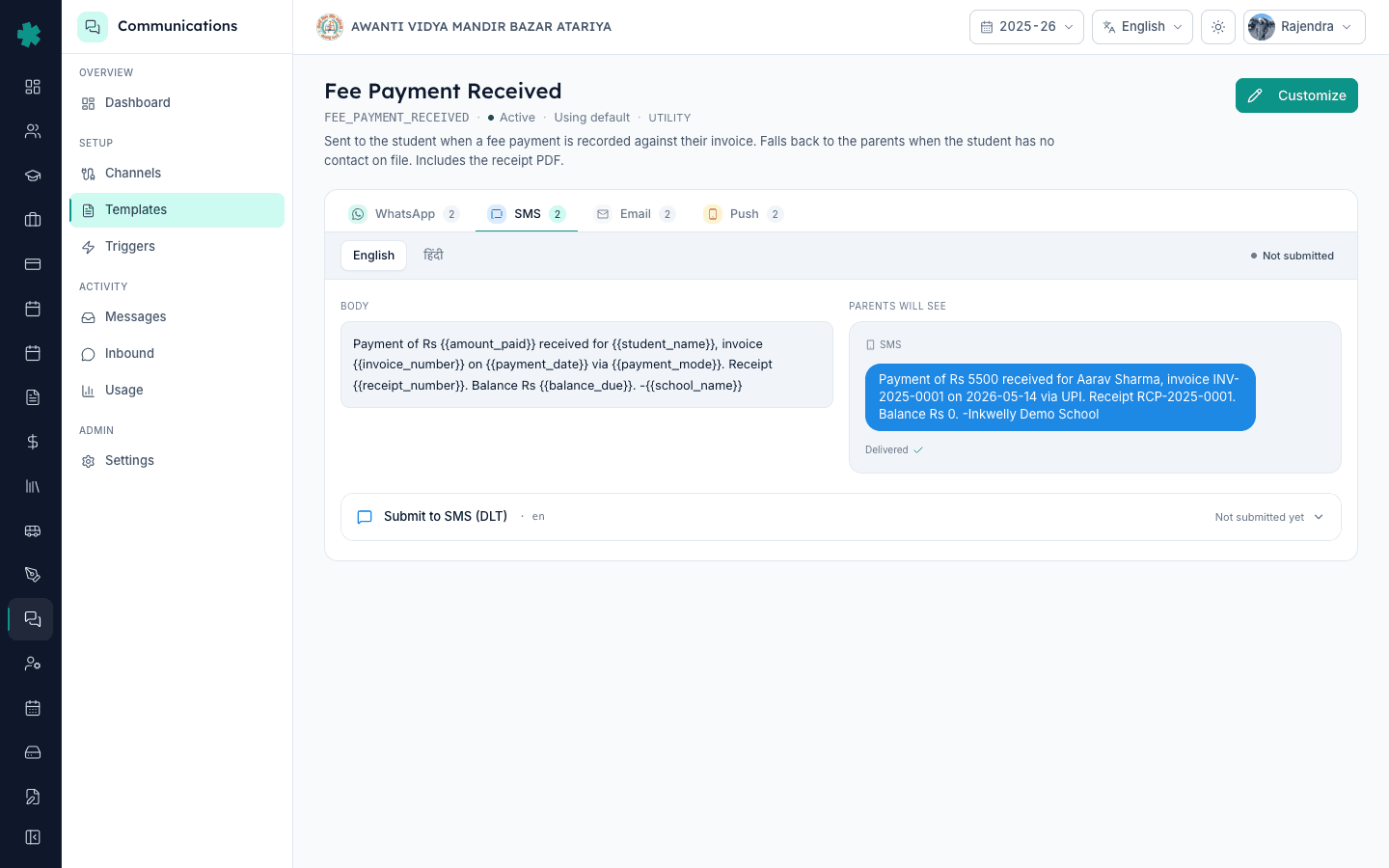
Communications, फिर Templates खोलें। SMS scope से filter करें। हर template row SMS variants के तीन sub-rows दिखाती है — आमतौर पर English, Hindi, regional। जिस variant पर DLT ID नहीं है वहाँ एक लाल "DLT pending" badge दिखेगी। Dashboard alert बताता है कि कितने variants pending हैं। Template में click करें, SMS tab पर जाएँ, और template body, variable count और category (Service-Transactional, Service-Implicit) note करें।
6. DLT_NOT_APPROVED fix — DLT portal पर register करें
अपने DLT principal entity portal में login करें (Jio TrueConnect, Vi Vilpower, Airtel IQ, या BSNL DLT — जिसपर आपका school रजिस्टर्ड है)। Template, फिर Add Content Template पर जाएँ। Body वैसे ही paste करें जैसे Inkwelly में दिख रहा है, variables को DLT के ज़रूरी {#var#} format में बदलें। Inkwelly जैसी category चुनें। Submit करें। DLT approval आमतौर पर 4 घंटे से 2 business days में आती है। Approve होने पर portal 19-digit Content Template ID देता है।
7. DLT ID को Inkwelly में paste करके verify करें
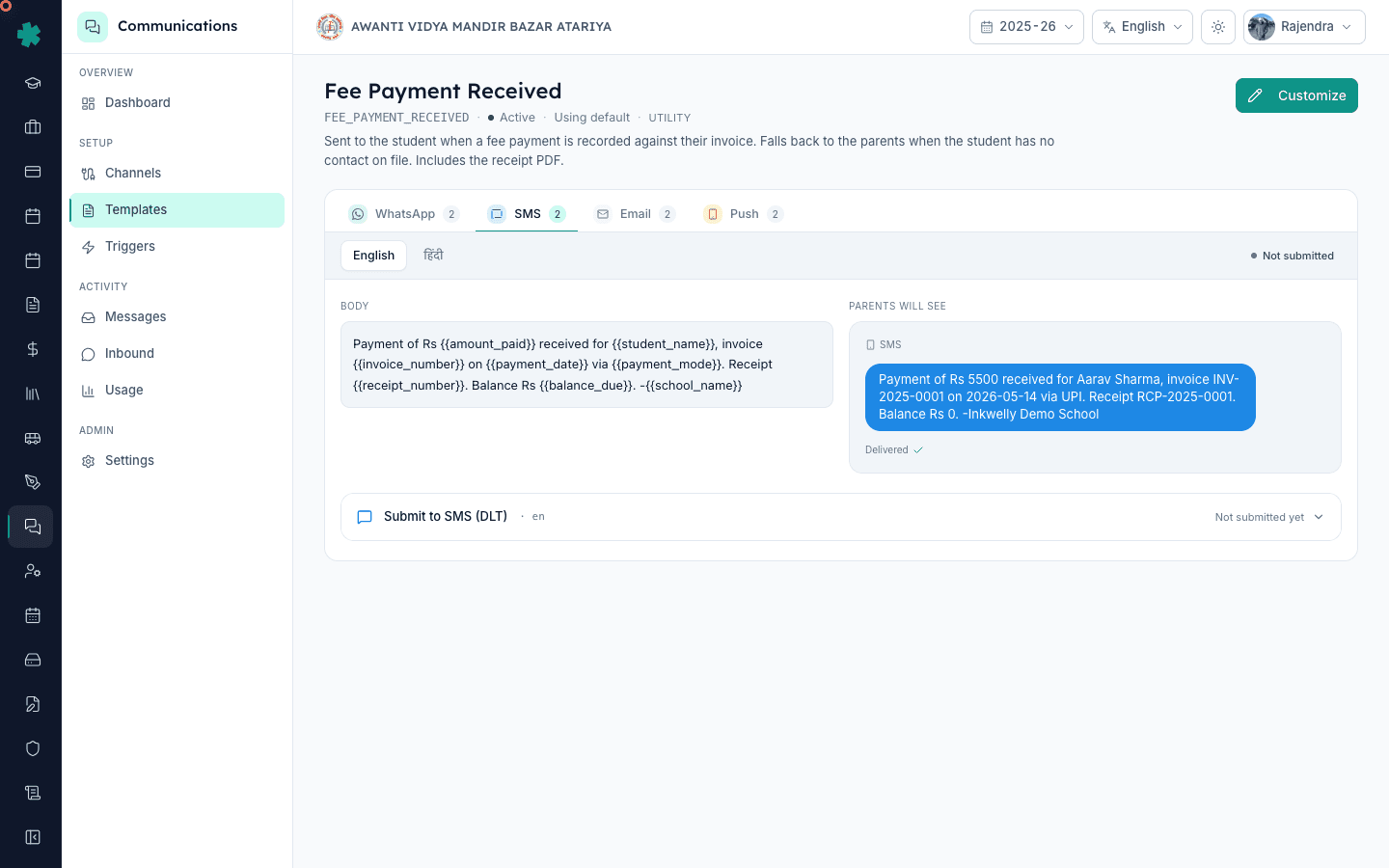
Inkwelly Templates पर वापस आएँ और वही SMS variant खोलें। 19-digit DLT Content Template ID को DLT ID field में paste करें। Save करें। लाल badge seconds में green हो जाएगा। Confirm करने के लिए अपने number पर test SMS fire करें — अब TRAI rejection के बजाय deliver होना चाहिए। Alert में flagged हर variant के लिए यही दोहराएँ। सारे flagged variants पर ID आते ही DLT_NOT_APPROVED alert 10 minutes में हट जाएगा।
आगे क्या करें। महीने में एक बार Channels & providers section पर "Last webhook" timestamps चेक करने का reminder रखें — एक दिन से ज़्यादा पुराना कुछ भी dashboard alert के बिना भी re-paste चाहता है। यदि campaign के लिए नया SMS template जोड़ें, तो पहले DLT पर register करें, बाद में Inkwelly में trigger को on करें। Monthly send health और cost के व्यापक audit के लिए Communications Usage page साथ-साथ खोलें।
Live demo पर देखें
20 मिनट का walkthrough book करें — हम test channel पर दोनों alerts पैदा करके आपको end-to-end fix दिखाएँगे।
अक्सर पूछे गए सवाल
6 सवालDLT_NOT_APPROVED दिखते समय क्या SMS फिर भी send होगा?
केवल Inkwelly की test list वाले numbers पर ही test sends जाएँगे। असली parent numbers पर non-test sends provider पर ही block हो जाते हैं, carrier तक पहुँचने से पहले, इसलिए TRAI violation log नहीं करता पर parent को SMS भी नहीं मिलता। यह alert hard-blocking है, advisory नहीं।
क्या WEBHOOK_SILENT का मतलब है कि parents को messages नहीं मिल रहे?
ज़रूरी नहीं। Sends Inkwelly से निकलकर provider तक पहुँचते हैं, और ज़्यादातर parents को सामान्य रूप से मिलते हैं। टूटता है return path — delivery confirmations वापस नहीं आतीं, इसलिए dashboards Sent पर रुक जाते हैं और receipt prove नहीं कर पाते। Webhook fix audit के लिए है, delivery के लिए नहीं।
DLT template registration में कितना समय लगता है?
ज़्यादातर principal entities transactional templates को 4 से 24 घंटों में approve कर देती हैं। Promotional templates 1 से 2 business days लेते हैं क्योंकि उनकी review सख़्त होती है। यदि template 48 घंटे के बाद भी Pending है, तो DLT operator के पास ticket करें और template ID का reference दें।
यदि मैंने अपना Meta access token rotate किया तो क्या webhook दोबारा paste करना ज़रूरी है?
हाँ। जो token webhook subscription रखता था वह rotate होने पर Meta subscription drop कर देता है। आपको WhatsApp Manager के Configuration tab में webhook URL दोबारा paste करना होगा और messages एवं message_status fields पर फिर से subscribe करना होगा। Inkwelly का webhook URL खुद नहीं बदलता।
WEBHOOK_SILENT alert Inkwelly mein kab apne aap clear ho jata hai?
Jaise hi naye webhooks 24 ghante ke andar arrive hote hain, alert apne aap clear ho jata hai. Agar paste karne ke 30 minute baad bhi alert raha, to webhook URL provider portal mein save nahi hua — do baar check karein.
DLT not approved alert kya har school ko aati hai ya sirf SMS use karne walon ko?
Sirf un schools ko jo Inkwelly mein SMS channel turn on karte hain. Agar aapka school sirf WhatsApp aur email use kar raha hai, to yeh alert kabhi nahi aayegi. DLT registration India mein har commercial SMS sender ke liye mandatory hai — yeh Inkwelly ka rule nahi, TRAI ka law hai.
आपको ये भी पसंद आ सकता है
3 लेखस्रोत व संदर्भ
- Meta WhatsApp Cloud API webhooks documentation
Meta's official guide for re-pasting the Callback URL and re-subscribing to message_status events.
- MSG91 DLT registration guide
Step-by-step DLT content template registration that produces the 19-digit ID Inkwelly requires.
- TRAI TCCCPR 2018 regulation on commercial communication
India regulator framework that mandates DLT registration for every commercial SMS template.
Inkwelly आपके स्कूल पर — खुद देखें
30 मिनट का डेमो। आपके मौजूदा ERP को आपके साथ खोलकर, कॉल पर ही आपका डेटा Inkwelly में लोड करते हैं। कॉल ख़त्म होते-होते एक तय तारीख़ का गो-लाइव प्लान आपके हाथ में।