Inkwelly में parent STOP replies को auto-handle कैसे करें
यह एक छोटी सी practical गाइड है उन स्कूल admin के लिए जो parent WhatsApp और SMS पर साफ-सुथरा, TRAI के नियमों के मुताबिक opt-out handling चाहते हैं। इस पेज के अंत तक आप Inkwelly में एक master toggle चालू कर लेंगे, जिससे हर STOP reply को auto-acknowledgement मिलेगा, Inbound page पर HANDLED tag के साथ record होगा, और किसी भी audit के लिए तैयार रहेगा।
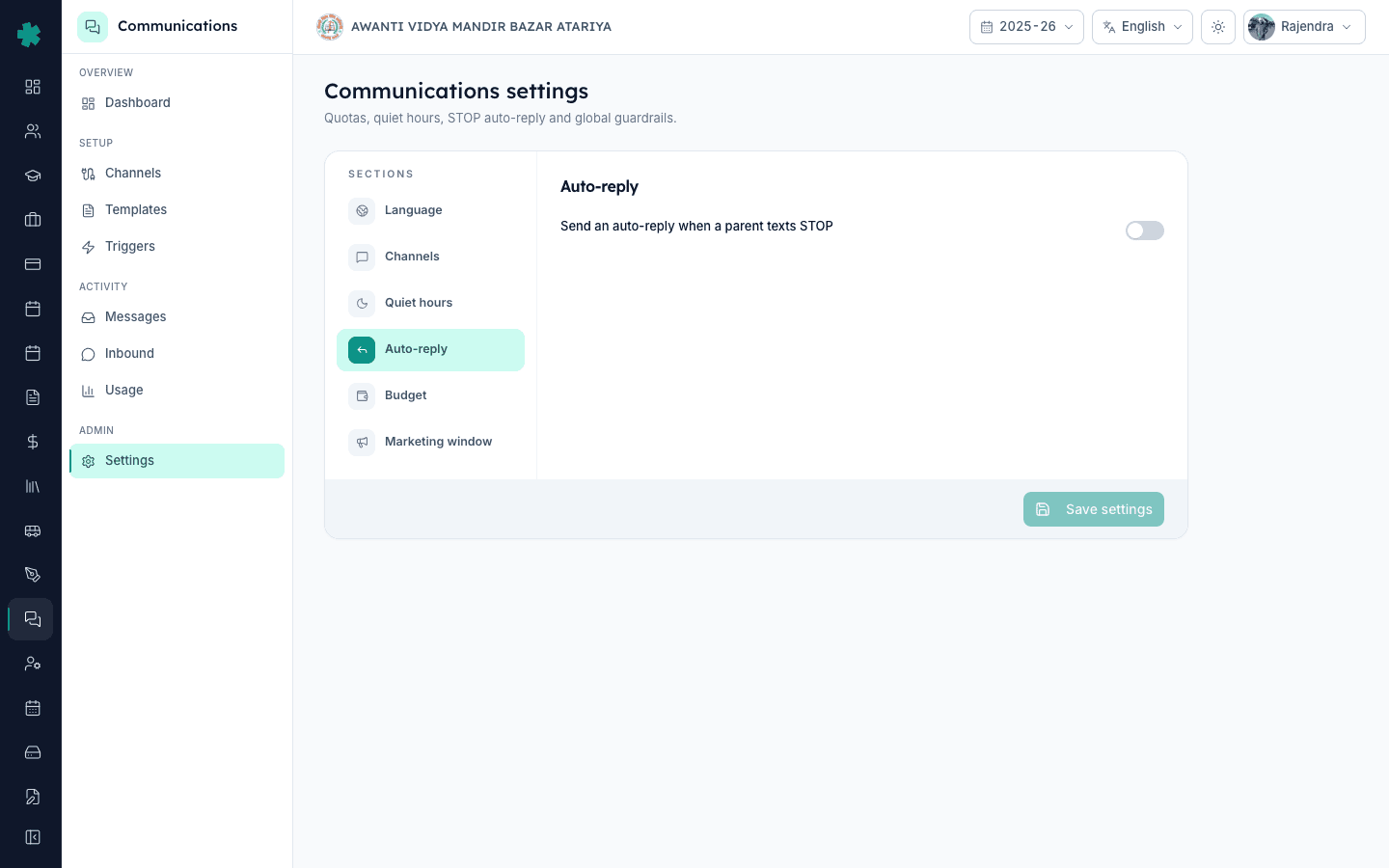
TL;DR — Communications खोलें, Settings पर जाएं, Auto-reply section पर click करें और Send an auto-reply when a parent texts STOP वाला toggle चालू करें। Save settings को click करें। इस क्षण से हर STOP reply जो आपके स्कूल के WhatsApp या SMS number पर आएगी, उसे auto-acknowledgement जाएगा और Inbound page पर HANDLED tag के साथ record हो जाएगा।
जो भारतीय स्कूल हर महीने 8,000 से ज्यादा parent messages भेजते हैं उनमें लगभग 1.2 से 1.8 प्रतिशत recipients पहले quarter में STOP या कोई मिलता-जुलता reply भेजते हैं — ज्यादातर वो parents जिनके बच्चे स्कूल छोड़ चुके हैं, एक दूसरे guardian का number जो किसी ने मांगा ही नहीं था, या बजुर्ग grandparent संपर्क जिन्हें updates की जरूरत नहीं। TRAI के TCCCPR 2018 framework के अंदर अगर स्कूल एक documented STOP request के बाद भी sends जारी रखता है तो operator-level penalties या DLT header suspension हो सकता है। मैनुअल handling पहले 200 messages में ही टूट जाती है। Inkwelly का Auto-reply यह बोझ हटा देता है — रविवार रात 9 बजे STOP भेजने वाला parent कुछ ही seconds में acknowledged हो जाता है, और Inbound page पर HANDLED के साथ सोमवार सुबह दफ्तर खुलने से पहले ही दिखने लगता है।
1. Communications settings खोलें
Communications admin के रूप में login करें। बाएं sidebar से Communications पर click करें। Communications workspace में side menu को नीचे scroll करके Admin group में Settings पर click करें। Communications settings पेज खुलता है जिसका heading पढ़ता है Quotas, quiet hours, STOP auto-reply and global guardrails। दाईं तरफ Sections column में Language, Channels, Quiet hours, Auto-reply, Budget और Marketing window की list होती है। यही पेज है जहां आप quiet hours और मासिक बजट भी configure करते हैं।
2. Auto-reply section पर click करें
दाईं तरफ Sections column में Auto-reply पर click करें। Active section हरे रंग में highlight हो जाता है और दाईं पैनल बदलकर Auto-reply panel दिखाने लगती है। इस पैनल में Auto-reply नाम का एक साफ heading है और नीचे केवल एक row का content है। यहां कोई sub-tabs नहीं हैं, कोई template tables नहीं, कोई keyword editor नहीं — सिर्फ एक उद्देश्य वाला control। toggle चलाने से पहले एक सेकंड रुककर इस row को पढ़ लें।
3. Row का label ध्यान से पढ़ें
Row पर लिखा है Send an auto-reply when a parent texts STOP और दाईं तरफ एक toggle switch है। यही पूरी setting है। Inkwelly keyword set, acknowledgement की भाषा और parent-status update को अंदर ही handle करता है। आपका काम है सोच-समझकर admin authority के साथ इसे चालू करना, ताकि auditor या operator (Jio, Airtel, Vi, BSNL) को audit ledger में एक साफ decision दिखे, किसी default का अंदाजा नहीं।
4. Toggle चालू करें
Toggle पर click करें। वो grey (बंद) से हरे (चालू) रंग पर चला जाता है। पेज अब नई state में है लेकिन बदलाव अभी save नहीं हुआ। एक जरूरी बात — इस toggle को साल भर चालू रखें। अगर शक है कि किसी parent ने STOP गलती से भेजा है तो पूरा toggle बंद करना गलत हल है — उसकी जगह Inbound page से उस एक parent को अपनी normal list में दोबारा जोड़ें। Auto-reply एक TRAI-safety feature है, per-campaign control नहीं।
5. Setting save करें
पेज के नीचे दाईं तरफ Save settings button पर click करें। Inkwelly आपकी choice को save कर देता है और पुष्टि कर देता है। इसी क्षण से WhatsApp या SMS पर आने वाली हर STOP reply को auto-acknowledgement जाएगा। Toggle चालू करने से पहले जो replies आ चुकी थीं वो retroactively handled नहीं होंगी — Inbound page खोलकर स्टाफ के साथ उन्हें एक बार मैनुअली साफ कर लें।
6. एक staff number से test करें
अपने किसी office staff से कहें कि वो अपने निजी फ़ोन से स्कूल के WhatsApp number पर STOP टाइप करके भेजे, और SMS sender ID पर भी। कुछ ही seconds में उसे एक polite acknowledgement message वापस मिलना चाहिए। Send count और पुष्टि की wording आपके active WhatsApp Business template inventory पर निर्भर करती है — अगर wording customise करनी है तो settings पेज पर से छेड़छाड़ करने की जगह Inkwelly team से template-edit request रखें।
7. Inbound page पर HANDLED की पुष्टि करें
Communications sidebar से Inbound पर click करें। Inbound messages पेज खुलता है जिसके ऊपर filter pills होते हैं — All, Pending, Replies, STOP — और एक search field। STOP pill पर click करें। आपकी test replies दिखनी चाहिए, हर row में phone number, लाल STOP tag, हरा HANDLED tag, message body STOP, और timestamp। यही वो audit trail है जो operator और auditor देखेंगे। अगर कभी कोई reply यहां HANDLED के बिना दिखे तो Inkwelly support को escalate करें — toggle चालू होने पर एसा नहीं होना चाहिए।
अब Inbound page को अपने हफ्ते की office routine का हिस्सा बनाएं। हफ्ते में एक बार खोलकर STOP, Pending और Replies tabs देखें। STOP सारी entries HANDLED होनी चाहिए — होती ही हैं। बाकी tabs वो जगह हैं जहां किसी parent ने एक असली सवाल पूछा है जिसका जवाब अभी तक नहीं गया। उन्हें Inkwelly के अंदर से ही सही teacher या admin को forward करें। अगर आप एक ही Inkwelly tenant पर कई campuses चलाते हैं तो हर campus के अपने Settings पेज से Auto-reply अलग-अलग चालू करें। इसके साथ मासिक Communications बजट और quiet hours pair कर दें और आपके पास पूरा TRAI-safe ओपरेटिंग envelope live हो जाएगा।
Inkwelly का TRAI-aligned Communications module live स्कूल पर देखें
20 मिनट का demo book करें। हम आपको STOP handling, DLT-routed SMS, WhatsApp template management, Inbound audit trail और मासिक बजट सब कुछ एक असली स्कूल पर दिखाएंगे।
अक्सर पूछे गए सवाल
6 सवालक्या भारतीय स्कूलों के लिए STOP handling अनिवार्य है?
हां। TRAI के TCCCPR 2018 के अनुसार हर commercial communication sender को — DLT-registered SMS या WhatsApp Business sender वाले स्कूल समेत — opt-out requests को तुरंत honour करना अनिवार्य है। न करने पर operator-level penalties या DLT header suspension हो सकता है। Inkwelly का Auto-reply एक click में TRAI-safe posture देता है और Inbound page पर defensible audit log भी।
Inkwelly में STOP reply भेजने वाले parents कहां दिखते हैं?
Communications खोलें, फिर Inbound। Inbound messages पेज के ऊपर filter pills होते हैं — All, Pending, Replies, STOP। STOP पर click करें और आपको हर वो parent reply दिखेगा जिसमें STOP keyword set था, हर row में phone number, लाल STOP tag, हरा HANDLED tag, message body और timestamp। यही एक पेज operator और auditor दोनों के लिए view है।
क्या settings पेज से acknowledgement की wording edit की जा सकती है?
Toggle वाले panel से नहीं। Auto-reply section एक single master switch है। Acknowledgement की copy आपके Inkwelly tenant में active WhatsApp Business template inventory पर निर्भर है, वहां जहां parent की पसंदीदा भाषा उपलब्ध हो। Custom wording के लिए Inkwelly को template-edit request भेजें, हम Meta के template approval queue में डाल देंगे।
अगर किसी parent ने गलती से STOP भेज दिया हो और अब updates चाहता हो तो क्या करें?
Communications, Inbound खोलें, STOP filter से उस row को ढूंढें, और student profile के जरिए Inkwelly inbox controls से parent को re-link या restore करें। हर status change Inkwelly audit ledger में उस admin के नाम से log होती है जिसने वो किया। सिर्फ एक गलत STOP के लिए master toggle बंद न करें — वो बाकी हर parent की compliance तोड़ देगा।
Inkwelly me parent STOP reply auto-handle kaise hota hai step by step?
Admin login karke Communications, Settings, Auto-reply par jaayein. Section me ek single toggle hai — Send an auto-reply when a parent texts STOP. Toggle on kar ke Save settings click karein. Uske baad jab bhi koi parent WhatsApp ya SMS par STOP likhe, Inkwelly turant acknowledgement bhej deta hai aur Inbound page par red STOP tag aur green HANDLED tag ke saath dikha deta hai — TRAI ke liye ready audit trail.
Kya school me TRAI DLT registration ke baad bhi STOP toggle on rakhna zaroori hai?
Haan. DLT registration aapke sender ID aur templates ko approve karta hai, but TCCCPR ki opt-out obligation alag hai. STOP toggle on rakhna apne school ko DLT header suspension se bachata hai — ek parent ka complaint operator ke paas pohochne par turant evidence chahiye, aur Inbound page wahi evidence deta hai HANDLED tag ke saath.
आपको ये भी पसंद आ सकता है
3 लेखस्रोत व संदर्भ
- TRAI TCCCPR 2018 - Telecom Commercial Communications Customer Preference Regulations · देखा गया 18 May 2026
Indian schools ke liye opt-out handling ki anivarya zaroorat aur DLT header suspension ke parinaam
- Meta WhatsApp Business Messaging Policy · देखा गया 18 May 2026
Quality rating aur template-suspension penalties jab senders opt-out signals ko ignore karte hain WhatsApp par
Inkwelly आपके स्कूल पर — खुद देखें
30 मिनट का डेमो। आपके मौजूदा ERP को आपके साथ खोलकर, कॉल पर ही आपका डेटा Inkwelly में लोड करते हैं। कॉल ख़त्म होते-होते एक तय तारीख़ का गो-लाइव प्लान आपके हाथ में।