Inkwelly में failed parent message कैसे diagnose करें
Parent आकर कहता है कि fee receipt कभी नहीं मिली। बिना सोचे फिर से भेजने के बजाय Messages log खोलें, FAILED row ढूँढें और provider का सटीक error code पढ़ें। छह error codes 95% failures cover करते हैं, और हर एक का एक-line fix है।
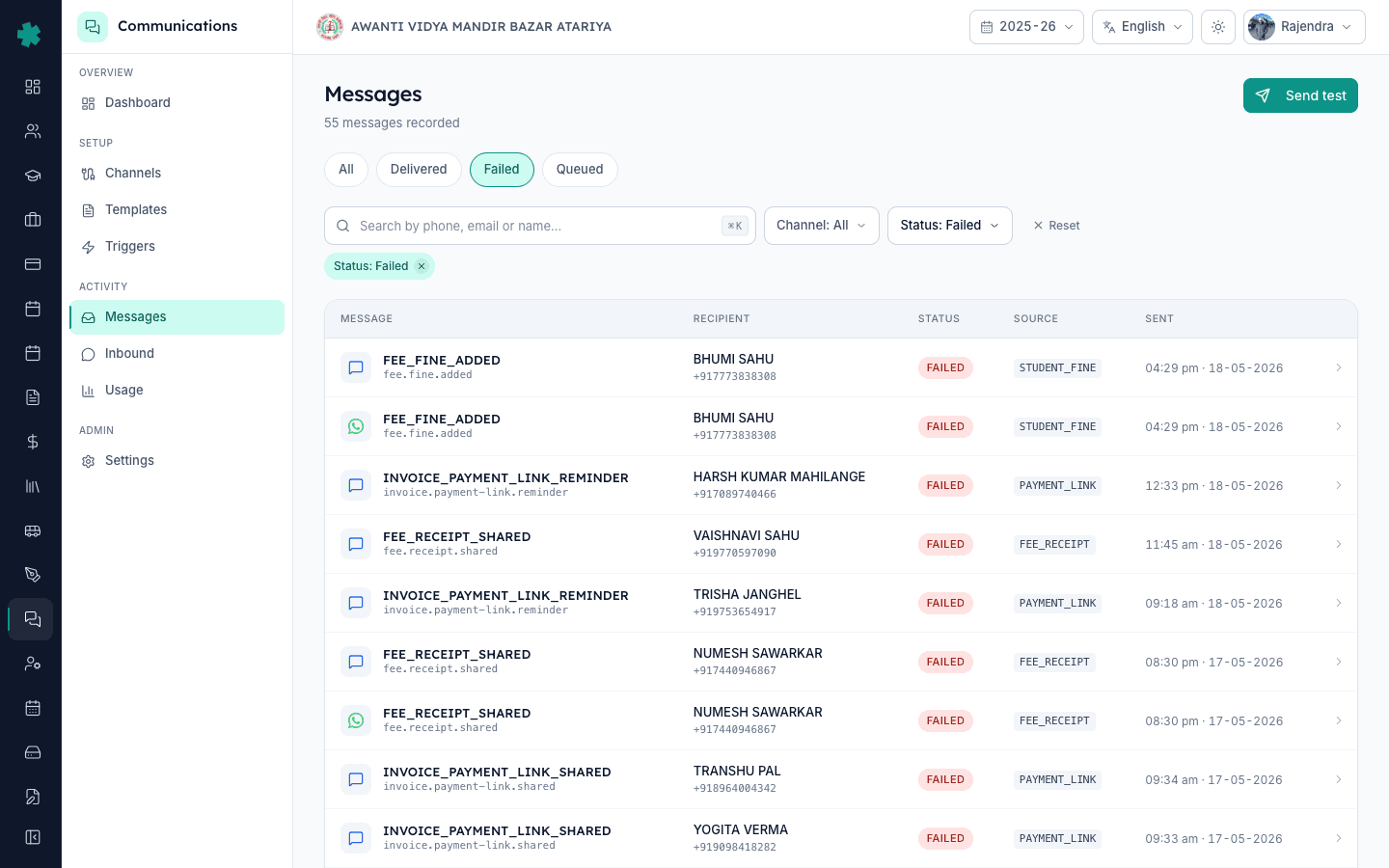
सार — Communications → Messages खोलें, Status: Failed से filter करें, parent के phone या email से search करें, FAILED row पर click करके detail page खोलें। ऊपर दिखने वाला provider error code बताता है कि चूक क्या है — invalid number, unapproved template, rate limit या webhook timeout। हर code का एक known fix है, अनुमान लगाने की जरूरत नहीं।
एक ही message दोबारा भेजना शायद ही काम करता है क्योंकि failure की एक वजह होती है और वह वजह अभी भी मौजूद है। जो WhatsApp template Meta ने approve नहीं किया है, वह दूसरी बार भी उसी तरह fail होगा। जो phone number valid 10-digit Indian mobile नहीं है, वह तब तक RECIPIENT_NUMBER_INVALID return करता रहेगा जब तक Students module में नहीं सुधारा जाए। Inkwelly पर Messages log एकमात्र source of truth है — हर dispatch attempt, provider का response, QUEUED/SENT/DELIVERED/FAILED के timestamps और Meta, MSG91, AWS SES या FCM का raw error code सब वहीं रहते हैं। Log में दो minute अनुमान लगाने के एक घंटे को बचा देते हैं।
1. Messages log खोलें
Communications dashboard से second-level navigation में Messages tab पर click करें या सीधे /communications/messages जाएँ। Page पिछले 90 दिनों में भेजे गए या प्रयास किए गए हर message को दिखाता है, नई entry पहले। Header total count बताता है — 800 students वाला typical CBSE school महीने में 3,000–6,000 messages देखता है। 50,000 monthly messages वाले schools के लिए भी page तीन second से कम में load होता है।
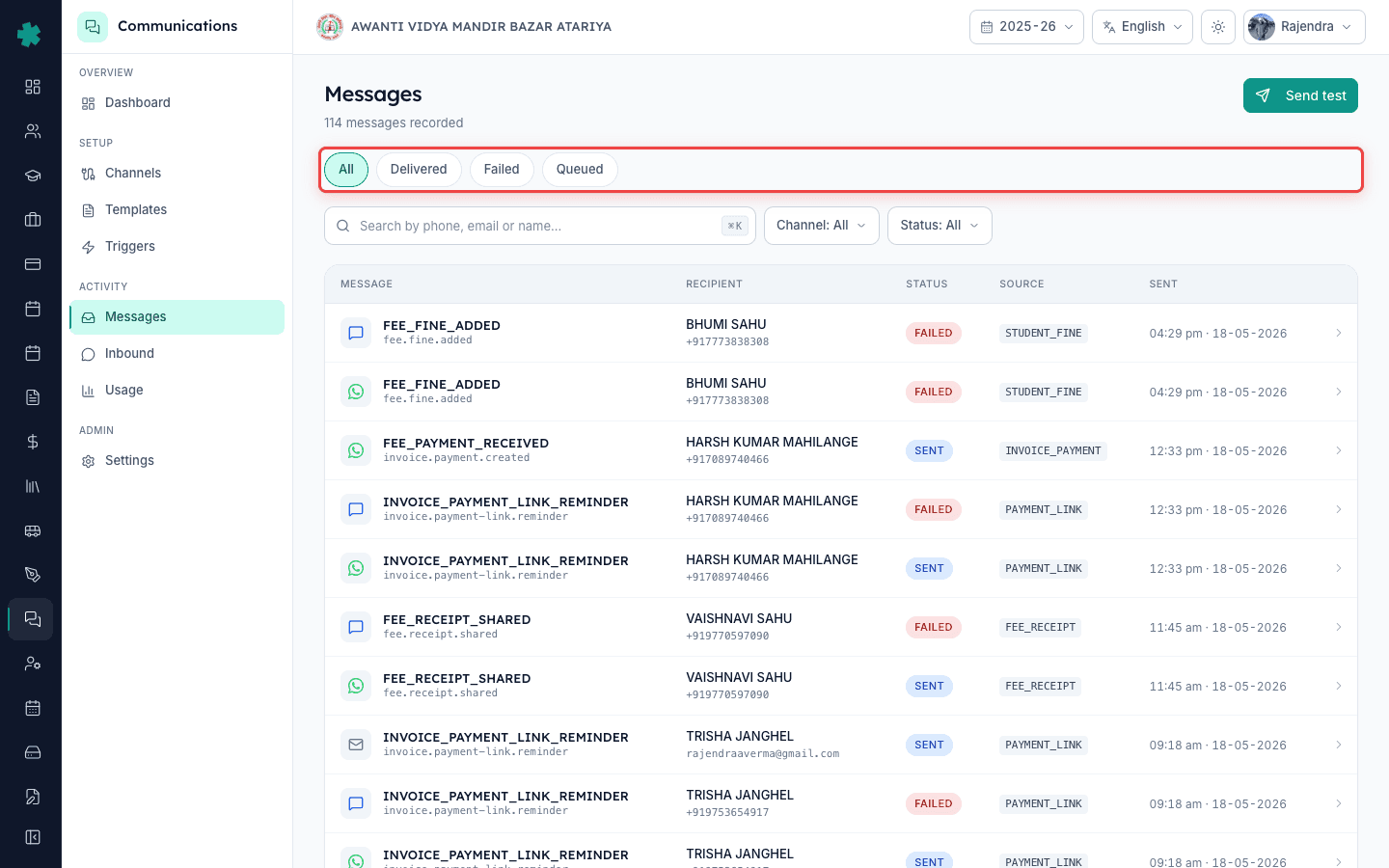
2. Status: Failed से filter करें
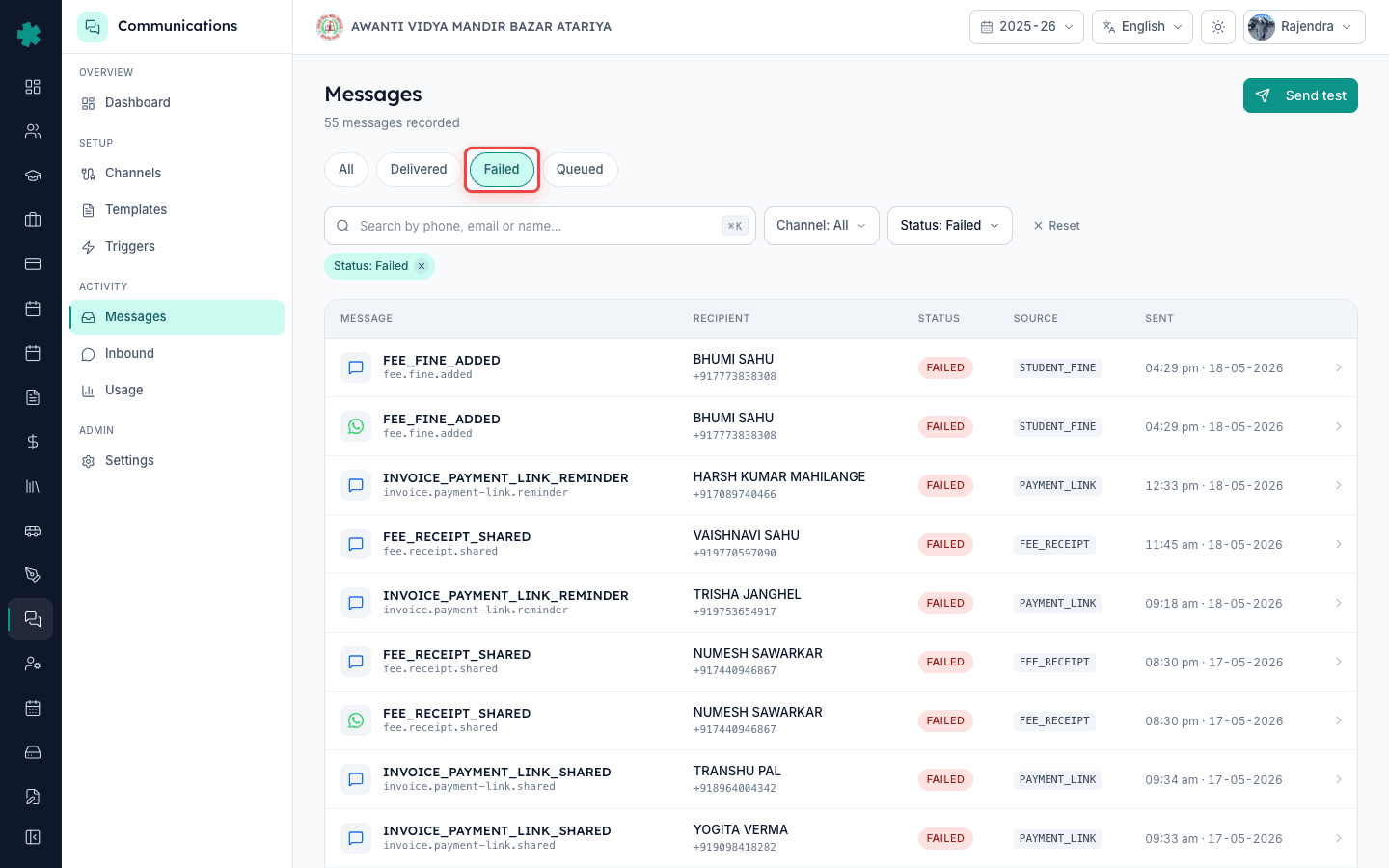
Table के ऊपर Status filter से Failed चुनें। अब table सिर्फ वे messages दिखाएगा जिन्हें Inkwelly ने dispatch किया लेकिन provider ने reject कर दिया या confirm नहीं किया। Total messages के 1% से कम failures दिखें तो delivery healthy है। अगर failures एक channel पर cluster कर रही हैं (SMS पर ज़्यादा, WhatsApp पर कोई नहीं) तो channel में configuration issue है — step 7 पर जाएँ। अगर failures channels में बिखरी हैं लेकिन एक parent पर cluster कर रही हैं तो parent का record टूटा है — step 3 पर जाएँ।
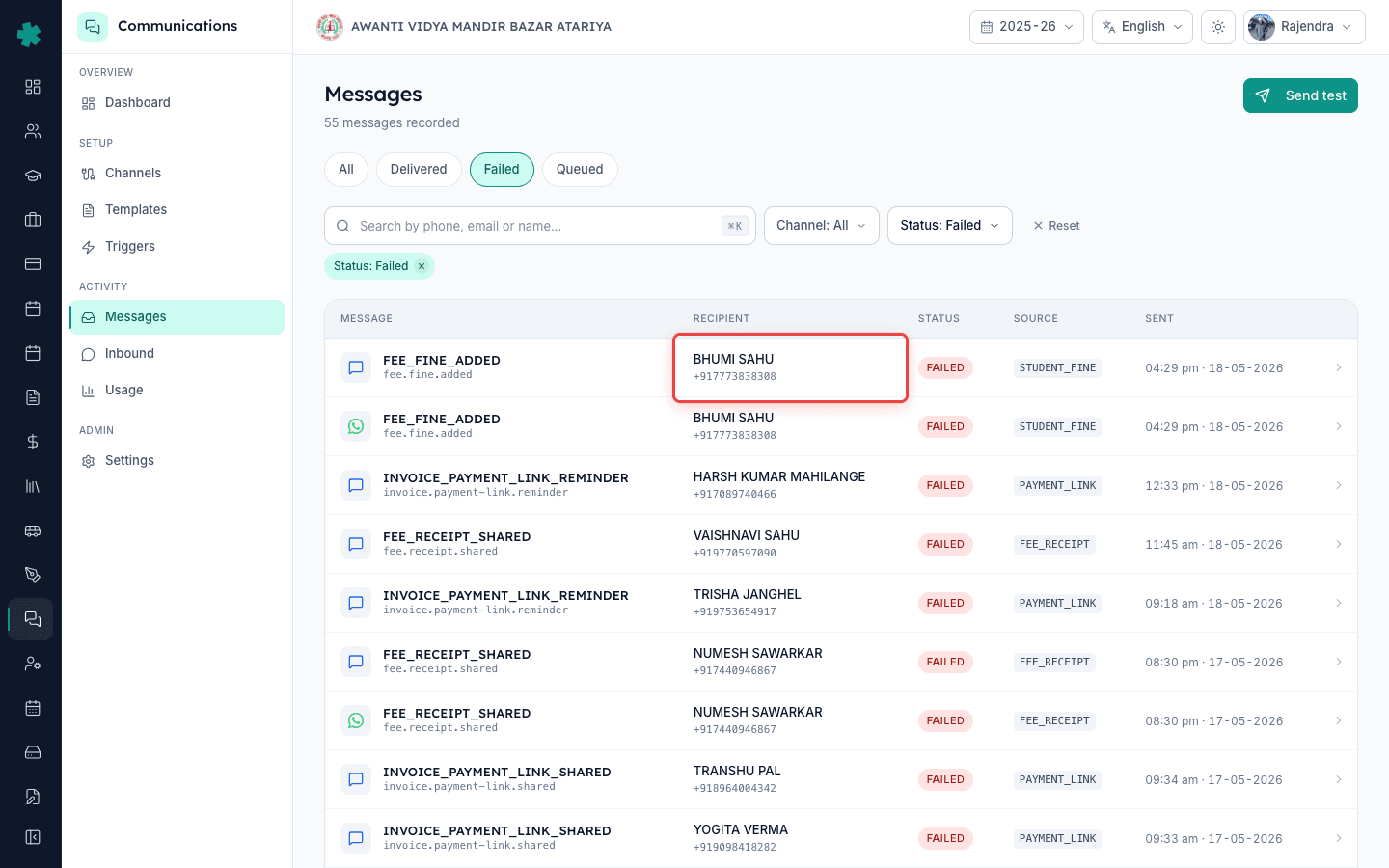
3. Parent के phone या email से search करें
Keyboard shortcut Cmd-K (Mac) या Ctrl-K (Windows) से search box खोलें। Parent का phone number paste करें (सिर्फ digits, country code नहीं) या email का address। Table उस parent के messages तक सीमित हो जाएगा — हर channel और हर source पर। एक send attempt = एक row। channel fallback enabled हो तो एक fee receipt तीन rows पैदा कर सकती है (WhatsApp SENT, SMS FAILED, Email SENT)। Parent की complaint से मेल खाती FAILED row चुनें।
4. FAILED row पर click करके message detail खोलें
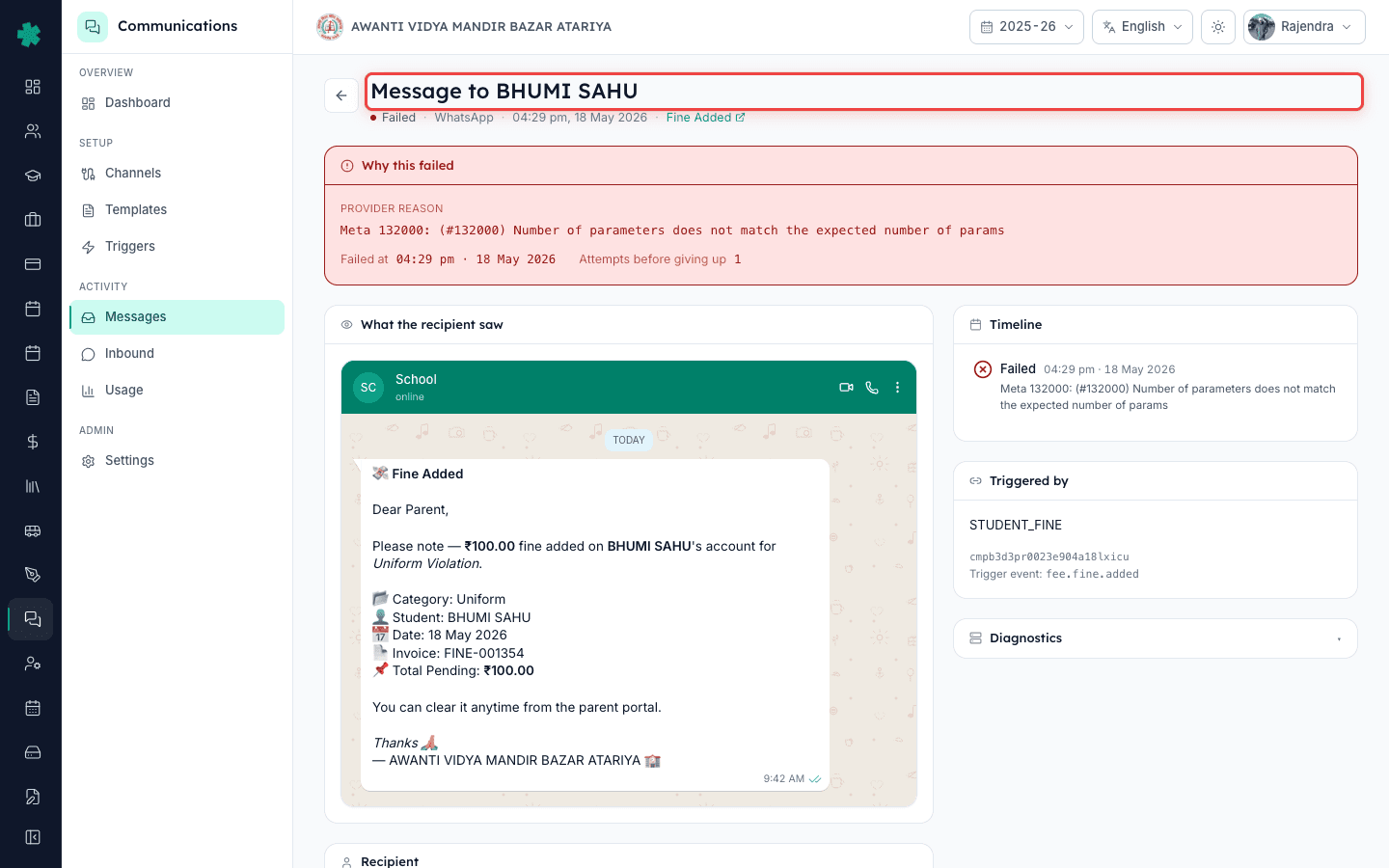
Row पर click करने पर detail page खुलता है — एक full panel जिसमें recipient address, template name, source (FEE_RECEIPT, PAYMENT_LINK, INVOICE_PAYMENT, STUDENT_FINE इत्यादि), channel, trigger event (fee.receipt.shared, attendance.absent.marked) और सबसे महत्वपूर्ण ऊपर red banner में raw provider error दिखता है। Banner कुछ ऐसा होता है — 'STATUS_FAILED — RECIPIENT_NUMBER_INVALID (Meta error 131026)'। यह एक line आपका जवाब है।
5. Error code को known fix से match करें
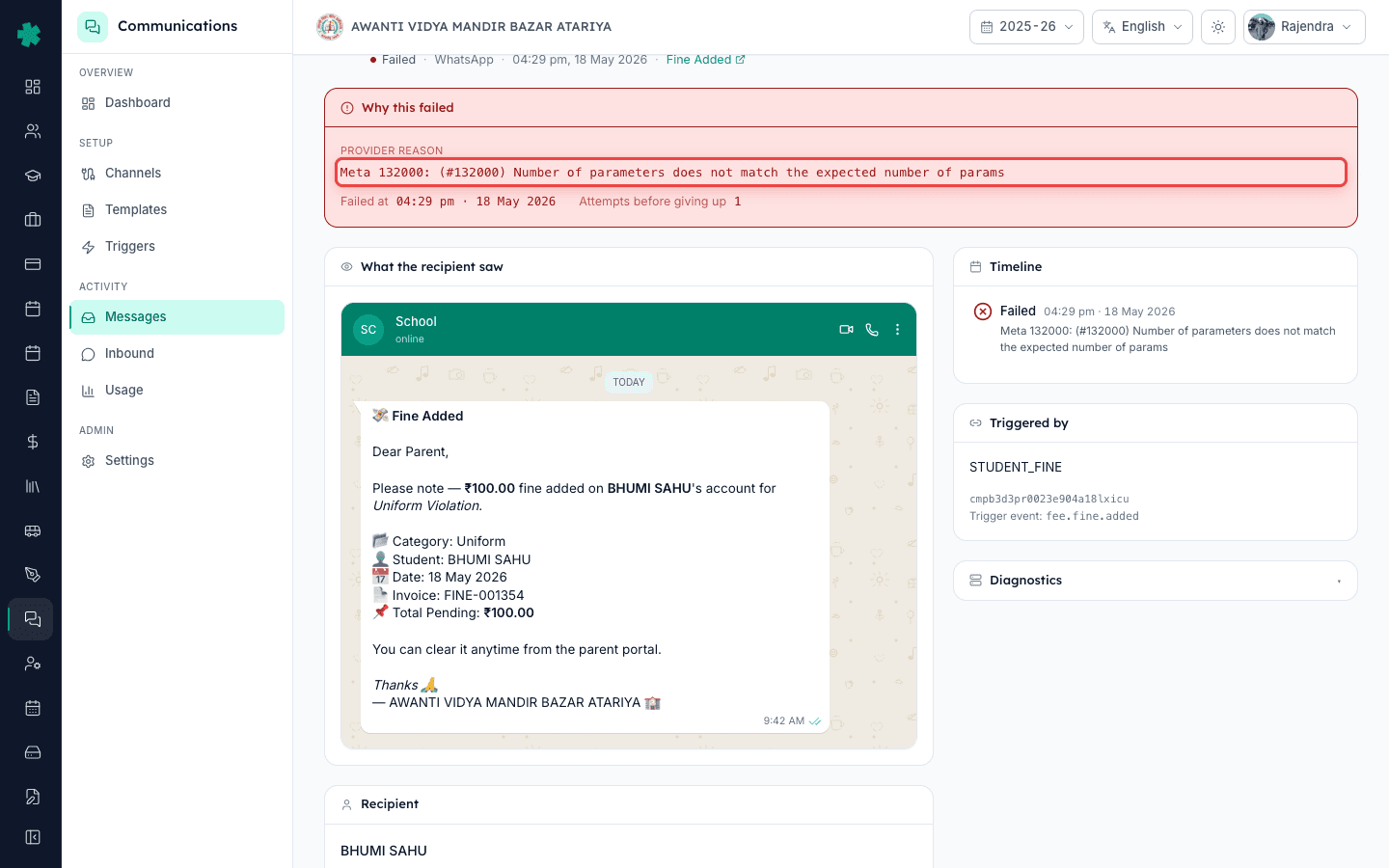
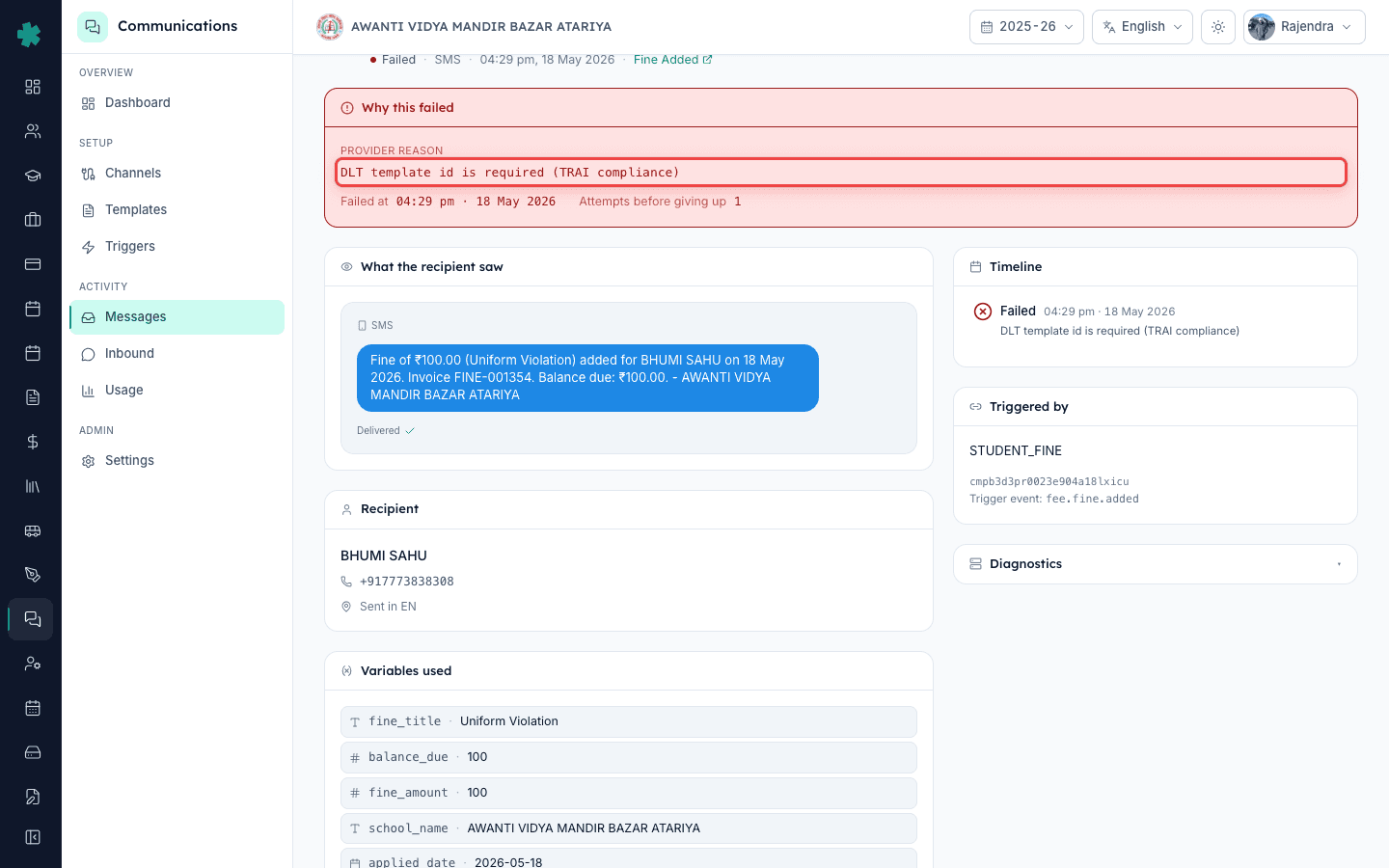
छह error codes 95% failures cover करते हैं। RECIPIENT_NUMBER_INVALID का मतलब phone column में non-mobile number है — Students module में सुधारें। TEMPLATE_NOT_APPROVED यानी WhatsApp template submission के बाद edit किया गया — Meta Business Manager से re-submit करें। RATE_LIMIT_EXCEEDED यानी एक साथ बहुत ज़्यादा messages — एक घंटा रुकें, campaign batch size कम करें। BLOCKED_BY_USER यानी parent ने WhatsApp number को spam report किया — SMS करें या call करें। WEBHOOK_TIMEOUT यानी provider ने acknowledge किया पर delivery confirm नहीं की — Settings → Channels में webhook re-verify करें। बिना sub-code के STATUS_FAILED यानी channel account की credentials expire हो गईं।
6. Fix उसके source पर लगाएँ, message पर नहीं
Underlying cause fix किए बिना detail page से message retry मत करें। RECIPIENT_NUMBER_INVALID के लिए Students module खोलें → student ढूँढें → parent phone column सही करें → save करें। TEMPLATE_NOT_APPROVED के लिए Settings → Communications → Templates खोलें → template ढूँढें → 'Submit for Meta review' पर click करें → 24–48 घंटे इंतज़ार करें। Meta के approve करने पर उस template से पहले failed messages Inkwelly auto-retry कर देता है — manually resend की जरूरत नहीं।
7. जब सारी failures एक channel पर हों, channel account check करें
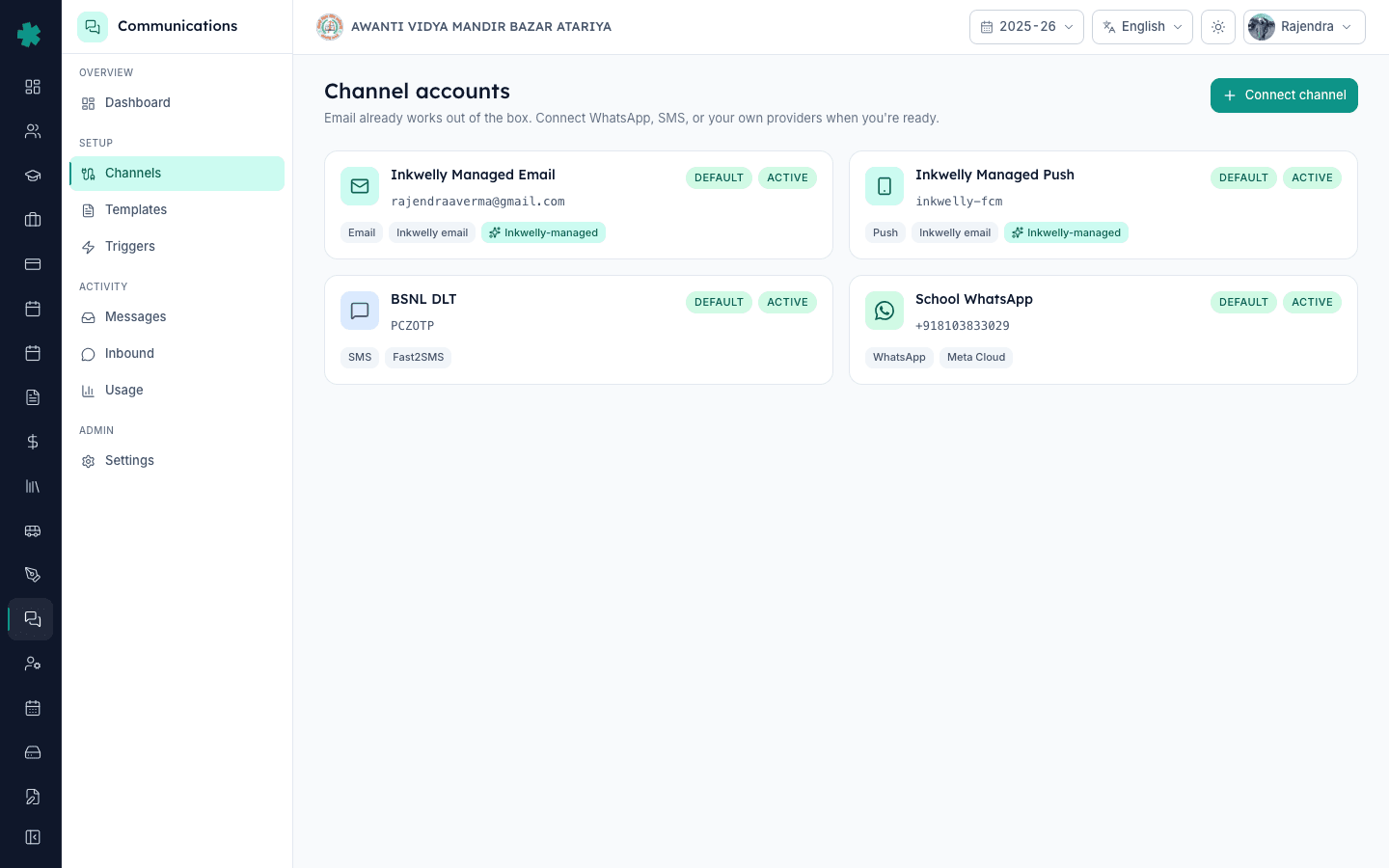
Settings → Communications → Channels जाएँ। हर tile पर channel, provider (Meta Cloud API, MSG91, Fast2SMS, AWS SES, FCM), last successful webhook timestamp और credential expiry दिखता है। 'Last webhook: Never' या 'Last webhook: >24h ago' दिखाए channel चुपचाप टूटा है। Tile पर click करें, access token या app secret दोबारा enter करें, 'Verify webhook' पर click करें। Successful re-verification के पाँच minute के अंदर Communications dashboard की Alerts strip clear हो जाती है।
आगे क्या — तीसरे या चौथे diagnosis के बाद आप देखेंगे कि वही दो-तीन error codes बार-बार आ रहे हैं। Communications dashboard का Delivery health card खोलें — इसका 'Top failure reasons' section पिछले सात दिनों में हर error code को frequency के हिसाब से रैंक करता है। Top reason इस हफ्ते का fix-project है। अगर RECIPIENT_NUMBER_INVALID प्रमुख है तो Students module का one-time audit चलाएँ। अगर TEMPLATE_NOT_APPROVED प्रमुख है तो WhatsApp templates audit करें और edit हुए templates को re-submit करें। एक term यह करने वाले schools failure rate 15% से 3% से नीचे ला देते हैं।
Failed messages पर अनुमान लगाना बंद करें
25 minute का free demo book करें — हम आपके अपने message log पर live walkthrough करेंगे, वास्तविक failure codes और हर एक का fix दिखाएँगे।
अक्सर पूछे गए सवाल
6 सवालFailed messages log में कितने दिनों तक retain होते हैं?
90 दिन। पुराने messages archive हो जाते हैं लेकिन FAILED count Delivery health card के aggregate में दिखता रहता है। 90 दिन से पुराना record चाहिए तो log को मासिक CSV में export करें — Settings → Communications → Digests में built-in monthly export है।
Log में FAILED और QUEUED में अंतर क्या है?
QUEUED यानी Inkwelly ने message accept किया है लेकिन provider को अभी dispatch नहीं किया — आम तौर पर quiet hours, rate limit या scheduled send window के कारण। FAILED यानी dispatch पूरी हुई और provider ने reject कर दिया। School hours में एक घंटे से ज़्यादा QUEUED रहना असामान्य है — dashboard पर queue depth check करें।
Cause fix किए बिना FAILED message retry करने से कुछ होगा?
नहीं। Retry पर वही error वापस आएगा क्योंकि underlying condition नहीं बदली — invalid number अभी भी invalid है, unapproved template अभी भी unapproved है। Inkwelly transient failures (network blips, rate limits) को automatically retry कर देता है, इसलिए log में जो failure दिख रहा है वह permanent है जिसकी जड़ ठीक करनी होगी।
क्या एक ही fee receipt पर parent को WhatsApp पर FAILED और SMS पर SENT मिल सकता है?
हाँ। अगर Settings → Communications में channel fallback enabled है तो WhatsApp FAILED पर उसी template के लिए SMS attempt automatically trigger हो जाता है। Messages log दोनों rows को एक ही trigger event से जोड़कर दिखाता है, इसलिए पूरी delivery story एक जगह दिखती है।
Inkwelly mein WhatsApp message FAILED dikha to kya karu?
Sabse pehle FAILED row pe click karke detail page kholo, red banner mein provider error code padho. RECIPIENT_NUMBER_INVALID hai to Students module mein number theek karo. TEMPLATE_NOT_APPROVED hai to Meta Business Manager se template phir submit karo. WEBHOOK_TIMEOUT hai to Settings → Channels mein webhook re-verify karo. Bina cause fix kiye dobara mat bhejo.
Parent ke fee receipt ka SMS nahi pohcha to log mein kahan dikhega?
Communications → Messages log kholo, Status filter mein Failed select karo, parent ka phone number Cmd-K se search karo. Source column mein FEE_RECEIPT dikhega, channel column mein SMS aur status FAILED. Us row pe click karke detail mein error code padho — wahi bataega ki failure ka exact reason kya hai.
आपको ये भी पसंद आ सकता है
3 लेखस्रोत व संदर्भ
- Meta WhatsApp Cloud API error codes · देखा गया 18 May 2026
Inkwelly Messages detail page पर surface होने वाले WhatsApp provider error codes (RECIPIENT_NUMBER_INVALID, TEMPLATE_NOT_APPROVED, RATE_LIMIT_EXCEEDED, BLOCKED_BY_USER) का authoritative reference।
- TRAI Telecom Commercial Communications Customer Preference Regulations, 2018 · देखा गया 18 May 2026
SMS DLT template approval और consent नियमों को govern करता है; MSG91 या Fast2SMS पर 'template mismatch' या 'header not registered' failures इन्हीं regulations से जुड़ी होती हैं।
Inkwelly आपके स्कूल पर — खुद देखें
30 मिनट का डेमो। आपके मौजूदा ERP को आपके साथ खोलकर, कॉल पर ही आपका डेटा Inkwelly में लोड करते हैं। कॉल ख़त्म होते-होते एक तय तारीख़ का गो-लाइव प्लान आपके हाथ में।