Inkwelly में इस महीने का Communications bill कैसे track करें
हर school जानना चाहता है कि parent messaging पर वह कितना खर्च कर रहा है, इससे पहले कि Meta या MSG91 का invoice आए। Inkwelly का Usage page हर send, हर failure और हर पैसे का real-time view देता है।
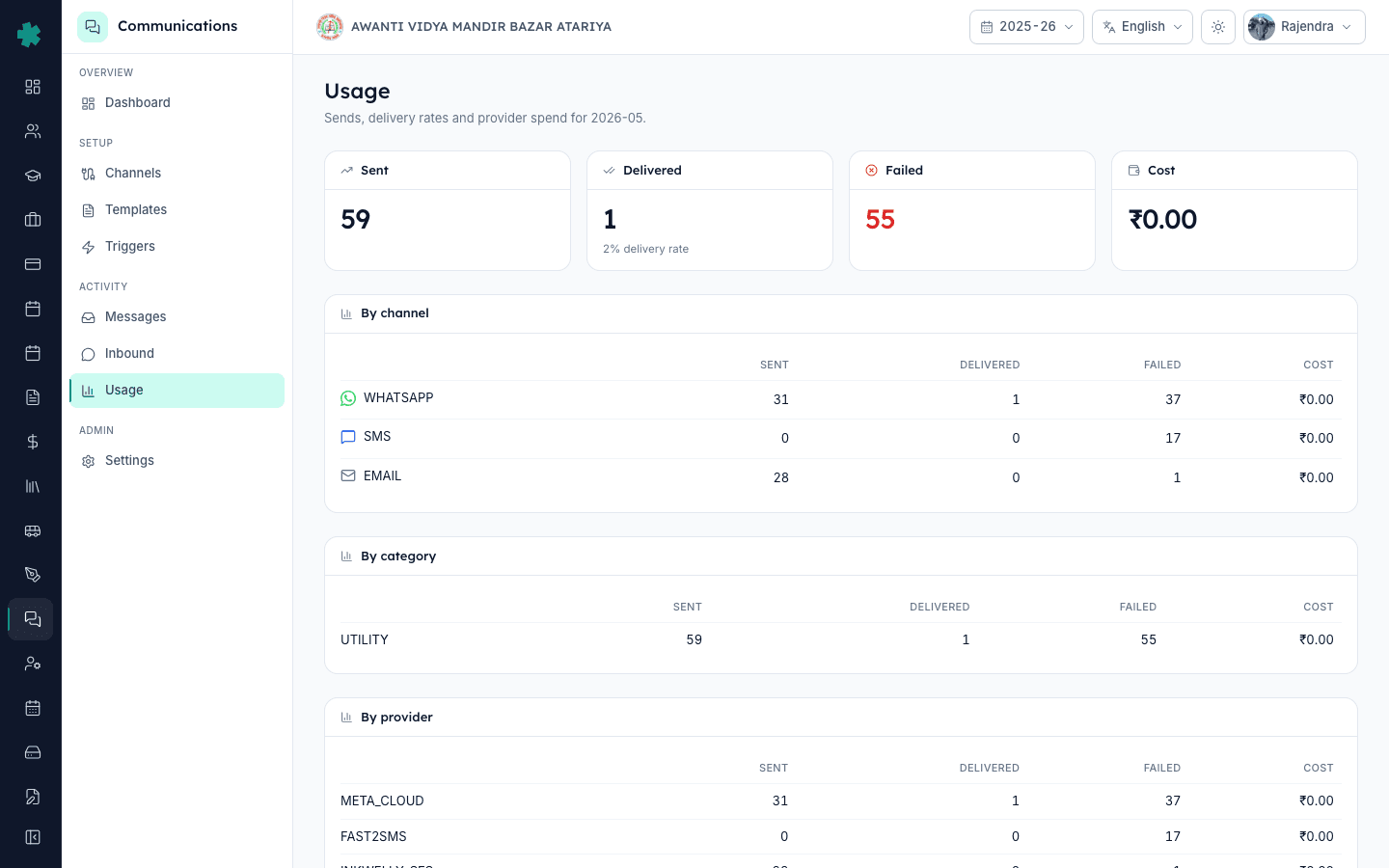
सार — Communications खोलें, फिर Usage पर जाएँ। Page इस महीने के Sent, Delivered, Failed और Cost के totals दिखाता है, और तीन breakdown tables भी — By channel, By category, By provider। ऊपर दाईं ओर picker से महीने बदलें। भुगतान करने से पहले Inkwelly के totals को Meta या MSG91 के invoice से मिलाएँ।
पुराने ERP पर चलने वाले schools को एक ही line item मिलता था — "SMS charges, ₹4,200" — बिना किसी breakdown के। उस पर सवाल उठाने का कोई तरीका नहीं था। Inkwelly इसे उल्टा करता है: हर send dispatch होते ही channel, category, provider और cost के साथ log होता है, और Usage page उसे चुने हुए महीने के लिए aggregate करता है। 2024 की KPMG India survey के अनुसार 71% K-12 schools SMS reconciliation को अपनी सबसे अस्पष्ट लागत मानते हैं, बिजली से भी ज़्यादा। Usage page यह gap invoice आने से पहले ही भर देता है, ताकि आप 30वें दिन ही billing mismatch पकड़ सकें, 60वें दिन write off करने के बजाय।
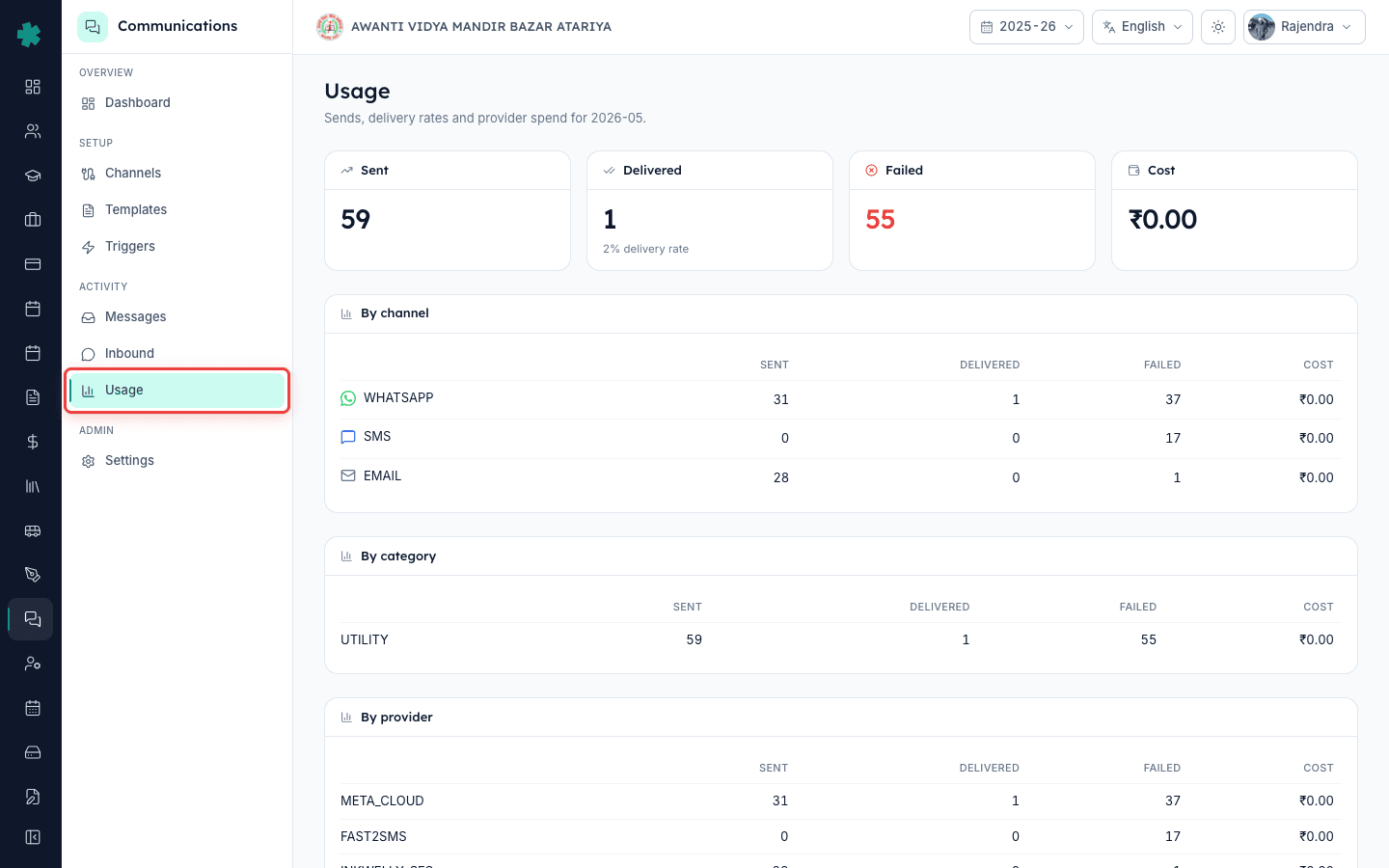
1. Communications खोलें और Usage पर जाएँ
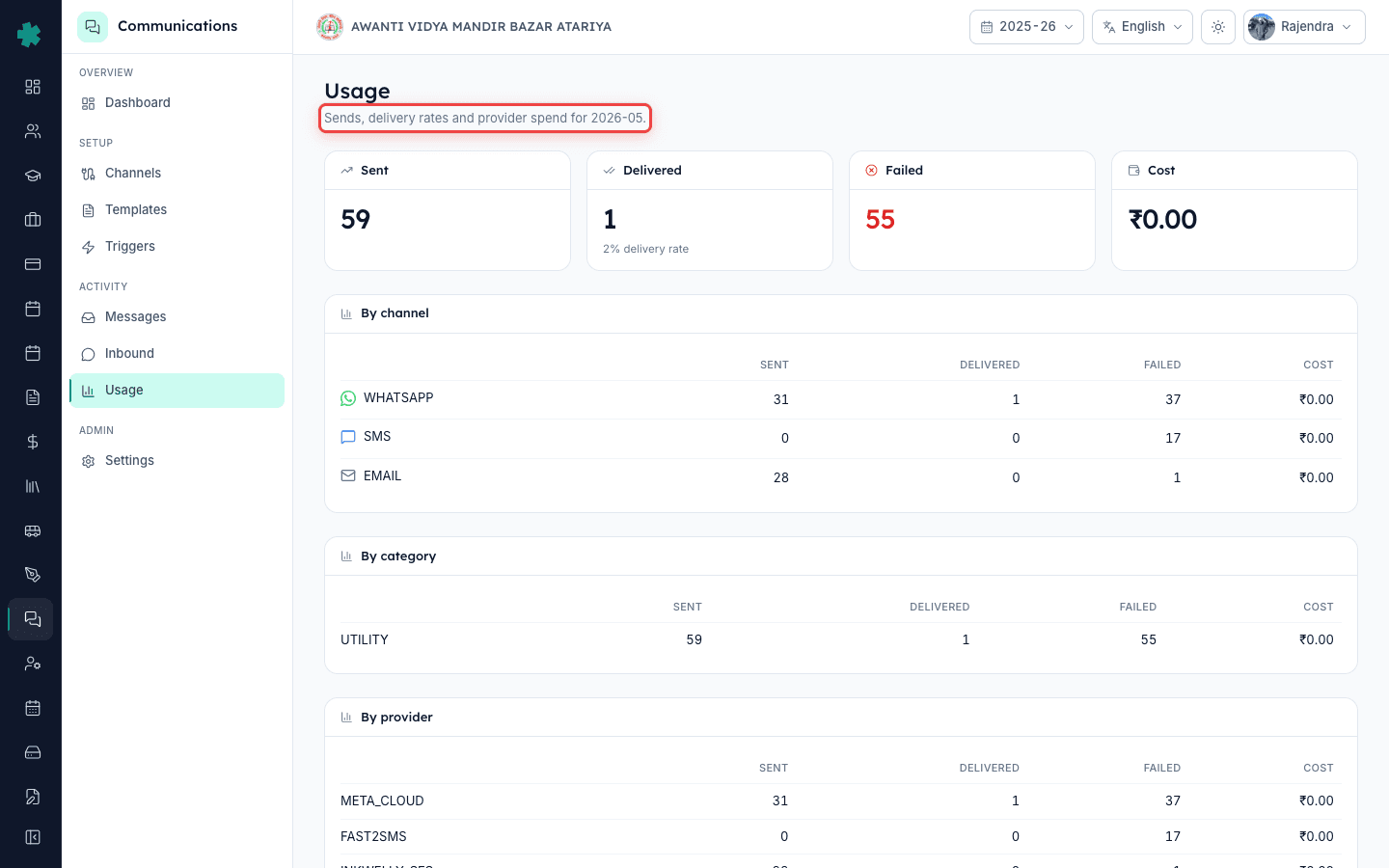
Left nav से Communications पर click करें। Default landing dashboard है। Sub-nav में Usage tab पर click करें। Page header पर लिखा होगा "Sends, delivery rates and provider spend" और साथ में year-month। Default view current calendar month का होता है — आज May 2026। यदि आपने अभी fee reminders की एक wave भेजी है और latest count चाहिए तो page reload करें।
2. ऊपर के चार totals पढ़ें
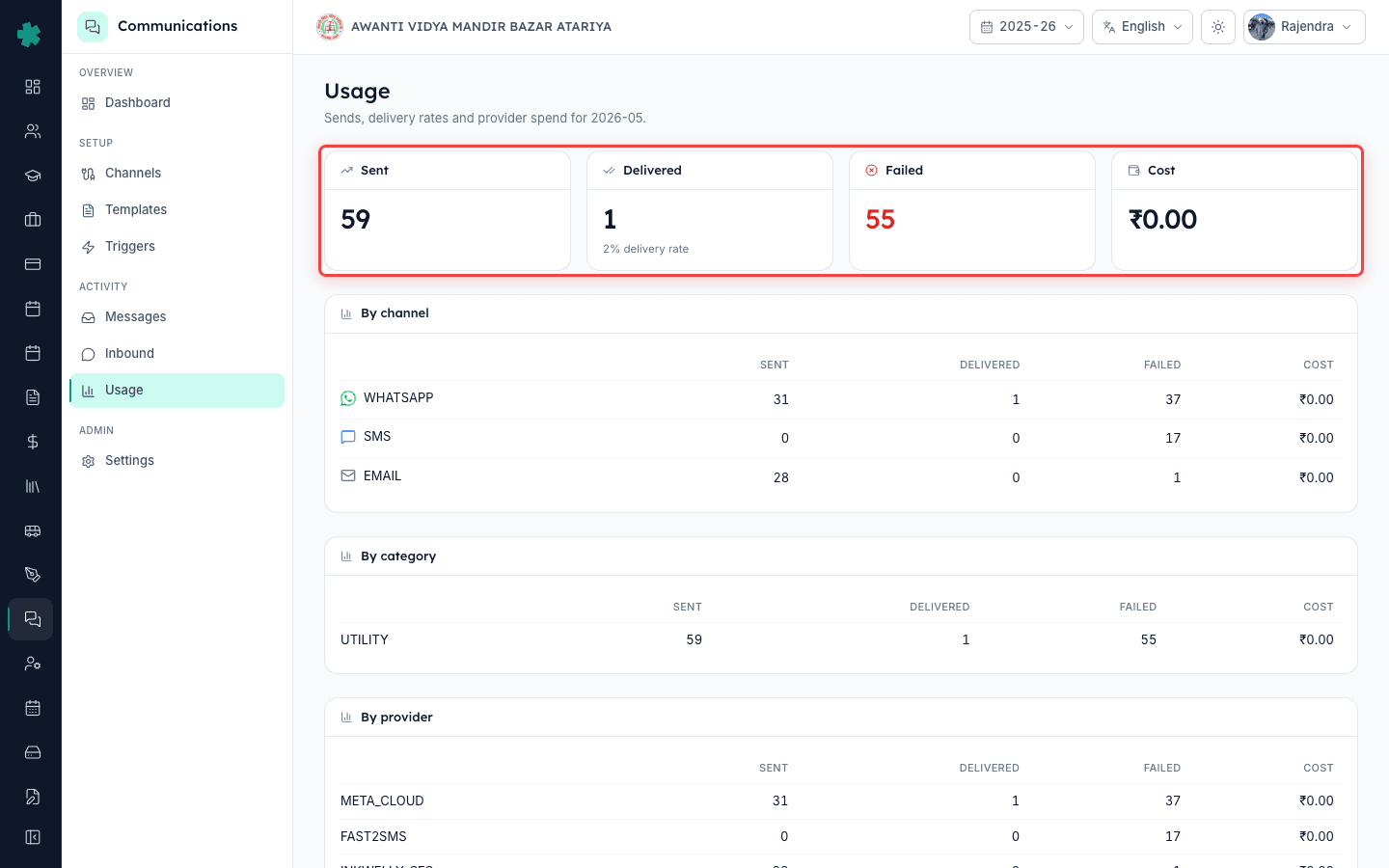
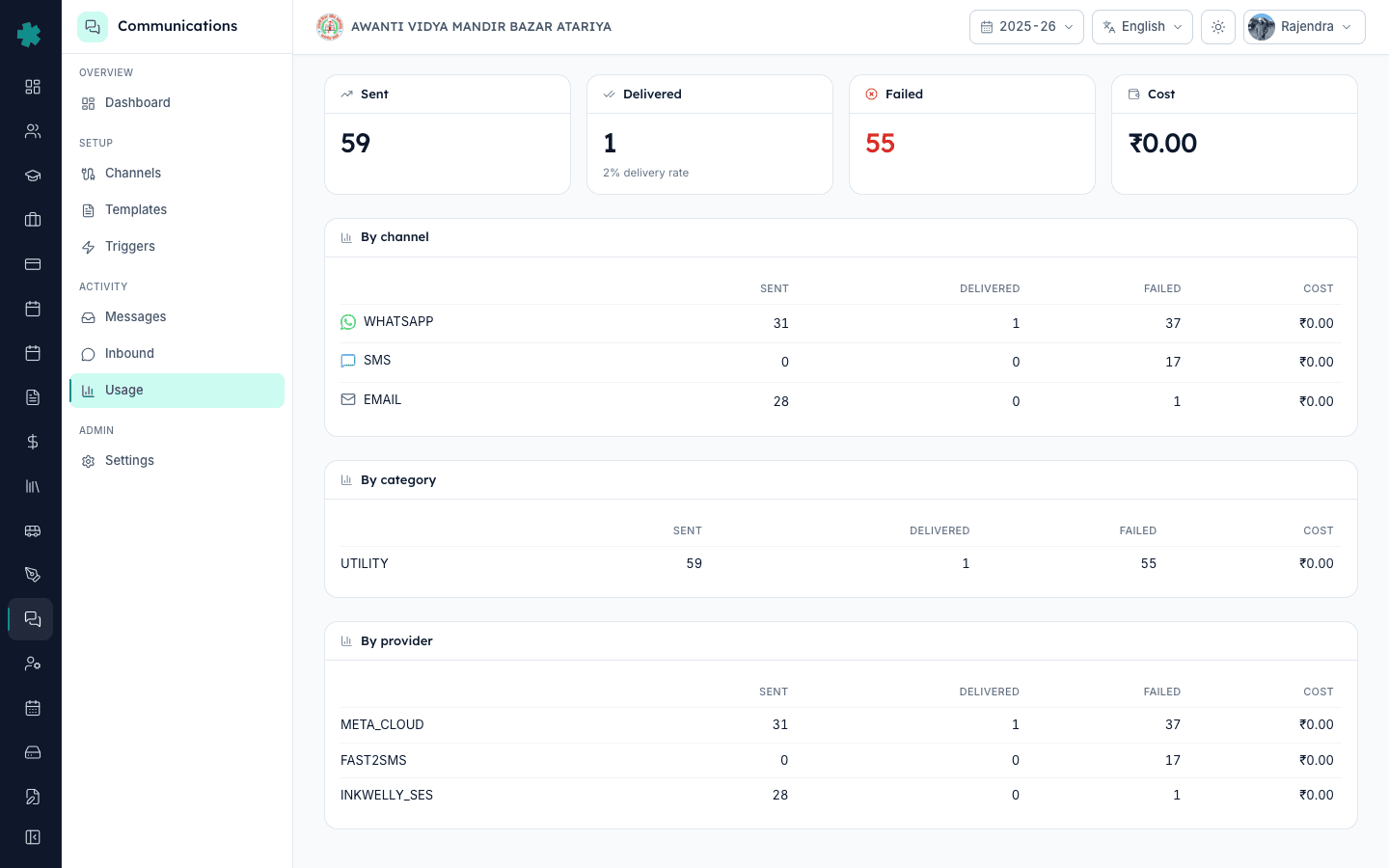
Page के ऊपर चार KPI cards हैं — Sent, Delivered, Failed, Cost। Sent वह सब है जो Inkwelly ने इस महीने किसी भी provider को dispatch किया। Delivered वह है जिसकी पुष्टि provider ने webhook से की कि device तक पहुँचा। Failed वह है जो provider ने reject किया या timeout हुआ। Cost उस महीने का wallet से कटा हुआ कुल रुपया है। Delivered card के नीचे delivery rate percentage भी छोटे text में दिखता है।
3. By channel table देखें
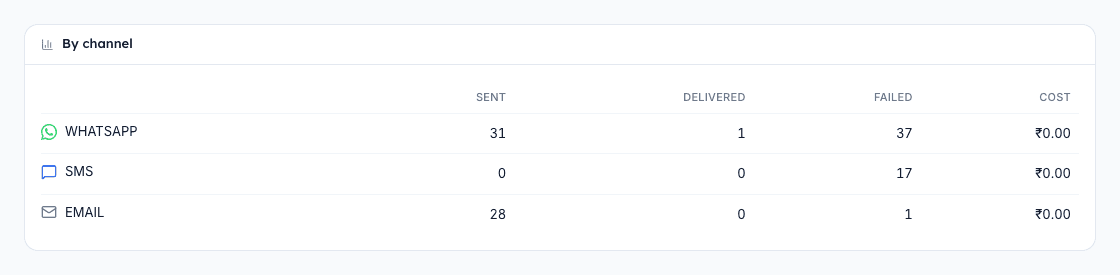
पहली breakdown table हर channel को list करती है — WHATSAPP, SMS, EMAIL, PUSH — अपने Sent, Delivered, Failed और Cost के साथ। यहीं WhatsApp की per-message ऊँची rate SMS के bulk-pack pricing के सामने साफ़ दिखती है। Meta की 2025 की India utility-conversation rate लगभग ₹0.115 प्रति 24-घंटे conversation है, जबकि transactional SMS MSG91 या Fast2SMS से ₹0.15–₹0.25 के बीच आता है। Inkwelly के managed SES से email रोज़ 1,000 तक free है।
4. By category table देखें
दूसरी breakdown category list करती है — UTILITY, AUTHENTICATION, MARKETING। School का अधिकांश traffic — fee reminders, attendance alerts, receipts — UTILITY है, जो Meta का सबसे कम WhatsApp slab carry करता है। यदि MARKETING numbers बड़े दिखें, तो आपका school event invitations या promotional content भेज रहा है; इनकी slab ज़्यादा है और TRAI के अनुसार parent opt-in evidence चाहिए। Accidental marketing spend को बढ़ने से पहले पकड़ने का यह सबसे सटीक तरीका है।

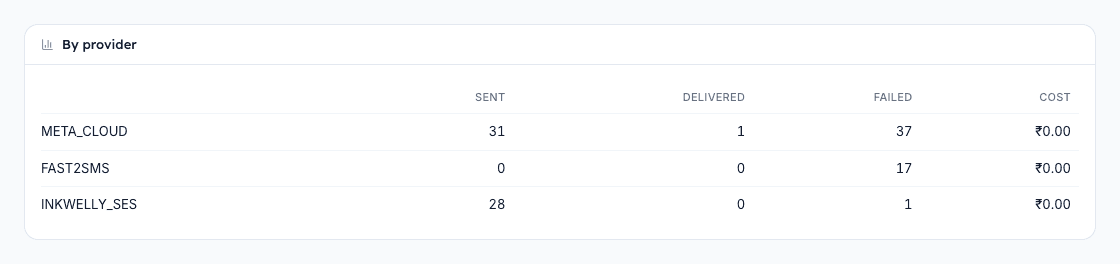
5. By provider table देखें
तीसरी breakdown provider list करती है — WhatsApp के लिए META_CLOUD, SMS के लिए FAST2SMS या MSG91, email के लिए INKWELLY_SES। हर row के Sent count को उस provider के invoice से मिलाएँ — Meta महीने का invoice Business account पर भेजता है, SMS providers आपके registered email पर। 2% से बड़ा mismatch आमतौर पर webhook delay या retried trigger से बने duplicate sends की ओर इशारा करता है।
6. Reconciliation के लिए दूसरा महीना चुनें
Usage page के ऊपर दाईं ओर month picker से पिछले महीने, पिछली तिमाही, या किसी भी पुराने महीने पर जाएँ। Inkwelly account के पूरे जीवन तक usage data रखता है, इसलिए May 2026 में June 2025 के numbers भी मिल जाएंगे यदि auditor माँगे। वही चार totals और तीन tables चुने हुए महीने के लिए refresh हो जाते हैं। अलग से कोई report download नहीं है — page खुद ही report है और screenshot deliverable।
7. Inkwelly totals को provider invoice से मिलाएँ
जब Meta या MSG91 का monthly invoice आए, तो उसी महीने का Inkwelly Usage page बगल में खोलें। तीन numbers की पुष्टि करें — Inkwelly का कुल Sent provider invoice के total messages के बराबर हो, Inkwelly का Cost provider के billable amount के 1% के अंदर हो, और Delivered count provider के delivered count से मेल खाए। यदि किसी में भी 1% से ज़्यादा drift है, तो provider के पास Inkwelly row count को सबूत बनाकर ticket raise करें।
आगे क्या करें। यदि delivery rate 90% से कम है, तो dashboard के alerts panel को खोलें — कोई webhook-silent या DLT-not-approved alert chupchaap traffic तोड़ रहा हो सकता है। यदि MARKETING numbers अपेक्षा से ज़्यादा हैं, तो Templates के अंदर अपनी trigger list audit करें और किसी भी non-utility scheduled send को disable करें। यदि parent किसी एक send पर सवाल उठाए, तो Student Fees में जाकर वह invoice खोलें और वहीं के Communications tab में per-invoice detail पढ़ें।
Live demo पर देखें
20 मिनट का walkthrough book करें — हम आपके school के असली numbers पर Usage page खोलकर sample provider invoice से reconcile दिखाएँगे।
अक्सर पूछे गए सवाल
6 सवालक्या Cost column में GST शामिल है या यह base provider rate है?
Cost पर base provider rate दिखती है जो Inkwelly आपके wallet से काटता है — GST page पर नहीं जुड़ता। Meta या MSG91 का monthly invoice उसी Sent count पर 18% GST ऊपर से जोड़ता है। Budget बनाते समय यह ध्यान में रखें।
इस महीने 31 WhatsApp messages भेजे फिर भी Cost zero क्यों दिख रही है?
Inkwelly WhatsApp को Meta के per-24-hour-conversation model पर bill करता है। यदि सभी 31 sends उन्हीं parent conversations के अंदर थे, तो Meta उन्हें कम billable conversations मानता है, और Inkwelly भी वही दिखाता है। Cost conversation count पर है, send count पर नहीं।
Usage page कितनी बार refresh होता है?
Sent, Failed और Cost dispatch के कुछ seconds के अंदर update हो जाते हैं। Delivered 1–10 minutes देर से आता है क्योंकि वह provider के webhook पर निर्भर है। यदि Delivered घंटों तक zero रहे, तो Alerts panel में WEBHOOK_SILENT warning देखें।
क्या Usage data को Excel में export कर सकते हैं?
Usage page पर built-in CSV export नहीं है — page खुद ही deliverable है। Row-level audit data के लिए Communications, फिर Messages पर जाएँ, date filter लगाएँ और वहाँ से export करें। Messages export में हर send की पूरी detail होती है।
WhatsApp utility vs marketing kya farak hai aur pricing kaise change hoti hai?
Utility messages transactional hote hain — fee invoices, attendance alerts, receipts. Marketing messages promotional hote hain — admission campaigns, event invites, newsletters. Meta marketing par har conversation ke liye zyada charge karta hai, aur TRAI ke hisab se parent opt-in evidence chahiye.
Communications usage page se monthly bill kaise samjhein agar Cost zero dikha raha hai?
Cost zero tab dikhta hai jab aapka school managed wallet par hai jo provider ko pre-pay karta hai, ya phir sends free promotional credits par gaye hain MSG91 ya Fast2SMS se. Actual rupee deduction provider ke monthly invoice mein dikhega. Per-send cost tracking enable karne ke liye Inkwelly support se baat karein.
आपको ये भी पसंद आ सकता है
3 लेखस्रोत व संदर्भ
- TRAI TCCCPR 2018 regulation on commercial communication
India regulator framework that mandates UTILITY versus MARKETING category split and consent for promotional sends.
- Meta WhatsApp Business pricing
Meta's per-conversation rate sheet that drives the Cost column on Inkwelly's Usage page.
Inkwelly आपके स्कूल पर — खुद देखें
30 मिनट का डेमो। आपके मौजूदा ERP को आपके साथ खोलकर, कॉल पर ही आपका डेटा Inkwelly में लोड करते हैं। कॉल ख़त्म होते-होते एक तय तारीख़ का गो-लाइव प्लान आपके हाथ में।