How to track this month's Communications bill in Inkwelly
Schools want to know what they are spending on parent messaging before the Meta or MSG91 invoice lands. Inkwelly's Usage page gives a real-time, current-month view of every send, every failure, and every paisa tied to it.
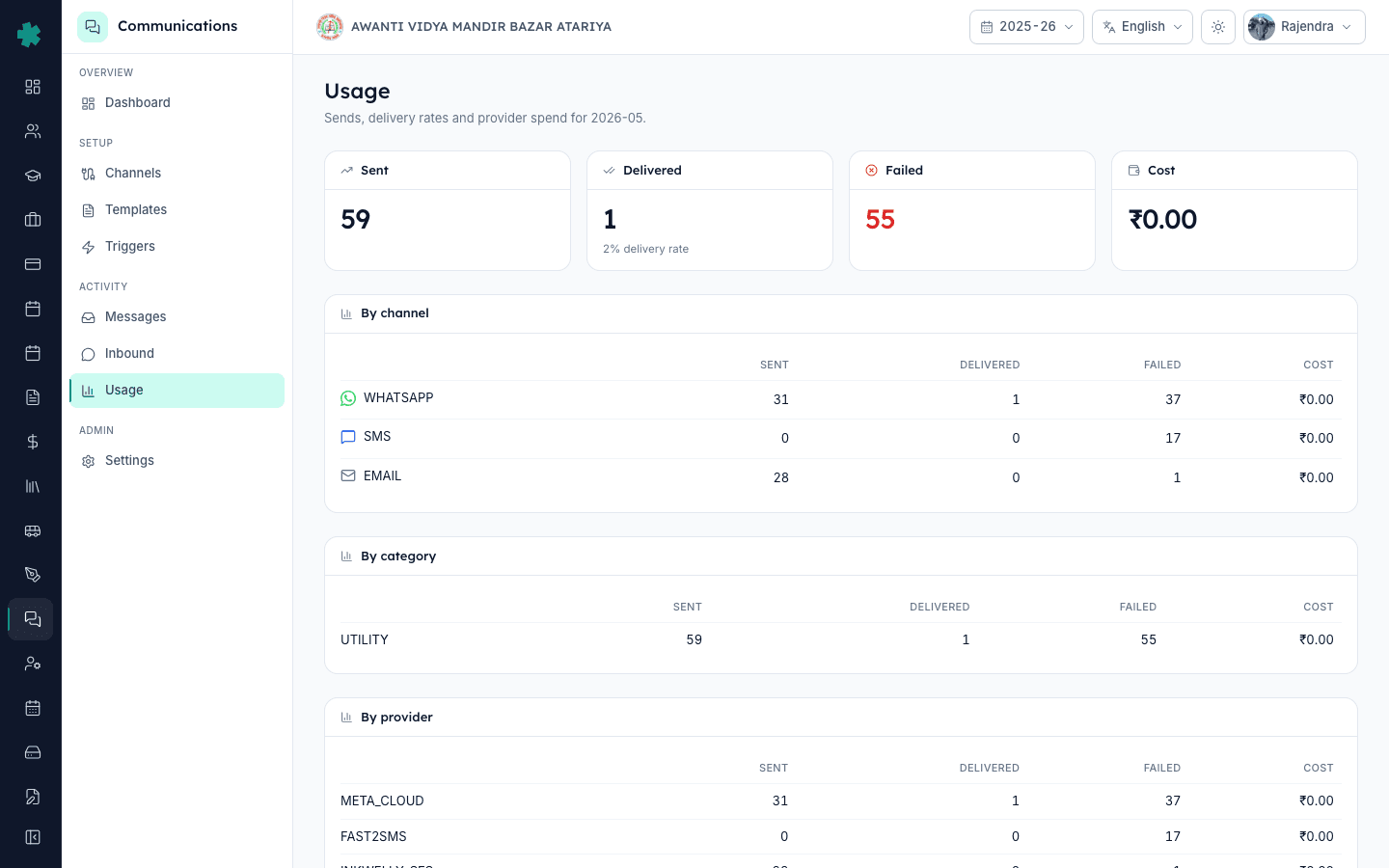
TL;DR — Open Communications, then Usage. The page shows current-month totals for Sent, Delivered, Failed, and Cost, plus three breakdown tables — By channel, By category, By provider. Switch months with the picker at the top right. Match Inkwelly's totals against the Meta or MSG91 invoice line items before paying.
Schools that ran on legacy ERPs got a single end-of-month line item — "SMS charges, ₹4,200" — with no breakdown. There was no way to question it. Inkwelly inverts that: every send is logged with channel, category, provider, and cost the moment it is dispatched, and the Usage page aggregates that across the chosen month. A 2024 KPMG India survey on school parent communication showed that 71% of K-12 schools find SMS reconciliation their biggest opaque cost, ahead of even electricity. The Usage page closes that gap before the invoice arrives, so you can call out a billing mismatch on day 30 instead of writing it off on day 60.
1. Open Communications and switch to Usage
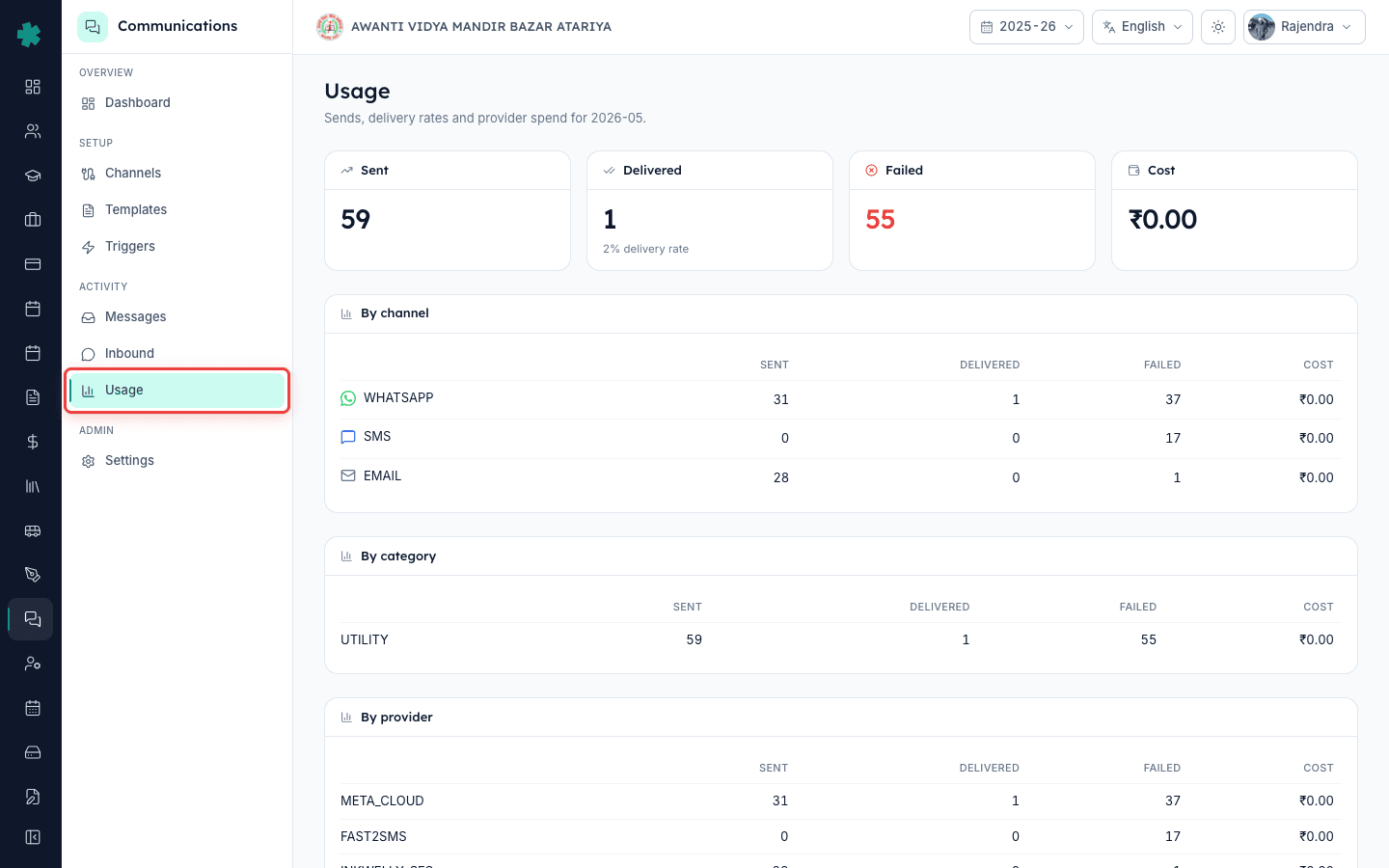
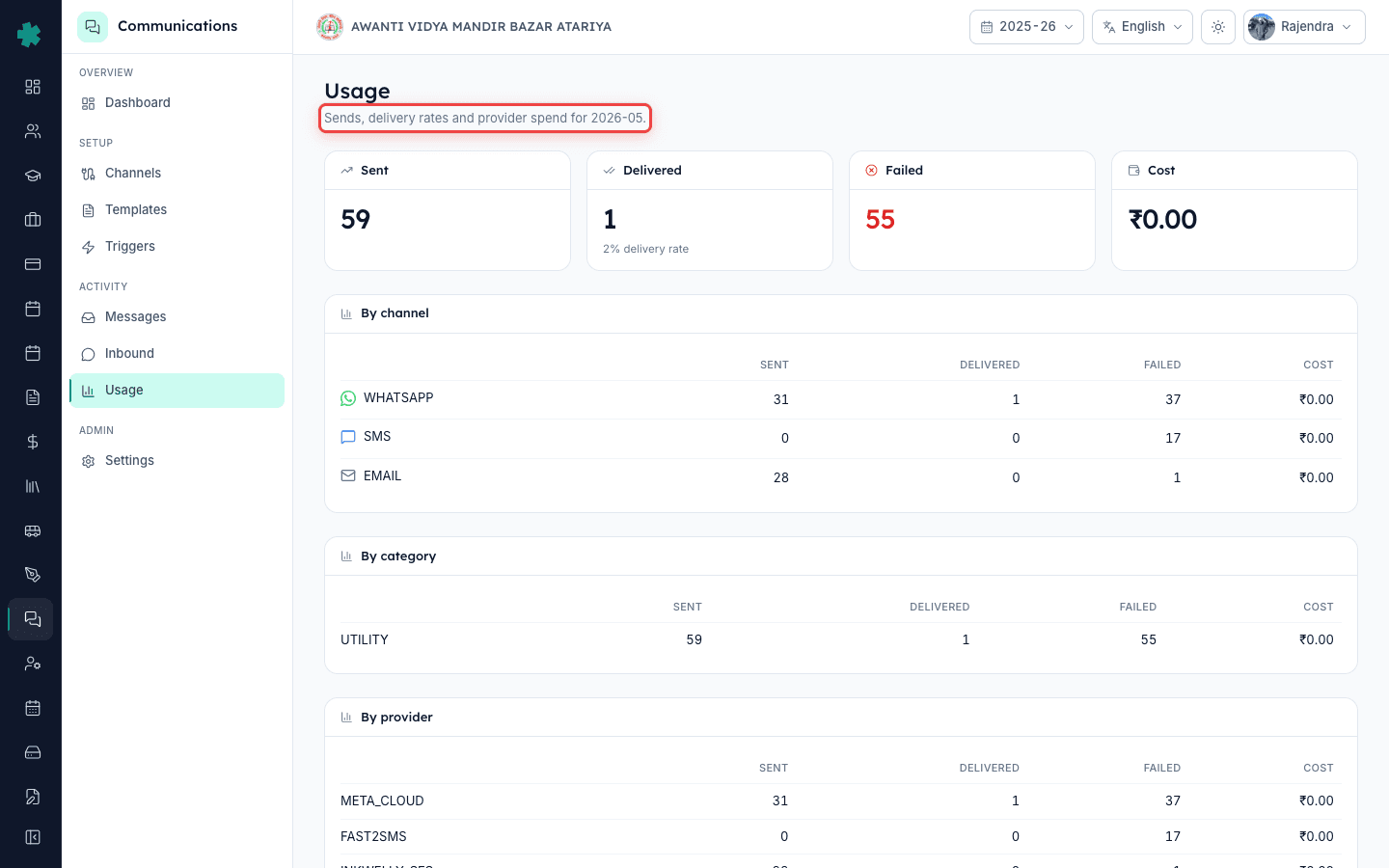
From the left nav, click Communications. The default landing is the dashboard. Click the Usage tab in the sub-nav. The page header reads "Sends, delivery rates and provider spend" followed by the year-month you are viewing. The default view is the current calendar month — May 2026 today. Reload the page if you have just sent a wave of fee reminders and want the latest count.
2. Read the four top-of-page totals
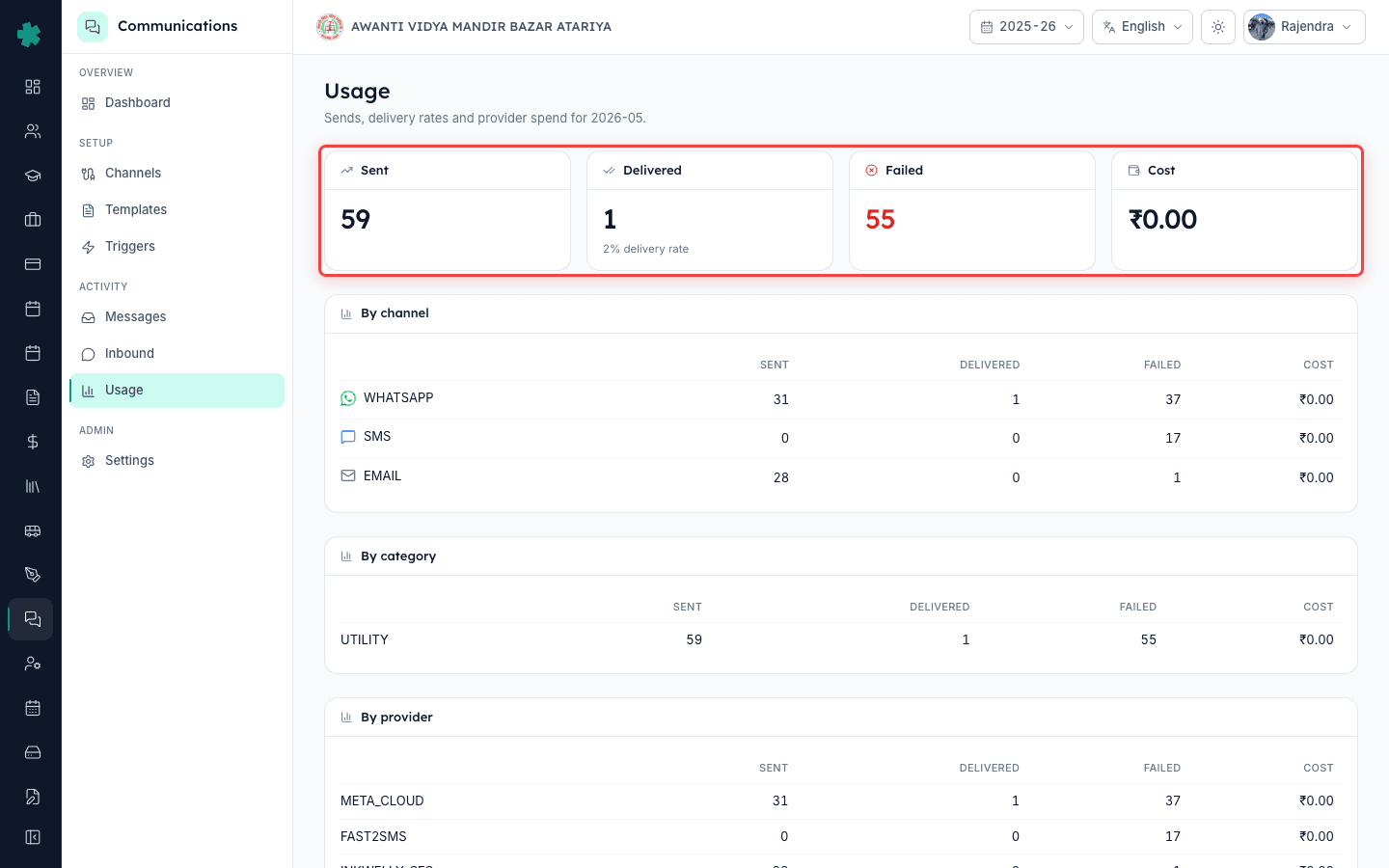
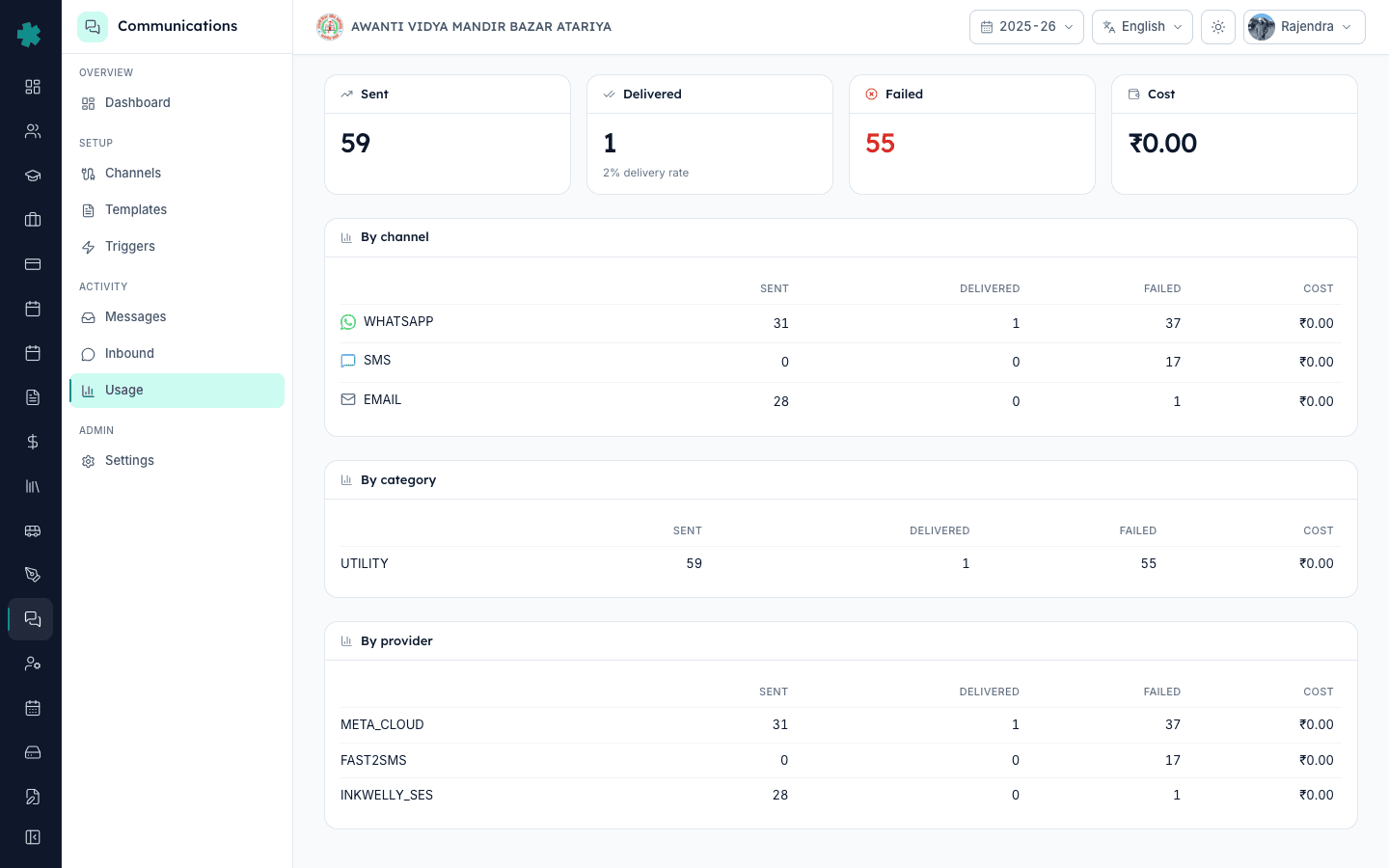
Four KPI cards sit at the top — Sent, Delivered, Failed, Cost. Sent is everything Inkwelly dispatched to any provider this month. Delivered is what the provider confirmed via webhook reached the device. Failed is what the provider rejected or what timed out. Cost is the running rupee total Inkwelly has deducted from your wallet against the senders' invoices. The Delivered card also shows the delivery-rate percentage in small text below the number.
3. Check the By channel table
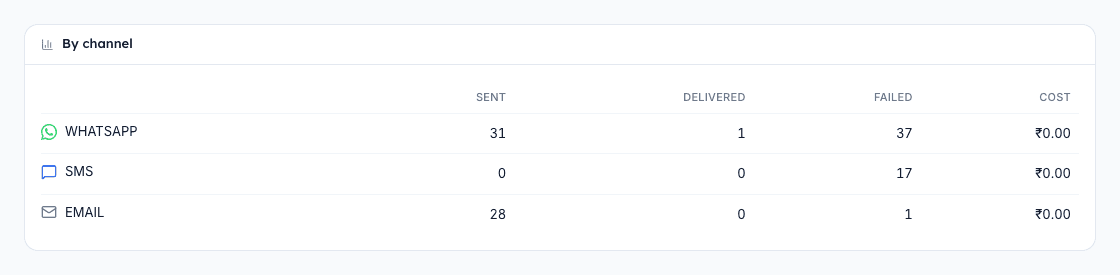
The first breakdown table lists each channel — WHATSAPP, SMS, EMAIL, PUSH — with its own Sent, Delivered, Failed, and Cost. This is where WhatsApp's higher per-message rate becomes visible against SMS's bulk-pack pricing. Meta's 2025 utility-conversation rate for India is around ₹0.115 per 24-hour conversation, while transactional SMS via MSG91 or Fast2SMS lands in the ₹0.15–₹0.25 range per send. Email via Inkwelly's managed SES is free up to the daily cap of 1,000.
4. Check the By category table
The second breakdown lists category — UTILITY, AUTHENTICATION, MARKETING. Most school traffic — fee reminders, attendance alerts, receipts — is UTILITY, which carries Meta's lowest WhatsApp slab. If you see large MARKETING numbers, your school is sending event invitations or promotional content; those carry a higher slab and need parent opt-in evidence under TRAI rules. The category split is the cleanest way to flag accidental marketing spend before it explodes.

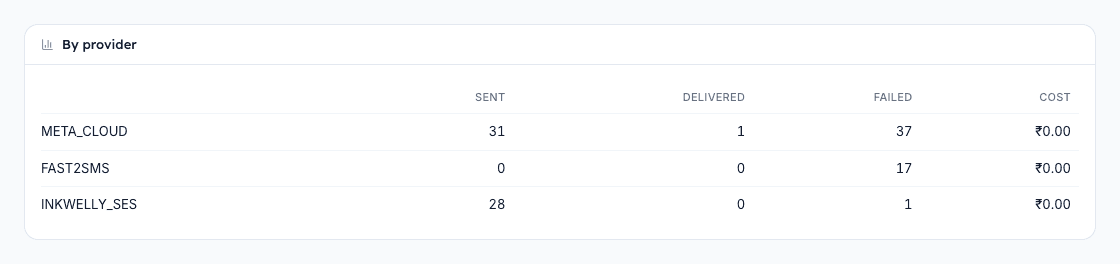
5. Check the By provider table
The third breakdown lists provider — META_CLOUD for WhatsApp, FAST2SMS or MSG91 for SMS, INKWELLY_SES for email. Match each row's Sent count against the corresponding provider invoice you receive — Meta invoices monthly via the Business account, SMS providers via your registered email. A mismatch larger than 2% usually points to either a webhook delay (status drifting after Inkwelly closed the row) or duplicate sends triggered by a retried trigger.
6. Switch to a different month for reconciliation
Use the month picker at the top right of the Usage page to jump to last month, last quarter, or any historical month. Inkwelly keeps usage data for the life of your account, so you can pull June 2025 numbers in May 2026 if your auditor asks. The same four totals and three tables refresh for the selected month. There is no separate report download — Inkwelly's reasoning is that the page itself is the report and a screenshot is the deliverable.
7. Match Inkwelly totals against the provider invoice
When Meta or MSG91 sends their monthly invoice, open Inkwelly Usage for the same month side by side. Confirm three numbers — total Sent on Inkwelly equals total messages on the provider invoice, total Cost on Inkwelly is within 1% of the provider's billable amount, and the Delivered count matches the provider's delivered count. If any of the three drifts more than 1%, raise a ticket with the provider citing Inkwelly's row count as your evidence.
What to do next. If your delivery rate is below 90%, open the dashboard alerts panel — a webhook-silent or DLT-not-approved alert may be silently breaking traffic. If MARKETING numbers are higher than expected, audit your trigger list under Templates and disable any non-utility scheduled sends. For per-invoice message detail when a parent disputes a specific send, jump into Student Fees, open the invoice, and read the Communications tab there.
See it on a live demo
Book a 20-minute walkthrough — we will open the Usage page on your school's real numbers and reconcile against a sample provider invoice.
अक्सर पूछे गए सवाल
6 सवालDoes the Cost column include GST or is it the base provider rate?
Cost shows the base provider rate Inkwelly charges to your wallet — GST is not added on the page. The Meta or MSG91 invoice you receive monthly will add 18% GST on top of the same Sent count. Plan for that when budgeting.
Why does WhatsApp Cost show zero even though I sent 31 messages this month?
Inkwelly bills WhatsApp on Meta's per-24-hour-conversation model. If all 31 sends fell inside the same parent conversations, Meta counts them as a smaller number of billable conversations, and Inkwelly mirrors that. The Cost reflects conversation count, not send count.
How often does the Usage page refresh?
Sent, Failed, and Cost update within seconds of dispatch. Delivered lags by 1–10 minutes because it depends on the provider's webhook arriving back to Inkwelly. If Delivered stays at zero for hours, check the Alerts panel for a WEBHOOK_SILENT warning.
Can I export the Usage data to Excel?
There is no built-in CSV export on the Usage page — the page itself is designed to be the deliverable. For row-level audit data, go to Communications, then Messages, apply a date filter, and export from there. The Messages export carries every send detail.
What is the difference between UTILITY and MARKETING for WhatsApp?
UTILITY messages are transactional — fee invoices, attendance alerts, exam schedules, payment receipts. MARKETING messages are promotional — admission campaigns, event invites, newsletter blasts. Meta charges a higher per-conversation rate for MARKETING and requires opt-in evidence under TRAI norms.
My Cost shows zero but I know we sent paid SMS — what happened?
Cost shows zero only when your school is on a managed wallet that pre-pays the provider, or when sends went through a free promotional credit pool from MSG91 or Fast2SMS. The actual rupee deduction will reflect in the provider's monthly invoice. Reach out to Inkwelly support to enable per-send cost tracking on your wallet.
आपको ये भी पसंद आ सकता है
3 लेखस्रोत व संदर्भ
- TRAI TCCCPR 2018 regulation on commercial communication
India regulator framework that mandates UTILITY versus MARKETING category split and consent for promotional sends.
- Meta WhatsApp Business pricing
Meta's per-conversation rate sheet that drives the Cost column on Inkwelly's Usage page.
Inkwelly आपके स्कूल पर — खुद देखें
30 मिनट का डेमो। आपके मौजूदा ERP को आपके साथ खोलकर, कॉल पर ही आपका डेटा Inkwelly में लोड करते हैं। कॉल ख़त्म होते-होते एक तय तारीख़ का गो-लाइव प्लान आपके हाथ में।