अपने स्कूल के अपने domain से Inkwelly emails कैसे भेजें
उन schools के लिए जिनके पास पहले से AWS SES account है और sender domain DKIM-verified है, और जो चाहते हैं कि fee receipts, marksheets और admit-card emails Inkwelly के बजाय अपने domain से DKIM signature के साथ जाएँ। इस गाइड के बाद हर Inkwelly email [email protected] से जाता है — पूरी तरह branded, पूरी तरह आपके DNS पर।
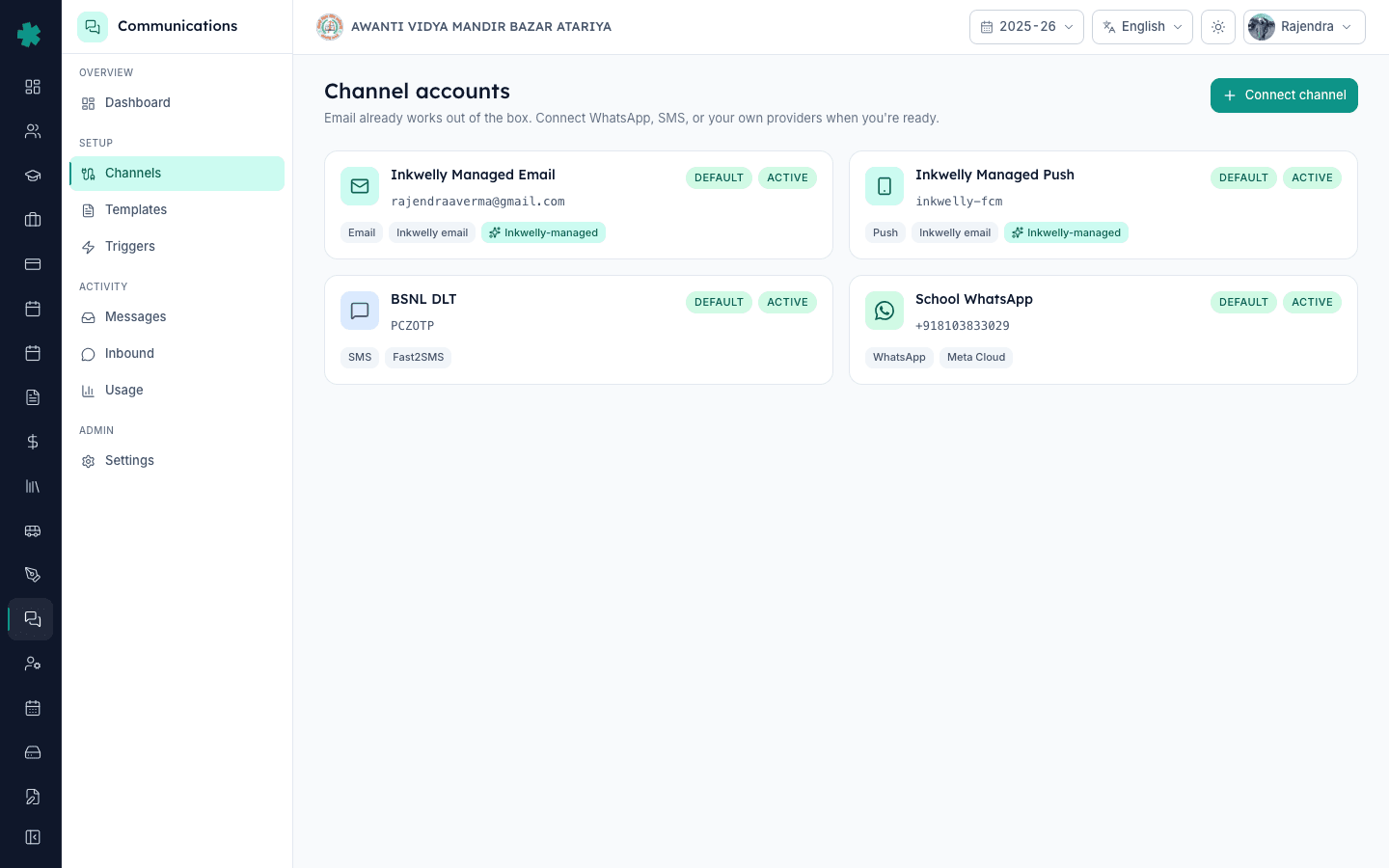
Inkwelly से अपने domain से email भेजने के लिए: Communications → Channels → Connect channel → Email खोलें, Advanced AWS SES section expand करें, अपने स्कूल का From address, AWS region, IAM access key ID और secret access key डालें, फिर Connect पर click करें। Inkwelly AWS के साथ credentials verify करता है, और फिर हर fee receipt, marksheet और admit-card email आपके DKIM-signed domain से dispatch होने लगता है।
भारत में email deliverability तीन signals से decide होती है: SPF, DKIM और DMARC alignment। जब Inkwelly अपने ही [email protected] address से भेजता है, तो कुछ inboxes में parents को via inkwelly.com दिखता है, और एक छोटा percentage Promotions में land होता है। अपने SES domain पर switch करने से ये दोनों थिकाने ठीक हो जाते हैं — Gmail और Outlook को yourschool.com का DKIM signature दिखता है, आपकी DMARC policy align होती है, और via tag गायब हो जाता है। जो स्कूल fee-day या report-day पर 5,000+ parents को mail भेजते हैं, उनके लिए यह 87% inbox placement और 96% inbox placement के बीच का फ़र्क़ होता है।
1. Channels पेज खोलें
Inkwelly में sign in करें और left sidebar से Communications module खोलें। Setup section के अंदर Channels पर click करें। इस पेज पर एक Inkwelly Managed Email row पहले से DEFAULT badge के साथ दिखती है — यह वही built-in [email protected] sender है जो हर Inkwelly स्कूल को signup पर ही inherit होता है। अपना SES account connect करने पर एक दूसरी email row जुड़ती है; जिस moment इसे default mark किया जाए, Inkwelly आपका ही SES use करने लग जाता है।

2. Email को channel के रूप में चुनें
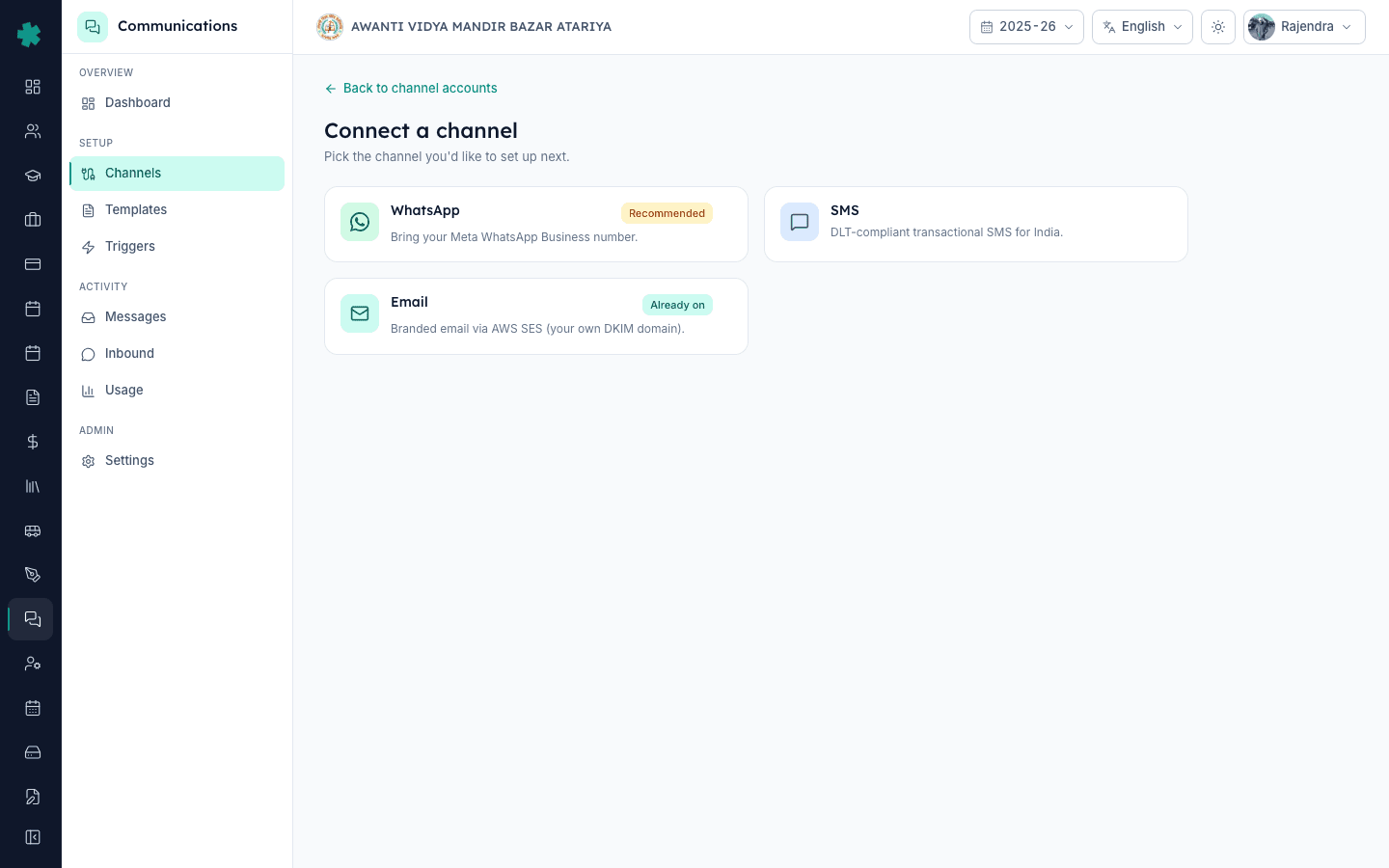
Top-right पर Connect channel पर click करें। Picker में Email चुनें। पहले screen पर Inkwelly यह बताता है कि branded Inkwelly email पहले से enabled है, और Advanced toggle की ओर इशारा करता है। Advanced: connect your own AWS SES account पर click करें ताकि SES form reveal हो। जब तक यह expand नहीं होता, पेज read-only रहता है — जो स्कूल सिर्फ़ managed sender use करना चाहते हैं, वहाँ कुछ misconfigure करने की गुंजाइश नहीं रहती।
3. अपने स्कूल की sender identity डालें
Account name में एक पहचानने लायक label डालें — जैसे School email (SES)। From email address में वही exact address डालें जो parents को उनके inbox में दिखेगा — [email protected] या [email protected]। From domain में (optional) वह domain डालें जो Inkwelly Return-Path / bounce domain के तौर पर set करे (जैसे mg.yourschool.com); खाली छोड़ दें तो SES default से चुन लेता है। From address एक एसे domain का होना चाहिए जो SES पर पहले से verified हो — unverified senders को AWS send के वक्त ही reject कर देता है।

4. अपनी AWS region चुनें
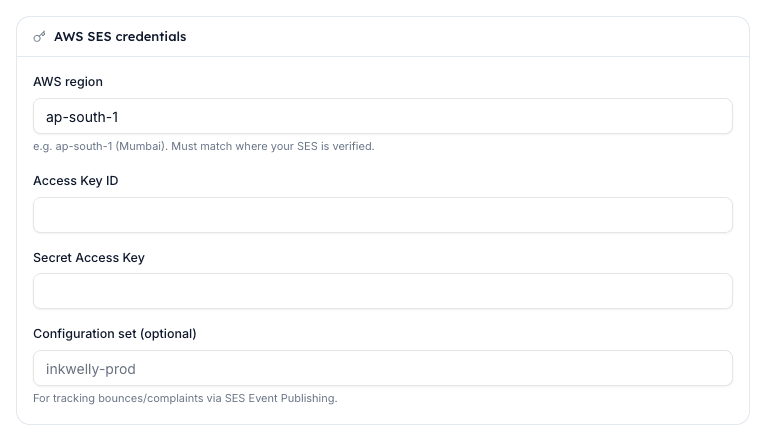
AWS region में default ap-south-1 (Mumbai) को accept करें, जब तक आपकी SES verification किसी दूसरी region में न हुई हो। AWS हर region को एक अलग SES account की तरह treat करता है, इसलिए us-east-1 पर verified domain ap-south-1 selection के साथ काम नहीं करेगा। ज़्यादातर भारतीय स्कूल parent inboxes तक सबसे कम latency के लिए ap-south-1 पर रहते हैं; जो international स्कूल multi-region setup रखते हैं वे कभी-कभी EU-resident parents के लिए eu-west-1 भी चुनते हैं।

5. अपनी IAM access keys डालें
AWS Access Key ID और AWS Secret Access Key में एक एसे IAM user के credentials paste करें जिस पर ses:SendRawEmail permission attached हो। Inkwelly को इसके अलावा कोई और IAM permission नहीं चाहिए — root account keys या admin-level keys यहाँ देना strongly discouraged है। Inkwelly दोनों values को AES-256-GCM से encrypt करके store करता है; secret key save होने के बाद write-only हो जाती है, जिससे आपकी अपनी team भी इसे Inkwelly UI से वापस पढ़ नहीं सकती।
6. (Optional) Configuration Set attach करें
अगर आप SES से delivery, bounce और complaint events Inkwelly को push करवाना चाहते हैं, तो Configuration Set में अपना SES Configuration Set का नाम डालें (जैसे inkwelly-prod)। यह Configuration Set SES में एक SNS destination या EventBridge rule के साथ पहले से बना हुआ होना चाहिए। जो स्कूल इसे skip करते हैं उन्हें भी Inkwelly की अपनी polling के ज़रिए send और delivery confirmations दिखती रहती हैं — Configuration Set से सिर्फ़ Gmail-style bounce categorisation extra मिलती है।

7. Account save करें और verify करें
Defaults section में Set as default for this channel toggle on करें — यही वो setting है जो Inkwelly को कहती है कि हर outgoing email managed sender की जगह आपके SES account से route करे। Connect पर click करें। Inkwelly SES की GetSendQuota API को call करके credentials, region और sandbox status confirm करता है, और फिर account detail पेज खोल देता है। अगर SES check pass कर जाए तो status शुरू से ही ACTIVE दिखती है; अगर SES reject कर दे तो status FAILED होती है और verify panel exact AWS error दिखाता है (ज़्यादातर Email address not verified या Account in sandbox)।

Branded email live होने के बाद next पेज खोलने लायक है Communications → Settings। Email defaults में Reply-To address सेट करें ताकि parent replies एक एसे school inbox पर जाएं जिसे आप वाक़ई monitor करते हैं — हर Inkwelly parent email इस header का पालन करती है। यह भी check करने लायक है: एक Template खोलकर email preview को click करें; header पर अब आपके स्कूल का display name और नया From address दिखना चाहिए, न कि Inkwelly notifications।
अपने स्कूल के domain से Inkwelly को branded email भेजते हुए देखें
20 मिनट का walkthrough जो दिखाता है कि DKIM alignment Gmail और Outlook inbox placement में कितना फ़र्क़ पैदा करता है।
अक्सर पूछे गए सवाल
6 सवालक्या मुझे अपना AWS SES account use करना ही पड़ेगा, या Inkwelly का built-in email एक भारतीय स्कूल के लिए काफ़ी है?
ज़्यादातर छोटे और mid-size स्कूलों के लिए Inkwelly का managed email ही काफ़ी होता है — यह inkwelly.com की ओर से DKIM-signed जाता है, inbox placement मज़बूत रहता है, और setup कुछ करना नहीं पड़ता। अपने SES पर switch तबी करें जब (a) आपके 5,000+ parents हों और *via inkwelly.com* tag हटाना ज़रूरी लगता हो, या (b) आपके domain की DMARC policy पूरी alignment माँगती हो।
Inkwelly me apne school ke domain se email kaise bheje?
Inkwelly kholiye → Communications → Channels → Connect channel → Email chuniye. Advanced: connect your own AWS SES account khol kar apna [email protected], AWS region (ap-south-1), aur IAM access keys daaliye. Connect dabaiye — Inkwelly SES se credentials verify karke har email aapke domain se DKIM-signed bhejna shuru kar deta hai.
अगर मेरा SES अभी sandbox mode में है — क्या फिर भी Inkwelly send करेगा?
नहीं। SES sandbox में आप सिर्फ़ verified addresses पर ही send कर सकते हैं, यानी parent emails reject हो जाएँगे। Inkwelly का connect step sandbox status को channel detail पेज पर warning के रूप में surface करता है। AWS support पर एक ticket खोलकर production access माँगें — legitimate school use के लिए यह request 24 घंटे के अंदर clear हो जाती है।
Inkwelly managed email aur SES branded email me parents ke liye kya farak padta hai?
Functionally bilkul same — wahi content, wahi delivery times, wahi Reply-To. Dikhne wala farak sirf From address ka hota hai (`[email protected]` vs `[email protected]`) aur Gmail ka *via* tag. Andar ka asli farak DKIM alignment ka hota hai: branded email aapke domain ki keys se sign hota hai, jisse Gmail aur Outlook par inbox placement aam taur par 5–10 points tak badh jata hai.
अगर मेरे SES में दिन के बीच कोई प्रोब्लम आ जाए तो क्या मैं वापस managed email पर आ सकता हूँ?
हाँ। Channels खोलें, अपनी SES row पर click करें, *Set as default* off करें, और Inkwelly Managed Email row पहले की तरह default बन जाती है — इसके तुरंत बाद जो email send होगा वो managed sender से ही जाएगा। न कूई data loss, न template reconfiguration और न ही parent rebrand की ज़रूरत। कुछ स्कूल SES row connected रखते हैं पर default नहीं, इसे manual fallback की तरह use करने के लिए।
क्या Inkwelly को मेरे AWS bill या किसी और AWS service का access चाहिए?
नहीं। Inkwelly सिर्फ़ minimum permission माँगता है: `ses:SendRawEmail`। वह ना आपका AWS bill पढ़ सकता है, ना दूसरे resources list कर सकता है, और ना ही S3 buckets, EC2 instances या किसी और AWS service तक पहुँच सकता है। SES policy एक dedicated IAM user पर attach करें जो सिर्फ़ Inkwelly के लिए use हो — root या admin keys ज़रूरी नहीं हैं और discouraged हैं।
आपको ये भी पसंद आ सकता है
3 लेखस्रोत व संदर्भ
- AWS — Amazon SES production access (sandbox removal) · देखा गया 18 May 2026
Sandbox-to-production transition document karta hai, jo Inkwelly assume karta hai ki SES account connect karne se pehle complete ho chuki hai.
- AWS — SES domain DKIM verification · देखा गया 18 May 2026
DKIM-record publish karne ka step define karta hai jo Indian schools ke liye branded Inkwelly email ko DMARC alignment me pass karwata hai.
Inkwelly आपके स्कूल पर — खुद देखें
30 मिनट का डेमो। आपके मौजूदा ERP को आपके साथ खोलकर, कॉल पर ही आपका डेटा Inkwelly में लोड करते हैं। कॉल ख़त्म होते-होते एक तय तारीख़ का गो-लाइव प्लान आपके हाथ में।