रिफंड को process और disburse कैसे करें Inkwelly में
यह गाइड स्कूल के अकाउंटेंट या कैशियर के लिए है जिन्होंने रिफंड पहले ही initiate कर दिया है और अब अभिभावक को NEFT, UPI या cheque के माध्यम से वास्तविक भुगतान करके Inkwelly में रिफंड बंद करना है। अंत में आपके पास एक Completed रिफंड होगा जिसमें audit trail के लिए transaction reference सुरक्षित रहेगा।
Inkwelly में रिफंड को process और disburse करने के लिए: Student Fee → Refunds खोलें, Pending टैब पर जाएँ, जिस रिफंड को बंद करना है उस पर क्लिक करें, ऊपर दाईं ओर Process बटन दबाएँ, NEFT, UPI या cheque का transaction reference और remarks भरकर confirm करें। Inkwelly रिफंड की स्थिति Pending से Completed कर देता है, processed date और ऑपरेटर का नाम stamp करता है, और अभिभावक के payment और invoice के विरुद्ध पूरा audit trail लिख देता है।
रिफंड स्कूल ऑफिस का सबसे संवेदनशील money movement है। Right of Children to Free and Compulsory Education Act 2009 और अधिकांश राज्य fee-regulation कानून स्कूलों से TC या withdrawal के 30 से 60 दिनों के भीतर रिफंड disburse करने की अपेक्षा करते हैं, और हर पैसे के लिए लिखित reference रखना अनिवार्य है। Income Tax Act की Section 35 के तहत स्कूलों को refund record कम से कम 6 साल तक संभालने होते हैं। Inkwelly हर रिफंड पर transaction reference, processed-by user, processed-at timestamp और remarks संग्रहित करता है ताकि 2 साल बाद कोई auditor या अभिभावक रिफंड पर सवाल उठाए तो ऑफिस के पास एक क्लिक में प्रमाण उपलब्ध हो।
1. Student Fee → Refunds खोलें
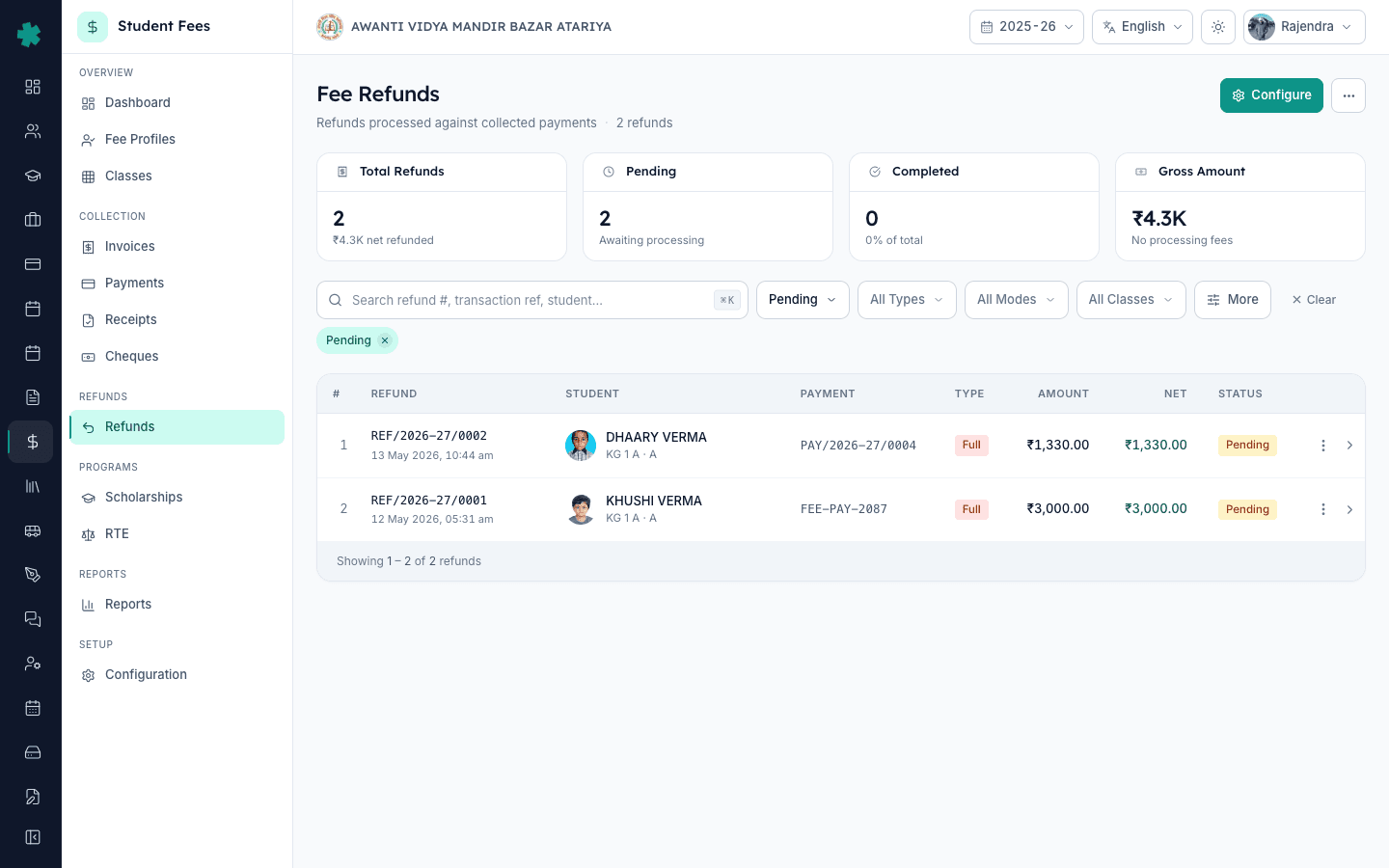
बाएँ साइडबार से Inkwelly → Student Fee खोलें, फिर REFUNDS सेक्शन के अंतर्गत Refunds पर क्लिक करें। Refunds पेज पर इस सत्र के सभी initiated रिफंड दिखाई देते हैं, ऊपर KPI tiles में कुल रिफंड, कुल राशि, processing fee और net disbursed प्रदर्शित होते हैं। एक सामान्य Tier-2 day school में 1,200 छात्रों पर हर साल लगभग 8 से 15 रिफंड बनते हैं — अधिकांश अप्रैल से जुलाई के TC withdrawal के समय।
2. Pending टैब चुनें और रिफंड पर क्लिक करें
रिफंड सूची के ऊपर Pending टैब पर क्लिक करें। Inkwelly तालिका को केवल उन रिफंड पर फ़िल्टर कर देता है जिनका disbursement अभी बाकी है — यही वे रिफंड हैं जिनमें अभिभावक को पैसा लौटाना शेष है। सूची को Refund #, छात्र का नाम, क्लास, mode (Bank Transfer, UPI, Cheque, Cash) और net amount से देखें। जिस रिफंड को बंद करना है उसकी पंक्ति पर क्लिक करें — उदाहरण के लिए REF/2026-27/0002 DHAARY VERMA, ₹1,330, Bank Transfer।
3. रिफंड detail खोलें और Process दबाएँ
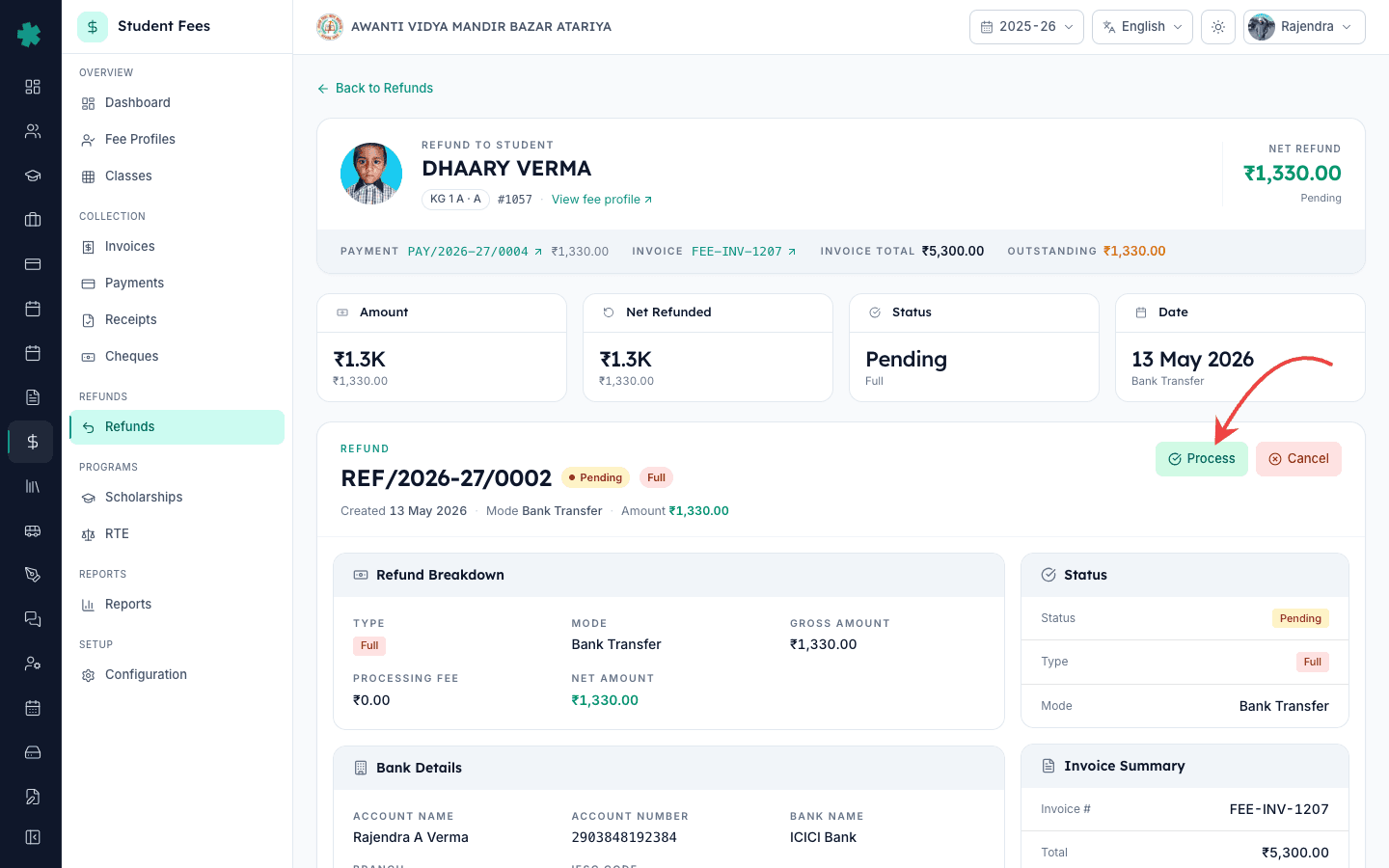
रिफंड detail पेज पर छात्र कार्ड, चार KPI tiles (Amount, Net Refunded, Status, Date), refund breakdown जिसमें mode और bank details होते हैं, और लिंक्ड payment व invoice दिखाई देते हैं। रिफंड header के ऊपर दाईं ओर एक हरा Process बटन लाल Cancel बटन के साथ मिलेगा। Process क्लिक करें। Process Refund dialog खुलता है और उसमें रिफंड का read-only सारांश दिखाई देता है — refund number, छात्र, gross amount, processing fee, net amount और mode।
4. Transaction reference और remarks भरें
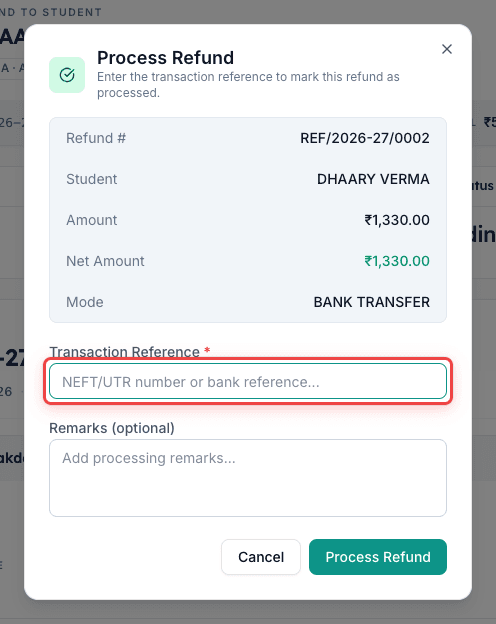
Transaction Reference फील्ड में वह वास्तविक reference paste करें जो आपने अभी-अभी बैंक से disbursement पर प्राप्त किया है। NEFT या RTGS के लिए यह बैंक की confirmation SMS से आया UTR नंबर होता है — सामान्यतः 16 से 22 अक्षर। UPI के लिए यह 12 अंकों का UPI transaction id होता है। Cheque के लिए cheque नंबर के साथ जारी करने वाले बैंक का नाम लिखें — उदाहरण 438215 SBI Aliganj। यदि ऑफिस को कोई विशेष टिप्पणी रखनी हो तो Remarks में लिखें, जैसे अभिभावक के अनुरोध पर दो भागों में disbursed या 15 अप्रैल 2026 के TC withdrawal के विरुद्ध भुगतान। Inkwelly इन remarks को refund detail पेज के Reason and Remarks कार्ड में संग्रहित करता है।
5. Confirm करें और Completed स्थिति सत्यापित करें
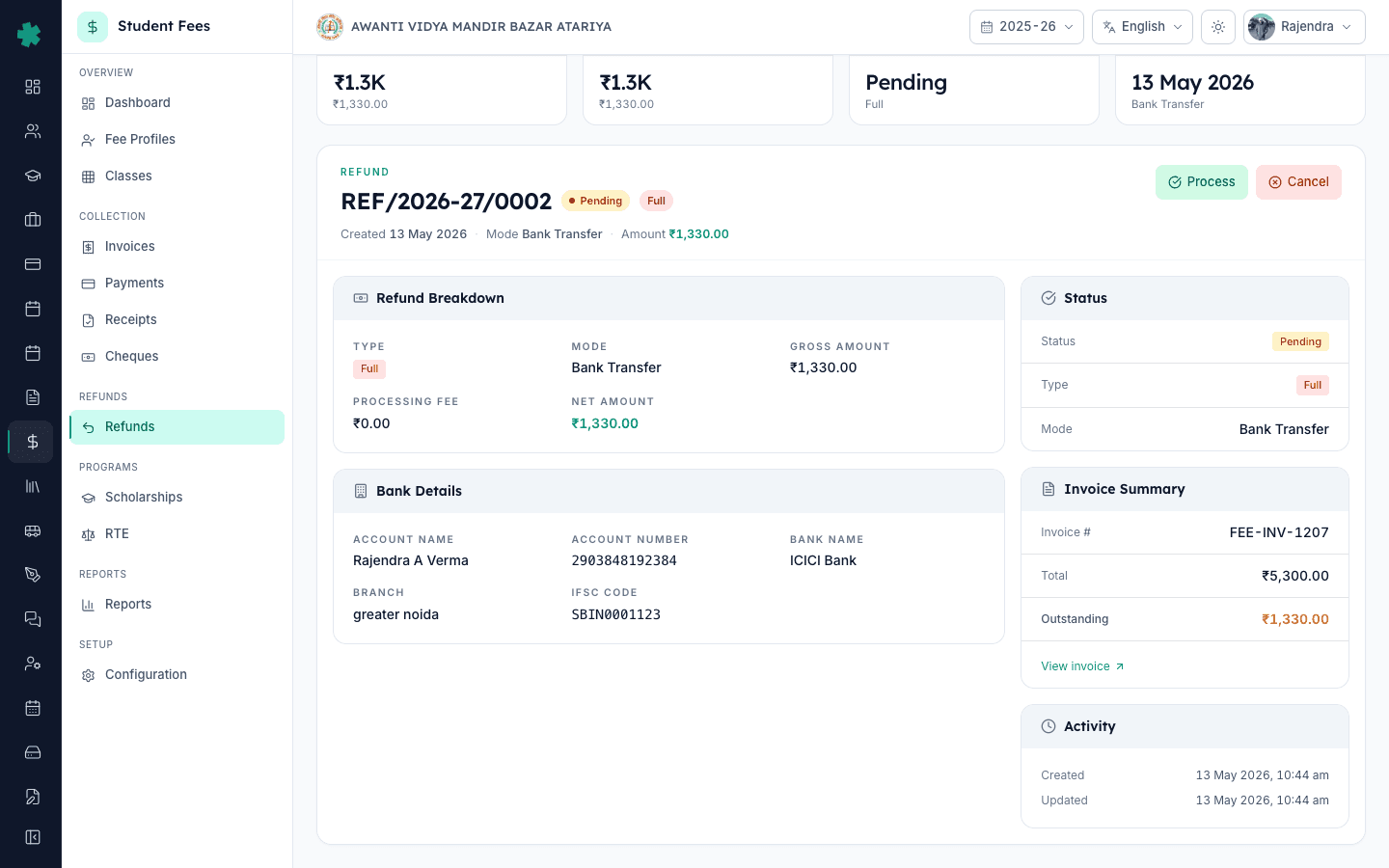
Dialog के नीचे हरे Process Refund बटन पर क्लिक करें। Inkwelly transaction reference को validate करता है, रिफंड को Completed मार्क करता है, processed date व ऑपरेटर का नाम stamp करता है और पेज refresh करता है। रिफंड header पर status pill पीले Pending से हरे Completed में बदल जाता है, दाईं ओर Activity कार्ड में नया Processed timestamp दिखाई देता है, और Refund Breakdown अब Transaction Ref फील्ड प्रदर्शित करता है। Process और Cancel बटन गायब हो जाते हैं क्योंकि Completed रिफंड बदला नहीं जा सकता — अब केवल receipt का download या share उपलब्ध होता है।
अगले कदम — अभिभावक को जानकारी देते रहें। Inkwelly से रिफंड receipt को सीधे अभिभावक के पास WhatsApp, SMS या email पर भेजा जा सकता है ताकि परिवार के पास भी वही UTR नंबर अपने रिकॉर्ड के लिए मोबाइल में रहे। यदि किसी कारण रिफंड को reverse करना पड़े — गलत राशि, गलत खाता — तो नया रिफंड बनाएँ या फीस payment कैसे reverse करें गाइड में बताए payment reversal flow का अनुसरण करें। TC withdrawal के विरुद्ध रिफंड जारी करने वाले स्कूलों के लिए time-based slabs वाली refund policy कैसे बनाएँ सहायक गाइड वह canonical संदर्भ है जो बताती है कि withdrawal के हर चरण पर कितना पैसा वापस होगा।
Inkwelly Student Fees को काम करते हुए देखें
अक्सर पूछे गए सवाल
6 सवालProcess क्लिक करने पर Inkwelly रिफंड को Completed कितनी देर में मार्क करता है?
Inkwelly status परिवर्तन तुरंत करता है — जैसे ही आप dialog में Process Refund बटन क्लिक करते हैं, रिफंड Pending से Completed हो जाता है और processed timestamp save हो जाता है। वास्तविक पैसे की गति आपके बैंक में पहले हो चुकी होती है (NEFT, UPI या cheque); Inkwelly केवल disbursement record करता है, execute नहीं करता। अभिभावक एक मिनट में अपने portal पर रिफंड बंद देख लेते हैं।
क्या Completed होने के बाद transaction reference बदला जा सकता है?
नहीं, Completed रिफंड अंतिम होता है और transaction reference lock हो जाता है। यह design से ऐसा है ताकि बंद होने के बाद audit trail चुपचाप बदला न जा सके। यदि गलत reference save हुआ हो, तो स्वीकृत ऑफिस प्रथा है छात्र के fee ledger में नोट जोड़ें और bank statement को सुधार के रिकॉर्ड के रूप में रखें। वास्तविक त्रुटि के लिए Inkwelly support से संपर्क करें — audited correction के साथ दोनों timestamps सुरक्षित रखे जाते हैं।
यदि रिफंड Completed होने के बाद भी अभिभावक के बैंक खाते में पैसा नहीं आया है तो क्या करें?
Inkwelly में Completed का अर्थ है स्कूल ऑफिस ने एक transaction reference के विरुद्ध disbursement record कर दिया है — अभिभावक के बैंक में वास्तविक settlement channel पर निर्भर करता है। NEFT बैंकिंग समय में सामान्यतः 2 घंटे में settle होता है, UPI तत्काल, और cheque 2 से 4 कार्य दिवसों में clear होता है। अभिभावक के साथ UTR या cheque नंबर साझा करें और उनसे अपने बैंक से trace करवाने को कहें; यह वही UTR है जो Inkwelly ने रिफंड पर save किया है।
Refund process kaise kare Inkwelly me?
Student Fee menu kholiye, sidebar me Refunds par jaiye, Pending tab select kijiye, jis refund ko process karna hai us row par click kijiye. Detail page khulega — upar right side me green Process button dabaiye. Dialog me NEFT UTR ya UPI transaction id ya cheque number daliye, remarks add kijiye, Process Refund button dabaiye. Status Pending se Completed ho jayega aur processed date save ho jayegi.
Disbursement kab record kare — bank se paise bhejne se pehle ya baad me?
Hamesha baad me. Pehle bank me NEFT, UPI ya cheque issue kijiye, transaction reference ya UTR number receive kijiye, phir Inkwelly me Process Refund kijiye aur wahi reference paste kijiye. Pehle Inkwelly me Completed mark kar dene se status real money flow se mismatch ho jayega aur audit me dikkat aayegi. School ka SOP yahi hona chahiye — bank pehle, system baad me.
भारतीय कानून के अनुसार स्कूल को रिफंड disburse करने के लिए कितने दिन मिलते हैं?
अधिकांश भारतीय राज्य fee-regulation कानून और CBSE affiliation bye-laws TC या withdrawal के 30 से 60 दिनों के भीतर रिफंड की अपेक्षा करते हैं। Right of Children to Free and Compulsory Education Act 2009 के तहत रिफंड में किसी भी देरी को District Education Officer के पास शिकायत का आधार माना जाता है। Inkwelly स्वतः disburse नहीं करता — लेकिन Fee Collection Center डैशबोर्ड पर pending रिफंड दिखाता है ताकि accountant के पास हर दिन की working queue तैयार रहे और कोई समय सीमा छूटे नहीं।
आपको ये भी पसंद आ सकता है
3 लेखस्रोत व संदर्भ
- Right of Children to Free and Compulsory Education Act, 2009 — Section 13 (No capitation fee, refund obligation) · देखा गया 19 May 2026
RTE Act स्कूलों को प्रकाशित संरचना से अधिक कोई शुल्क लेने से रोकता है और अतिरिक्त राशि समय पर लौटाने के लिए बाध्य करता है, जिससे रिफंड का सही रिकॉर्ड अनिवार्य हो जाता है।
- CBSE Affiliation Bye-Laws — Chapter VII, Fee Structure and Refunds · देखा गया 19 May 2026
CBSE bye-laws affiliated स्कूलों से refund policy प्रकाशित करने और TC, withdrawal या overpayment पर अभिभावक को disbursed प्रत्येक रिफंड का auditable रिकॉर्ड रखने की अपेक्षा करते हैं।
- Income Tax Act, 1961 — Section 35 (Record retention for charitable and educational institutions) · देखा गया 19 May 2026
शैक्षणिक trusts के रूप में पंजीकृत स्कूलों को refund vouchers और transaction references सहित वित्तीय रिकॉर्ड कम से कम 6 assessment वर्ष तक संग्रहित रखने होते हैं।
Inkwelly आपके स्कूल पर — खुद देखें
30 मिनट का डेमो। आपके मौजूदा ERP को आपके साथ खोलकर, कॉल पर ही आपका डेटा Inkwelly में लोड करते हैं। कॉल ख़त्म होते-होते एक तय तारीख़ का गो-लाइव प्लान आपके हाथ में।