एक छात्र के लिए अकेला invoice कैसे बनाएं Inkwelly में
यह गाइड उन office clerk और accountant के लिए है जिन्हें किसी एक छात्र का अलग से invoice बनाना है — बीच सत्र में आया नया admission, दूसरे बोर्ड से देर से जुड़ा छात्र, या drop हो कर वापस लौटा बच्चा। अंत में आपके पास उस छात्र के fee profile पर एक नंबर सहित invoice तैयार होगा, जो parent को भेजने के लिए तुरंत उपलब्ध रहेगा।
Inkwelly में किसी एक छात्र का invoice बनाने के लिए: Student Fee → Fee Profiles खोलें, छात्र का नाम search करें, उसका profile खोलें, Overview tab में नीचे scroll कर के Invoices section तक जाएँ, जिस installment का invoice चाहिए उसके सामने Generate बटन दबाएँ, dialog में राशि और due date की पुष्टि करें, और Generate Invoice दबाएँ। नंबर सहित invoice तुरंत profile पर और स्कूल की Invoices सूची में दिखता है, parent को भेजने या काउंटर पर पैसा लेने के लिए तैयार।
भारतीय स्कूलों में बीच सत्र में admission होना सामान्य है — हर शैक्षणिक वर्ष में लगभग 4 से 6 प्रतिशत छात्र एक स्कूल से दूसरे में जाते हैं, parent transfer, बोर्ड बदलने और drop हो कर लौटने जैसे कारणों से। CBSE से जुड़े स्कूल दूसरी तिमाही तक देर से आने वाले बच्चों को लेते हैं, और अधिकांश राज्य बोर्ड primary classes में पूरे साल admission की अनुमति देते हैं। पूरी स्कूल के लिए bulk Invoices → Generate page हर installment पर एक बार ही चलता है, इसलिए जो छात्र उस sweep के बाद admit हुआ है उसके लिए profile पर एक अलग invoice बनाना पड़ता है। Inkwelly का single-invoice action ठीक इसी काम के लिए है: एक छात्र, एक installment, एक click।
1. छात्र का fee profile खोलें
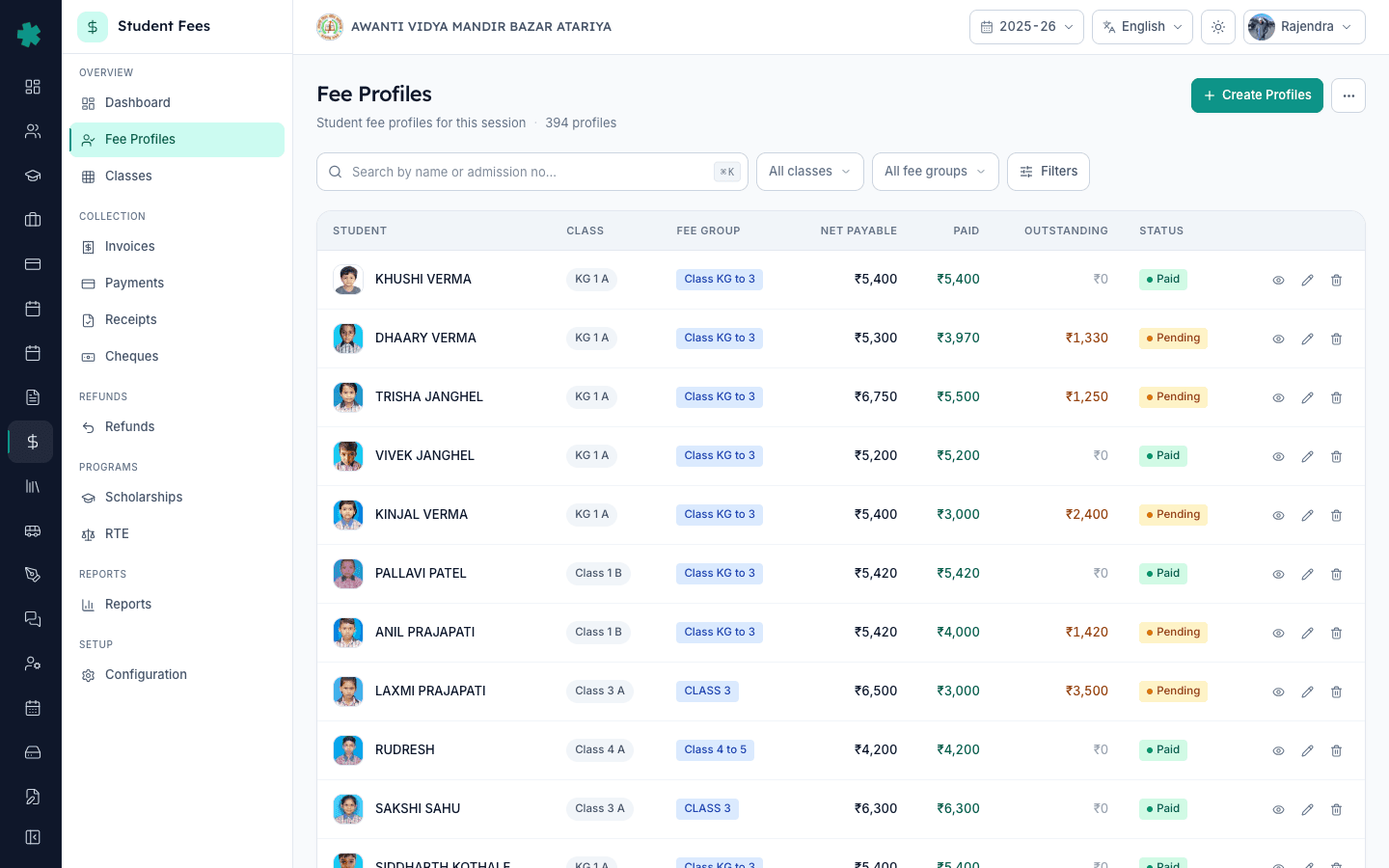
बाएँ साइडबार से Inkwelly → Student Fee → Fee Profiles खोलें, यह OVERVIEW section के अंदर मिलता है। छात्र का नाम, admission number या roll number से search करें। हाल ही में admit हुए छात्र के लिए Newest first से sort करें या क्लास से filter करें ताकि वह जल्दी मिले। पंक्ति पर click करें — profile डिफ़ॉल्ट रूप से Overview tab पर खुलता है, और Invoices section इसी tab में होता है।
2. Invoices section ढूंढें
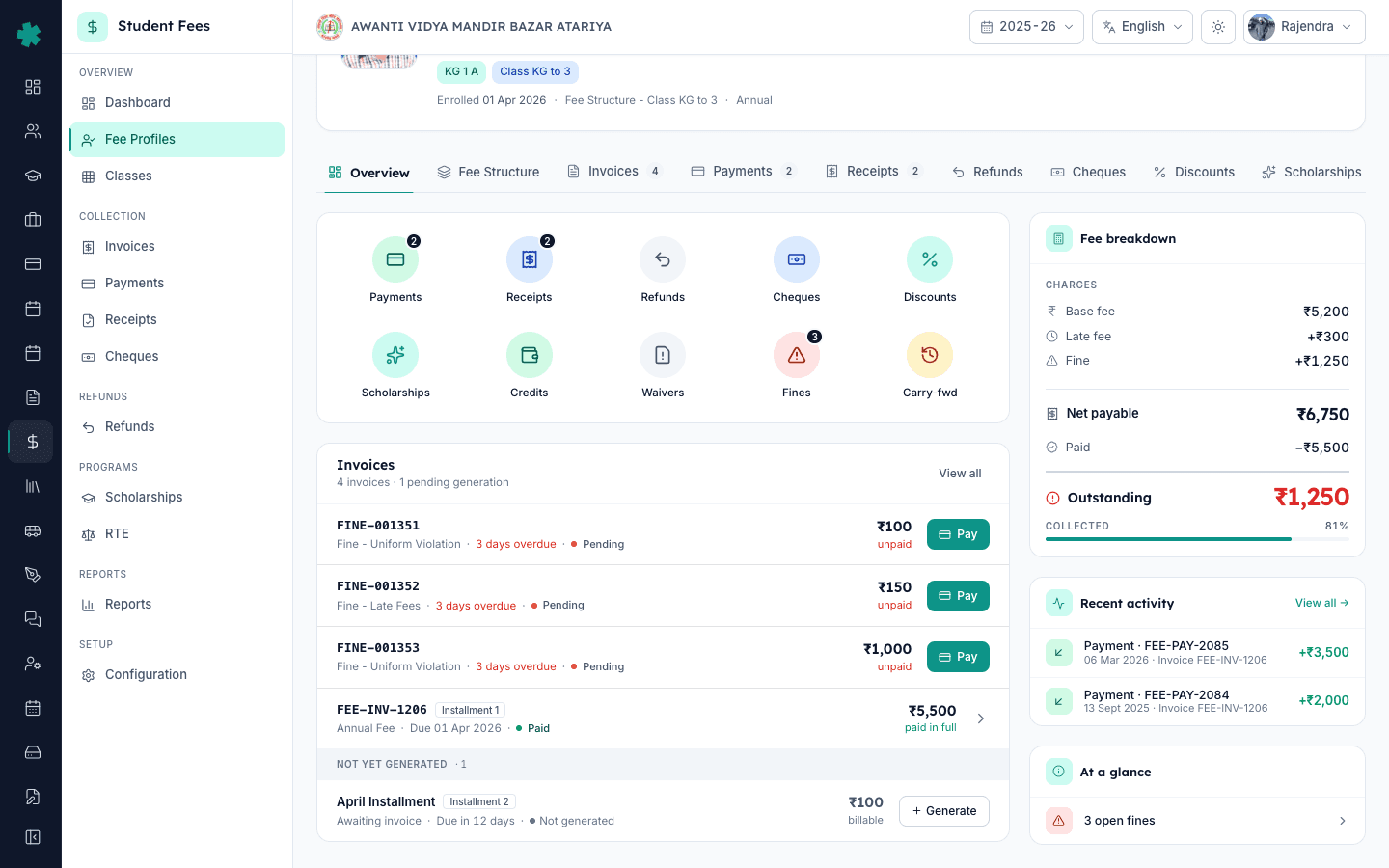
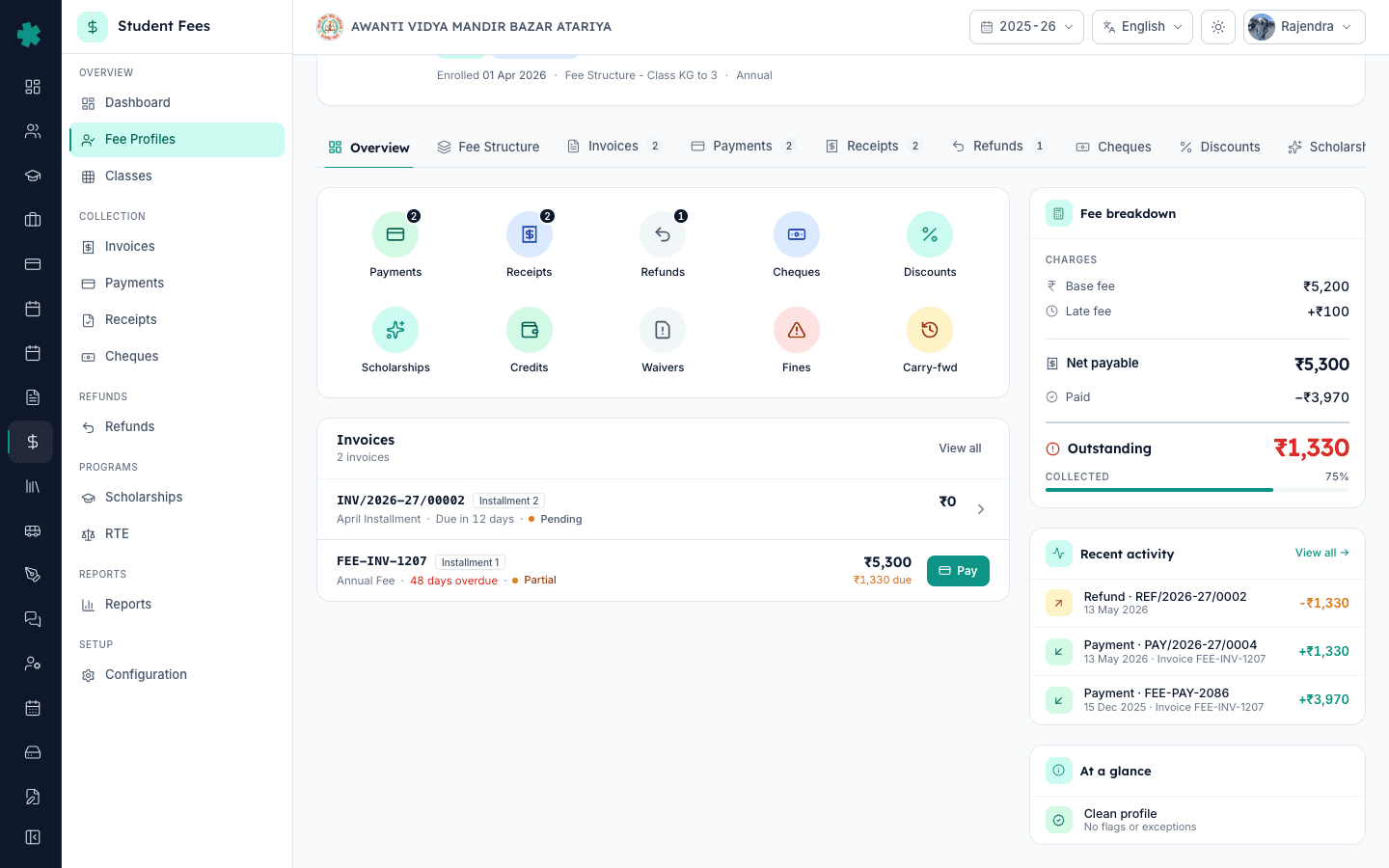
Overview tab पर नीचे scroll करें जब तक Invoices section दिखाई न दे। उसके header में दो counts दिखती हैं — कितने invoice अभी तक बने हैं, और कितनी installments का invoice अभी बनना बाकी है (उदाहरण 1 invoice · 3 pending generation)। पहले से बने invoices के नीचे एक पतली पट्टी पर NOT YET GENERATED लिखा होता है। उस पट्टी के नीचे की हर पंक्ति एक installment है जिसका invoice बनना अभी बाकी है।
3. सही installment के सामने Generate दबाएँ
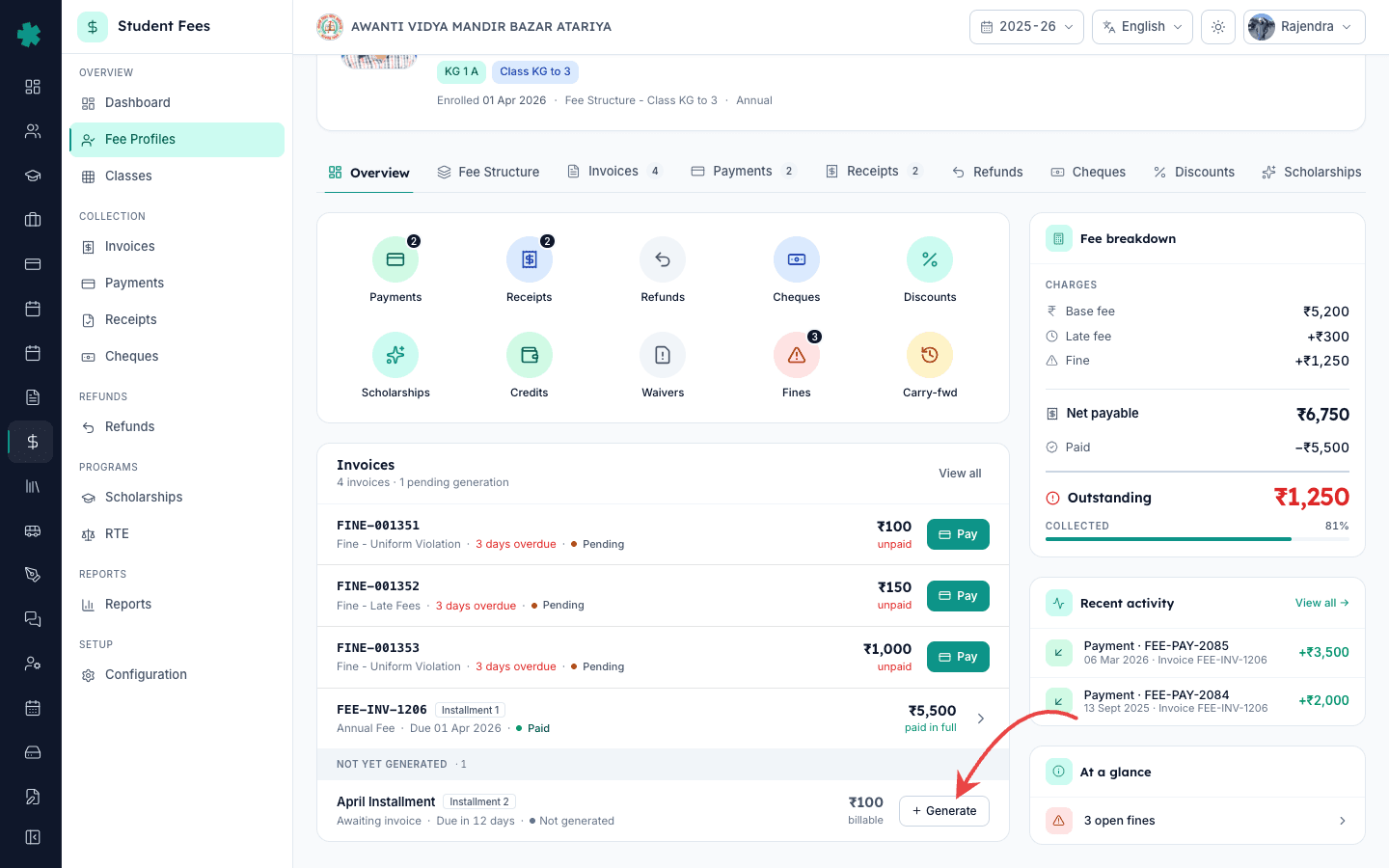
वह installment पहचानें जिसका invoice इस छात्र के लिए बनाना है — आमतौर पर वह तिमाही जिसमें छात्र जुड़ा। पंक्ति में installment का नाम (जैसे Q2 — July to September), installment number, due date और billable राशि दिखती है। पंक्ति के दाहिने सिरे पर मौजूद छोटा Generate बटन दबाएँ। पूरी पंक्ति पर click करने से भी वही action चलता है। Inkwelly उस installment को पहले से चुने हुए के साथ Generate Invoice dialog खोलता है।
4. Installment, नाम, due date और राशि की पुष्टि करें
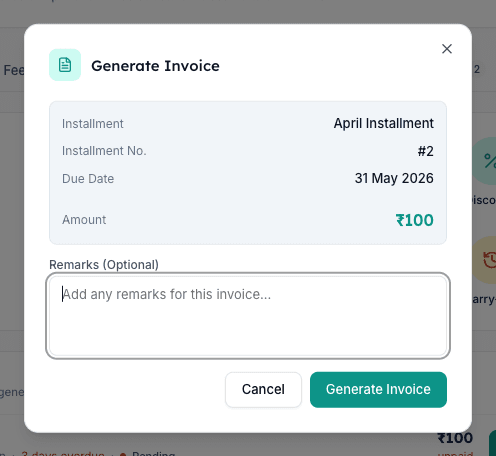
Generate Invoice dialog कुछ भी save होने से पहले bill का सारांश दिखाता है। चार fields verify करें — Installment (plan का नाम), Installment No. (ताकि यह सही तिमाही हो), Due Date (dd MMM yyyy format में), और Amount (रुपये में)। यदि इनमें से कोई गलत लगे तो dialog बंद करें और पहले छात्र को assign किया गया fee structure जाँचें। यहाँ दिखाई गई राशि assigned fee structure के line item का योग है; late-fee की adjustment invoice बनाते समय नहीं, बाद में जुड़ती है।
5. Audit trail के लिए एक छोटा remark जोड़ें
Remarks field में एक पंक्ति का context टाइप करें — जैसे Late admission on 18 July, billed Q2 only या Rejoined after Q1 break, prorated by trustee approval। यह remark invoice पर print होता है और invoice detail page पर भी दिखता है, ताकि अगली बार इस record को खोलने वाला (parent, auditor, या प्रिंसिपल) समझ सके कि invoice मैन्युअल रूप से क्यों बनाया गया था। यह वैकल्पिक है पर बीच सत्र की billing के लिए हमेशा भरने की सलाह दी जाती है।
6. Generate Invoice दबाएँ
Dialog के नीचे दाईं ओर Generate Invoice बटन दबाएँ। Inkwelly invoice बनाता है, स्कूल का अगला invoice number assign करता है, fee structure के line items जोड़ता है और इस छात्र के लिए उस installment को billed मार्क कर देता है। ऊपर दाईं ओर toast में Invoice generated successfully दिखता है। Dialog बंद होता है और profile refresh होकर Invoices section के ऊपर नया invoice status Pending के साथ दिखाता है।
7. Invoice खोलें और parent को भेजें
नई invoice पंक्ति पर click करके invoice detail page खोलें। ऊपर दाईं ओर से Send to Parent (WhatsApp, SMS या email पर), PDF download, या तुरंत counter पर Collect कर सकते हैं। यह invoice अब पूरे स्कूल की Student Fee → Invoices सूची में भी दिखाई देता है, छात्र की क्लास से filter करने योग्य ताकि कल cashier इसे आसानी से खोज ले। Inkwelly पूरा audit trail रखता है — किसने, कब, किस installment के लिए invoice बनाया।
अगला कदम — यदि किसी एक तिमाही के लिए कई late-admission छात्रों का invoice एक साथ बनाना है, तो Generate hub page से Inkwelly का bulk-generate flow उपयोग करें। पहले यह सुनिश्चित करें कि स्कूल का fee plumbing सही है: सत्र के लिए fee structure और क्लास से जुड़े fee groups तय करते हैं कि किस छात्र के profile पर कौन सी installments दिखेंगी। अगली तिमाही में सामान्य छात्रों के लिए invoice अपने आप बने इसके लिए Generate hub page पर हर installment के लिए auto-generation चालू करें — Inkwelly एक pass में हर छात्र के profile पर sweep करता है, और single-invoice action केवल देर से आए छात्रों के लिए चाहिए होता है।
Inkwelly Student Fees को live demo में देखें
अक्सर पूछे गए सवाल
6 सवालबीच सत्र में आए नए छात्र के लिए invoice कैसे बनाएँ?
Student Fee खोलें, Fee Profiles में जाएँ, नए छात्र का नाम search करके profile खोलें। Invoices section तक scroll करें और NOT YET GENERATED पट्टी के नीचे उस installment की पंक्ति ढूंढें। Generate दबाएँ, dialog में installment का नाम, due date और राशि verify करें, late admission का एक पंक्ति का remark जोड़ें, और Generate Invoice दबाएँ। Invoice number तुरंत assign हो जाता है और उसी दिन parent को billing की जा सकती है।
Mid-session naya student aaye to invoice kaise banaye?
Student Fee → Fee Profiles kholiye, naye student ka naam search kijiye, profile open kijiye. Overview tab par neeche scroll kar ke Invoices section me jaiye. Vahaan jis quarter ka invoice chahiye, us installment ke saamne Generate button dabaiye. Dialog me amount aur due date check kijiye, ek line ka remark daliye jaise 'Late admission on 18 July', aur Generate Invoice par click kijiye. Naya invoice turant ban jata hai aur parent ko bhejne ke liye taiyar ho jata hai.
Ek student ke liye invoice manually kaise generate kare?
Inkwelly me single-invoice action har student ke fee profile ke andar hai. Overview tab par Invoices section me 'Not yet generated' list me sirf un installments ke saamne Generate button dikhta hai jin ka invoice abhi tak nahi bana. Us button ko dabaiye, dialog me installment ke details check kijiye, optional remark daliye aur Generate Invoice par click kijiye. Yeh process bulk Generate page se alag hai — yahaan sirf ek student ka ek installment bill hota hai.
जो installment मुझे bill करनी है वह Not yet generated में क्यों नहीं दिख रही?
दो संभावनाएँ हैं। पहली — उस installment का invoice पहले से बन चुका है; Invoices section में ऊपर scroll करके उस installment number से tagged मौजूदा invoice देखें। दूसरी — छात्र के assigned fee structure में वह installment ही नहीं है; profile के Fee Structure tab पर जाकर assignment जाँचें, और ज़रूरत हो तो profile recalculate करें या structure फिर से assign करें।
क्या due date से पहले अगली installment का invoice बनाया जा सकता है?
हाँ। Inkwelly due date के आधार पर invoice generation को रोकता नहीं है — जो भी installment छात्र के fee structure में है और अभी bill नहीं हुई है, उसका invoice बनाया जा सकता है। कई स्कूल अगली तिमाही का invoice due date से एक-दो हफ्ते पहले बनाते हैं ताकि parent को planning का समय मिले। बनाए गए invoice पर installment की मूल due date रहती है, और late-fee नियम तभी लागू होते हैं जब वह तारीख निकल जाए।
क्या यह single-invoice action बाद में bulk generator चलने पर duplicate बना देगा?
नहीं। Inkwelly हर छात्र और हर installment के जोड़े के लिए generated invoices को track करता है। एक बार invoice बन जाने के बाद bulk generator उस जोड़ी को skip करता है और केवल उन छात्रों के लिए invoice बनाता है जिनका उस installment पर invoice अभी नहीं है। Profile पर pending-generation count भी यही दिखाता है — bill हो चुकी installment NOT YET GENERATED सूची से तुरंत हट जाती है।
आपको ये भी पसंद आ सकता है
3 लेखस्रोत व संदर्भ
- CBSE Affiliation Bye-Laws — Chapter VI on Admissions and Fee Collection · देखा गया 19 May 2026
CBSE bye-laws permit rolling admissions and require schools to maintain a clear fee record for every admitted student, including mid-session entrants, with the fee structure declared at the start of the session.
- Right of Children to Free and Compulsory Education Act, 2009 — Section 15 on No Denial of Admission · देखा गया 19 May 2026
The RTE Act mandates that no child is denied admission for want of a fixed admission cycle, which is why Indian schools see consistent mid-session admissions and need a per-student invoice generation path.
- Ministry of Education — UDISE+ School Profile and Enrolment Module · देखा गया 19 May 2026
UDISE+ enrolment data shows roughly 4 to 6 percent of students change schools across an academic year, which is why mid-session billing is a routine office task and not an edge case.
Inkwelly आपके स्कूल पर — खुद देखें
30 मिनट का डेमो। आपके मौजूदा ERP को आपके साथ खोलकर, कॉल पर ही आपका डेटा Inkwelly में लोड करते हैं। कॉल ख़त्म होते-होते एक तय तारीख़ का गो-लाइव प्लान आपके हाथ में।