फीस रसीद कैसे रद्द करें Inkwelly में
यह गाइड उन स्कूल अकाउंटेंट और फीस क्लर्क के लिए है जिनसे गलत छात्र पर रसीद कट गई हो, गलत राशि चार्ज हो गई हो या एक ही पेमेंट पर दो बार रसीद बन गई हो। अंत में आप Inkwelly में गलत रसीद को CANCELLED में बदल चुके होंगे, कारण रिकॉर्ड पर होगा और मूल पेमेंट सही invoice से दोबारा जोड़ने के लिए तैयार होगा।
Inkwelly में फीस रसीद रद्द करने के लिए: Student Fee → Receipts खोलें, गलत रसीद ढूँढें, उसका detail पेज खोलें, ऊपर दायीं ओर लाल Cancel बटन दबाएँ, स्पष्ट कारण लिखें (कम से कम 10 अक्षर) और Cancel Receipt पर क्लिक करें। रसीद की status CANCELLED हो जाएगी, ऊपर लाल notice band कारण और समय दिखाएगा और मूल पेमेंट सही invoice से जोड़ने के लिए मुक्त हो जाएगा।
व्यस्त भारतीय स्कूल ऑफिस में फीस रसीद कैश ड्रॉअर से ज़्यादा बार ग़लत होती है। कोई क्लर्क Class 6 के invoice पर ग़लत admission number टाइप कर देता है, अभिभावक भाई-बहन की फीस ग़लत बच्चे के profile पर भर देते हैं, या peak collection week में एक ही UPI ट्रांसफ़र पर दो क्लर्क दो रसीदें काट देते हैं। एक मध्यम Tier-2 स्कूल में Inkwelly एक सत्र में 731 रसीदें ट्रैक करता है और सामान्य correction rate 1–3 प्रतिशत होती है — यानी हर सत्र 7 से 22 रद्दीकरण। Companies Act 2013 और Income Tax record retention नियम स्कूल से माँग करते हैं कि मूल entry और उसका reversal दोनों रिकॉर्ड में रहे ताकि auditor को ट्रेल दिखे, चुपचाप किया गया सुधार नहीं। Inkwelly किसी भी क्लर्क को रसीद delete नहीं करने देता; रद्द करना ही सही रास्ता है।
1. Receipts पेज खोलें
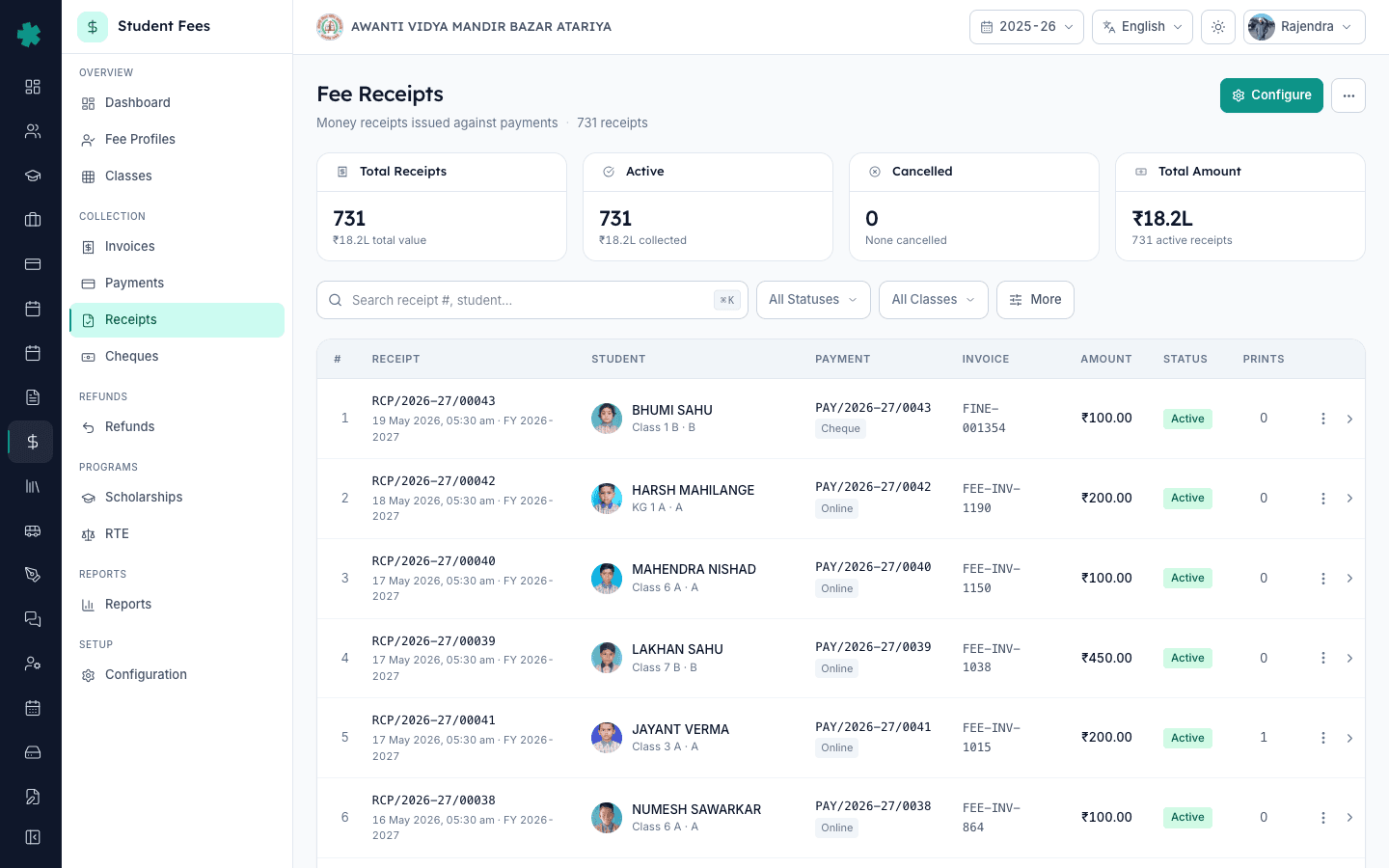
बाएँ साइडबार से Inkwelly → Student Fee खोलें, फिर COLLECTIONS के अंतर्गत Receipts पर क्लिक करें। Receipts पेज पर ऊपर KPI दिखेंगे — कुल रसीद, active गिनती, cancelled गिनती और कुल राशि — और नीचे filterable टेबल होगी। सक्रिय सत्र की हर रसीद इसी पेज पर सबसे नई पहले के क्रम में मिलेगी।
2. गलत रसीद ढूँढें
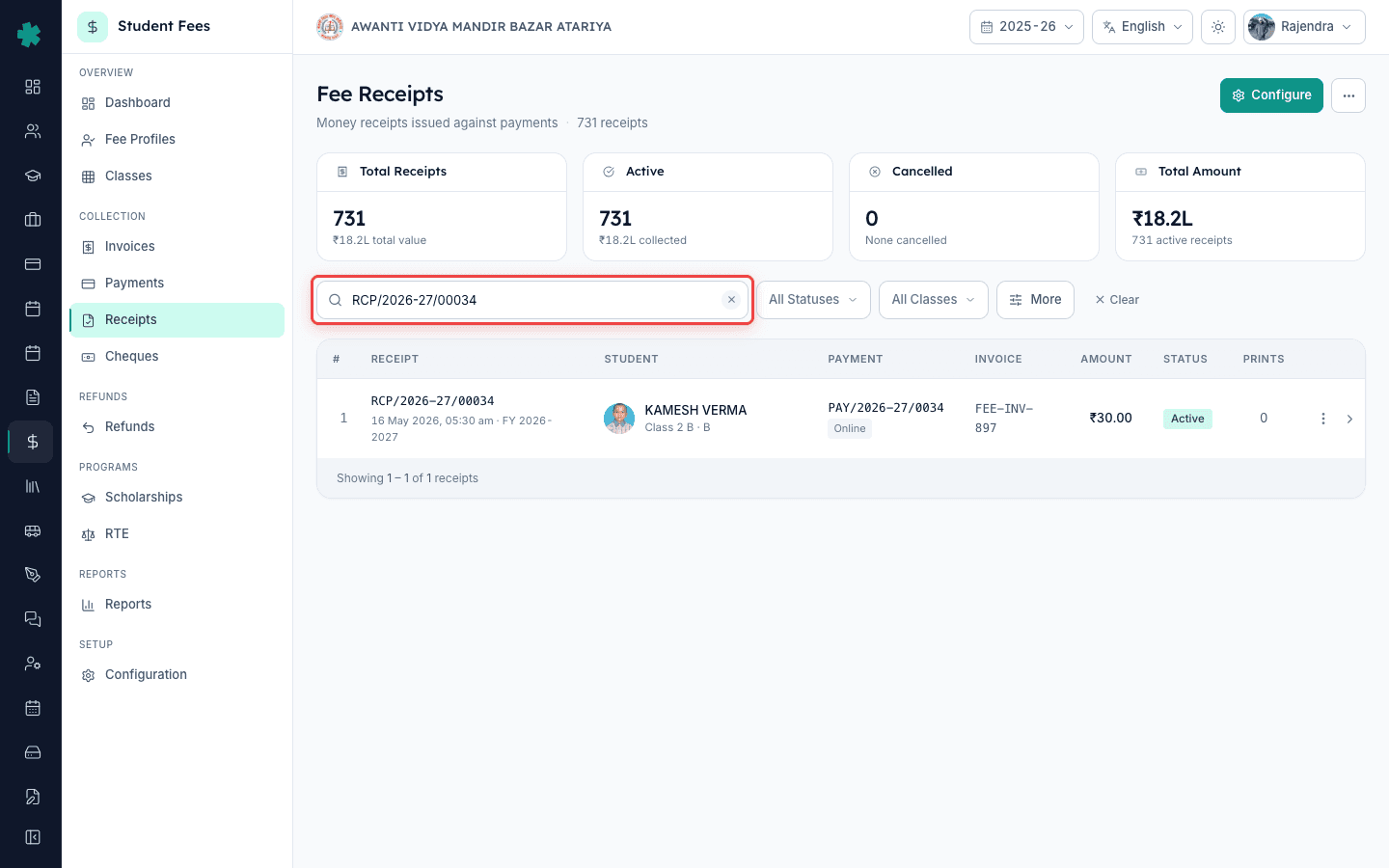
टेबल के ऊपर दिए search bar में रसीद नंबर, छात्र का नाम, admission number या payment number से रसीद खोजें। केवल तिथि और राशि याद हो तो date-range फ़िल्टर और amount कॉलम का प्रयोग करें। Inkwelly 5,000 से ज़्यादा रसीदों पर भी टेबल को एक सेकंड के अंदर फ़िल्टर करता है। सही row पर क्लिक करके detail पेज खोलें।
3. रसीद का detail पेज खोलें
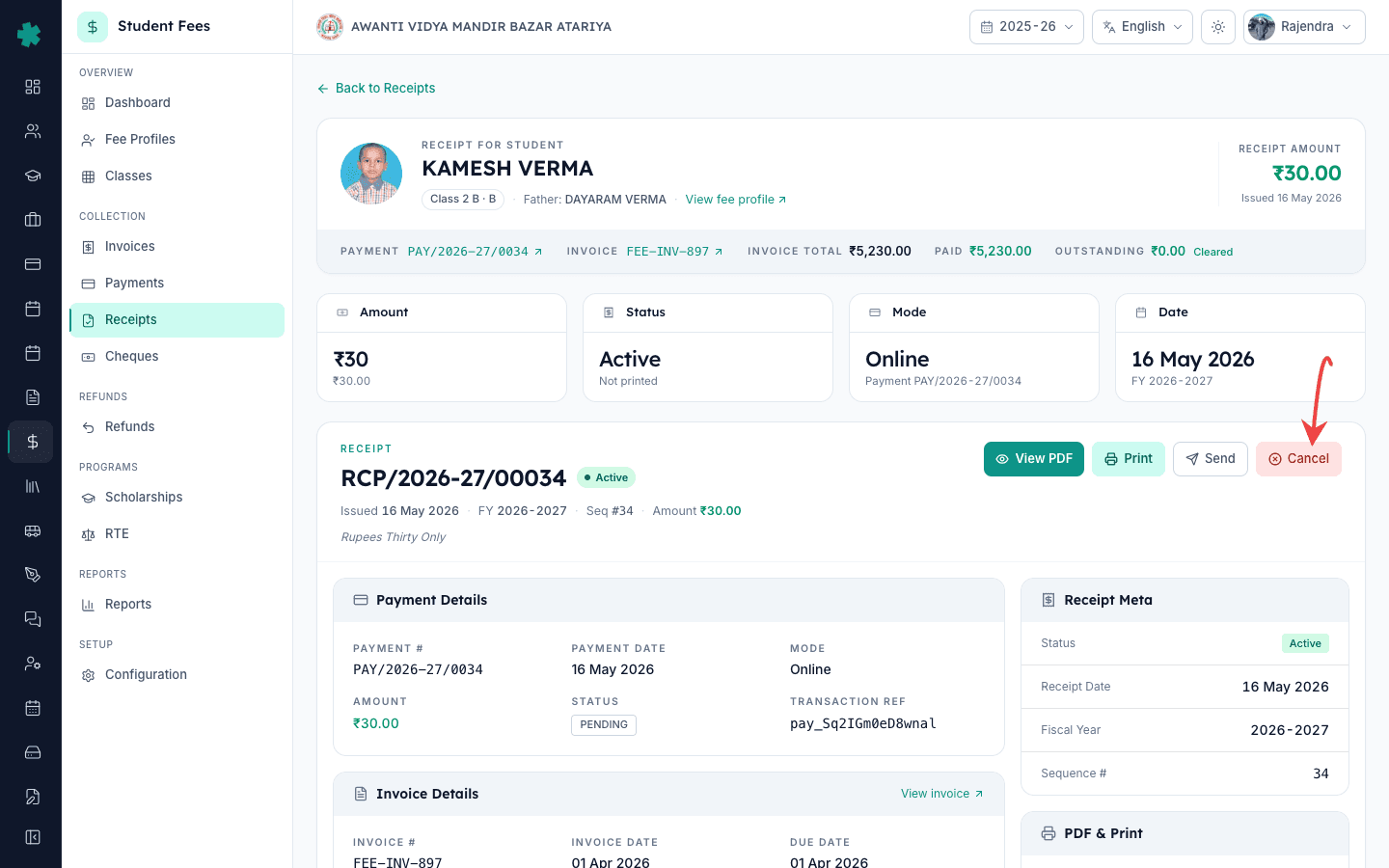
Detail पेज पर एक ही स्क्रीन पर रसीद नंबर, राशि, पेमेंट मोड, invoice link और छात्र की जानकारी दिखती है। ऊपर दाईं ओर के action bar में Print, Send और लाल Cancel बटन होते हैं। Cancel केवल तब दिखता है जब रसीद की status ACTIVE हो — पहले से cancelled और void रसीदों पर यह छिप जाता है। कुछ भी क्लिक करने से पहले avatar, admission number और class से सही छात्र की पुष्टि कर लें।
4. Cancel दबाएँ और कारण लिखें
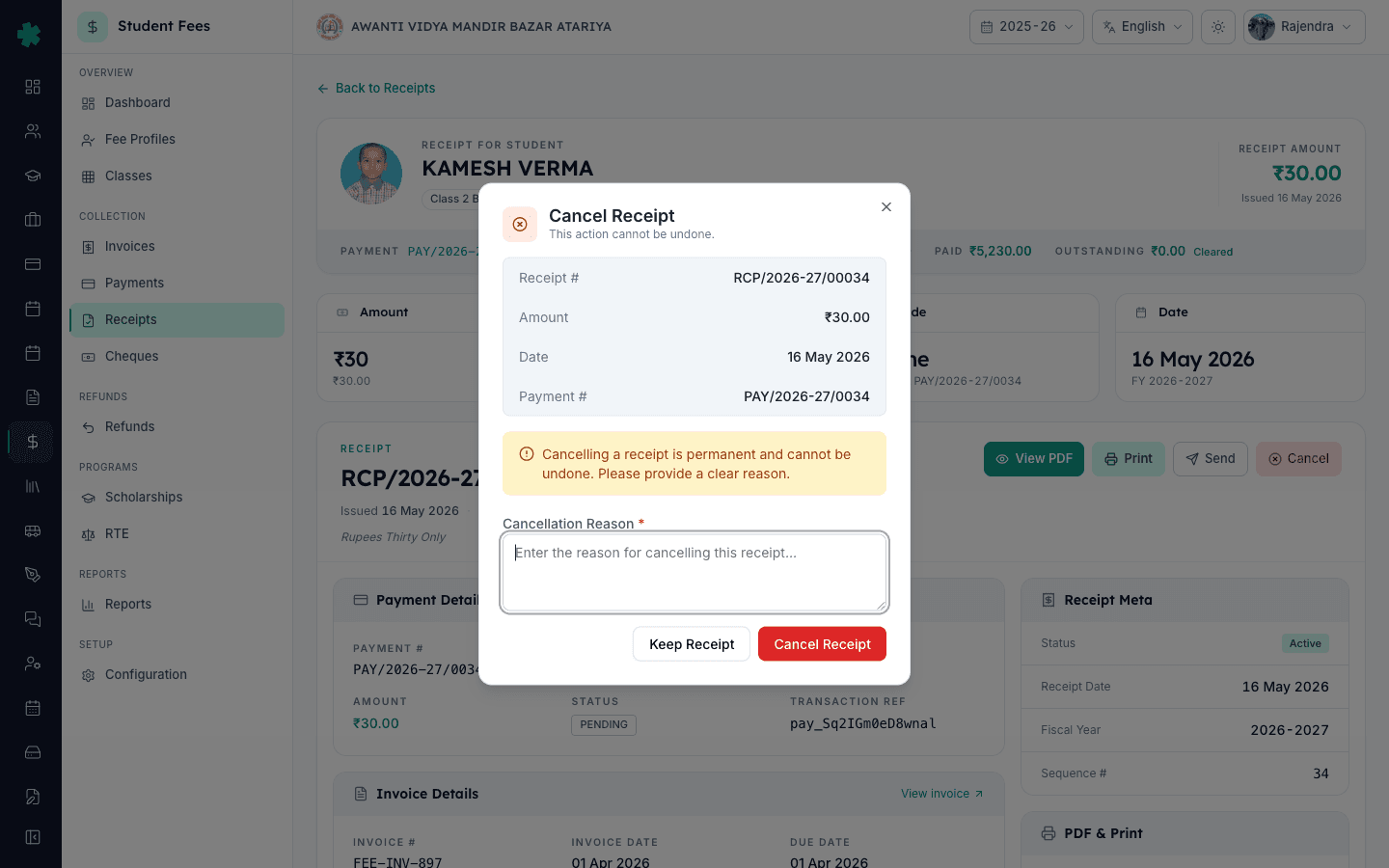
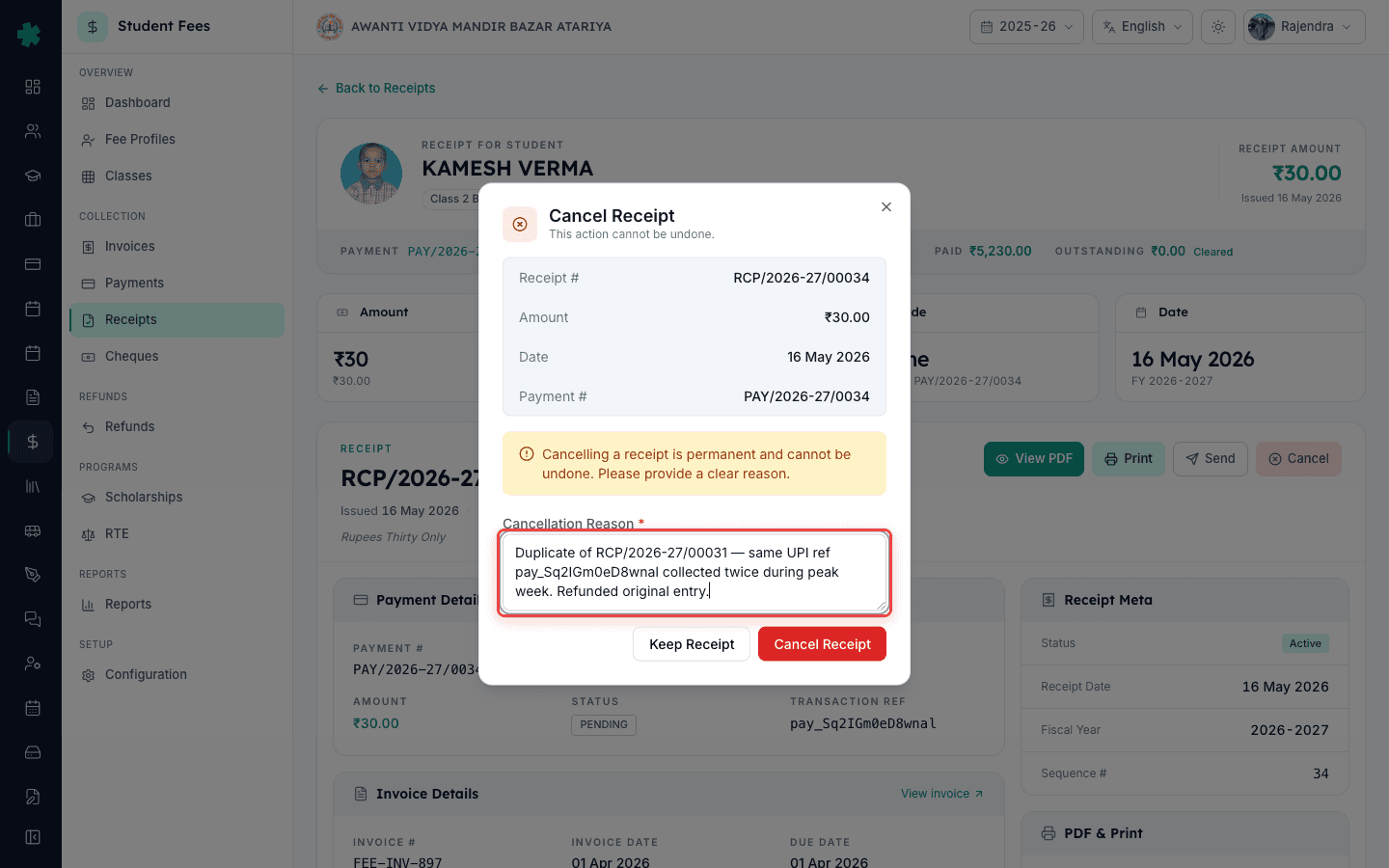
लाल Cancel बटन पर क्लिक करें। Inkwelly Cancel Receipt dialog खोलता है जिसमें ऊपर रसीद नंबर, राशि, तिथि और payment number दिखते हैं ताकि किस row को रद्द किया जा रहा है इसमें कोई शक न रहे। warning band याद दिलाता है कि यह स्थायी है। कारण लिखें — कम से कम दस अक्षर, इतना स्पष्ट कि महीनों बाद कोई auditor पढ़कर समझ ले। अच्छे उदाहरण: "Wrong student — meant for Class 3 Rohan Verma not Rohan Singh", "Duplicate of RCP/2026-27/00031 for same UPI ref", "Parent dispute, mode swap to cheque pending"।
5. रद्दीकरण की पुष्टि करें
Dialog के नीचे लाल Cancel Receipt बटन पर क्लिक करें। Inkwelly cancel endpoint कॉल करता है, रसीद की status CANCELLED कर देता है, कारण और timestamp को audit log में लिख देता है और नीचे का पेमेंट सही invoice से जोड़ने के लिए मुक्त कर देता है। कोने में success toast दिखता है और dialog बंद हो जाता है। Detail पेज लाल CANCELLED status pill और ऊपर एक notice band के साथ reload होता है जो कारण और cancelled-at समय दिखाता है।
6. ज़रूरत हो तो मूल पेमेंट को दोबारा जोड़ें
रद्द की गई रसीद के पीछे का पेमेंट अब void-ready state में है। यदि अभिभावक का पैसा अभी भी स्कूल के पास है — जैसे आपने सही राशि गलत बच्चे पर ले ली थी — तो Student Fee → Payments खोलें, उस पेमेंट को ढूँढें और सही invoice से दोबारा जोड़ दें। नया invoice नई sequence number वाली ताज़ा रसीद जारी करेगा। यदि अभिभावक को पैसा वापस देना है तो उसके बजाय refund प्रक्रिया अपनाएँ। Cancelled रसीद का मूल पेमेंट से link बना रहता है ताकि ट्रेल जुड़ा रहे।
7. Receipts सूची में audit trail की पुष्टि करें
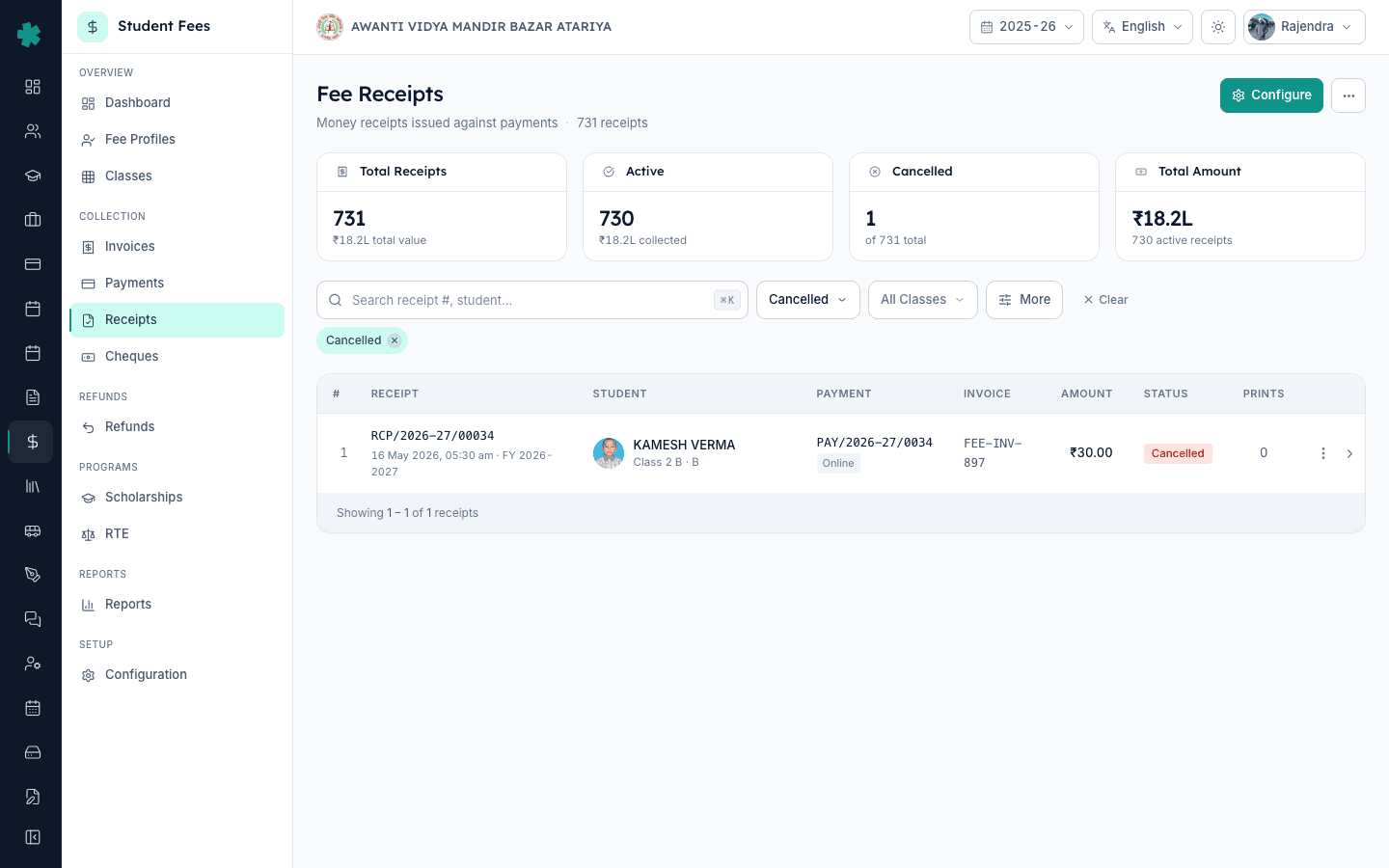
Student Fee → Receipts पर वापस जाएँ। Status फ़िल्टर CANCELLED करें ताकि सत्र की हर रद्द रसीद दिखे। मूल row अब भी वहीं है, बस ACTIVE की जगह लाल CANCELLED badge है। ऊपर के KPI अपडेट हो जाते हैं: active गिनती एक कम, cancelled गिनती एक ज़्यादा। Auditor किताबों में दोनों rows देखता है — जारी होना और रद्द होना — जो Companies Act voucher नियमों और CBSE accounting bye-laws की माँग है।
अगला कदम — यदि अभिभावक का पैसा वापस करना है तो How to initiate a refund for a parent का अनुसरण करके मुक्त पेमेंट पर refund रिक्वेस्ट दर्ज करें। यदि पैसा स्कूल के पास ही रहना है पर किसी और invoice पर, तो How to reverse a fee payment in Inkwelly से पेमेंट को साफ़-सुथरे ढंग से detach और re-attach करें। ग़लत रसीद को स्रोत पर ही रोकने के लिए How to design the A4 fee receipt template पढ़ें और रसीद पर छात्र-फोटो प्रिंट चालू करने पर विचार करें — छपी रसीद पर फोटो होने से अभिभावक के ऑफिस से जाने से पहले ही mismatch पकड़ी जाती है।
देखिए कि Inkwelly का रसीद workflow आपके audit trail की रक्षा कैसे करता है
अक्सर पूछे गए सवाल
7 सवालInkwelly में गलती से बनी फीस रसीद कैसे रद्द करें?
Student Fee → Receipts खोलें, गलत रसीद ढूँढें, detail पेज खोलें, ऊपर दायीं ओर लाल Cancel बटन दबाएँ, कम से कम दस अक्षर का कारण लिखें और Cancel Receipt पर क्लिक करें। Inkwelly status को CANCELLED कर देता है, audit log में कारण लिख देता है और मूल पेमेंट को मुक्त कर देता है ताकि उसे सही invoice से जोड़ा जा सके।
क्या रद्द की गई रसीद वापस बहाल की जा सकती है?
नहीं। रद्दीकरण डिज़ाइन से ही स्थायी है — auditor को जारी होना और reversal दोनों दिखने चाहिए। रद्द किया गया row किताबों पर रहता है और मूल पेमेंट void-ready state में चला जाता है। पैसा सही invoice पर लगाना हो तो Student Fee → Payments से पेमेंट को सही invoice से जोड़ दें। अभिभावक को पैसा लौटाना हो तो refund रिक्वेस्ट करें।
रसीद रद्द करने पर पेमेंट का क्या होता है?
पेमेंट रद्द रसीद से अलग हो जाता है और re-allocation के लिए उपलब्ध हो जाता है। Inkwelly रद्द रसीद से मूल पेमेंट तक का link बनाए रखता है ताकि audit trail जुड़ा रहे। पैसा स्कूल के पास रहना है तो Payments पेज से सही invoice से जोड़ दें। अभिभावक को वापस देना है तो refund प्रक्रिया अपनाएँ।
Galat receipt cancel kaise kare Inkwelly me?
Student Fee → Receipts kholiye, search bar me galat receipt ka number ya student ka naam type kijiye, row par click karke detail page open kijiye. Upar dayi taraf laal Cancel button par click kijiye. Dialog me cancellation reason likhiye (kam se kam dus character), aur Cancel Receipt dabaiye. Status CANCELLED ho jayega aur audit trail me poora record save ho jayega.
Cancel ke baad payment ka kya hota hai?
Payment khud cancel nahi hota — wo void-ready state me chala jata hai aur kisi bhi correct invoice se dobara attach kiya ja sakta hai. Agar parent ko paisa wapas dena hai to refund flow follow kijiye. Cancelled receipt ka link payment se bana rehta hai taki audit trail tooto na. Pura paisa school ke paas surakshit rehta hai jab tak aap khud kuch action na lein.
क्या रसीद रद्द करने के लिए हेड क्लर्क या प्रिंसिपल की अनुमति ज़रूरी है?
यह आपके स्कूल की नीति पर निर्भर करता है, Inkwelly पर नहीं। Inkwelly user role पर cancel permission देखता है — सामान्यतः हेड क्लर्क, अकाउंटेंट और प्रिंसिपल को मिलती है। कई स्कूल Inkwelly में cancel चलाने से पहले offline sign-off (प्रिंसिपल द्वारा आरंभ की गई पर्ची) रखते हैं। उस स्वीकृति को reason field में दर्ज करें — जैसे: "Approved by Principal, slip dated 12 Aug 2025"।
क्या रद्द की गई रसीद daily collection register में दिखेगी?
रसीद खुद active collection कुल से हट जाती है — यही रद्दीकरण का पूरा उद्देश्य है। Inkwelly के KPI active और cancelled को अलग दिखाते हैं और daily collection register केवल active rows रिपोर्ट करता है। Cancelled रसीदें audit register और cancellations report में कारण और timestamp के साथ दिखती हैं, ताकि auditor दोनों ओर मिलान कर सके।
आपको ये भी पसंद आ सकता है
4 लेखस्रोत व संदर्भ
- Companies Act 2013 — Section 128 (Books of account) · देखा गया 19 May 2026
हर कंपनी (Section 8 निजी स्कूल सहित) से माँग करता है कि वह हर रसीद और उसका reversal कालक्रम में रखे, जो Inkwelly के cancellation-with-reason मॉडल का आधार है।
- Income Tax Act 1961 — Section 44AA (Maintenance of accounts) · देखा गया 19 May 2026
assessment year की समाप्ति से कम से कम छह साल तक रसीद और उसके reversal रखने की अनिवार्यता है, इसलिए स्थायी cancellation rows ज़रूरी हैं, delete नहीं।
- CBSE Affiliation Bye-Laws — Chapter VII, school finance and audit · देखा गया 19 May 2026
CBSE से जुड़े स्कूलों से माँग करता है कि वे cancellation entries timestamp और कारण सहित रखें — Inkwelly हर रसीद रद्दीकरण पर यह दर्ज करता है।
Inkwelly आपके स्कूल पर — खुद देखें
30 मिनट का डेमो। आपके मौजूदा ERP को आपके साथ खोलकर, कॉल पर ही आपका डेटा Inkwelly में लोड करते हैं। कॉल ख़त्म होते-होते एक तय तारीख़ का गो-लाइव प्लान आपके हाथ में।