Loans, advances and exits, closed clean.
Issue salary advances and staff loans, auto-deduct EMIs every month, and close exits with a complete full and final settlement — gratuity, leave encashment and recovery, all in a single statement. No paper register. No goodwill loans that quietly disappear.
How most Indian schools track staff loans today
The accountant keeps a small notebook in the bottom drawer of the office desk. Inside it, in pen, are 14 active staff loans — some festival advances of ₹10,000, some bigger personal loans of ₹75,000 disbursed last year. Each entry has a name, an amount, a tentative monthly EMI and a column with checkmarks for the months EMI was deducted. By the time the accountant is in her fifth year on the job, the notebook has 90 entries and three are entirely illegible.
When a teacher resigns mid-year, the principal asks 'how much loan does she still owe?' and the accountant flips back through the notebook for ten minutes. Often a small sum is forgiven because the entries do not tally. When a long-serving teacher retires after 22 years, the gratuity calculation is done on a calculator, the leave encashment is done from a leave register, and the final settlement is paid as a single round figure that nobody can later defend in front of an auditor or a Labour Department inspector.
None of this is dishonesty. It is a tooling gap. Loans, advances, gratuity and full-and-final settlement need a real ledger that lives inside payroll — not a notebook that lives in a drawer. The Employee Payroll module ties all four together, because they all pull from the same employee, the same salary structure and the same locked pay periods.
How loans and advances work in Inkwelly
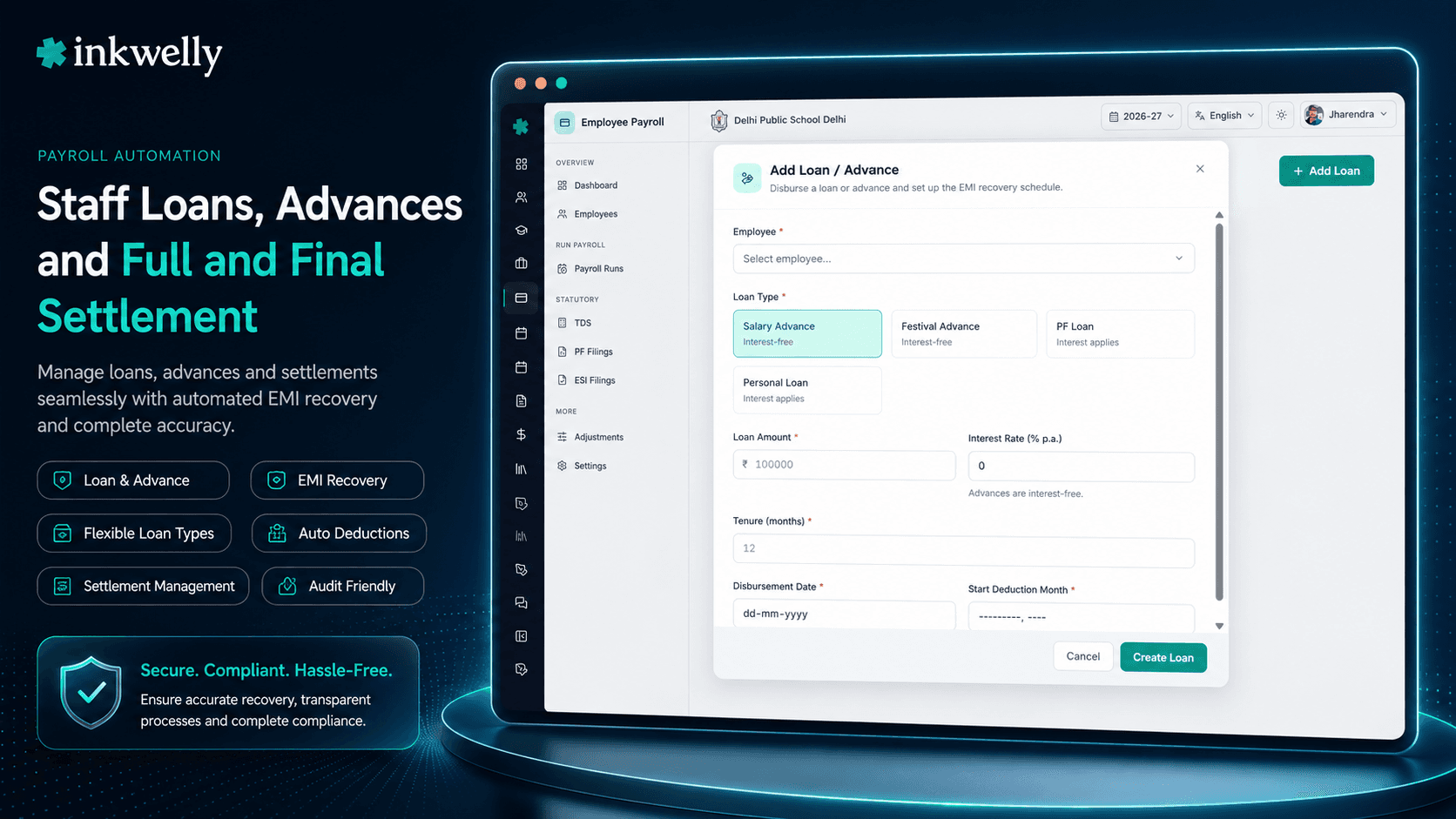
A loan or advance in Inkwelly is created against an employee, with a clean amount, an interest rate (often zero for staff welfare loans), an EMI amount, an EMI start month, and an end condition (number of EMIs OR final balance). When the loan is approved, the disbursement amount can either be released through the next pay run as a one-off positive line item, or the school can pay it externally and mark it as 'disbursed outside payroll'.
From the next pay period, the EMI auto-appears as a deduction line on the employee's payslip, with a clear reference to the loan ID and the running balance. The teacher sees the loan ledger in the employee portal — disbursed amount, EMIs deducted to date, current outstanding, projected end month. No ambiguity. The accountant cannot 'forget' an EMI because the system applies it on every pay run until the balance hits zero.
Festival advances, salary advances and welfare loans are all the same primitive in Inkwelly — the school sets a 'Type' (Festival, Salary Advance, Personal, Education) so the report can be filtered by purpose, but the deduction logic is identical. A festival advance is just a one-EMI loan; a personal loan is a 24-EMI loan. Both run through the same engine.
EMI auto-deduction without ever forgetting
The accountant's nightmare is forgetting to deduct an EMI for one month, especially during a busy period like exam season or admission week. Inkwelly removes the possibility — once a loan is approved with an EMI start month, every active pay period within the EMI window auto-includes that deduction. The accountant cannot 'skip' a month silently; they would have to explicitly mark the EMI as deferred, which creates an audit log entry and adjusts the loan end month forward.
For employees on long unpaid leave (medical, maternity, study leave) where deducting EMI from a non-existent salary is impossible, Inkwelly automatically defers the EMI to the next paid period and extends the loan end month — with a clear note on the loan record. The teacher sees the deferment in their portal.
Partial settlement and prepayment
If a teacher receives a Diwali bonus and wants to prepay part of her loan, Inkwelly handles it in three clicks: open the loan, enter the prepayment amount, choose 'reduce EMI' or 'reduce tenure'. The next pay run applies the prepayment, recalculates the schedule, and the new running balance shows up on the next payslip.
If a teacher takes a second loan while the first is still active, both run in parallel — two distinct EMI lines on the payslip, two distinct running balances, two ledgers. Inkwelly does not auto-merge loans even of the same type, because the disbursement dates and approval letters are distinct. The teacher's payslip is honest about both.
What every staff loan record holds
- Loan amount, type (Festival / Salary Advance / Personal / Education / Marriage / Medical), interest rate (default 0%)
- Disbursement method — added to the next pay run as a positive line OR marked as paid outside payroll
- EMI amount, start month, total EMIs, projected end month — all auto-derived from the schedule
- Approval workflow — accountant proposes, principal approves with a signed approval letter (digital signature)
- Running balance — updated after every locked pay run, visible to the teacher in the employee portal
- Prepayment with the option to reduce tenure or reduce EMI
- Deferment for unpaid leave months — auto-applied or manually with reason
- Recovery on exit — outstanding balance auto-flows into the full and final settlement with a clear deduction line
- Document attachments — loan application, salary deduction consent, approval letter, prepayment receipts — all stored on the loan record
- Audit trail — who approved, who deferred, who prepaid, every action timestamped
How full and final settlement works
When a teacher resigns or is terminated, the school owes a clean computation: salary for days worked in the last month, leave encashment for unused earned leaves, gratuity if the employee has completed 5 years of continuous service, bonus accrual for the part of the year worked, MINUS any outstanding loan balance, advance recovery, notice-period shortfall, and pending statutory deductions (TDS, EPF, ESI, PT) for the final month.
In Inkwelly, this entire computation lives on a single page. The accountant clicks 'Initiate Full and Final' on the employee profile, picks the last working day, and the system pulls every relevant figure: pro-rated final salary from the locked attendance, leave balance from the Employee Attendance module, gratuity computed under the Payment of Gratuity Act formula (15 days basic salary for every completed year of service, with the 26-day month convention), bonus accrual from the year-to-date locked pay runs, every outstanding loan balance from the loans ledger, and every statutory deduction recomputed against the final month.
The accountant reviews each line, can override a value with an explicit reason (rare — Inkwelly tries hard to compute every piece correctly), and generates the FNF statement — a single PDF on school letterhead, signed by the principal and counter-signed by the teacher, with every component itemised. The net amount is paid via the same bank advice flow that handles regular salaries. The teacher's UAN is marked as exited in the next ECR. Form 16 is generated for the year up to the exit date. The audit log captures every step.
Gratuity, the way the law says
Gratuity is owed to any employee who completes 5 years of continuous service — even at exit, even on retirement, even on death (with a relaxation of the 5-year rule for death). Section 4 of the Payment of Gratuity Act prescribes the formula: 15 days of last drawn basic + DA, divided by 26, multiplied by completed years of service — capped at ₹20 lakh.
Inkwelly applies the formula exactly, picks up the last drawn basic from the locked penultimate payslip, counts completed years of service (with the 6-month-rounds-up rule) and presents the gratuity number with the working shown. The school cannot accidentally underpay; the teacher cannot dispute the calculation.
What the FNF statement always contains
- Pro-rated salary for days worked in the final pay period — read from locked attendance
- Leave encashment for unused earned leaves at the school's policy rate — default basic + DA per day
- Gratuity under the Payment of Gratuity Act formula, capped at ₹20 lakh
- Statutory bonus accrual for the part of the financial year worked, per the Payment of Bonus Act
- Variable pay or performance incentives accrued but not yet paid — if applicable per offer letter
- Recovery of every outstanding loan and advance balance — each as a separate line
- Notice period shortfall recovery — if the teacher's notice was shorter than the contractual period
- TDS on the entire FNF amount — computed against the year-to-date taxable income with the regime locked in April
- EPF and ESI for the final pay month — included in the next month's ECR with exit flag set
- Net payable — the single number transferred to the teacher's bank account on the agreed exit date
Real-world cases this fixes
The retiring senior teacher. A senior teacher retires after 28 years at the school. Without Inkwelly, gratuity, leave encashment and PF withdrawal are computed by the accountant on a calculator, copied into a Word document, and signed off in 10 days. With Inkwelly, the FNF statement is ready the day the resignation is accepted — every component shown with the formula and the source data link — and the teacher leaves with full closure on the same date.
The mid-year resignation. A teacher resigns in November. She has a ₹45,000 personal loan with ₹21,000 outstanding, 18 unused earned leaves, and her notice period is one month short. The FNF page computes salary for November (locked attendance), leave encashment for 18 days at her basic+DA rate, recovers ₹21,000 against the loan, recovers one month's notice shortfall, deducts TDS on the net, and shows a positive net payable. Total time: 8 minutes. No ambiguity in any number.
The festival advance recovery. Twelve teachers received ₹10,000 each as a Diwali advance in October. Each has a 1-EMI loan that auto-deducts in November's pay run. Without Inkwelly, the accountant maintains a separate ledger and forgets one teacher's recovery in the rush; that recovery now goes uncollected. With Inkwelly, every advance is on the loans page, every EMI is auto-applied, and the principal sees a 'no advances outstanding' confirmation on the December dashboard.
The notice-period buyout. A teacher resigns and the school waives her one-month notice period in exchange for a smooth handover. Inkwelly's FNF page lets the accountant add a 'Notice Buyout (employer-paid)' positive line, with a typed reason. The line shows on the FNF statement, is paid as part of the net payable, and is captured in the audit log — visible in any future Labour Department inspection.
Run a Full & Final on a real exit — in your demo
Bring details of any one resigning or retired teacher (with permission), and we will compute the entire FNF statement during the call — gratuity, leave encashment, loan recovery, TDS — to the rupee.
Limits, audit and small print
Loans and advances follow the school's policy on maximum loan amount as a multiple of monthly basic — a school-level setting (commonly 3x or 6x basic). Inkwelly does not block loans above the limit; it warns the accountant and requires an explicit override with reason. Interest rate is per loan and can be zero (typical for welfare loans) or any positive number; if non-zero, Inkwelly computes interest on declining balance and includes it in EMI breakdown.
Gratuity is computed strictly per Section 4 of the Payment of Gratuity Act — the formula, the 26-day month, the 15-days-per-completed-year, and the ₹20 lakh cap. Schools that have a higher gratuity policy (sometimes 30 days per year for senior staff) configure the policy at the structure level; Inkwelly applies whichever is more favourable to the employee, with a clear note on the FNF showing both. Leave encashment uses the school's policy rate — most schools use basic + DA per day, but some use full gross; both are supported.
FNF statements are stored as immutable PDFs on Mumbai servers, retained for seven years (the Labour Department audit window). Once an FNF is signed by both the principal and the teacher, it cannot be edited — only superseded with a new signed version that explicitly references the previous one. The teacher receives the FNF PDF over email and inside the employee portal; UAN passbook closure, EPS withdrawal forms (if eligible), and the final Form 16 are all linked from the same FNF page. There is no separate exit register that needs to be maintained outside Inkwelly.
Belongs to
1 moduleFrequently asked
7 questionsCan a teacher have multiple active loans at the same time?
Yes. Inkwelly supports any number of concurrent loans per employee — each with its own type, EMI and ledger. The payslip shows them as distinct deduction lines, and the employee portal shows each loan with its own running balance. Most schools cap concurrent loans at 2 or 3 via policy; Inkwelly enforces the cap as a school-level setting.
What happens if a teacher cannot pay the EMI in a particular month?
If she is on unpaid leave or her salary is insufficient, Inkwelly automatically defers the EMI to the next paid period and extends the loan end month. The deferment is logged with the reason. If a teacher requests a structured re-schedule (longer tenure, lower EMI), the accountant can issue a new EMI plan against the same loan with the principal's approval — captured as an audit event.
How is gratuity computed for teachers in service less than 5 years?
Section 4 of the Payment of Gratuity Act requires 5 years of continuous service for entitlement — except in the case of death (no minimum) or disablement. For teachers with less than 5 years and a normal exit, Inkwelly's FNF shows gratuity as zero with a reference to the Act. Schools that pay an ex-gratia amount in lieu can add it as a separate line with an explicit note.
Does Inkwelly handle leave encashment at exit?
Yes. Leave encashment is computed against the unused earned leave balance from the [Employee Attendance](/modules/employees-attendance) module at the per-day rate set in the school's policy (usually basic + DA per day or full gross per day). The encashment line appears on the FNF with the day count and the per-day rate shown. If the school caps encashment at a maximum number of days, Inkwelly enforces the cap.
What about teachers serving notice but on garden leave?
Garden leave is fully payable — the teacher is paid for the notice period without working. Inkwelly's FNF page has a 'Garden Leave' setting that pays the teacher's full salary (including allowances) for the notice month, with statutory deductions, and includes the EMI for any active loan. The audit log captures the garden leave decision and the principal's approval.
How does notice period buyout work?
If the teacher's notice period is shorter than the contract requires, the school can either recover the shortfall from the FNF (deduct one month's basic, for example) or waive it. Both options are explicit settings on the FNF page; the school cannot 'silently' waive the recovery — a typed reason and the principal's approval are required. The waiver appears on the FNF as a zero recovery line with the reason printed.
Is the FNF statement legally defensible at a Labour Department inspection?
Inkwelly produces a fully itemised FNF with every component — salary, leave encashment, gratuity, bonus, loan recovery, TDS, statutory deductions — and the formula or source data link for each. The statement is signed by the principal and counter-signed by the teacher, stored as an immutable PDF, and retrievable in any future inspection in seconds. Schools we have onboarded have used the FNF artefact in two Labour Department inspections without follow-up notices.
You might also like
4 readsSee Inkwelly on your school
30-minute demo. We open your current ERP with you and load your data into Inkwelly on the call. Dated go-live plan by the end of it.