EPF and ESI, filed without spreadsheets.
Inkwelly generates the EPFO ECR text file and the ESIC monthly challan from your locked pay run — UAN linked, Aadhaar verified and ready to upload directly to the EPFO and ESIC portals. The 15th of every month stops being a problem.
What 'ECR generation day' looks like at most Indian schools
The 14th of the month. The accountant logs into the EPFO Unified Portal with a UAN-stuck connection, downloads the previous month's wage upload template, opens it in Excel, and starts copying numbers from the locked salary sheet. Twenty-eight rows for twenty-eight teachers. EPF wages, EPS wages, EDLI wages, employer contribution, employee contribution, NCP days, refund of advance. Twenty-eight rows, fourteen columns each, all numerical. One typo in the wage column means the EPFO portal rejects the upload with the unhelpful message: 'File format error. Line 17.'
The accountant fixes line 17, re-uploads. Now line 23 is wrong because the rejection workflow shifted the row numbers. Two more attempts. By 8pm, the file is uploaded, the challan is generated, the school's accountant manually transfers ₹1,84,567 to EPFO via the bank's corporate banking portal, and screenshots the receipt. The same dance happens five days later for ESIC, with a different format and a different portal.
None of this is the school's job. The school ran payroll. EPF and ESI numbers are already inside the locked pay run. Inkwelly's contribution to the world is to remove the manual copy-paste step entirely — the ECR file and the ESIC challan are generated from the same data, on the same day the period is locked. Read the pay periods workflow for how locking works.
How the ECR file is generated
The EPFO Electronic Challan-cum-Return (ECR) is a fixed-width text file with a hash separator (#~#) between fields. Each line represents one employee for one wage month: UAN, name, gross wages, EPF wages, EPS wages, EDLI wages, EPF contribution remitted, EPS contribution remitted, EPF EPS difference remitted, NCP days, refund of advance. The file gets uploaded on epfindia.gov.in, the portal computes the totals, and the challan is generated for online payment.
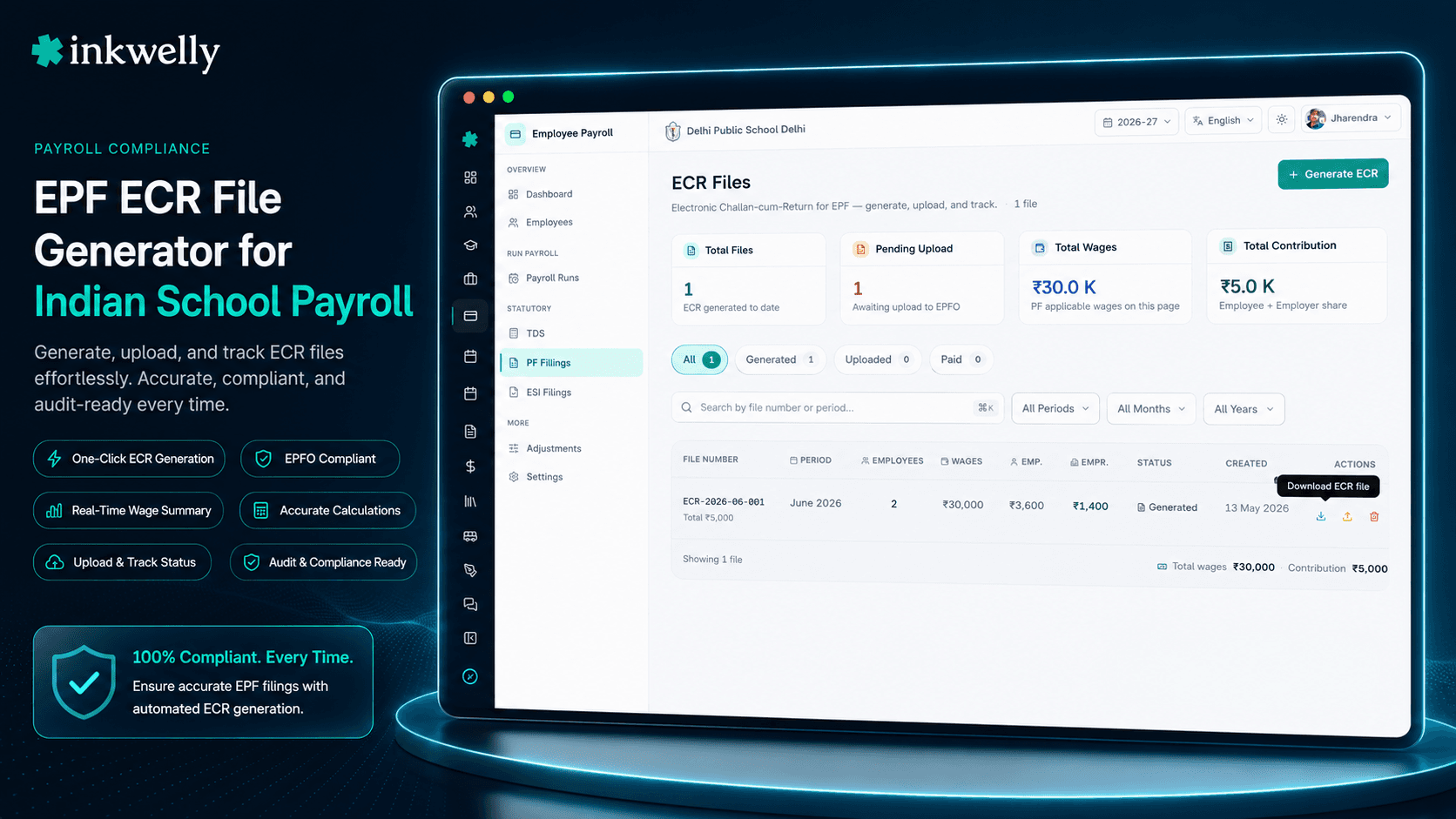
In Inkwelly, the moment a pay period is locked, the ECR for that period is ready. The accountant opens the pay-period detail page, clicks 'Generate ECR for April 2026', and Inkwelly produces the .txt file pre-validated against the EPFO 2.0 specification. UAN format, length, Aadhaar-UAN linkage status, EPF wage cap (₹15,000 default unless your school has opted for above-ceiling), EPS wage cap (₹15,000), NCP days computation — all enforced before the file is downloaded. If a teacher has a missing UAN or an unlinked Aadhaar, the ECR generation surfaces it as a blocking warning instead of writing a bad file that the EPFO portal will reject silently.
The accountant downloads the .txt file, logs into the EPFO portal, uploads it, and within a minute the portal echoes the same totals back. The challan is generated, copied into Inkwelly automatically (so the next month's accounts entry is one click), and paid via bank corporate banking. Inkwelly tracks the challan number, the payment date, the total contribution, and reconciles it against the locked pay run — every rupee accounted for.
UAN-Aadhaar-PAN linkage check
From 2024 onwards, EPFO rejects ECR uploads where a UAN does not have a verified Aadhaar link — part of the government's KYC drive. Inkwelly checks UAN-Aadhaar-PAN linkage status against the EPFO MIS at the moment ECR is generated, not at the moment the file is uploaded. If a teacher's UAN-Aadhaar link is missing, Inkwelly flags it the day the period is locked — not on the 14th when the EPFO portal rejects the file.
The accountant has 14 days to fix the linkage. The teacher can also fix it from the employee portal by uploading Aadhaar and verifying the OTP. By the time ECR is generated, every UAN is portal-ready.
EPF wage cap and above-ceiling option
The statutory EPF wage cap is ₹15,000 — contribution is computed at 12% of the basic salary capped at this number, giving a maximum employer contribution of ₹1,800 per employee per month. Many private schools, especially CBSE and ICSE schools paying senior teachers above ₹50,000 basic, opt to contribute above the ceiling on the actual basic. This is a school-level setting in Inkwelly: 'Contribute on actual basic' or 'Contribute on ₹15,000 cap'.
Whichever option the school selects, ECR is generated correctly — EPS contribution is always at the ₹15,000 cap (statutory), and EPF can be at full basic or capped depending on the school's choice. The teacher's UAN passbook reflects exactly what the school remitted, every month.
What the ECR file gets right out of the box
- Fixed-width text format with
#~#field separator — EPFO 2.0 specification compliant - UAN format check (12-digit numeric) and Aadhaar-UAN-PAN linkage status before file write
- EPF wages capped at school-set ceiling (₹15,000 default) or full basic if school opts above-ceiling
- EPS wages capped at ₹15,000 statutory — no override available, follows law
- EDLI wages computed at ₹15,000 cap with 0.5% employer contribution
- NCP (Non-Contribution Period) days for unpaid leaves auto-calculated from attendance data
- Refund of advance for any employee resigning mid-month with PF advance — captured automatically
- International Worker (IW) flag for foreign passport holders (rare but supported for some boarding schools)
- Joining and exit date columns auto-filled for new joiners and exiting staff in the period
- Total reconciliation — sum of every column matches the school's payroll summary to the rupee
How the ESIC challan works
ESIC — the Employees' State Insurance Corporation — covers employees earning under a gross monthly threshold (currently ₹21,000) for medical care and cash benefits. The school deducts 0.75% of gross wages from the employee, contributes 3.25% from its own account, and remits both via a monthly challan on the ESIC portal by the 15th of the following month.
In Inkwelly, the ESIC monthly contribution is generated alongside the ECR — same locked pay run, different output format. The accountant clicks 'Generate ESIC challan for April 2026'. Inkwelly identifies every employee under the gross threshold, computes the deduction and contribution, generates the .csv format that the ESIC portal accepts, and writes the per-employee IP (Insured Person) numbers and contribution lines. The accountant uploads the file, the portal generates the challan, and the school pays it through the same corporate banking workflow.
Unlike EPFO, ESIC has a strict 'newly insurable' rule — an employee crossing into the threshold from below is added as Insured automatically; one crossing above the threshold mid-period continues to be insured for the rest of the contribution period. Inkwelly tracks both transitions — it does not blindly remove employees from ESIC the month their gross goes above ₹21,000.
Professional Tax — every state, every slab
Professional Tax (PT) is a state-level levy. Maharashtra, Karnataka, West Bengal, Kerala, Tamil Nadu, Telangana, Andhra Pradesh, Gujarat, Madhya Pradesh and Punjab each have their own slabs and remittance schedules — some monthly, some semi-annual, some half-yearly. Inkwelly ships the live slab table for every state that has PT in force, and the accountant only needs to confirm the school's state once during onboarding.
Professional Tax appears as a deduction on the locked payslip, gets aggregated into a state-specific PT challan format, and is filed against the school's PT registration number. No spreadsheet. No state-specific Excel template. No delayed remittance because someone forgot the half-yearly cycle for Karnataka.
Statutory output Inkwelly generates from one locked pay run
- EPFO ECR — Electronic Challan-cum-Return text file, ready for portal upload
- ESIC monthly contribution — csv format aligned with the ESIC portal upload spec
- Professional Tax challan — state-specific format for every Indian state with PT in force
- Form 24Q — quarterly TDS return assembled from the same locked TDS lines (see TDS feature)
- PF Form 5 (new joiners) — auto-listed for every employee who joined in the wage month
- PF Form 10 (exits) — auto-listed for every employee who exited; ties into full and final settlement
- EPS Pension Form 10C / 10D — generated for retirees and exits with pension claim eligibility
- ESIC declaration form for new IPs (Insured Persons) crossing into the threshold
- Bonus Act compliance — annual bonus computation and Form D for the financial year
- Gratuity computation — actuarial-style projected liability for the school's books
What the 15th of the month looks like with Inkwelly
The period is locked on the 28th of the previous month. On the 1st, ECR, ESIC and PT files are auto-generated and a notification goes to the accountant: 'April 2026 statutory pack ready. UAN linkage clean. Total liability ₹1,84,567 EPF + ₹12,800 ESI + ₹6,400 PT.' The accountant downloads the three files, uploads each one to its portal, pays the three challans through the school's corporate banking. Total time on the 1st: under 30 minutes for a 50-staff school. The challan numbers and payment dates flow back into Inkwelly, the employee portal shows each teacher their UAN passbook contribution, and the audit log captures every step.
By the 15th, the deadline that used to consume two days of the accountant's time, the work is already done. The 15th is now just a confirmation date — 'Yes, all challans paid for April. Yes, EPFO and ESIC portals confirm receipt. Yes, no rejections this month.' The accountant moves on to other work. The principal stops worrying about EPFO inquiry notices. Compliance becomes a calendar event instead of a crisis.
Generate your school's ECR for last month — in the demo
Bring last month's locked pay sheet (or a sample), the school's PF code and ESIC code, and we will produce a portal-ready ECR file during the call. No commitment.
Limits, edge cases and small print
For a school with multiple establishments — say, a CBSE branch in Lucknow and an ICSE branch in Kanpur, each with its own PF code — Inkwelly generates a separate ECR per PF code, drawn from the locked pay periods of that branch only. The same applies for ESIC sub-codes. Both EPF and ESI rules can change mid-financial-year (a wage threshold notification, a contribution rate change). When such a change is gazetted, Inkwelly publishes a notice on the school's payroll dashboard with the effective date; from that date onwards, the new rule is applied automatically and the old months remain locked exactly as they were.
For employees who exit during the wage month, the ECR includes their final wage line and an exit date column — EPFO uses this to mark the UAN as 'exited' for that establishment without manual Form 10 filing. For new joiners, EPFO Form 5 is auto-prepared from the joining date in the employee profile. For International Workers (foreign passport holders, applicable mostly for boarding schools with international staff), the IW flag is set and contribution rules apply on the actual basic with no ₹15,000 cap — Inkwelly knows.
ESIC contribution period rules are followed strictly: an employee crossing into the gross threshold mid-period continues to be insured for the rest of that contribution period (April-September or October-March). The school cannot stop ESIC mid-cycle for an individual; Inkwelly does not allow it either. Salary data, statutory data and challan PDFs are stored in India, on Mumbai servers, with seven-year retention to satisfy EPFO inspection windows.
Belongs to
1 moduleFrequently asked
7 questionsIs the ECR file format pre-validated against the EPFO 2.0 specification?
Yes. Inkwelly's ECR generator implements the full EPFO 2.0 specification — fixed-width text, `#~#` separator, all 11 columns, exact field length and order. Files are pre-validated against UAN regex, Aadhaar linkage status, wage caps and NCP days before the .txt file is even written. Schools we have onboarded have a near-zero portal-rejection rate after the first month.
Does Inkwelly file ECR with EPFO directly?
No, by deliberate choice. EPFO requires a school-level digital signature certificate (DSC) bound to the employer's PAN, and the school's accountant or CA already manages the upload step. Inkwelly produces the portal-ready file; the accountant uploads it through the EPFO portal in under a minute. We keep the human-verified upload as a safety step — no silent automated filing.
What happens if a teacher's UAN is not linked to Aadhaar?
Inkwelly flags the unlinked UAN at period-lock time — not on ECR generation day. The accountant gets two weeks to fix the linkage; the teacher can complete it themselves from the employee portal by uploading Aadhaar and verifying the OTP. If the linkage is still missing on ECR day, Inkwelly produces the file but warns explicitly that EPFO may reject — the accountant decides whether to upload or wait.
How are NCP days (unpaid leave days) computed for ECR?
NCP — Non-Contribution Period — days are unpaid leave days that reduce the contribution. Inkwelly reads them directly from the [Employee Attendance](/modules/employees-attendance) module — if a teacher had 3 unpaid leaves in April with 26 working days, NCP is 3 and EPF wages are computed on 23/26 of the basic. The school does not enter NCP separately.
Does Inkwelly support above-ceiling EPF contribution?
Yes. The school sets one school-level toggle: 'Contribute on actual basic' or 'Contribute on ₹15,000 statutory cap'. Once set, every monthly ECR follows that choice. Above-ceiling contributions show correctly in the teacher's UAN passbook over time, and the difference between EPF (above-ceiling) and EPS (always capped at ₹15,000) is computed automatically per the EPFO rule.
Does Inkwelly handle EPFO inquiries or inspections?
We do not respond to EPFO inquiries on the school's behalf, but we make inquiries painless. Every monthly ECR is stored as a .txt artefact alongside the locked pay run, with the challan number, payment date and EPFO acknowledgement. An inspector pulling three years of records gets 36 portal-ready files exported in under a minute, with cross-references to the locked salary sheets they were generated from.
What if the school is in a state without Professional Tax?
Some Indian states — UP, Bihar, Haryana, Delhi, Rajasthan, Chhattisgarh, Uttarakhand — do not levy Professional Tax. Inkwelly detects the school's state during onboarding and switches PT off automatically; no PT line appears on payslips, no PT challan is generated. If the state introduces PT later, the slab table is updated centrally.
You might also like
4 readsSee Inkwelly on your school
30-minute demo. We open your current ERP with you and load your data into Inkwelly on the call. Dated go-live plan by the end of it.