Run salaries for the whole school in one click.
Set up a clean monthly pay period, run payroll for every teacher and staff member at once, and lock the period the moment salaries hit accounts. Audit-ready, restartable, and India-compliant from your very first month.
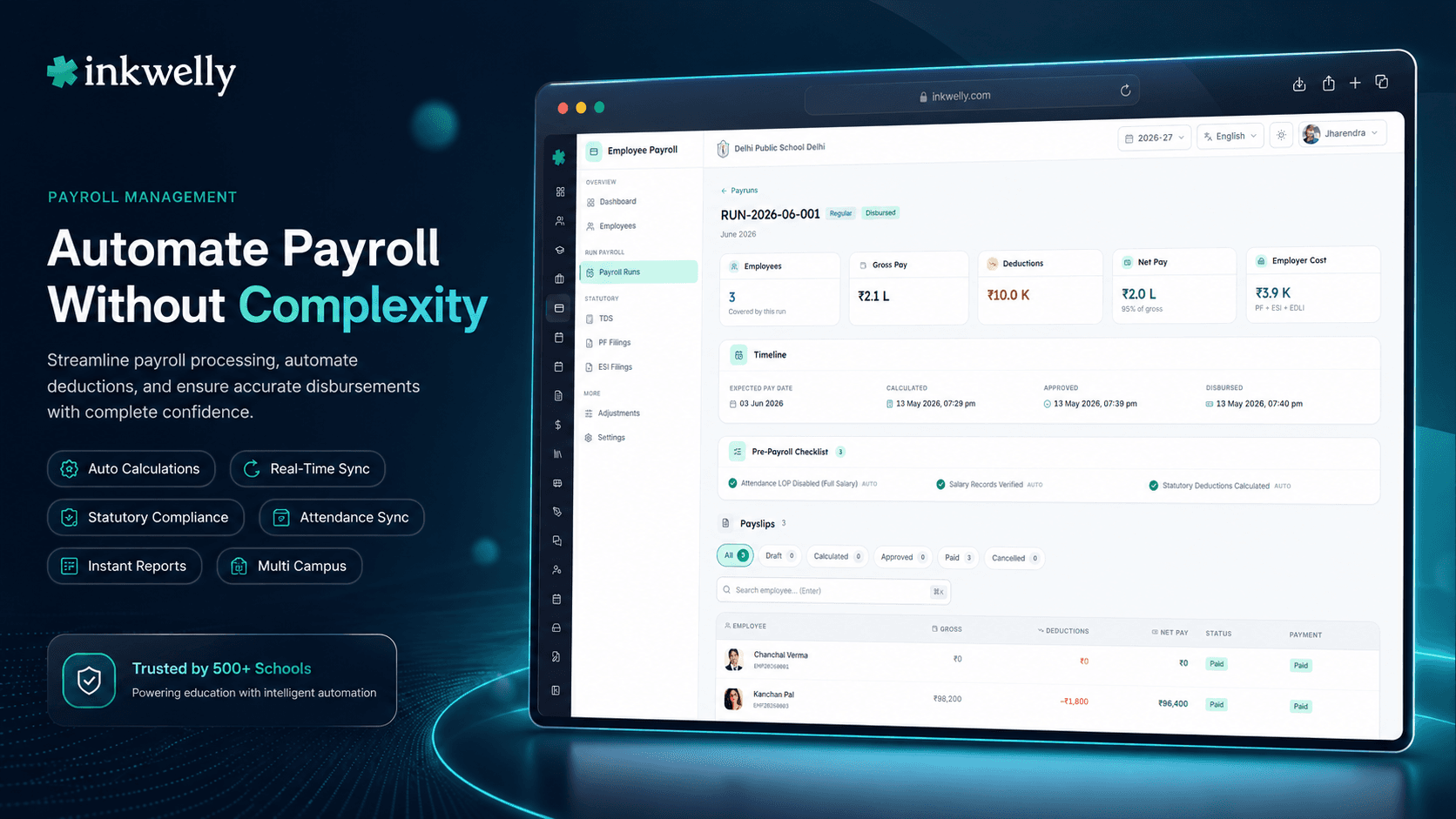
How Indian schools run salary today
It is the 28th of the month. The accountant opens an Excel file called Salary March 2026.xlsx, the eighth copy of the same sheet this academic year. Late marks from the biometric machine are added by hand. Loan EMIs are subtracted by remembering who owes what. The principal asks for one final tweak — a ₹2,000 loyalty bonus for two senior teachers — and the accountant copies the file again, this time as Salary March 2026 v8 FINAL.xlsx.
At the end of the day, the bank file goes out. Two teachers receive the wrong amount. One teacher's PF was not deducted because her UAN was missing in the new sheet. The accountant catches it, pays from her own pocket to keep peace, and adds an arrears row for next month. The Excel file with the original mistake is now the source of truth for Form 16 next March.
This is how most Indian schools run payroll — month after month, board after board. Not because anyone is careless, but because spreadsheets cannot enforce a process. Inkwelly replaces that pattern with a real pay-period workflow: open a period, run it, lock it, never touch it again.
How a pay period works in Inkwelly
A pay period in Inkwelly is a calendar month — April 2026, May 2026, and so on — created once and reused every academic year. Each period has a clear start date, end date, working days count, attendance cut-off, and a single status: open or locked.
When a period is open, the accountant can include or exclude employees, override one-off allowances, attach arrears, and re-run the calculation as many times as needed. When the period is locked — usually the day salaries are credited — Inkwelly freezes every payslip, every TDS computation and every PF/ESI line on that period. Edits stop. Audits begin.
A pay run is the act of computing salary for that period. One click runs the calculation for every active employee, picking up their salary structure, attendance, loan EMI schedule, investment declarations, arrears and one-off bonuses. The run is restartable — if you spot a mistake, you fix the underlying data and re-run the period. The locked snapshot is what TDS, EPF, ESI, payslips and Form 16 are all built on. Read the Employee Payroll module for the full picture.
What a single pay period contains
- Period name, working days, attendance cut-off date and disbursal date — set once at the start of the financial year
- Every active teacher and staff member auto-included; on long leave or notice period, employees can be excluded with one toggle
- Live link to attendance — late marks, leaves and unpaid leave deductions flow in from the Employee Attendance module
- Loan and advance EMIs scheduled this month — auto-deducted with a clear ledger line on the payslip
- Per-employee TDS recomputed against their declared regime and proof status — no separate tax run needed
- Arrears, retro increments and DA hikes attached to the period without breaking past locked months
- EPF, ESI and Professional Tax computed at the line level so ECR and challans match the rupee on the payslip
- Auto-generated payslips for every employee with school letterhead, PF/ESI numbers, UAN and IFSC details
- One-click bank advice file — NEFT, RTGS or salary upload format for HDFC, ICICI, SBI, Axis and most cooperative banks
- Period-level audit log — who created the run, who approved, who locked, and every override with timestamp
Restartable pay runs
A pay run in Inkwelly is not a one-shot button. The accountant can run April payroll on the 26th to preview totals, find that three teachers had unpaid leave that was missed, fix the attendance, and run the same period again on the 28th. Every re-run is logged. The previous numbers are never lost — they are versioned inside the period.
This matters most in the first three months of the financial year. When the salary structure is being fine-tuned, when the new annexure is being uploaded, when the principal is still adjusting allowances — schools need a tool that says 'try again' instead of 'create a new file'.
Locking is the audit anchor
When the bank file goes out, the period is locked. After lock, no one can change the working days, the salary structure, the loan EMI or any allowance for that month — not the accountant, not the principal, not even the school admin. The only way to change a locked month is to file an arrears entry against the next open period.
This one rule is what makes Inkwelly's Form 16, TDS computation and EPF ECR uploads trustworthy. The locked snapshot is the law for that month, and the whole compliance stack reads from it.
What runs inside a single click
When the accountant clicks 'Run Payroll' for April 2026, Inkwelly does the following for every active employee in under a second per row. The employee's salary structure is loaded — basic, HRA, conveyance, special allowance, employer PF, employer ESI, gratuity contribution. Attendance for the period is fetched, present days are converted to a payable ratio, and any unpaid leave is deducted. Active loan and advance EMIs are pulled from the staff ledger and applied. The current month's TDS is computed against the declared regime, projected annual income, and submitted proof status — old regime gets 80C/80D/HRA exemptions, new regime gets the standard deduction and lower slab rates. EPF is computed at 12% of basic (capped at the wage ceiling unless your school opts for above-ceiling contribution). ESI is computed for any employee under the gross threshold. Professional Tax is applied per the state slab — Maharashtra, Karnataka, West Bengal and others all have different rules and Inkwelly knows each one.
The result is a payslip per employee, a bank advice file at the school level, a per-employee TDS line that flows into Form 24Q, and a per-employee EPF and ESI line that flows into the next ECR upload and challan generation. All of this is computed once, on lock, and never recomputed unless the accountant unlocks the period.
Bank advice files for every Indian bank
The school's bank determines the format. Inkwelly ships ready-to-upload templates for HDFC Salary Upload, ICICI Connected Banking, SBI CINB, Axis CMS, Kotak FAST, IndusInd, Yes Bank, RBL, and the major cooperative bank formats used by tier-2 and tier-3 schools — Saraswat, Cosmos, Punjab and Sind, Karnataka Bank and others.
Files are generated from the locked period only — never from a draft run. So the file the bank receives matches the payslip the teacher receives, to the rupee. No reconciliation calls.
What the period status really controls
- Open: edit anything, run any number of times, no payslip is final
- Run completed but not locked: payslips visible to admin only, employees cannot see them yet — perfect for principal review
- Locked: payslips visible to employees on the employee portal, bank file released, all numbers frozen
- Locked + disbursed: marked once the bank confirms credit; ledger reflects paid status against each employee
- Reopened (rare, audit-tracked): if a critical mistake is found post-lock, an admin can reopen with a written reason — every reopen is logged with user, timestamp and justification
See your school's first pay period in 30 minutes
We will set up April 2026 with your real salary structure, real teachers and a sandbox attendance feed — and run a payroll end-to-end before you decide anything.
Real-world use cases this fixes
The bonus night. It is the night before Diwali bonuses are credited. The principal calls and asks for an extra ₹3,000 for the entire teaching team. In Excel, this is a 45-minute job and three reconciliation errors. In Inkwelly, the accountant adds a one-off allowance to the open period, re-runs payroll, eyeballs the new totals against the old, locks and releases the bank file in under five minutes.
The wrong UAN. A new teacher joins on the 12th of the month. Her UAN is entered with one digit wrong. Inkwelly's pay run flags her as an exception — UAN format invalid — instead of silently issuing a payslip with bad PF data. The accountant fixes the UAN in the employee profile, re-runs and locks. EPFO does not reject the ECR a week later.
The retro increment. Increments approved in May with effect from April need to be paid as arrears. Inkwelly's pay-period model handles this without unlocking April — a retro arrears entry is created against the open May period, with a clear note linking it to the April increment letter. TDS for the arrears flows into May's tax run automatically.
The audit visit. A regional CBSE compliance officer asks how much was paid to a specific teacher in October 2025. The accountant opens October's locked period, exports the locked payslip and the locked attendance — both timestamped, both signed by the lock event. The auditor leaves in 15 minutes.
Limits, safety and small print
A period must be created in calendar order — you cannot open July before June. This prevents accidentally locking a month out of sequence and breaking the year-to-date totals that drive TDS projection. Periods cannot overlap; if a month is split (say a mid-month payroll for a residential school), it is modelled as two pay-runs inside the same period rather than two periods. The maximum number of employees per pay run in a single click is 5,000 — comfortably above the largest CBSE school payrolls we have onboarded; behind the scenes Inkwelly batches into chunks of 200 to keep the calculation predictable. Locked periods can only be reopened by a SUPER_ADMIN role with a written reason, and every reopen is captured in the audit log with user, time, IP, and the change set when the period is locked again. There is no 'silent edit' mode. Salary data is stored in India, on servers in Mumbai, with full DPDP-Act compliance. Daily encrypted backups run for the last 35 days; long-term snapshots are kept for seven years to satisfy Income Tax and EPFO retention windows. If your school has fewer than 25 staff, you can run all of this from a single account; if you have multiple campuses or branches, each runs its own pay periods under one organisation umbrella with consolidated reporting.
Belongs to
1 moduleFrequently asked
7 questionsCan I run payroll multiple times for the same month?
Yes. As long as the period is open, you can run payroll as many times as needed. Each run replaces the previous calculation — the period stays in 'draft' until you lock it. Once locked, the numbers are frozen and the only way to change them is via an arrears entry on the next open period.
What happens if a teacher joins or exits mid-month?
Inkwelly auto-prorates salary by attendance days. A teacher who joins on the 14th and the period has 26 working days will be paid 13/26 of the structured salary, with PF, ESI and TDS computed on the prorated amount. Mid-month exits work the same way and feed directly into the [full and final settlement](/features/loans-advances-full-final) flow.
Do we need separate periods for teaching and non-teaching staff?
No. One period covers every active employee — teaching, non-teaching, transport, hostel, security and contractual. Salary structures are per-employee, so a Class XII teacher and a security guard can be in the same April 2026 run with completely different components, allowances and statutory rules.
How are unpaid leaves and late marks deducted?
Unpaid leaves and late-mark conversions are read directly from the Employee Attendance module — no double entry. The school sets the rule once (e.g., '3 late marks = 1 day deduction', or 'unpaid leave deducts proportionally from basic only'), and Inkwelly applies it on every pay run automatically.
Can the principal review payslips before they go out?
Yes. Run the period, leave it unlocked, and only admin and principal roles can view the draft payslips. Employees see nothing until the period is locked. Most Inkwelly schools use this exact flow — accountant runs on the 26th, principal reviews on the 27th, lock and disburse on the 28th.
Will reopening a locked period affect already-filed TDS or EPF returns?
It can. That is why reopen is restricted to a SUPER_ADMIN role and requires a written reason. If the underlying period changes after a TDS or EPF return is already filed, Inkwelly highlights the dependency, suggests the correct revised return, and locks future periods until the discrepancy is reconciled.
Is the bank file format already configured for our bank?
Inkwelly ships pre-built advice templates for HDFC, ICICI, SBI, Axis, Kotak, IndusInd, Yes, RBL, IDFC FIRST, and the major Indian cooperative banks. If your school uses a regional bank not on the list, we add the format during onboarding — no engineering involvement needed from your side.
You might also like
4 readsSee Inkwelly on your school
30-minute demo. We open your current ERP with you and load your data into Inkwelly on the call. Dated go-live plan by the end of it.