Fee receipts अब सीधे आपके thermal printer पर print होंगी — 80mm, 58mm, एक click में। Olivetti, Epson, TVS। Paper चुनें, Print दबाएँ, parent को हाथ में दें।
सालों से हर Indian school के fee counter पर एक ही रोज़ की लड़ाई है — cashier PDF download करता है, खोलता है, printer चुनता है, scale के लिए print dialog से लड़ता है, फिर ऊपर एक छोटी सी receipt वाला पूरा A4 page निकलता देखता है, और इस सब में paper व parent का time बर्बाद होता है। Inkwelly के नए Print button ने यह लड़ाई खत्म कर दी। हर fee receipt पर Print दबाएँ, visual paper-size picker पर Thermal 80mm या Thermal 58mm चुनें, Print दबाएँ — आपके counter पर thermal printer से दो second के अंदर receipt निकल आती है। Olivetti PRT80, Epson TM-T82, TVS RP-3160 और उन सारे generic 80mm व 58mm ESC/POS receipt printers के साथ काम करता है जो Indian schools के पास पहले से हैं। Windows, macOS और Linux तीनों पर free QZ Tray bridge के through cross-platform — fee counter PC पर एक बार install कर लें, फिर हर cashier हर browser से silent print करता है।
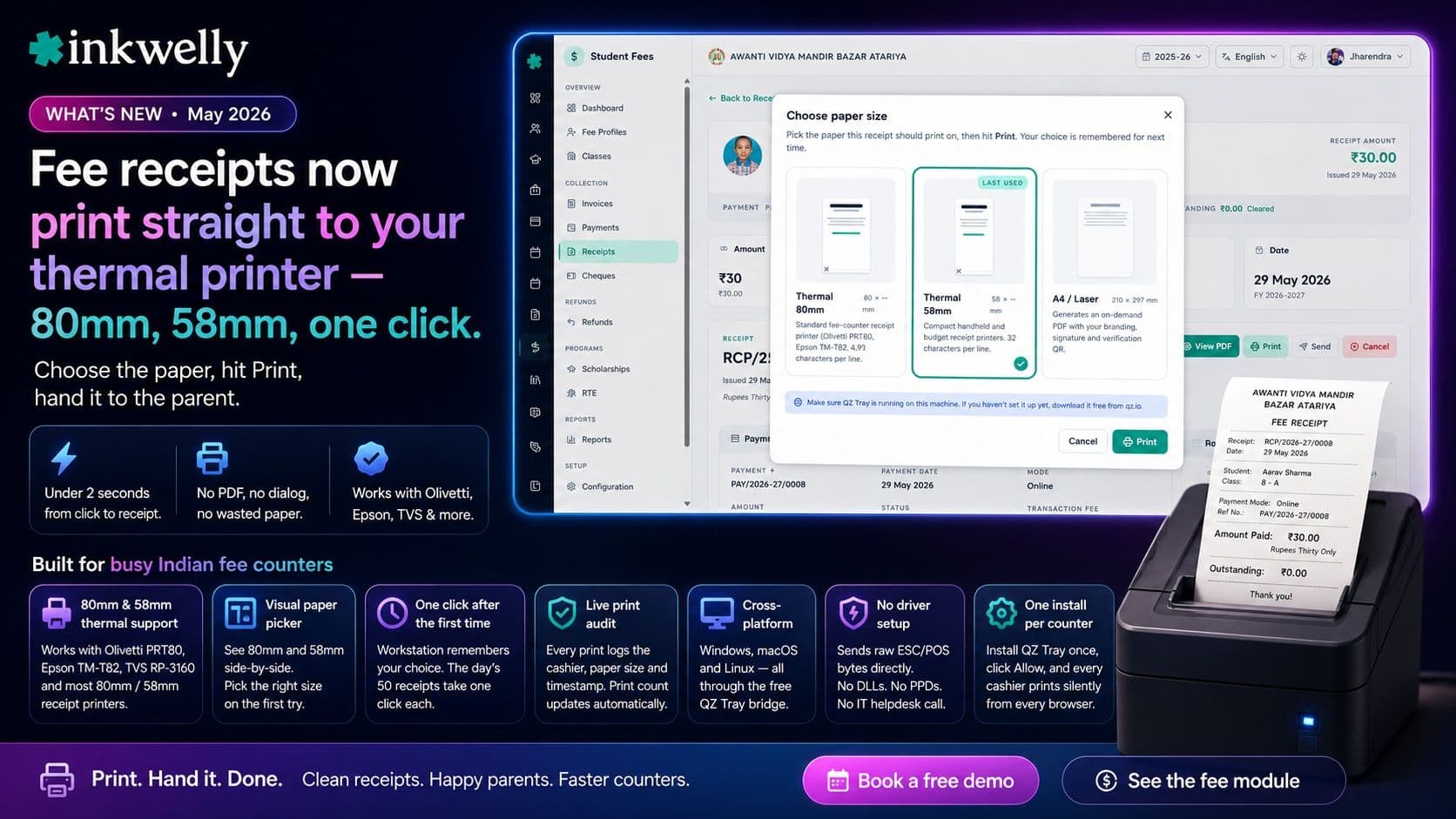
इस release में क्या आया
Inkwelly में कोई भी fee receipt खोलिए, ऊपर एक नया Print button दिखेगा। उसे दबाएँ, dialog में Thermal 80mm या Thermal 58mm चुनें, Print दबाएँ — आपके fee counter पर thermal printer से दो second के अंदर receipt निकल आती है। न PDF download, न browser का print dialog, न paper-size settings की लड़ाई, न पहली line पर rasterised कचरा। Parent के हाथ में जो receipt जाती है वो बिल्कुल वैसी दिखती है जैसी आपका office चाहता है — ऊपर school का नाम और trust, फिर student व class का block, payment mode व transaction reference, figures व words दोनों में paid amount, और सबसे नीचे outstanding balance ताकि parent को हमेशा पता रहे कि साल भर का कितना और बकाया है। यह feature 2026 में हर उस CBSE, ICSE और State Board school ने माँगा था जिसे हमने Tier-2 व Tier-3 India में onboard किया।
इस release में नया क्या है
- 80mm thermal support — Olivetti PRT80, Epson TM-T82, TVS RP-3160 और Indian school fee counters पर इस्तेमाल होने वाले बाकी अधिकतर 80mm receipt printers के साथ काम करता है।
- 58mm thermal support — छोटा compact format, handheld units और semi-urban व Tier-3 schools के budget printers के लिए useful।
- Visual paper picker — एक छोटा dialog 80mm और 58mm की actual widths side-by-side दिखाता है, ताकि office staff को पहली बार में सही paper चुनने के लिए यह याद रखने की ज़रूरत न रहे कि कौन सा printer किस counter पर है।
- Workstation आपकी पसंद याद रखता है — अगला print उसी paper size पर एक click में चला जाता है; दिन की पहली receipt के बाद बाकी पचास receipts एक-एक click में निकल जाती हैं।
- Live print audit — हर print हुई receipt पर cashier, paper size और timestamp log होता है; receipt का print count व last-printed-at field automatic update होते हैं, ताकि reconciliation के समय हर reprint trace हो सके।
- Cross-platform — Windows, macOS और Linux तीनों पर qz.io के free desktop bridge QZ Tray के through support है।
- No driver setup — Inkwelly Windows / CUPS driver stacks को bypass करके सीधे raw ESC/POS bytes भेजता है जो printer समझता है। न DLLs, न PPDs, न IT helpdesk call।
- एक बार school setup — fee counter computer पर QZ Tray एक बार install करें, पहले print पर Allow दबाएँ, फिर उस computer पर logged in हर browser से हर cashier silent print करता है।
- A4 / laser option wired in — dialog में A4 / Laser tile पहले से दिख रही है; on-demand PDF download इसी flow का अगला step है।
- ₹ symbol और Hindi receipts roadmap पर हैं — current release maximum compatibility के लिए साफ ASCII में 'Rs.' label के साथ print करता है; पहली Hindi-medium school के पूछते ही bilingual image-mode receipts ship हो जाएँगी।
Indian fee counters के लिए यह क्यों ज़रूरी है
March में किसी busy Tier-2 school में fee counter एक घंटे में पचास से अस्सी receipts print करता है। इस release से पहले cashier को receipt PDF खोलना पड़ता था, printer चुनना पड़ता था, A4 select करना पड़ता था, full-sheet preview load होते देखना पड़ता था, Print दबाना पड़ता था, फिर पूरा A4 page निकलते देखना पड़ता था जिसके top corner पर एक छोटी सी receipt होती थी — paper बर्बाद, parent का time बर्बाद, cashier का lunch break बर्बाद। एक session के 200 working days से multiply करें तो office एक पूरा हफ़्ता staff time उस software flow को दे देता है जो कभी fit ही नहीं हुआ।
नया Print button per-receipt time को तीन second से कम कर देता है। Dialog पहले से कल वाले last print की 80mm tile selected रखकर खुलता है, cashier Print दबाता है, और अगला परिवार window पर आने से पहले parent के हाथ में साफ 80mm receipt होती है। हमने इसे Olivetti PRT80 पर MacBook से USB पर test किया, और यही flow Windows 11 fee counter PC पर generic Pos-80 USB printer के साथ बिल्कुल same चलता है। पूरे fee-collection workflow के लिए Student Fee module देखें।
इसे अपने school के fee counter पर देखें
अपना मौजूदा thermal printer एक 20-minute walkthrough पर लाएँ — हम उसे आपके school के data पर एक sample fee receipt से live connect करेंगे और पहली slip आप खुद print करेंगे।
ये मॉड्यूल शामिल
1 moduleअक्सर पूछे गए सवाल
3 सवालInkwelly me thermal printer kaise connect kare?
Sirf fee counter ki machine pe ek baar setup karna hota hai. qz.io se free QZ Tray app download karein, install karein (~30 seconds), thermal printer plug karein, Inkwelly khole, koi bhi Print button daba dein, aur QZ Tray jo permission dialog pehli baar pop karta hai uspe Allow daba dein. Phir uss computer pe har browser se har cashier silent print karta hai — na per-user setup, na admin password, na IT team.
यह किन-किन thermal printers के साथ काम करता है?
कोई भी 80mm या 58mm ESC/POS-compatible receipt printer काम करता है — Olivetti PRT80, Epson TM-T82, TVS RP-3160, generic Pos-80, Pos-58, BTP-R580 और वो सारे unbranded Chinese 80mm printers जो ज़्यादातर Indian schools के पास पहले से हैं। USB या LAN पर connect करें। Inkwelly QZ Tray के through raw ESC/POS bytes भेजता है, इसलिए OS-level printer driver की कोई दिक्कत नहीं — अगर operating system को printer अपनी printer list में दिख रहा है, तो Inkwelly उससे print कर सकता है।
WhatsApp pe parents ko bhejne wali PDF receipt band ho jayegi kya?
Nahi, dono saath saath chalti hain. PDF receipt automatically generate hoti rahegi aur download, WhatsApp share aur email ke liye available rahegi — un parents ke liye useful jo apne records ke liye digital copy chahte hain. Naya thermal print woh paper slip hai jo cashier counter par parent ko hath mein deta hai. Most Indian schools dono use karte hain: in-person paper slip, aur WhatsApp pe PDF parent ke records ke liye. Receipt ka print count dono kinds ko track karta hai.
Inkwelly आपके स्कूल पर — खुद देखें
30 मिनट का डेमो। आपके मौजूदा ERP को आपके साथ खोलकर, कॉल पर ही आपका डेटा Inkwelly में लोड करते हैं। कॉल ख़त्म होते-होते एक तय तारीख़ का गो-लाइव प्लान आपके हाथ में।