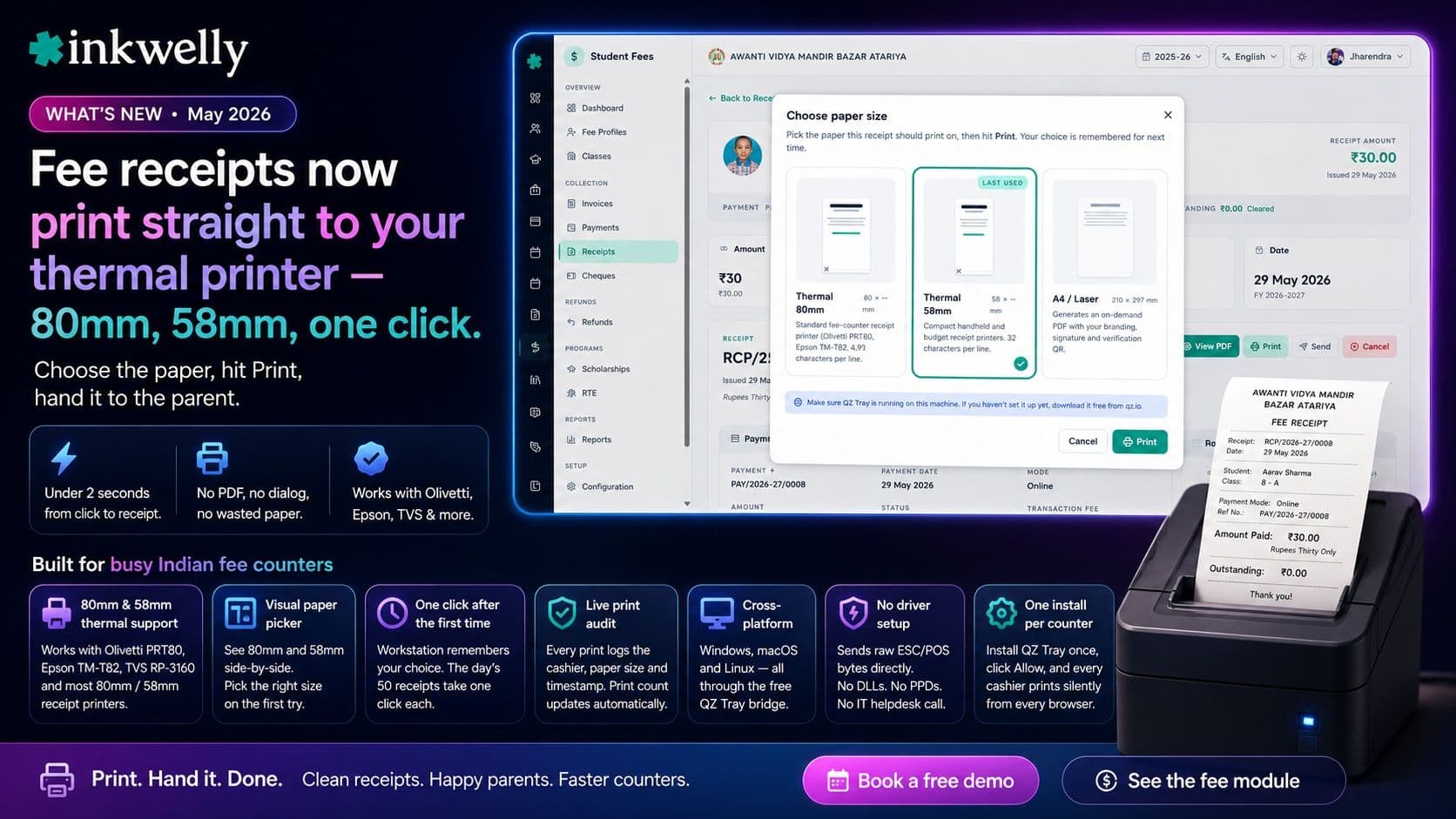
Fee receipts now print straight to your thermal printer — 80mm, 58mm, one click. Olivetti, Epson, TVS. Choose the paper, hit Print, hand it to the parent.
For years, the daily fight at every Indian school fee counter has been the same — the cashier downloads a PDF, opens it, picks the printer, fights the print dialog about scale, watches an A4 page come out with a tiny receipt at the top, wastes paper and the parent's time. Inkwelly's new Print button on every fee receipt ends that fight. Click Print, choose Thermal 80mm or Thermal 58mm on a visual paper-size picker, hit Print — the receipt rolls out of the thermal printer at your counter in under two seconds. Works with Olivetti PRT80, Epson TM-T82, TVS RP-3160 and the long tail of generic 80mm and 58mm ESC/POS receipt printers Indian schools already own. Cross-platform on Windows, macOS and Linux through the free QZ Tray bridge — install it once on the fee counter PC and every cashier on every browser prints silently from then on.
What we shipped
Open any fee receipt in Inkwelly and you'll see a new Print button. Click it, pick Thermal 80mm or Thermal 58mm in the dialog, hit Print — the receipt rolls out of the thermal printer at your fee counter in under two seconds. No PDF download, no browser print dialog, no fighting with paper-size settings, no rasterised garbage on the first line. The receipt the parent gets in their hand looks exactly the way your office wants it — the school name and trust at the top, the student and class block, payment mode and transaction reference, the amount paid in figures and words, and the outstanding balance underneath so the parent always knows what's left for the year. This was the most-asked feature from every CBSE, ICSE and State Board school we onboarded across Tier-2 and Tier-3 India in 2026.
What's new in this release
- 80mm thermal support — works with Olivetti PRT80, Epson TM-T82, TVS RP-3160 and most other 80mm receipt printers used at Indian school fee counters.
- 58mm thermal support — the smaller compact format, useful for handheld units and budget printers in semi-urban and Tier-3 schools.
- Visual paper picker — a small dialog shows the actual 80mm and 58mm widths side-by-side so office staff pick the right paper on the first try, without needing to remember which printer is at which counter.
- Workstation remembers your choice — the next print goes straight to the same paper size with one click; the day's fifty receipts after the first take a single click each.
- Live print audit — every printed receipt logs the cashier, the paper size and the timestamp; the receipt's print count and last-printed-at fields update automatically, so reprints during reconciliation are always traceable.
- Cross-platform — Windows, macOS and Linux are all supported through QZ Tray, the free desktop bridge from qz.io.
- No driver setup — Inkwelly bypasses Windows / CUPS driver stacks and sends raw ESC/POS bytes the printer understands directly. No DLLs, no PPDs, no IT helpdesk call.
- One-time school setup — install QZ Tray once on the fee counter computer, click Allow on the first print, and every cashier on every browser logged in on that computer prints silently from then on.
- A4 / laser option wired in — the dialog already shows the A4 / Laser tile; on-demand PDF download lands as the next step in this same flow.
- ₹ symbol and Hindi receipts on the roadmap — current release prints clean ASCII with 'Rs.' labels for maximum compatibility; bilingual image-mode receipts ship when the first Hindi-medium school asks.
Why this matters for Indian fee counters
In a busy Tier-2 school during March, the fee counter prints fifty to eighty receipts an hour. Before this release the cashier had to open the receipt PDF, choose the printer, pick A4, watch a full-sheet preview load, hit Print, then watch an entire A4 page come out with a tiny receipt at the top — wasting paper, parent time and the cashier's lunch break. Multiply that by 200 working days a session and the office loses a working week of staff time to a software flow that never fit.
The new Print button drops the per-receipt time to under three seconds. The dialog opens with the 80mm tile already selected from yesterday's last print, the cashier hits Print, the parent has a clean 80mm receipt in their hand before the next family steps up to the window. We tested it on the Olivetti PRT80 connected to a MacBook over USB, and the same flow runs identically on a Windows 11 fee counter PC plugged into a generic Pos-80 USB printer. See the full Student Fee module for the wider fee-collection workflow.
See it on your school's fee counter
Bring your existing thermal printer to a 20-minute walkthrough — we'll connect it live to a sample fee receipt on your school's data and you'll print the first slip yourself.
Covers modules
1 moduleFrequently asked
3 questionsWhat thermal printers does this work with?
Any 80mm or 58mm ESC/POS-compatible receipt printer works — Olivetti PRT80, Epson TM-T82, TVS RP-3160, generic Pos-80, Pos-58, BTP-R580 and the long tail of unbranded Chinese 80mm printers most Indian schools already own. Connect over USB or LAN. Inkwelly speaks raw ESC/POS bytes through QZ Tray, so the OS-level printer driver doesn't matter — if the operating system sees the printer in its printer list, Inkwelly can print to it.
Do we need to set anything up on every cashier's computer?
Only on the fee counter machine itself, and only once. Download the free QZ Tray app from qz.io, install it (about 30 seconds), plug in the thermal printer, open Inkwelly, click any Print button, and click Allow on the small permission dialog QZ Tray pops the very first time. From then on every cashier on every browser logged in on that computer prints silently. No per-user setup, no admin password, no IT team needed.
Will this replace the existing PDF receipts we send to parents on WhatsApp?
No, both work side-by-side. The PDF receipt is still generated automatically and is available for download, WhatsApp share and email — useful for parents who want a digital copy for their records. The new thermal print is what the cashier hands the parent at the counter as the physical receipt. Most Indian schools use both: a paper slip in-person, a PDF on WhatsApp for the parent's records. The print count on the receipt tracks both kinds.
See Inkwelly on your school
30-minute demo. We open your current ERP with you and load your data into Inkwelly on the call. Dated go-live plan by the end of it.