Inkwelly में Communications dashboard कैसे पढ़ें
Communications dashboard एक ही जगह बताता है कि parents तक messages सच में पहुँच रहे हैं या नहीं। यह guide हर card, ज़रूरी numbers और गिरावट दिखने पर तुरंत क्या करना है — सब आसान भाषा में समझाता है।
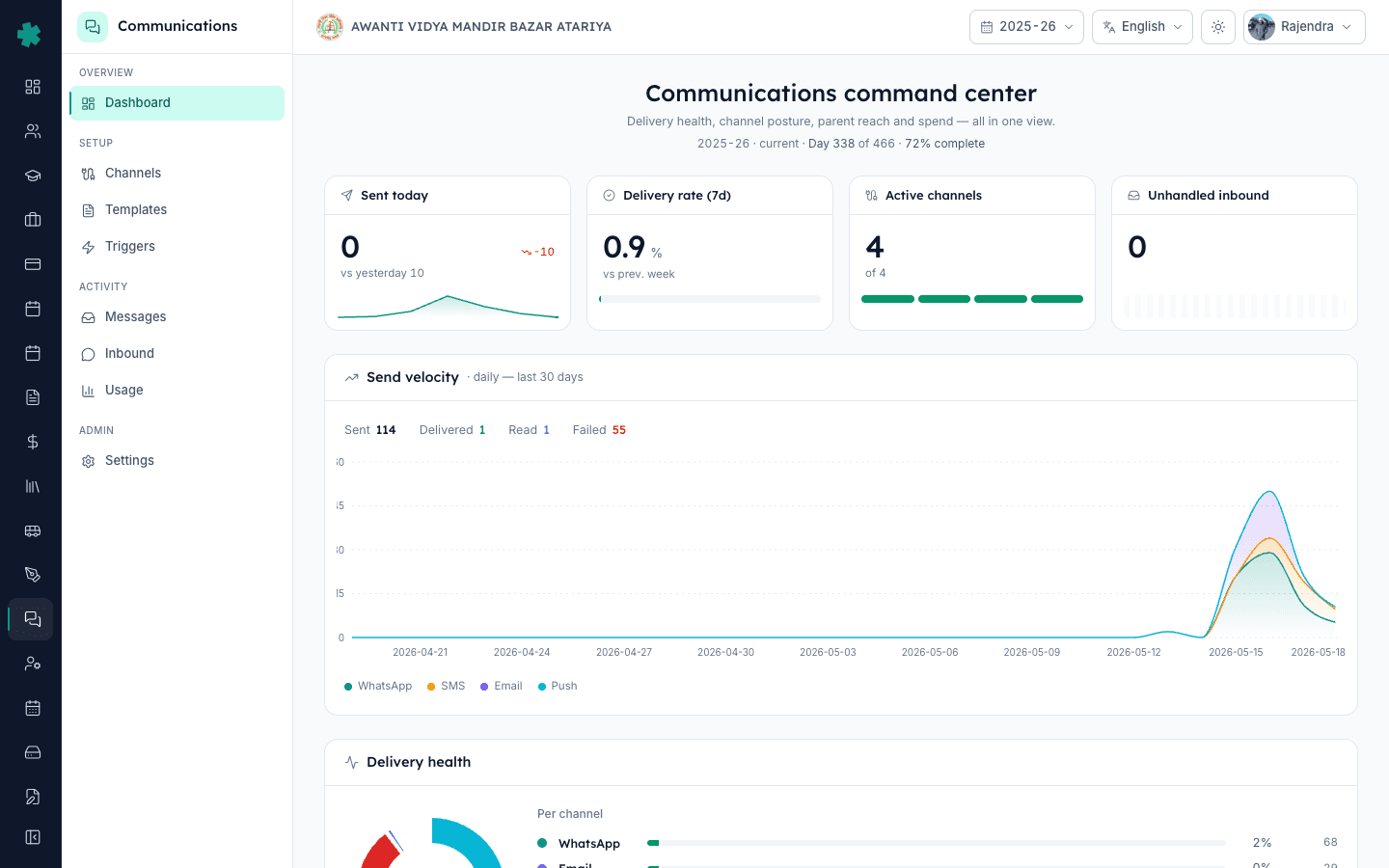
सार — Communications खोलें और ऊपर के चार Hero KPI देखें (Sent today, Delivery rate 7d, Active channels, Unhandled inbound)। स्वस्थ school में Delivery rate 92% से ऊपर, कोई red alert नहीं और Unhandled inbound लगभग शून्य होता है। कोई भी card amber या red हो तो उस पर click करें — dashboard ठीक वही recipient list या template बताता है जिसे सुधारना है।
अधिकांश Indian principals एक ही बात कहते हैं — ERP पर green tick देखकर मान लेते हैं कि message चला गया, लेकिन दो हफ्ते बाद parent आकर पूछता है कि fee receipt क्यों नहीं मिली। यह dashboard इसी अंधे भरोसे को तोड़ने के लिए है। /communications का हर card एक ही सवाल का जवाब देता है — आज कितने messages गए, कितने deliver हुए, कौन सा channel leak कर रहा है, कौन सा template reject हुआ और किन parents तक पहुँच नहीं है। रोज़ सुबह दो minute पढ़ने की आदत बनाएँ और आप शिकायतों से नहीं, dashboard से समस्याएँ पकड़ने लगेंगे।
1. Dashboard खोलें और चार Hero KPI पढ़ें
Left navigation में Communications पर click करें। ऊपर की strip में चार numbers दिखते हैं — Sent today (आज midnight से अब तक सभी channels के total messages), Delivery rate 7d (पिछले सात दिनों में DELIVERED का अनुपात), Active channels (WhatsApp, SMS, Email, Push में से कितने इस वक्त usable हैं) और Unhandled inbound (parents के वो replies जिन पर अभी तक किसी ने जवाब नहीं दिया)। 800 students वाले typical school में fee या homework वाले दिन 200–800 sent, Delivery rate 92% से ऊपर, चारों channels active और Unhandled inbound 10 से कम होना चाहिए।
2. Send velocity chart में spikes और silence देखें
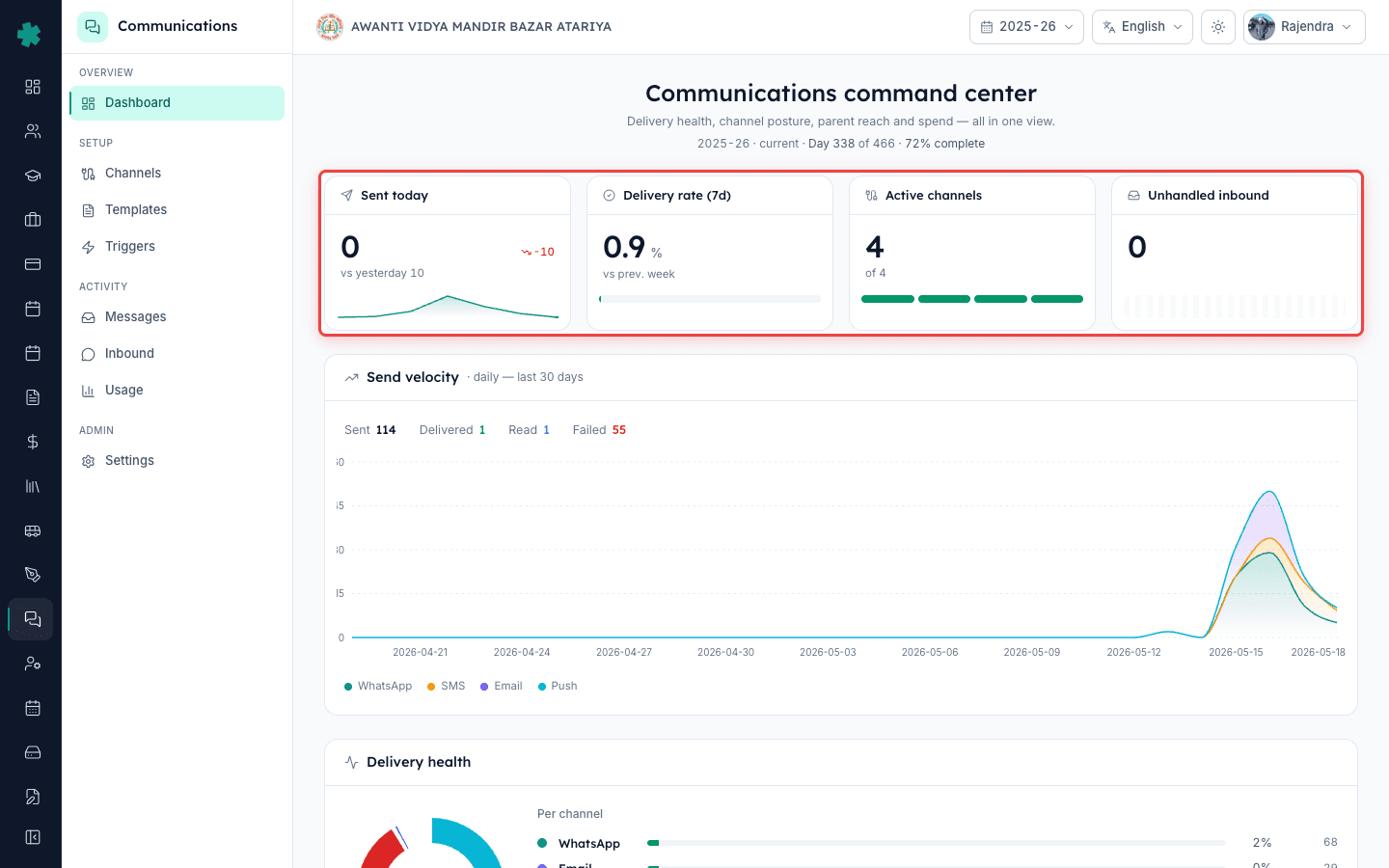
KPIs के नीचे Send velocity chart है — 31 दिन का bar graph, हर channel के लिए अलग रंग। स्वस्थ school में school days पर एक जैसा volume और Sunday को लगभग शून्य दिखता है। दो pattern खतरे की घंटी हैं — एक vertical spike (किसी ने बिना segment किए 5,000 messages का blast भेजा — template का गलत उपयोग) और किसी active channel पर तीन या उससे ज़्यादा दिनों की flat-zero line (provider चुपचाप reject कर रहा है और team को पता नहीं चला)। किसी भी bar पर hover करें तो date और exact count दिखेगा, और click करने पर उस दिन की Messages page खुल जाएगी।
3. Delivery health से leaking channel पकड़ें
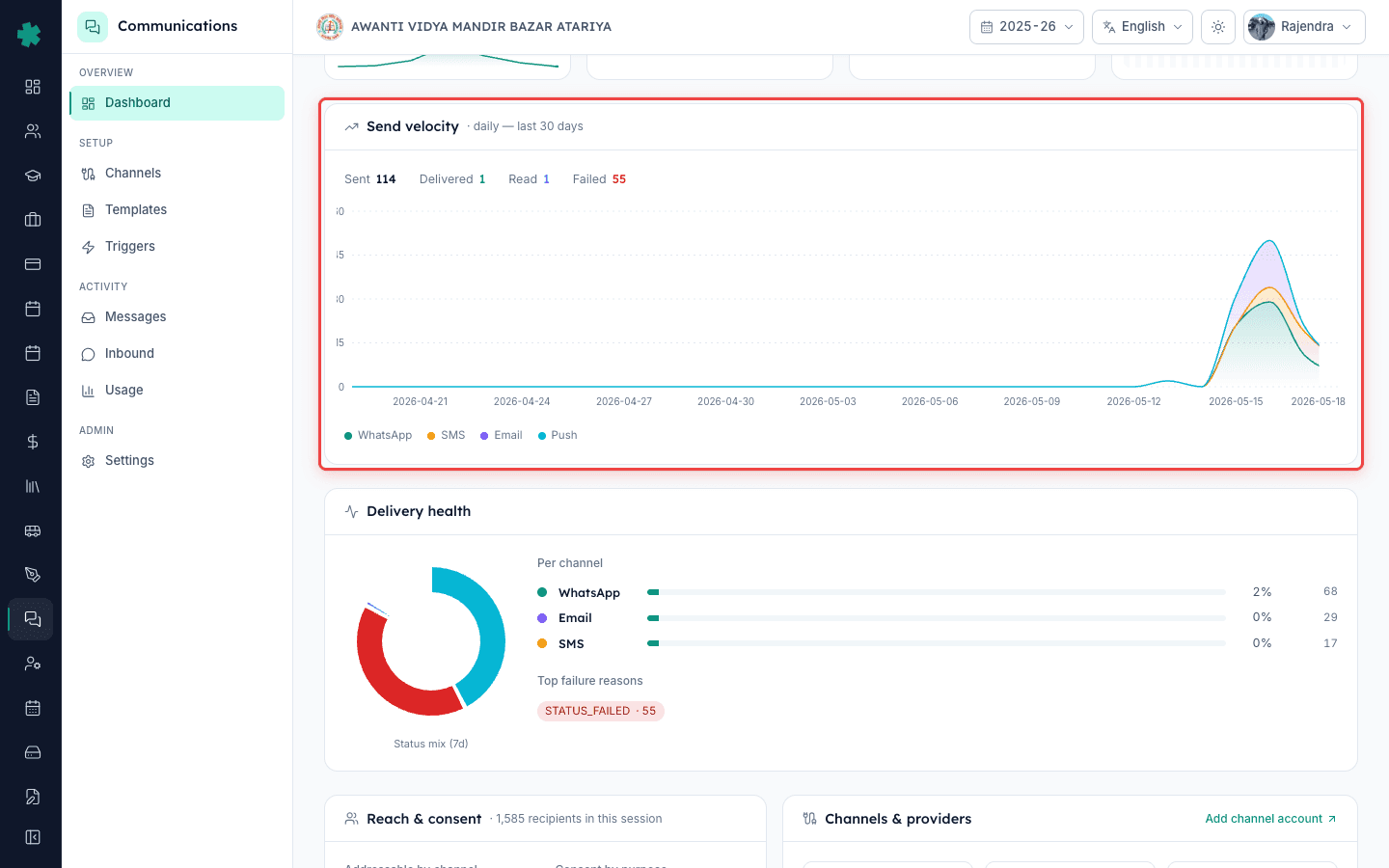
Delivery health card पिछले 7 दिनों के हर message को SENT, DELIVERED, READ और FAILED में बाँटता है और हर channel के top failure reasons listing करता है। Tier-2 city के CBSE school की typical तस्वीर — WhatsApp 96% delivered, SMS 87% delivered (top reason 'DLT template mismatch'), Email 99% delivered। इस card का असली काम green number नहीं — failure list है। अगर 'RECIPIENT_NUMBER_INVALID' top three में है तो phone numbers पुराने हैं; अगर 'TEMPLATE_NOT_APPROVED' दिखे तो WhatsApp template को बिना Meta को re-submit किए edit कर दिया गया।
4. Reach & consent से unreachable parents पहचानें
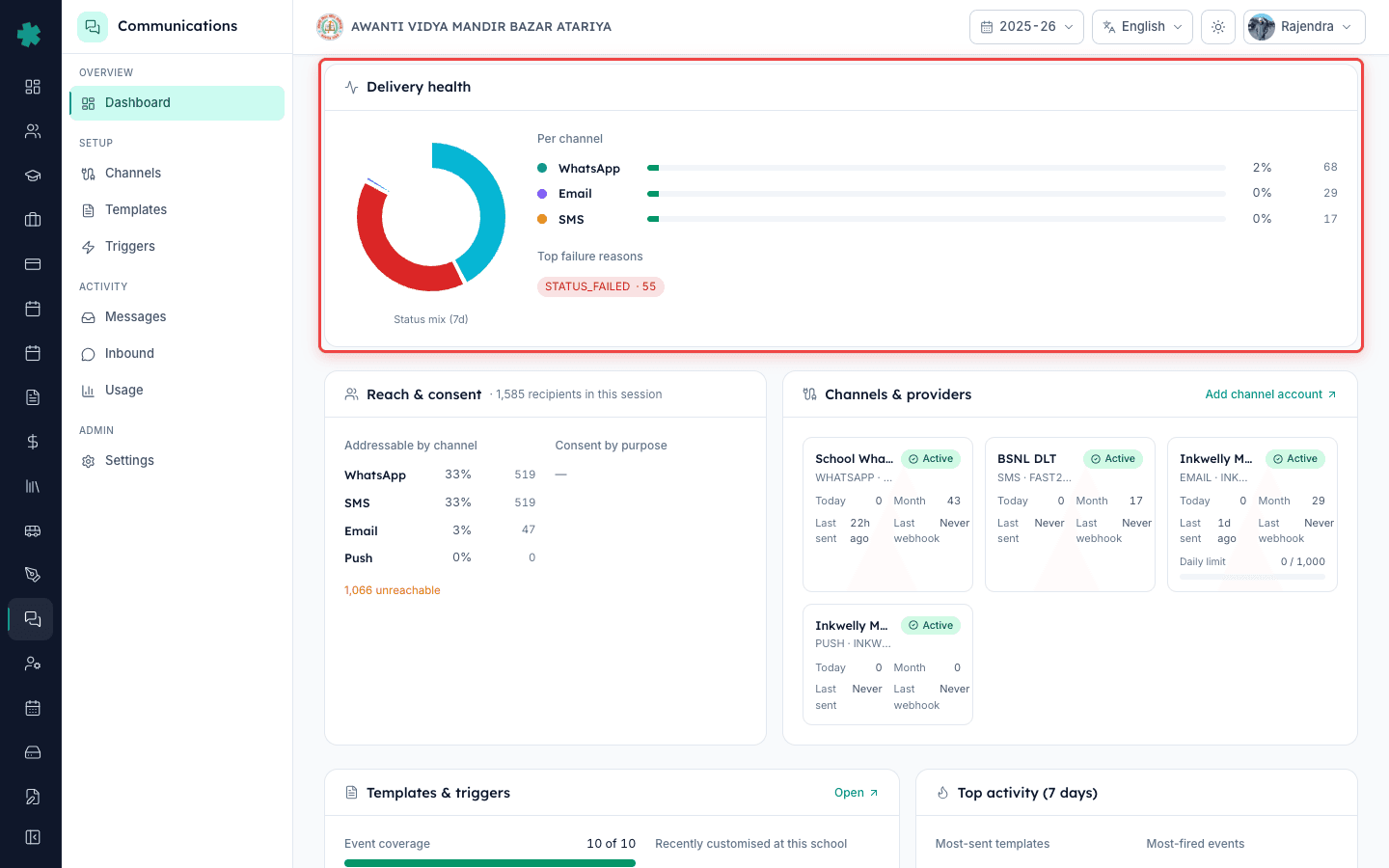
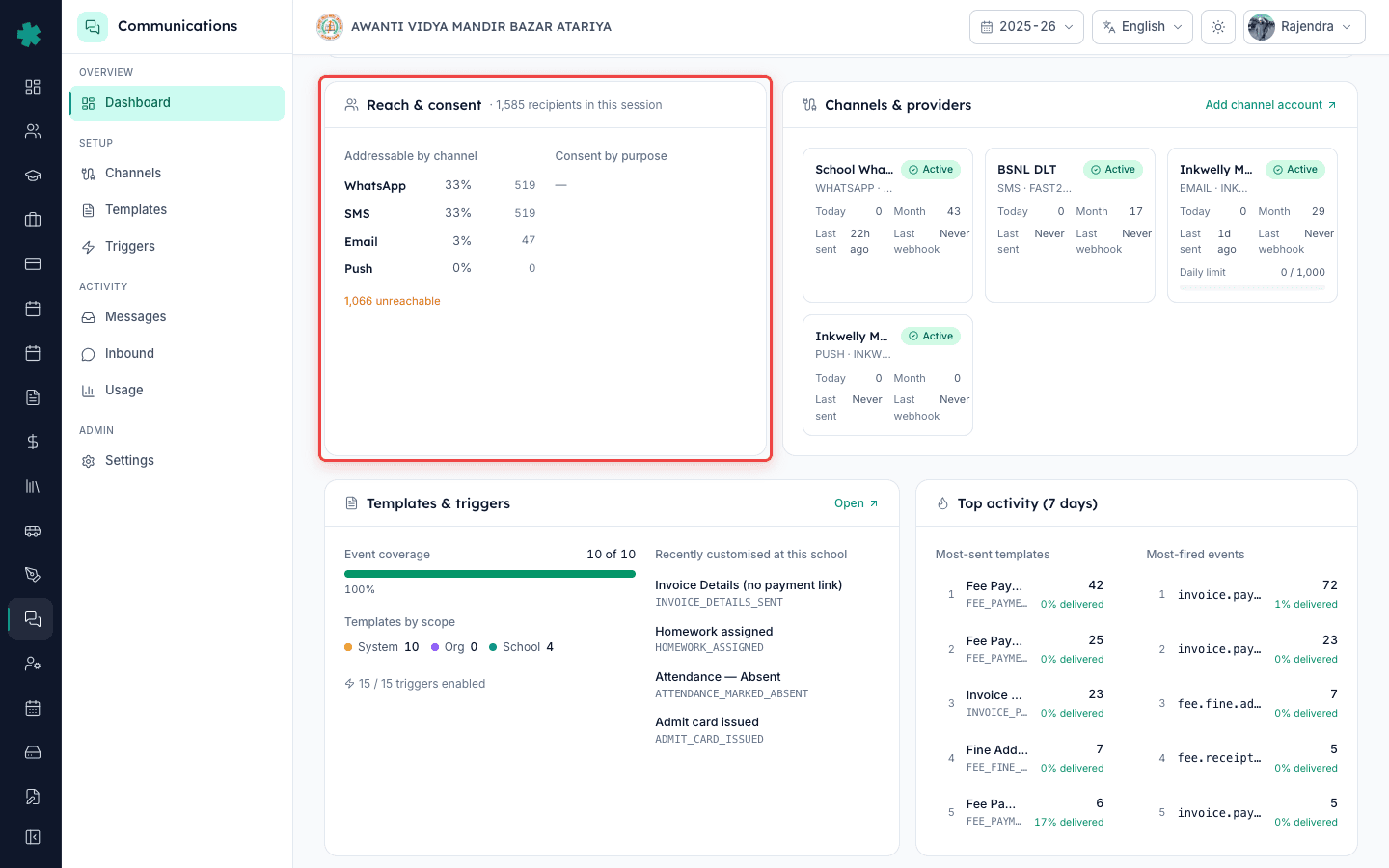
Reach & consent card बताता है कि आपके कितने recipients वास्तव में हर channel पर addressable हैं। यह दिखाता है '1,247 recipients in this session' और उन्हें breakdown करता है — WhatsApp 1,089, SMS 1,201, Email 612, Push 884 — साथ ही एक 'Y unreachable' number उन parents के लिए जिनके पास phone नहीं, format गलत है या opt-out कर चुके हैं। Fee receipts को paper से digital करने से पहले ईमानदार target है 90% WhatsApp reach। 90% से नीचे हैं तो असली fix Communications में नहीं — Students module में जाकर phone column को bulk-edit करना है।
5. Channels & providers और Templates strip देखें
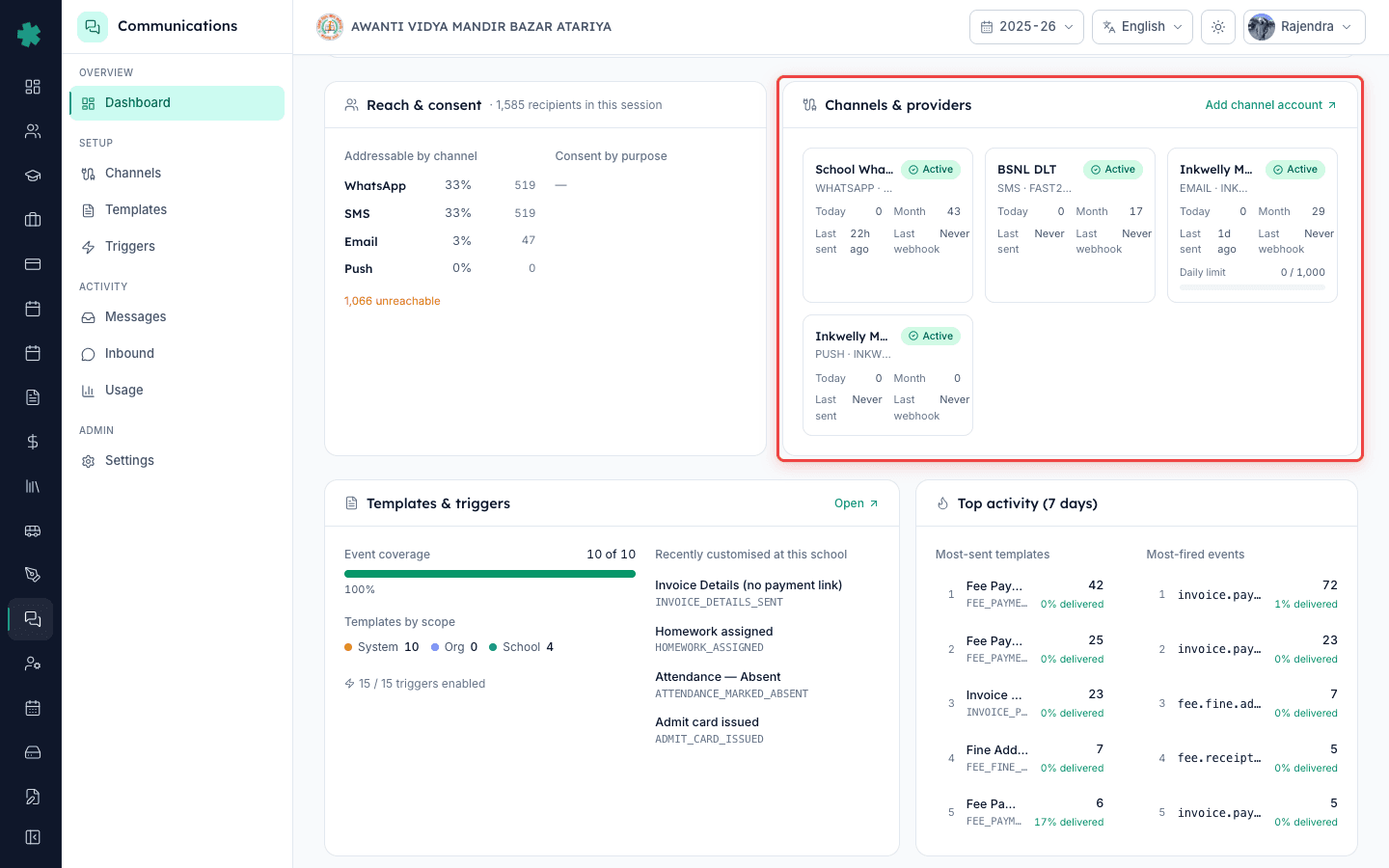
अगली row में Channels & providers strip है — हर tile एक channel है जिसमें उसका provider (WhatsApp के लिए Meta Cloud API, SMS के लिए MSG91 या Fast2SMS, Email के लिए AWS SES, Push के लिए FCM) और एक health dot दिखता है। Grey dot = 'कभी इस्तेमाल नहीं हुआ', amber = 'हाल में failures', red = 'webhook silent' या 'credentials expired'। ठीक बगल में Templates & triggers event coverage दिखाता है — admission, fee, attendance, exam जैसे कितने school events में active template है। नए schools 30–40% से शुरू होकर एक term में 90%+ तक पहुँचते हैं।
6. Top activity देखें — क्या parents तक ज़रूरी बातें पहुँच रही हैं
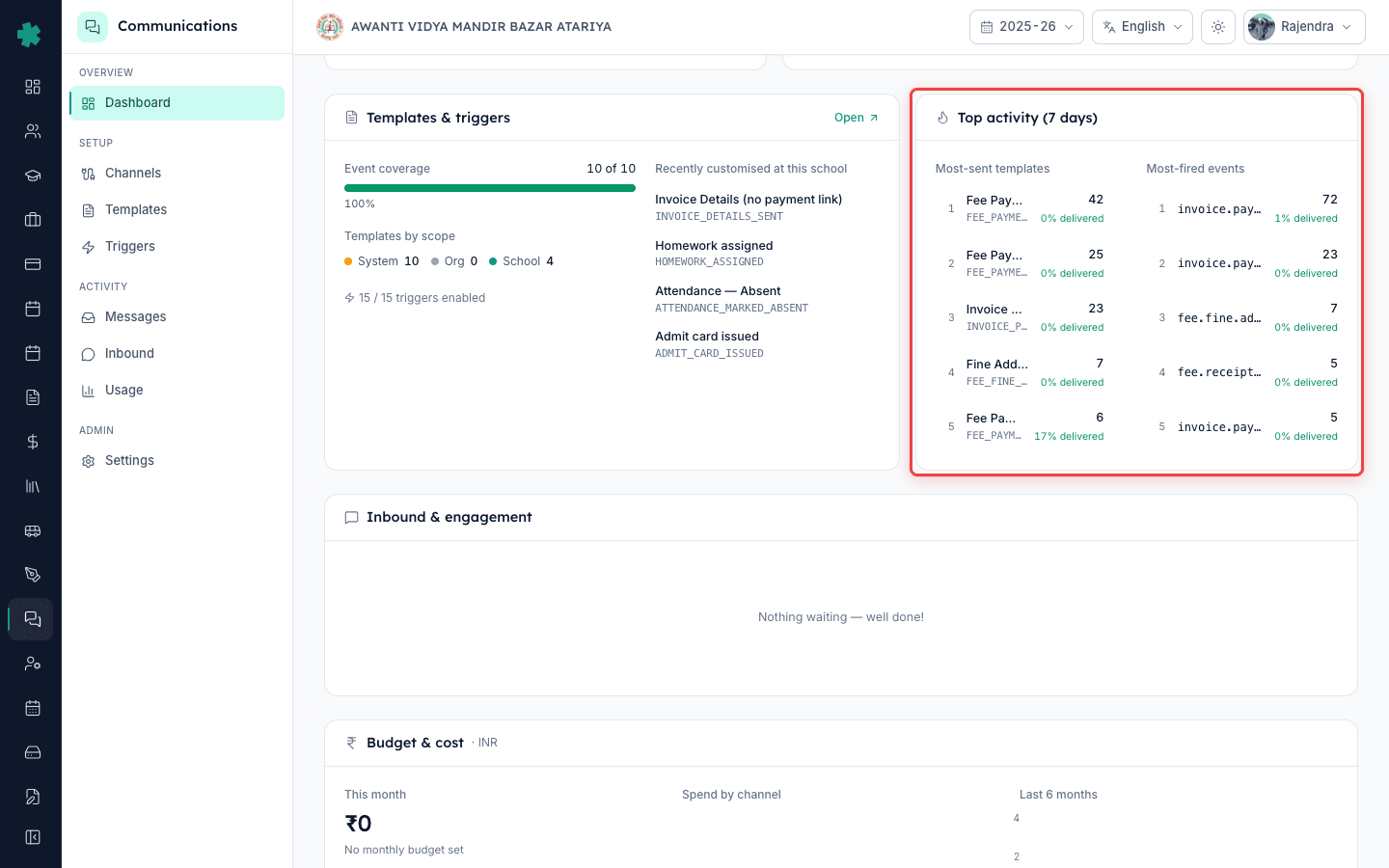
Top activity दो छोटी lists हैं — इस महीने के Most-sent templates (जैसे Fee receipt, Absent today, PTM reminder) और Most-fired events (जैसे payment.success, attendance.absent.marked, homework.assigned)। यह card एक ऐसा सवाल पूछता है जो principals आम तौर पर नहीं पूछते — 'क्या parents को ज़रूरी बातें मिल रही हैं या हम उन्हें noise में डुबा रहे हैं?' अगर 'attendance.absent.marked' महीने में 4,000 बार fire हो रहा है और 'payment.success' सिर्फ 200 बार, तो absent template spam में चला जाएगा और fee receipt कहीं खो जाएगी। एक को कसें, दूसरे को बढ़ाएँ।
7. Tab बंद करने से पहले हर alert resolve करें
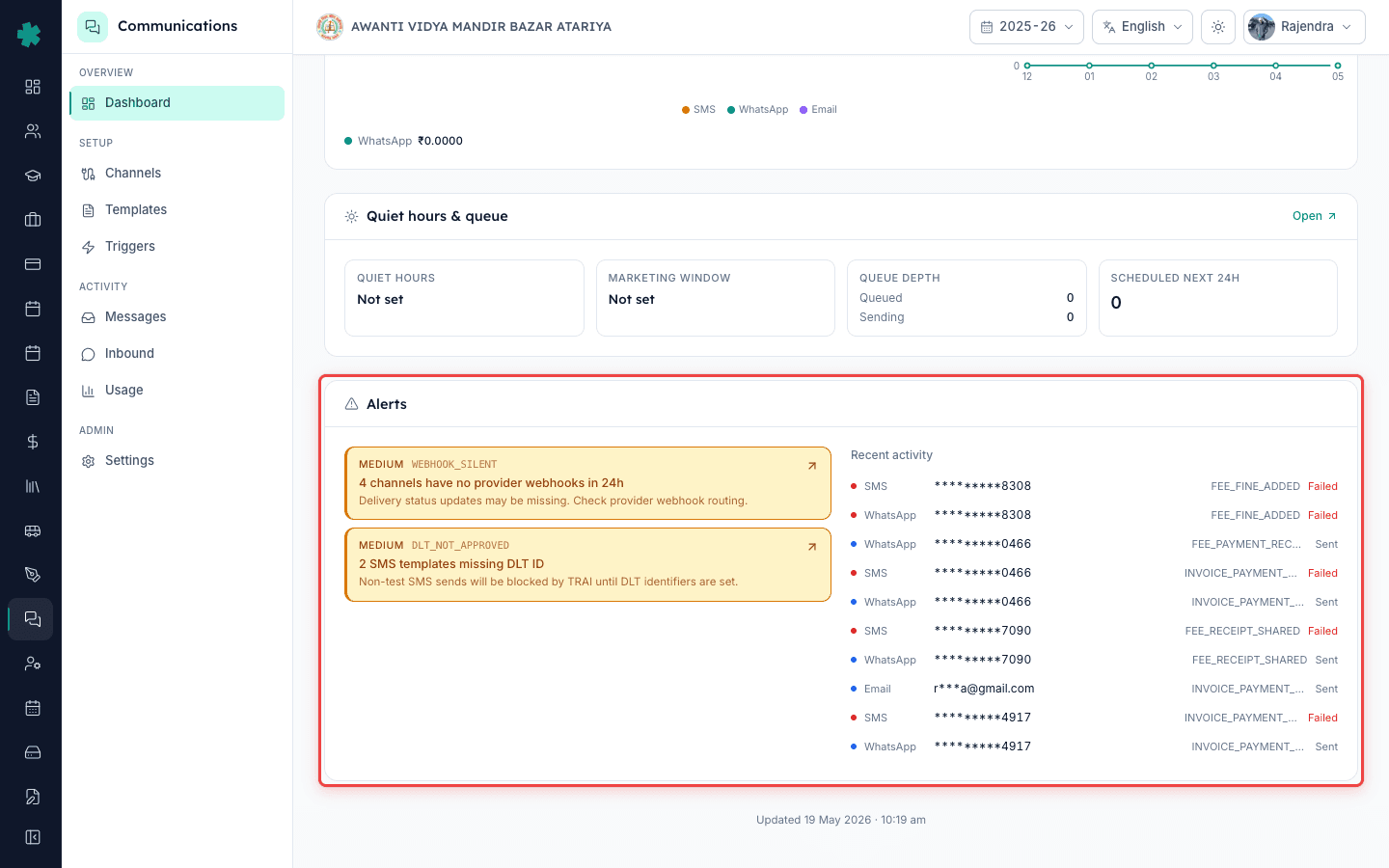
नीचे की Alerts strip non-negotiable है — red banners तभी दिखते हैं जब कुछ चुपचाप टूटा हो। तीन alerts जो आप वाकई देखेंगे — 'Webhook silent for >24h on <channel>' (delivery receipts रुक गए हैं, green ticks झूठ बोल रहे हैं), 'DLT not approved for <template>' (उस template से जाने वाला हर SMS drop हो रहा है) और 'Quiet hours overlap with school timing' (गलत window 10am के messages को रोक रहा है)। Banner पर click करें, dashboard आपको ठीक उसी settings page पर ले जाएगा, fix करें, और पाँच minute में banner clear हो जाएगा।
आगे क्या — Dashboard साफ हो जाए तो दो काम करें। पहला, इस page को Vice-Principal के लिए default landing tile बनाएँ ताकि वो आपसे पहले सुबह की गिरावट पकड़ें — Inkwelly हर role के लिए अलग default landing card pin करने देता है। दूसरा, Reach & consent card खोलकर 90% WhatsApp project शुरू करें — unreachable list export करें, Students module में numbers ठीक करें और हर हफ्ते count फिर से चलाएँ। अधिकांश schools एक term में 60% से 94% reach तक पहुँच जाते हैं, और यही fee receipts व PTM cards को paperless करने का सबसे बड़ा unlock है।
अपने school के असली data पर देखें
25 minute का free demo book करें — हम आपके पिछले 30 दिनों के messages को sandbox में load कर देंगे ताकि आप screenshots नहीं, असली numbers के साथ dashboard पढ़ सकें।
अक्सर पूछे गए सवाल
6 सवालIndian school के लिए healthy WhatsApp delivery rate कितना होना चाहिए?
Inkwelly में healthy 7-day WhatsApp delivery rate 92% या उससे ऊपर है। SMS थोड़ा नीचे 85%+ रहता है क्योंकि DLT rejections और out-of-network numbers होते हैं। Email 98–99% पर चलता है अगर sender domain verified है।
Messages जा रहे हैं लेकिन dashboard 'Webhook silent' क्यों दिखा रहा है?
Messages dispatch तो हो रहे हैं लेकिन provider की delivery receipts Inkwelly तक नहीं आ रहीं, इसलिए green ticks पुराने हैं। आम तौर पर channel account का webhook URL या verify token rotate हुआ होता है। Settings → Channels में जाकर channel re-verify करें।
Principal को Communications dashboard कितनी बार check करना चाहिए?
रोज़ सुबह दो minute काफी है। पहली घंटी से पहले खोलें, कोई red alert clear करें, Delivery rate 7d और Unhandled inbound पर एक नज़र डालें और tab बंद कर दें। रोज़ की आदत हफ्ते की deep-dive से बेहतर है।
क्या Vice-Principal को भी वही dashboard दिखता है जो Principal को दिखता है?
हाँ, अगर IAM के तहत उनके role में Communications module add किया गया है। Inkwelly हर role के लिए dashboard को default landing card के रूप में pin करने देता है ताकि VP सुबह की गिरावट पहले पकड़ें।
Inkwelly dashboard pe daily kitne minute lagte hain check karne mein?
Sirf 2 minutes — subah pehli ghanti se pehle Communications kholo, 4 Hero KPIs dekho, koi red alert ho to click karke fix karo, aur tab band kar do. Roz ki yeh aadat hi sabse bada difference banati hai.
WhatsApp delivery rate kam ho raha hai kya karu?
Pehle Delivery health card khol kar top failure reasons dekho. Agar 'RECIPIENT_NUMBER_INVALID' hai to Students module mein numbers bulk-edit karo. Agar 'TEMPLATE_NOT_APPROVED' hai to Meta Business Manager se template phir se submit karo. Webhook silent ho to Settings → Channels mein re-verify karo.
आपको ये भी पसंद आ सकता है
4 लेखस्रोत व संदर्भ
- TRAI Telecom Commercial Communications Customer Preference Regulations, 2018 · देखा गया 18 May 2026
Delivery health card पर दिखने वाले SMS failure reasons को drive करने वाले DLT registration और template approval नियम।
- Meta WhatsApp Cloud API error codes · देखा गया 18 May 2026
Delivery health failure reasons में दिखने वाले provider error codes (जैसे RECIPIENT_NUMBER_INVALID, TEMPLATE_NOT_APPROVED) का reference।
Inkwelly आपके स्कूल पर — खुद देखें
30 मिनट का डेमो। आपके मौजूदा ERP को आपके साथ खोलकर, कॉल पर ही आपका डेटा Inkwelly में लोड करते हैं। कॉल ख़त्म होते-होते एक तय तारीख़ का गो-लाइव प्लान आपके हाथ में।