Inkwelly में एक invoice के सभी messages कैसे देखें
Inkwelly हर send को उसके trigger source के अनुसार group करता है, इसलिए एक fee invoice के share message, payment reminder, receipt और fine alert एक ही जगह दिखते हैं। यह page उस view को खोलने और parent-support call के लिए delivery status पढ़ने का तरीका बताता है।
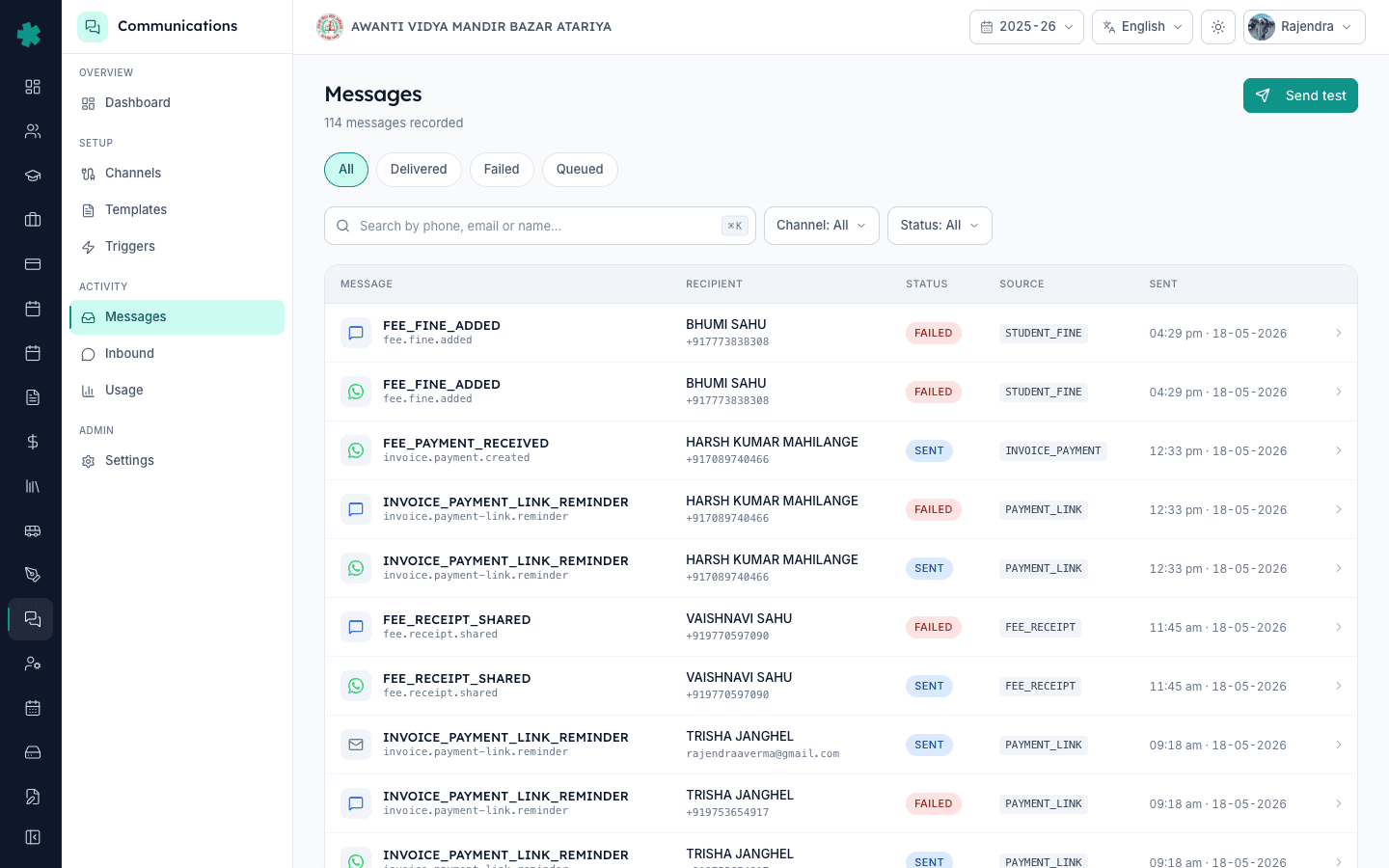
सार — Student Fees खोलें, invoice चुनें, Communications tab पर click करें। उस invoice के लिए Inkwelly ने जो भी WhatsApp, SMS और email भेजे हैं वे क्रम में दिखेंगे — invoice-shared message, payment-link reminder, receipt, fine alert — हर एक के साथ समय, channel, recipient number और delivery status।
ज़्यादातर school ERP messages log को एक लंबी stream की तरह दिखाते हैं — आप scroll करते हैं, phone number से search करते हैं, और उम्मीद करते हैं कि सही send मिल जाए। Inkwelly हर message को उसके causation के अनुसार index करता है, यानी वह system event जिसने उसे trigger किया। एक fee invoice एक causation है। उस invoice के कारण Inkwelly ने जो भी send किया — पहला share, 3-day reminder, payment receipt, fine alert — सब उसी एक invoice के नीचे रहता है। जब कोई parent call करके कहे कि receipt नहीं आई, तो आप invoice खोलकर देख सकते हैं कि क्या भेजा गया, कब, किस number पर, और provider ने delivered status लौटाया या नहीं।
1. Student Fees में invoice खोलें
Left nav से Student Fees पर जाएँ, फिर Invoices। Student का नाम, admission number या invoice number से filter करें। Invoice row पर click करके detail page खोलें। ऊपर amount, due date, paid status और चार tabs दिखेंगे — Details, Payments, Receipt, Communications। यदि invoice पिछले 24 घंटों में बना है और अभी तक कोई message नहीं गया, तो Communications tab दिखेगा लेकिन खाली रहेगा।
2. Communications tab पर switch करें
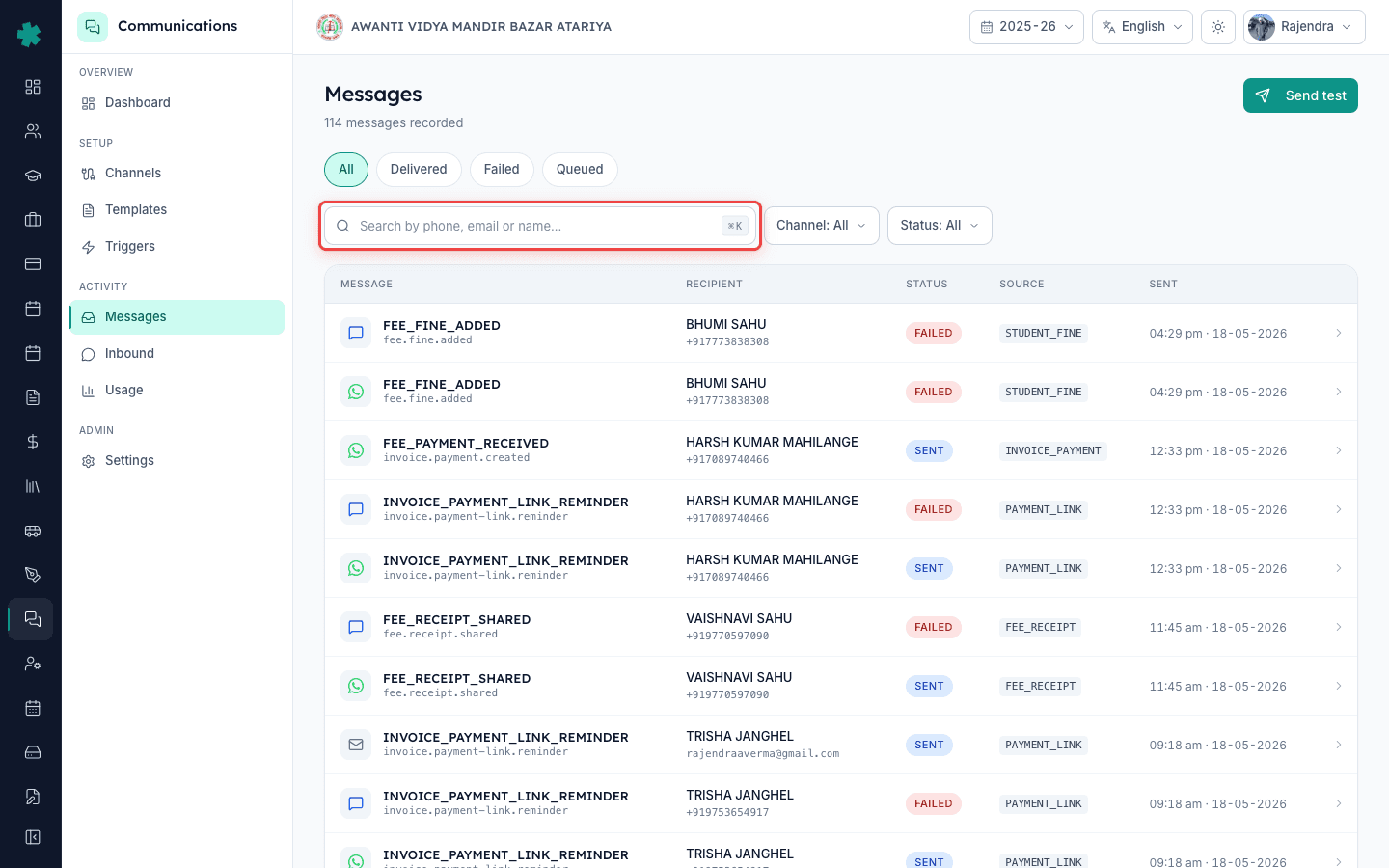
Communications पर click करें। Inkwelly इस invoice से जुड़े सभी sends को नए-पहले order में list करता है। हर row में channel icon (WhatsApp / SMS / Email), trigger name (Invoice Shared, Payment Reminder, Receipt Generated, Fine Applied), recipient number या email, send समय और एक coloured delivery pill दिखती है — sent, delivered, read, failed। Read receipts केवल WhatsApp के लिए तब दिखेंगे जब parent ने अपने end पर read receipts enabled कर रखी हों।
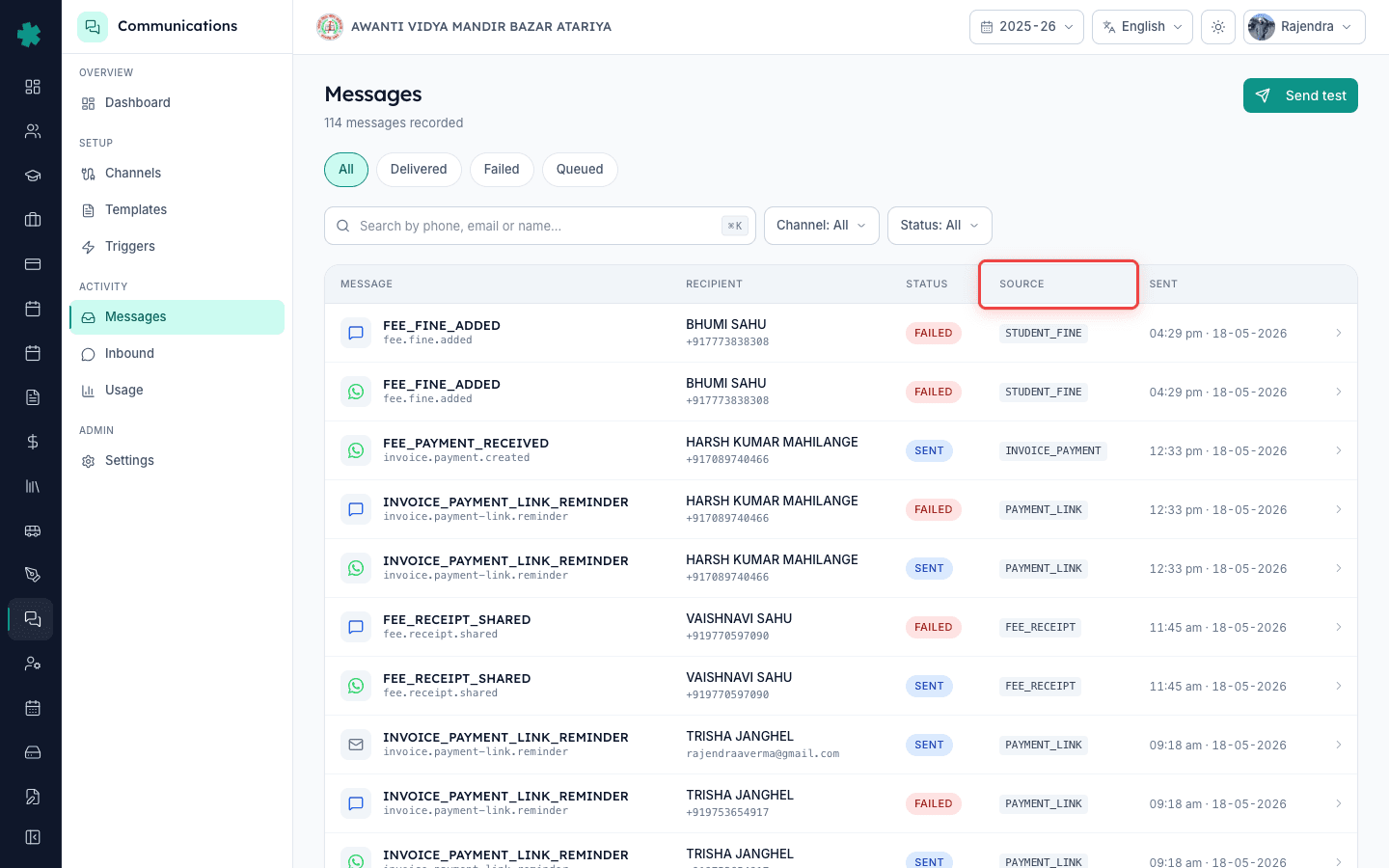
3. Delivery status pill पढ़ें
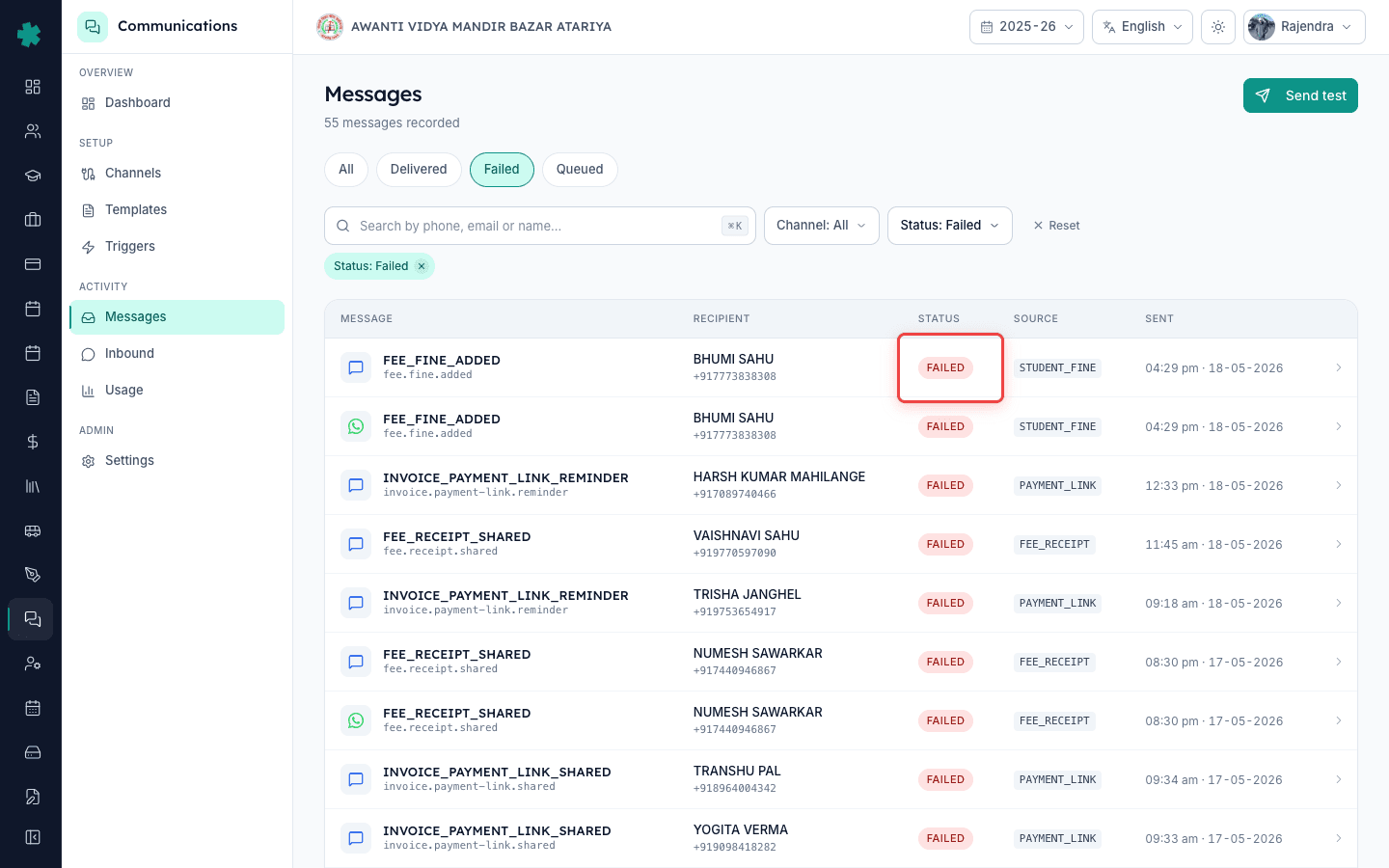
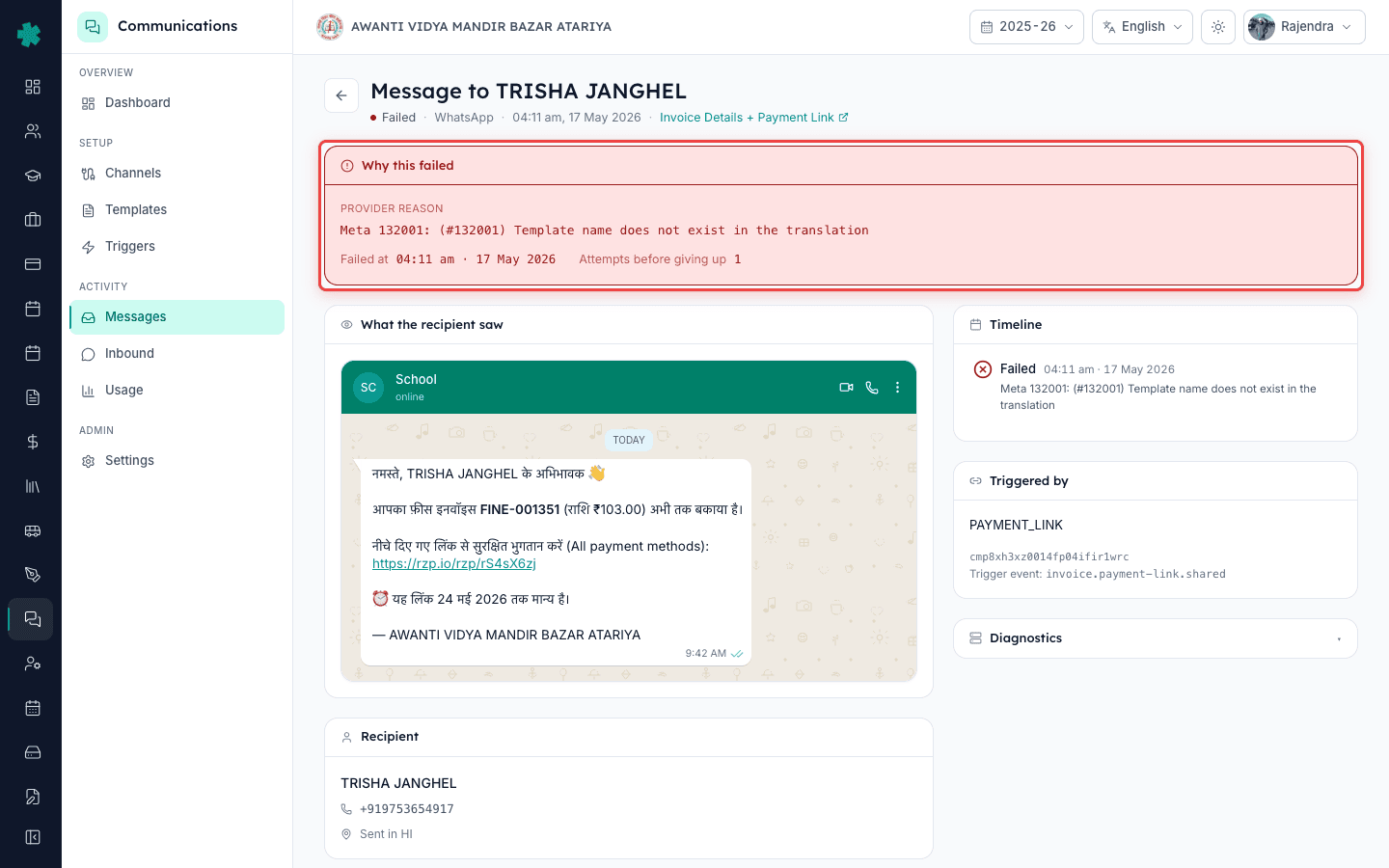
Pill का रंग बताता है कि parent side पर क्या हुआ। Sent (grey) का मतलब है Inkwelly ने message provider को सौंप दिया लेकिन acknowledgement अभी नहीं आया — 60 seconds रुककर refresh करें। Delivered (blue) मतलब provider ने confirm किया कि device को मिल गया। Read (green) केवल WhatsApp के लिए है और मतलब है parent ने chat खोली। Failed (red) मतलब provider ने reject किया — row पर click करके rejection reason देखें (invalid number, opted-out, template not approved)।
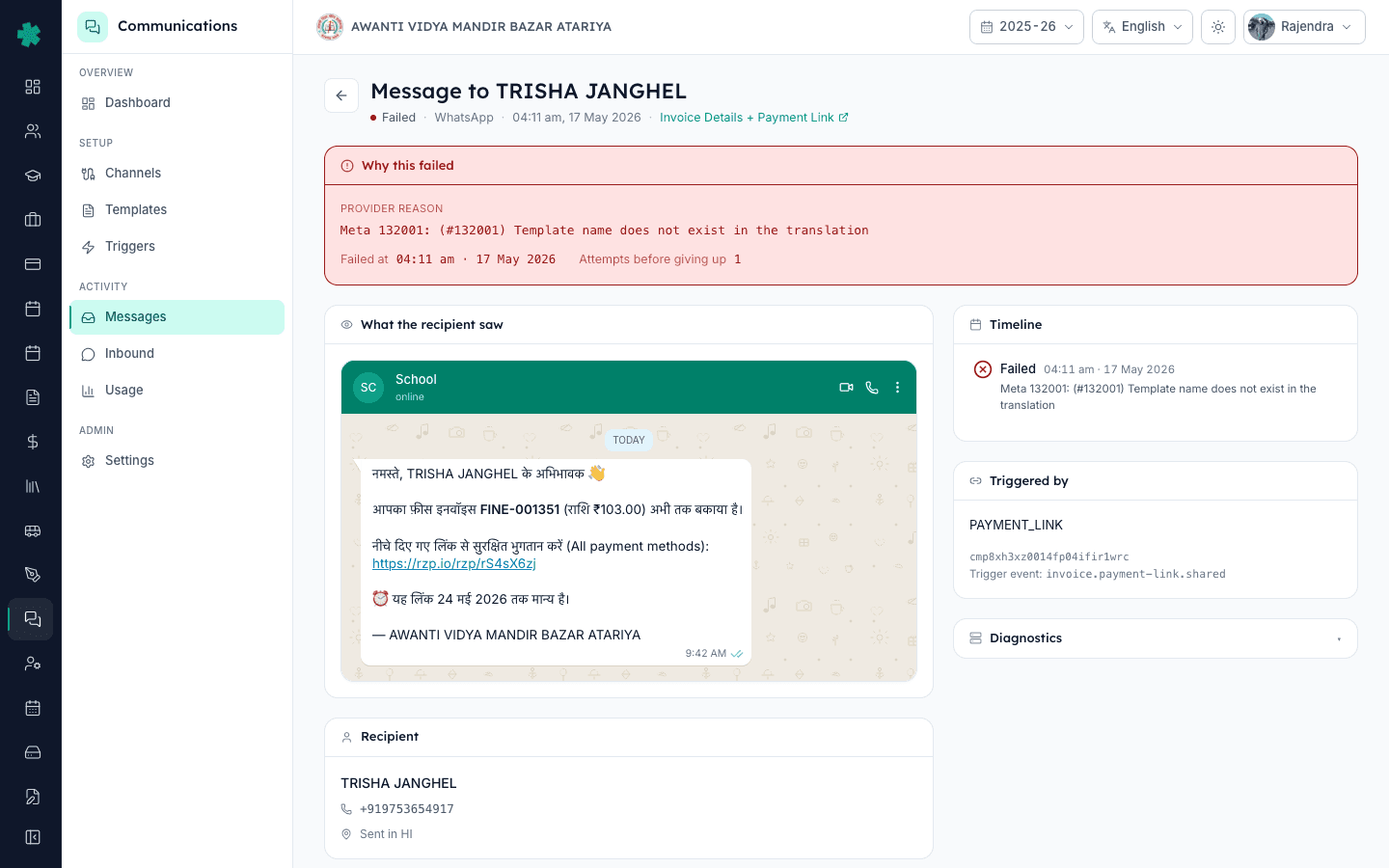
4. एक message को पूरी detail के लिए खोलें
किसी भी row पर click करके expand करें। आपको exact rendered body दिखेगी (parent का नाम, amount और due date के साथ), Inkwelly ने जो template variant use किया, delivering provider (WhatsApp के लिए Meta Cloud, SMS के लिए MSG91 या Fast2SMS, email के लिए Inkwelly SES), provider message ID, और wallet से charged cost। यही वह screen है जिसे आप parent call के समय screen-share करते हैं ताकि साबित हो सके क्या भेजा गया।
5. Messages filter को alternative path के रूप में use करें
यदि आप Communications module से शुरू कर रहे हैं invoice से नहीं, तो Communications, फिर Messages पर जाएँ। Filter panel खोलें और Causation Type को INVOICE_PAYMENT set करें। Causation Reference field में invoice ID या invoice number paste करें। Apply। वही sends की list मिलेगी, बस दूसरी direction से। यह तब use करें जब parent transaction ID या receipt number दे लेकिन student का नाम न दे।
6. एक click में failed message resend करें
यदि कोई row Failed दिखाए तो उस पर hover करें। एक Retry button दिखेगा। Inkwelly वही template उसी recipient को आपके channel rotation के अगले available provider से फिर से send करता है। यदि failure का कारण गलत number था, तो पहले student profile पर parent contact ठीक करें, फिर Retry पर click करें — Inkwelly अपने आप सही number उठा लेगा। Retries fresh send जितना ही cost करते हैं और पुरानी row का status नहीं बदलते, नई row बनती है।
7. लिखित audit trail के लिए log export करें
Communications tab के ऊपर दाईं ओर Export icon पर click करें। Inkwelly एक CSV download करता है जिसमें screen पर दिखने वाले सभी columns होते हैं — channel, trigger, recipient, body preview, status, timestamp, provider, cost। जब parent principal को escalate करे या लिखित सबूत माँगे, तब यह CSV रखें। यह monthly internal audit के लिए भी useful है कि हर class teacher से कितने fee messages गए।
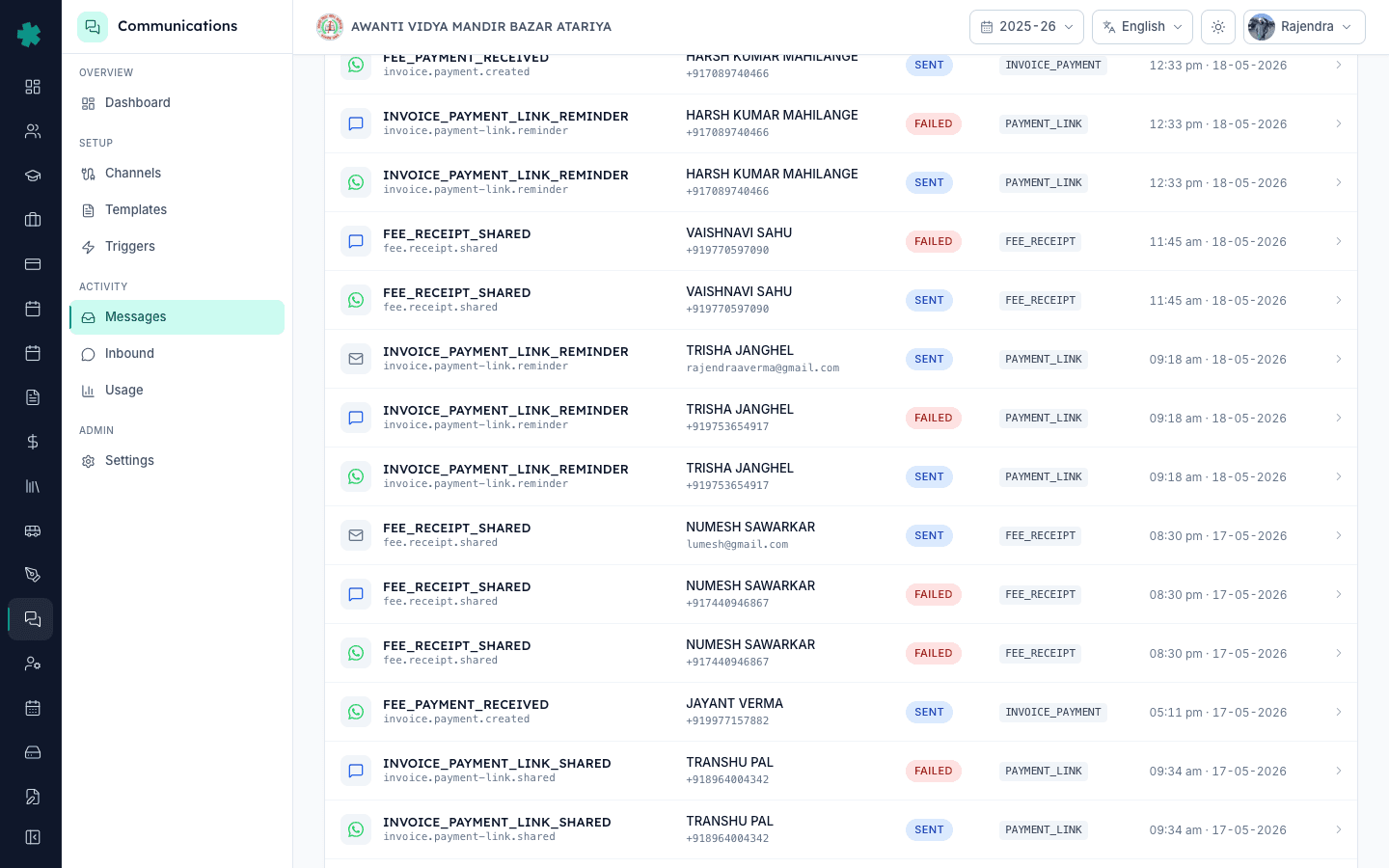
आगे क्या करें। यदि एक के बाद एक कई invoices Failed दिखा रहे हैं, तो channel ही down हो सकता है — alerts troubleshooting page देखें। यदि parent ज़ोर दे कि message नहीं मिला हालाँकि Inkwelly Delivered दिखा रहा है, तो parent ने शायद sender number को WhatsApp पर block कर दिया है; उनसे unblock कराकर manual resend करें। Meta या MSG91 invoice के साथ monthly billing reconciliation के लिए Communications Usage page use करें।
Live demo पर देखें
20 मिनट का walkthrough book करें — हम आपके school के data पर एक असली invoice खोलकर by-causation message view दिखाएँगे।
अक्सर पूछे गए सवाल
6 सवालक्या Communications tab उन messages को दिखाता है जो Inkwelly पर switch करने से पहले भेजे गए थे?
नहीं। यह tab केवल वही sends दिखाता है जो Inkwelly ने fire किए। पुराने ERP, WhatsApp Web से manually, या personal phone से भेजे गए messages यहाँ नहीं दिखेंगे। पुराने messages के लिए पुराने system या parent की chat देखें।
एक invoice पर तीन reminder messages क्यों दिख रहे हैं?
Inkwelly payment-link reminder fixed intervals पर fire करता है — आमतौर पर due date के 3 दिन, 7 दिन और 14 दिन बाद — जब तक invoice paid न हो या written off न मार्क हो। हर fire अलग row के रूप में अपनी delivery status के साथ दिखती है।
Read pill ka exact matlab kya hai?
Sirf WhatsApp ke liye, Read ka matlab hai Meta ne read receipt return kiya — parent ne chat open ki. Agar parent ne apne phone par read receipts disable kar rakhi hain, to aapko kabhi Read nahi dikhega chahe unhone message khol bhi liya ho. SMS aur email kabhi Read nahi dikhate.
Kya parent reply kar sakte hain aur replies kahan dikhti hain?
WhatsApp par connected Business number ke liye haan. Replies Communications, fir Inbox mein dikhti hain, usi parent ke against threaded. Reply invoice ke Communications tab ke andar nahi dikhti — woh tab outbound-only hai.
Messages कितने समय तक store रहते हैं?
हमेशा के लिए, आपके Inkwelly tenant data के हिस्से के रूप में। Body, status, recipient और provider IDs account के पूरे जीवन तक queryable रहते हैं। आपके download किए CSV भी retention से प्रभावित नहीं होते।
क्या failed message retry करने का अलग cost लगता है?
हाँ। हर retry provider के लिए fresh send है — Meta या MSG91 हर attempted delivery पर charge करते हैं, success पर नहीं। Inkwelly retry को नई row के रूप में अपनी cost के साथ दिखाता है ताकि आपका Usage page total सही रहे।
आपको ये भी पसंद आ सकता है
3 लेखस्रोत व संदर्भ
- TRAI TCCCPR 2018 regulation on commercial communication
India regulator framework that requires per-message audit trails for school-to-parent commercial sends.
- Meta WhatsApp Cloud API webhooks documentation
How Meta delivers the sent / delivered / read status events that Inkwelly renders as the delivery pill.
Inkwelly आपके स्कूल पर — खुद देखें
30 मिनट का डेमो। आपके मौजूदा ERP को आपके साथ खोलकर, कॉल पर ही आपका डेटा Inkwelly में लोड करते हैं। कॉल ख़त्म होते-होते एक तय तारीख़ का गो-लाइव प्लान आपके हाथ में।