How to handle a bounced cheque and redeposit it in Inkwelly
For school accountants and principals when the bank returns a parent's fee cheque unpaid — insufficient funds, signature mismatch, account closed or stop-payment. By the end you will have marked the cheque bounced in Inkwelly, restored the invoice balance, recorded any bounce charges, notified the parent, and redeposited the fresh cheque the parent sent in its place.
To handle a bounced cheque in Inkwelly: open Student Fee → Cheques, find the deposited cheque the bank returned, open the kebab menu and click Mark Bounced. Fill the bounce date and reason (for example, Insufficient funds), add any bounce charges the bank levied, and save. Inkwelly reverts the payment, restores the invoice balance, and flips the status pill to BOUNCED. When the parent issues a fresh cheque, open the same row and click Redeposit.
A bounced cheque is a high-stakes correction, not a cosmetic status change. When you click Mark Bounced in Inkwelly, the platform reverses the linked payment, restores the invoice balance to what it was before the cheque was collected, and writes the reversal into the student fee ledger. The Negotiable Instruments Act 1881, section 138, makes a dishonoured cheque drawn for the discharge of any debt punishable with up to two years' imprisonment or a fine of twice the cheque amount — so the school's contemporaneous record (bounce date, reason, bank memo) is the legal proof if the case ever reaches a magistrate. RBI's Cheque Truncation System guidance directs banks to return a bounced cheque within 24 to 48 working hours of the clearing run, so the office usually has the memo in hand the next day.
1. Open the Cheques page
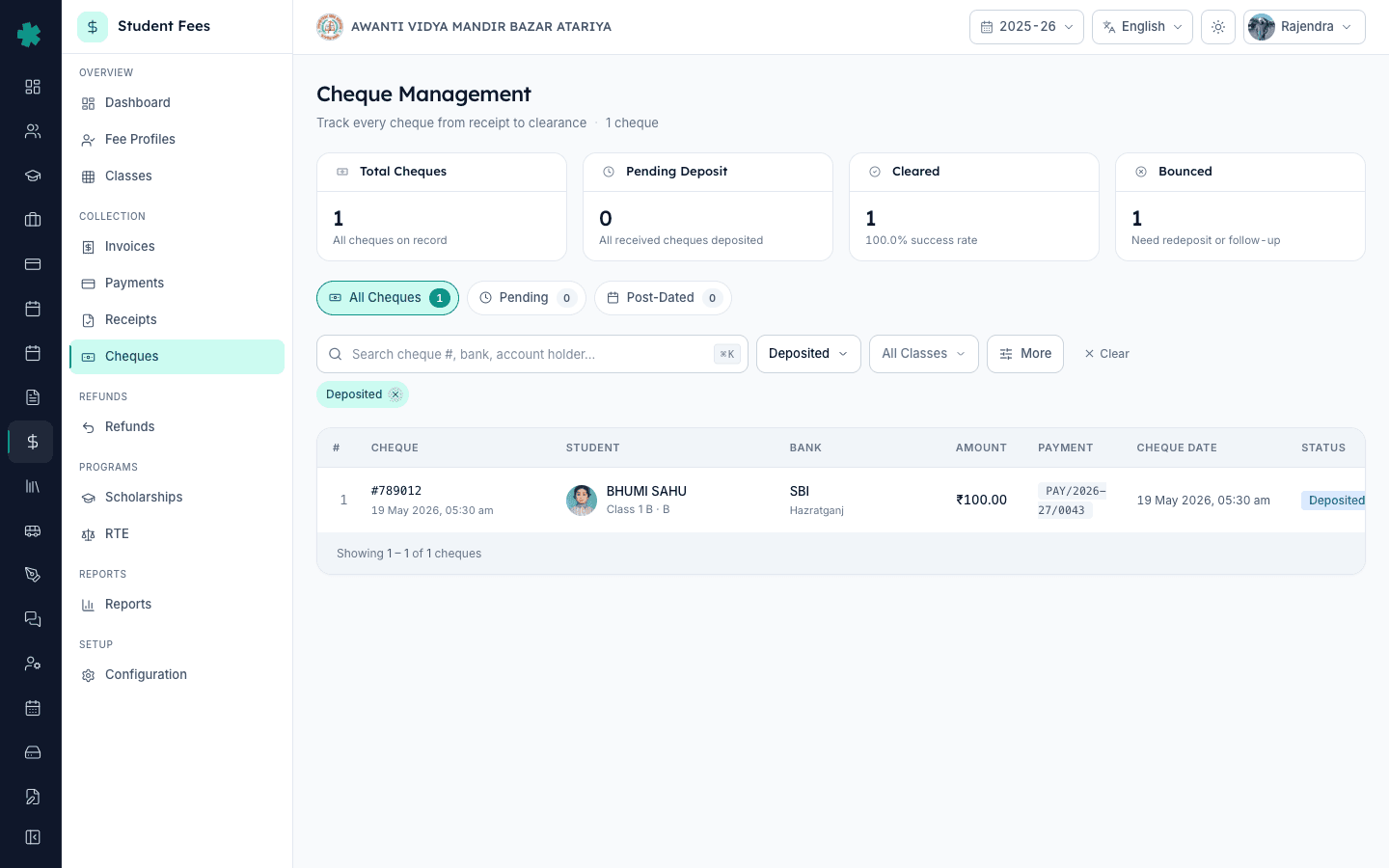
Open Inkwelly → Student Fee. In the left sidebar, under COLLECTION, click Cheques. Inkwelly opens the cheque ledger for the active session with four KPI tiles across the top — Total Cheques, Pending Deposit, Cleared and Bounced — and the All Cheques tab selected by default. The table lists every cheque payment recorded against student invoices this session, with the status pill in the second-to-last column.
2. Find the deposited cheque the bank returned
Use the search bar at the top of the table to type the cheque number from the bank return memo, the student name, or the admission number. Or filter by status using the status dropdown and pick Deposited to narrow the list to every cheque currently with the bank for clearing. Confirm the row matches the memo — cheque number, bank, amount and student should all line up. The row shows the deposited date and the school bank account where it went.
3. Open the row actions and click Mark Bounced
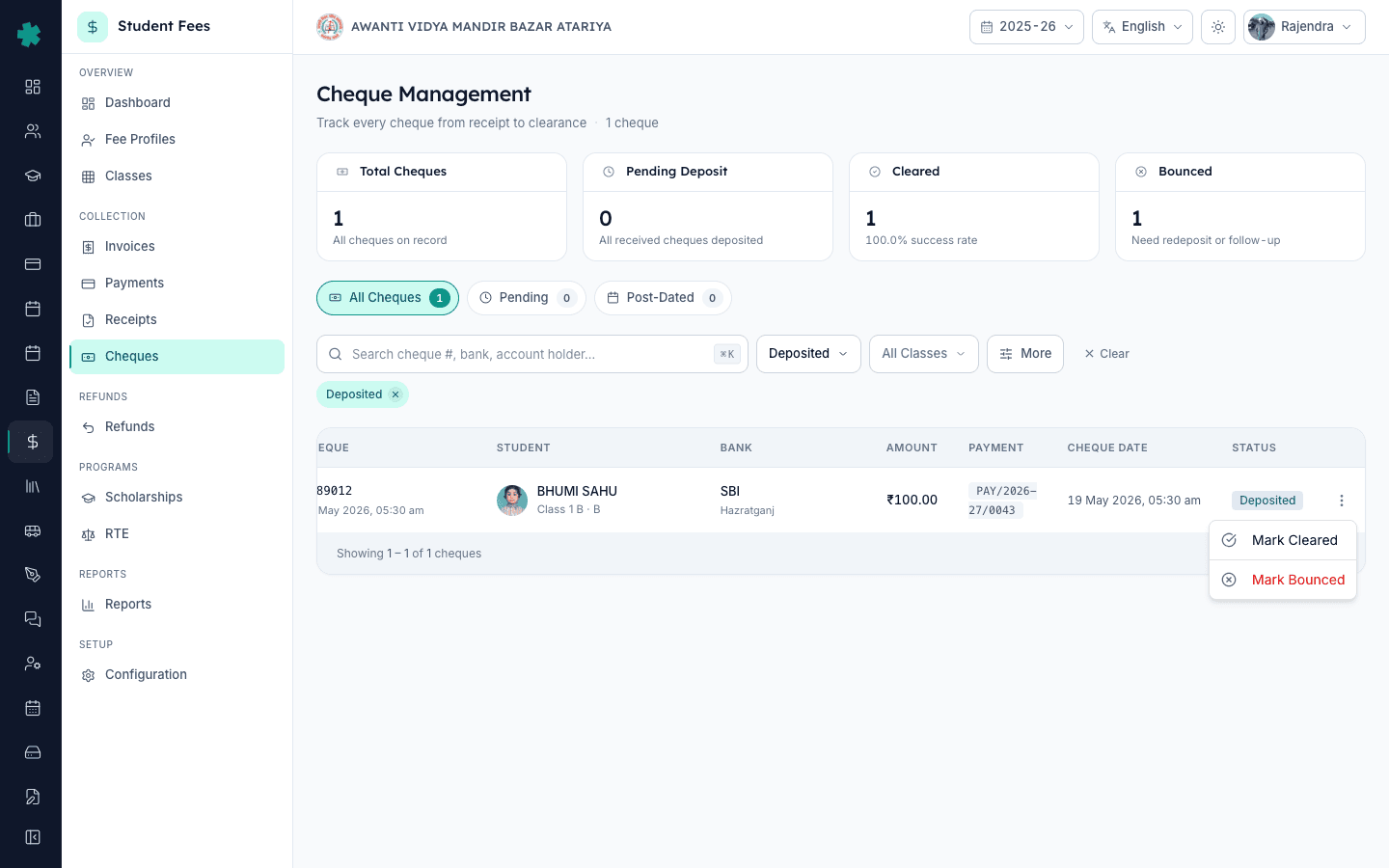
Click the kebab icon at the right edge of the row to open the actions menu. For a cheque in Deposited status, Inkwelly shows three options — Mark Cleared, a divider, and Mark Bounced. Click Mark Bounced. The destructive option is separated from the success option deliberately, so a tired counter clerk does not click the wrong one at the end of a long collection day.
4. Fill the bounce date, reason and charges
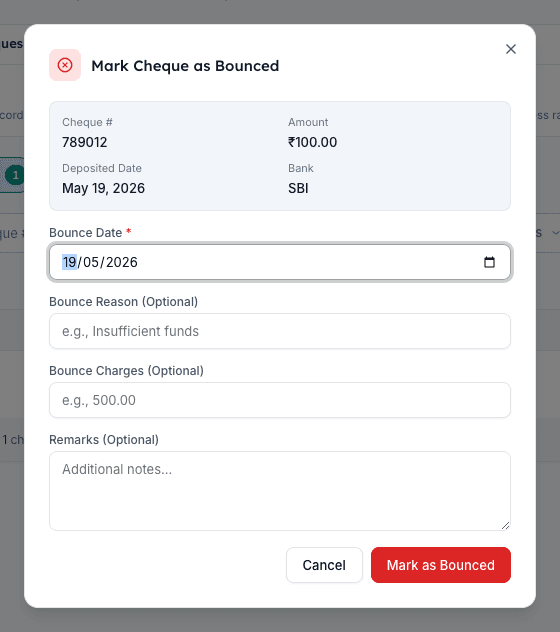
Inkwelly opens the Mark Cheque as Bounced dialog with the cheque preview at the top — number, amount, deposited date and bank — so you can cross-check against the bank memo one last time. Pick the Bounce Date from the date picker; this should match the date stamped on the bank return memo, not today's date. In Bounce Reason, type the exact text from the memo — Insufficient funds is the most common, followed by Signature differs and Account closed. In Bounce Charges, enter the rupee amount the school's bank deducted from your account for the return — leave blank if the school absorbs it. Add a short Remark if useful, then click Mark as Bounced.
5. Confirm Inkwelly has reverted the payment
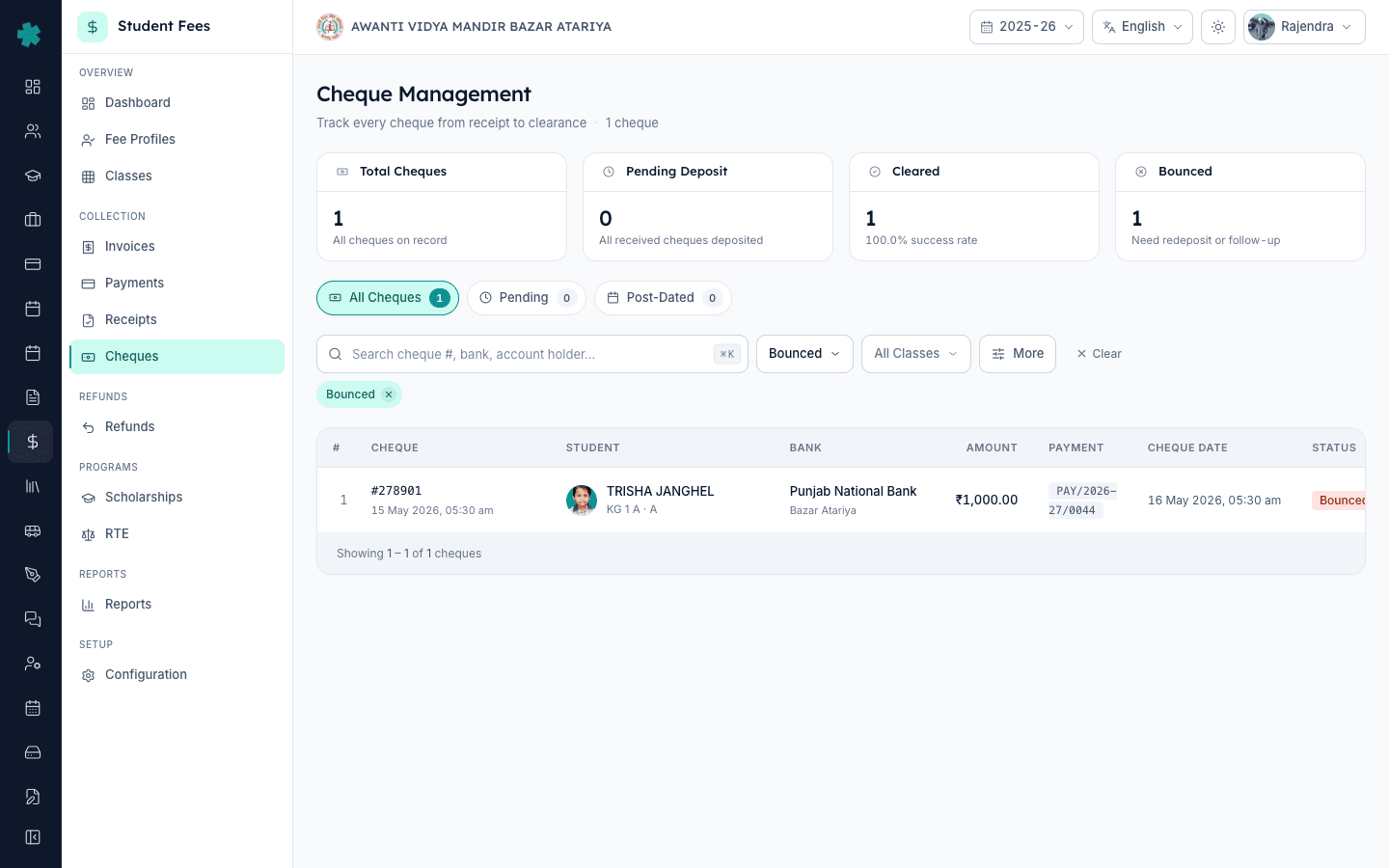
After the dialog closes, Inkwelly shows a confirmation toast and the row's status pill flips to BOUNCED in red. Click into the cheque row and open the linked invoice from the student profile — the invoice balance has gone back up by the cheque amount, and the original receipt issued at deposit time has been voided. Notify the parent over WhatsApp or SMS the same day and ask for a fresh cheque or a UPI transfer; a same-day intimation is what the Negotiable Instruments Act expects as the start of the 30-day window before a section 138 notice can be issued.
6. Record a redeposit when the parent gives a fresh cheque
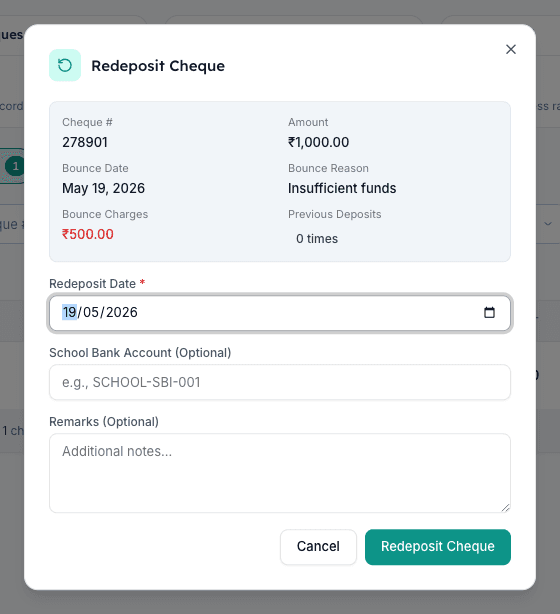
When the parent hands over a replacement cheque, open Student Fee → Cheques again and find the bounced row (filter by status Bounced if needed). Open the kebab menu and click Redeposit. Inkwelly opens the Redeposit Cheque dialog showing the bounce date, reason, charges, and a Previous Deposits counter — if the cheque has already been redeposited twice, Inkwelly shows a warning to consider an alternative payment method instead. Pick the Redeposit Date the new cheque went to the bank, add the school bank account (for example, PNB-50100123456789), and click Redeposit Cheque.
Next steps — if your school plans to charge a flat ₹500 dishonour fee on every bounce, set that up once under How to set up late fee rules (flat, percentage, slab or hybrid) in Inkwelly so the fee posts automatically the next time. If a parent withdraws a child and asks for the cheque-paid amount back, follow How to create a refund policy with time-based slabs in Inkwelly first so the slabbed refund matches the school's published policy. And for the new fresh cheque the parent gave, make sure the next invoice and receipt PDF reflects the school's letterhead — How to customise the invoice template in Inkwelly walks the eight sections of the template editor.
See Inkwelly Student Fees in action
Frequently asked
6 questionsWhat happens to the invoice and receipt when a cheque bounces in Inkwelly?
Inkwelly reverses the linked payment record, voids the receipt that was issued at deposit time, and restores the original invoice balance to its pre-deposit amount. The student fee ledger keeps both the original collection entry and the bounce reversal so the audit trail is preserved. The parent still owes the original installment plus any bounce charges and dishonour fees the school applies. The row stays visible in the Cheques page with a red BOUNCED status pill and the full bounce date, reason and charges on it.
Can the school charge the parent a penalty for a bounced cheque?
Yes. Most CBSE and state-board schools publish a flat dishonour fee (₹250 to ₹500 is typical for Tier-2 cities) in the school's annual fee circular under the cheque-bounce clause. Add it once as a late fee rule in Inkwelly so it posts automatically, or apply it manually as a fine line on the student fee profile. The penalty is separate from any bank charges the school's own bank deducted for processing the return.
How many times can the same cheque be redeposited in Inkwelly?
Inkwelly allows multiple redeposits, but after two redeposits of the same cheque the Redeposit dialog shows a warning suggesting the school consider an alternative payment method. RBI guidance recommends that a cheque returned for Insufficient funds be re-presented only once; for Account closed or Stop payment, do not re-present at all and ask the parent for a UPI or NEFT transfer instead. Inkwelly does not block the action, but the warning keeps tired counter staff from a third round that the bank will reject anyway.
Inkwelly me bounced cheque kaise mark kare?
Student Fee menu kholiye, sidebar me Cheques par jaiye, jis cheque ka bounce hua hai use cheque number ya student name se search kijiye. Row ke daayein side ke kebab (teen dot) icon par click kijiye, phir Mark Bounced dabaiye. Bounce date wahi rakhiye jo bank ke return memo par hai, Bounce Reason me memo ka exact text type kijiye (jaise Insufficient funds), bank ke bounce charges add kijiye, aur Mark as Bounced button dabaiye. Inkwelly payment ko reverse kar dega aur invoice ka balance fir se outstanding dikhayega.
Cheque bounce hone par parent ko kya bhejna chahiye?
Bank se return memo milte hi same day parent ko WhatsApp ya SMS bhej dijiye — Inkwelly receipts page se cheque ki copy aur memo attached message bheja ja sakta hai. Parent se Insufficient funds case me 7 din me fresh cheque ya UPI transfer maangiye. Yeh same-day intimation Negotiable Instruments Act ke section 138 ke 30-din notice window ki shuruaat hai, aur agar baad me legal action lena pade to school ki contemporaneous record sabse strong evidence banta hai.
What is the difference between cancelling a receipt and bouncing a cheque in Inkwelly?
Cancel a receipt when the school office made a recording mistake — wrong student, wrong amount, wrong invoice — and the underlying money never moved through a bank. Bounce a cheque when the parent's bank returned the cheque unpaid after Inkwelly had recorded a successful deposit. Both restore the invoice balance, but only Bounce captures the bank's return memo as legal evidence, applies bounce charges, and lets the parent re-pay against the same row with a Redeposit click instead of a fresh collection entry.
You might also like
4 readsSources & references
- Negotiable Instruments Act 1881 — Section 138 (Dishonour of cheque for insufficiency of funds) · accessed 19 May 2026
Defines the offence and punishment when a cheque drawn for the discharge of any debt is dishonoured by the drawee bank, and prescribes the 30-day notice and 15-day cure period the payee must follow.
- Reserve Bank of India — Master Circular on Customer Service in Banks (cheque return and dishonour handling) · accessed 19 May 2026
Directs banks to return a bounced cheque within 24 to 48 working hours of the clearing run and prescribes the bounce charges schedule and the standard cheque return memo format.
- CBSE Affiliation Bye-Laws — Chapter VII, Fees and Funds · accessed 19 May 2026
Requires CBSE-affiliated schools to publish their fee circular including the cheque-dishonour penalty clause and to maintain dated audit trails of every fee collection, reversal and re-collection.
See Inkwelly on your school
30-minute demo. We open your current ERP with you and load your data into Inkwelly on the call. Dated go-live plan by the end of it.