Student Transfer Management & Transfer Certificate — live for every Indian school. CBSE, ICSE and State Board ready. Bulk exits, legacy import, one-click TC, instant reversal.
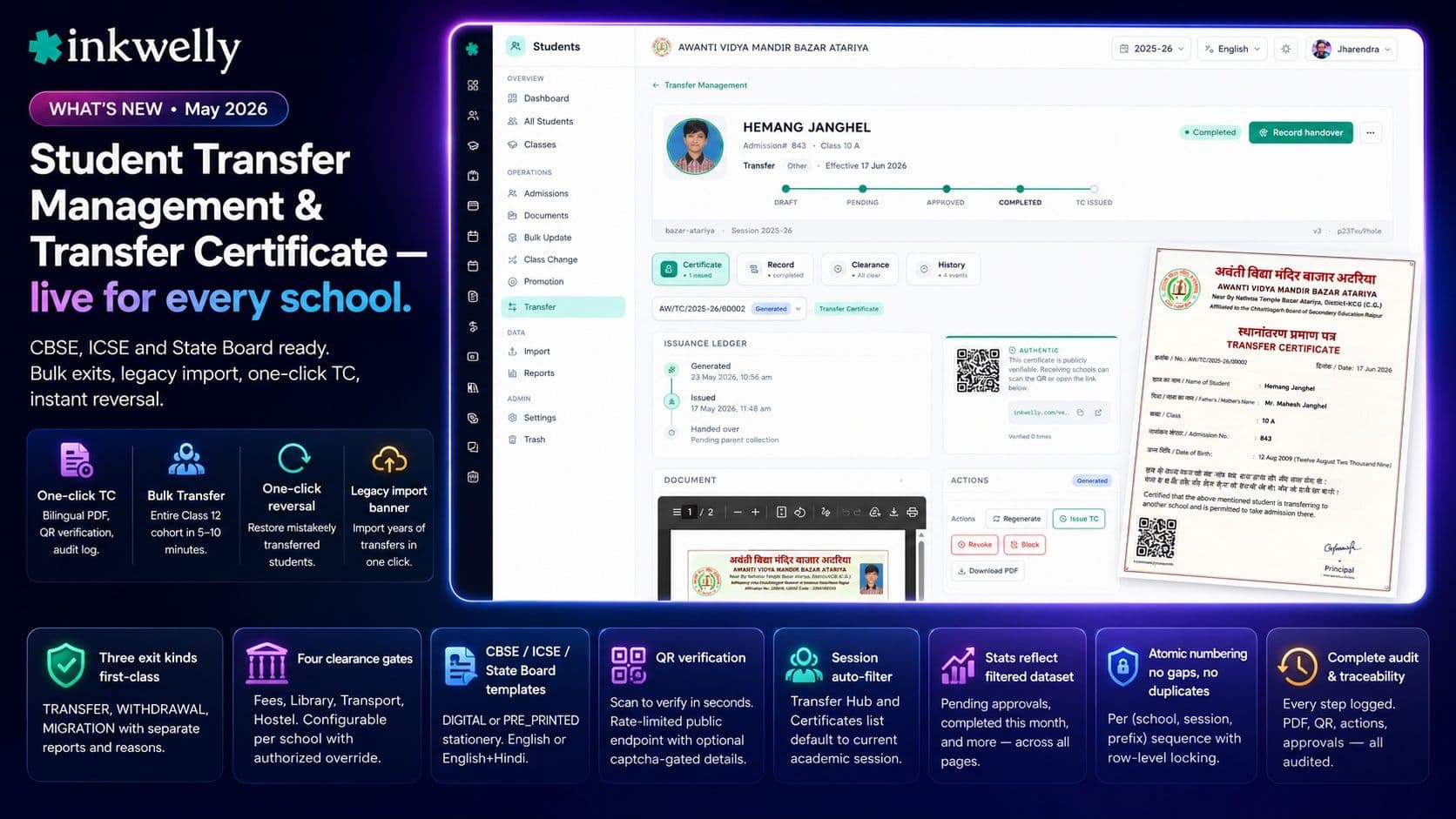
The week every school office dreads — when 30 to 200 students leave with their TC and the parent admission counter at the receiving school is closing in two days — just got a lot smaller. Inkwelly's new Transfer Management hub is live for every school in the Student Information module: structured exits, four configurable clearance gates, one-click Generate-and-Issue Transfer Certificate with atomic numbering and QR verification, end-of-session bulk wizard, legacy import banner for ERP-migration schools, and one-click reversal that works even years after the student left.
What's in this release
The Transfer Management module now sits inside the Student Information module as a dedicated hub. It handles the entire student-exit lifecycle — Transfer (with TC), Withdrawal (no continuing studies), and Migration (post-Class 10 or Class 12 board exit) — with structured reasons, an opt-in approval workflow, and four configurable clearance gates (fees, library, transport, hostel) that probe the student's actual records before completion. Schools running approval-required mode get principal sign-off; schools that don't need approval go straight from Initiate to Completed.
The headline win is one-click Transfer Certificate. From a completed transfer record, click 'Generate & Issue TC' once and Inkwelly allocates the next certificate number atomically (per (school, session, prefix) sequence with row-level locking — no gaps, no duplicates ever, even with concurrent clicks), renders the bilingual PDF using your school's CBSE / ICSE / State Board / Custom template, stamps a QR verification code, and stores it on secure cloud storage. The parent gets a downloadable PDF and a shareable QR; the school gets a complete audit chain.
For session-end, the new Bulk Transfer Wizard handles entire Class 12 cohorts in one batch — phase-1 validation surfaces per-student blockers (pending dues, library books), phase-2 execution transfers and issues TCs in parallel with configurable abort-on-error. For schools migrating from another ERP, the Transfer Hub auto-detects historical transferred students and surfaces a one-click Import banner so years of legacy data shows up in the hub immediately, fully searchable and (importantly) restorable. Mistakenly transferred a student? Click 'Reverse Transfer' and the student is back to ACTIVE in 90 seconds — even if they left two years ago and the standard reversal window expired.
Highlights
- One-click Transfer Certificate — atomic number, bilingual PDF, QR verification, audit log, all in a single click.
- Bulk Transfer Wizard — entire
Class 12cohort transferred and TC-issued in 5–10 minutes with per-student verdicts. - Legacy import banner — schools switching from another ERP import every historical transfer in one click; fully restorable years later.
- One-click reversal — restore a mistakenly transferred student to ACTIVE; TC auto-revoked; legacy records bypass the 30-day window.
- QR verification — receiving schools scan to verify in seconds; rate-limited public endpoint with optional captcha-gated full details.
- Three exit kinds first-class — TRANSFER, WITHDRAWAL, MIGRATION — each with separate reports, distinct reasons.
- Four clearance gates — fees, library, transport, hostel; configurable per school; authorised override with reason.
- CBSE / ICSE / State Board templates — DIGITAL or PRE_PRINTED stationery, English or English+Hindi side-by-side.
- Session auto-filter — Transfer Hub and Certificates list default to the current academic session from the URL.
- Stats reflect filtered dataset — pending approvals, completed this month, etc., across all pages, not just the visible 20.
Read the full feature deep-dive at Student Transfer Management. Want to see it on your school's data? Book a demo and bring last year's TC register — we'll set up your Transfer Settings, configure your CBSE template, run an end-of-session bulk for an entire cohort, and demonstrate the legacy import using your old ERP's data.
Covers features
1 featureFrequently asked
3 questionsIs this available to my school today?
Yes. Transfer Management is live for every school on the Student Information module starting with v2.5.0 (May 2026). No setup required — open the Students sidebar and you'll find a new 'Transfers' section. If you want to enable approval workflow or configure clearance gates, head to Transfer Settings; otherwise the defaults work for most CBSE / ICSE / State Board schools out of the box.
Do I need to migrate my existing transfer records?
No — the Transfer Hub auto-detects students already in TRANSFERRED, WITHDRAWN or MIGRATED status from before this release and surfaces an 'Import N legacy transfers' banner on first visit. One click runs the bulk-backfill: every legacy student gets a synthesised transfer record with isLegacy=true, the original leaving date preserved, the exit reason mapped from your existing data. The records become searchable, audit-logged, and restorable immediately.
Can I issue Transfer Certificates in Hindi?
Yes — every TC template supports English-only or English+Hindi side-by-side rendering. Configure per template via the TC Designer. The PDF generator resolves the school's preferred language at issue time. Numbers stay in Latin digits; brand names like CBSE, ICSE, UP Board stay in English script even on the Hindi version, per Indian schooling convention.
You might also like
1 readsSee Inkwelly on your school
30-minute demo. We open your current ERP with you and load your data into Inkwelly on the call. Dated go-live plan by the end of it.