The best school–parent communication app is the one parents actually read read
A circular goes out, half the parents miss it, and the office spends Monday fielding calls about a notice that was sent on Friday. This guide cuts through the noise — WhatsApp versus in-app versus SMS, what read receipts really tell you, why Hindi reach matters, and why a communication tool wired into attendance, fees and homework beats a standalone chat app.
It is 8:40 AM and the principal of a 900-student school in Lucknow has just decided to close early because of heavy rain. The office assistant types the notice, forwards it to fourteen WhatsApp groups, and then spends the next two hours answering calls from the parents who never saw it — buried under good-morning forwards and a Diwali sticker someone posted in the middle of the thread. By the time the message reaches everyone, some children are already on the bus. This is the daily reality of school-parent communication in India: the message exists, but the school has no idea who actually received it.
The best school-parent communication app is not the one with the most features. It is the one parents actually open, in the language they read, with proof of who saw what. Everything else — chat threads, polls, fancy dashboards — is secondary to that single test.
What a school-parent communication app actually needs to do
Most schools already "communicate" — over WhatsApp groups, SMS blasts, diary notes and the occasional phone call. The problem is not the volume of messages; it is that none of those channels tell the school whether the parent received the message, in a language they understand, with a record the school can stand behind later. A real communication app fixes that. Here is what separates a genuine tool from a glorified group chat.
Core requirements for an Indian school
- Delivery and read confirmation: The school must see who received and opened each message. A WhatsApp group shows no read status for circulars; a real app shows a delivered/read funnel per message, so the office knows exactly who to follow up with.
- Targeted and broadcast messaging: Send to the whole school, one class, one section, transport route, or a single parent — without creating yet another group. Broadcast for circulars, targeted for fee dues, one-to-one for a behaviour note.
- Hindi and regional-language reach: The same notice should go out in Hindi or the regional language, not just English. In a UP or Bihar state-board school, an English-only circular loses half its audience.
- Two-way where it helps, one-way where it doesn't: Parents should be able to reply to a teacher's private message, but a fee circular or a holiday notice should be one-way — no 200-parent thread descending into chaos.
- Channel fallback: If a parent has no smartphone, the alert should fall back to SMS automatically. One message, multiple channels, no parent left out.
- Privacy by default: A parent's question about their child should not be visible to 45 other parents. Teacher-parent chat must be private; admin broadcasts should not expose every parent's phone number.
- A permanent, searchable record: Every message logged with a timestamp, so a fee or discipline dispute months later has evidence — not a 'we definitely sent it' from someone's personal phone.
- Tied to school data: Attendance absences, fee dues, homework and exam results should trigger messages automatically, addressed to the right parent with the child's name and the exact detail — no manual typing.
The India bar: what separates a great app from a generic one
A communication app built for an American school district assumes every parent has a smartphone, checks email, and reads English. Indian conditions are different, and that difference is the whole game. India has over 500 million WhatsApp users, and for a large share of parents WhatsApp is the only app they open daily — not email, not a school-branded app they have to download and remember a password for. A great app meets parents where they already are, in the language they read, and degrades gracefully to SMS for the family that still uses a feature phone. A generic app forces every parent through a download-and-login wall and then wonders why engagement is 30%.
WhatsApp vs in-app vs SMS: how to actually choose
The real decision is not 'which one' — it is which channel for which message. Here is the buyer framework that holds up in an Indian school:
-
Use WhatsApp as the primary channel for anything urgent or important. Absence alerts, fee dues, early-closure notices, exam schedules — these need to be seen today, and WhatsApp is the one app parents open many times a day. Insist on the official WhatsApp Business API (via a Meta-approved partner), not someone's personal number or an unofficial workaround that gets the school's number banned.
-
Use SMS as the fallback, never the primary. SMS is buried under OTPs and spam and parents distrust links in it. But it reaches the feature-phone parent and the one who hasn't opened WhatsApp. A good system sends SMS automatically only when WhatsApp can't deliver.
-
Use the in-app feed for the permanent record and two-way chat. The app (inside the school's parent app) is where the full history lives, where a parent replies privately to a teacher, and where homework, results and the fee ledger sit. It is the system of record — WhatsApp is the notification layer on top of it.
-
Match the direction to the message. Broadcast circulars are one-way. Fee dues are targeted and one-way. A teacher's note about a child is one-to-one and two-way. Never put a one-way circular into a channel where 200 parents can reply.
-
Demand read receipts on the channel that matters. For a fee circular or an exam-date notice, the school must be able to pull a list of who has not yet opened it and follow up with just them — instead of re-broadcasting to everyone and annoying the parents who already read it.
The standalone chat app trap
The options you will run into split into two camps. There are standalone parent-communication and chat apps — the kinds of names that come up include Hello Parent, Teno and various WhatsApp-CRM tools — and there are the communication modules built into full school ERPs, where names you will encounter include Teachmint, Vidyalaya, Fedena, Entab (CampusCare), MyClassboard, Campus 365 and Edunext. The standalone chat app is often cheaper and feels modern, but it lives apart from the school's actual data. It can send a fee reminder, but it doesn't know the amount, the installment or the student — someone has to type it. It can chase an absentee, but the absence was marked in a different system. You end up maintaining two tools and copying data between them by hand.
Pricing reality in 2026
What a school should expect to pay:
As a module inside a full school ERP: Usually bundled at no extra software charge. For a 500-1,000 student school paying ₹50,000-₹1,50,000/year for the whole ERP, communication is one of 8-12 included modules.
Standalone communication app: ₹10,000-₹40,000/year depending on student count, often priced per student.
WhatsApp Business API message costs (the line item everyone forgets): Meta charges roughly ₹0.30-₹0.80 per template message in India, and this is separate from the software fee. A 600-student school sending daily absence alerts plus weekly circulars can use 15,000-25,000 messages a year — that's ₹5,000-₹18,000/year in pure messaging charges. Always confirm whether your vendor bundles a message pack or bills it on top. This is the most common year-two surprise on a school's invoice.
Where Inkwelly fits
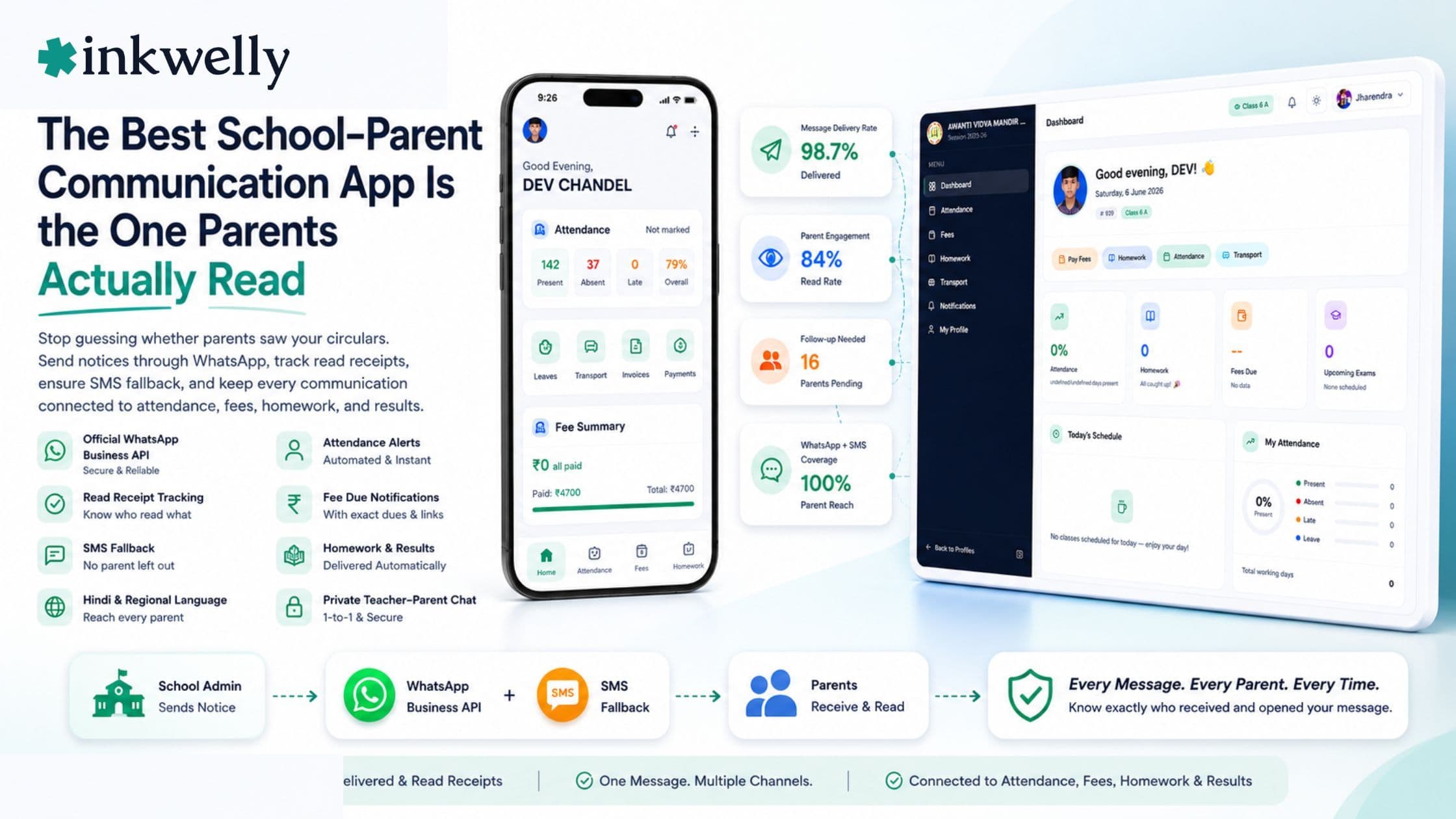
Inkwelly treats communication as the layer that ties the whole school together, not a bolt-on chat box. Notices, fee dues and absence alerts go out over the official WhatsApp Business API with SMS fallback, and the Communications module shows a delivered-and-read funnel per message so the office follows up only with parents who missed it. Because it is one system, an absence marked in Student Attendance triggers the parent alert automatically, a WhatsApp fee link carries the exact dues, and homework and exam results reach parents without anyone retyping a thing. Messages can go out in Hindi or the regional language, and every one is logged with a timestamp the school can stand behind.
“The school never had a communication problem. It had a 'who actually read this' problem — and you cannot solve that inside a WhatsApp group that shows no read status for the one circular that mattered.”
How to decide in two weeks
Run a small pilot before you commit. Pick one channel question — say, fee dues for two sections — and send them through the candidate app on the official WhatsApp API. Watch the read-receipt report, time how long it takes to identify and re-notify only the parents who missed it, and check whether the message pulled the right student and amount automatically or whether someone had to type it. The app that wins is the one where parents open the message, the school can prove they did, and the data flowed in on its own.
See WhatsApp circulars, read receipts and absence alerts in Inkwelly
Frequently asked
8 questionsWhat is the best school-parent communication app in India in 2026?
The best app is the one parents actually open, in the language they read, with proof of who saw each message. In practice that means WhatsApp (via the official WhatsApp Business API) as the primary channel, SMS as automatic fallback, and an in-app feed for the permanent record and two-way chat. A communication tool wired into attendance, fees and homework beats a standalone chat app, because messages send themselves with the right student and amount instead of being typed by hand.
Is WhatsApp or a dedicated school app better for parent communication?
Use both, for different jobs. WhatsApp is best for urgent, must-be-seen messages because it is the one app nearly every Indian parent opens daily. The dedicated app is best as the system of record — full message history, private teacher-parent chat, homework, results and the fee ledger. The app sends; WhatsApp notifies. Relying on WhatsApp groups alone fails past a few hundred students because there is no read status, no privacy and no targeting.
Why are WhatsApp groups a bad way for schools to communicate with parents?
WhatsApp groups have no read confirmation for circulars, no privacy (a parent's question is visible to 45 others), no targeting (you can't message just the fee defaulters), and no permanent searchable record tied to each child. Past 400-500 students they create more work than they save. A proper communication app fixes all four — read receipts, private chat, targeted sends and a timestamped log.
How much does a school-parent communication app cost in India?
As a module inside a full school ERP it is usually bundled — part of a ₹50,000-₹1,50,000/year fee for a 500-1,000 student school. A standalone app runs ₹10,000-₹40,000/year. Separately, WhatsApp Business API messages cost roughly ₹0.30-₹0.80 each, which can add ₹5,000-₹18,000/year for an active school. Always confirm whether the message pack is bundled or billed on top.
Do school communication apps work in Hindi and regional languages?
The good ones do, and for Tier-2 and Tier-3 schools it is essential. An English-only circular loses a large share of UP, Bihar, MP and Rajasthan state-board parents. Look for an app that can send the same notice in Hindi or the regional language and that supports a Hindi parent app, not just English.
What are read receipts and why do they matter for school circulars?
A read receipt tells the school whether a parent received and opened a message. They matter because a school sends hundreds of circulars a year; with read receipts the office can pull a list of who missed the fee notice and follow up with only them, instead of re-broadcasting to everyone. Without them, the school is guessing — and has no evidence when a parent later claims they never got the message.
Should a parent communication app be separate from the school ERP?
It is better integrated. A standalone chat app can send a fee reminder but does not know the amount, installment or student, so staff retype it. When communication lives inside the ERP, an absence marked in attendance, a fee due, a homework post or an exam result triggers the right message automatically, addressed to the right parent. One system means no copying data between two tools.
What should I check in a demo of a school communication app?
Five things: that WhatsApp uses the official WhatsApp Business API (not a personal number); that the read-receipt report is a real working screen, not a slide; that you can send targeted messages (one class, one route, one parent) without a new group; that messages go out in Hindi or the regional language; and that an absence, fee due or homework post triggers a message automatically with the correct student and detail filled in.
You might also like
3 readsSee Inkwelly on your school
30-minute demo. We open your current ERP with you and load your data into Inkwelly on the call. Dated go-live plan by the end of it.