Best school ERP for a group of schools or multi-branch trust group
Running five branches on five copies of single-school software is not a group system — it is five problems. This guide is for trusts and chains: what a real multi-branch ERP must do, where single-school products fitted with a "multi-branch" checkbox break, and the demo test that separates the two.
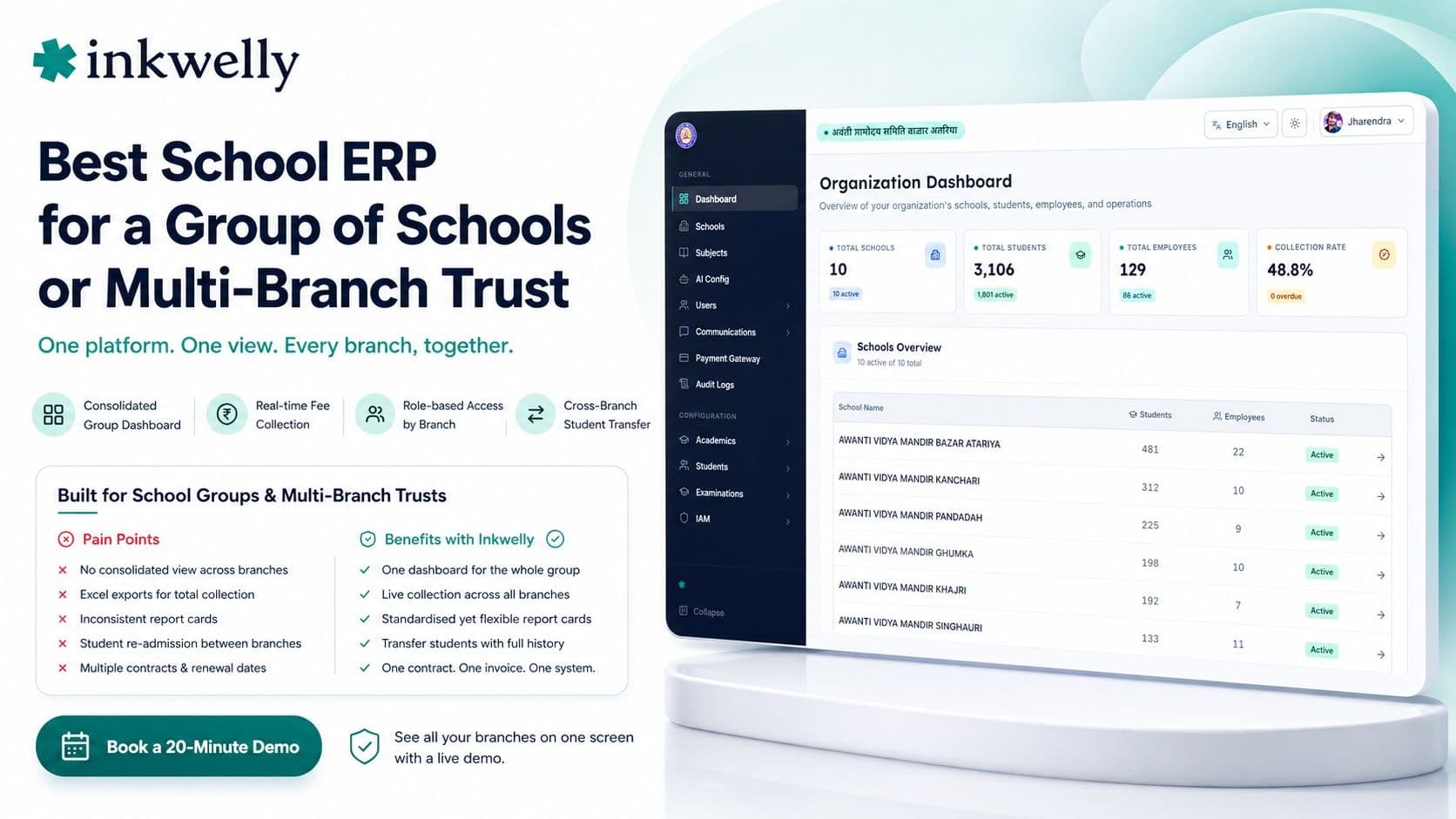
A trust runs four branches across a district. Each one bought the same popular ERP separately, so on paper they are "on one system". Then the chairman asks a simple question at the August board meeting: what is total fee collection across all four branches today, and which branch is lagging? Nobody can answer in under a day. Each branch exports its own sheet, someone stitches them in Excel, and the number is already stale by the time it lands. The software was built for one school and sold four times — it never gave the trust a single place to stand and see everything. For a group, that missing view is the whole game.
Here is the thesis: a group of schools does not need four copies of single-school software — it needs one platform that gives the trust a consolidated view while letting each branch run its own day. Most products advertise "multi-branch" but deliver separate logins with no group layer on top. The right system is defined by what the chairman can see in one screen, not by the feature list each branch gets.
What a multi-branch group actually needs
The needs of a trust are different in kind, not just in scale, from a single school. These are the capabilities a "multi-branch checkbox" almost never delivers.
The group / trust checklist
- A group dashboard — one screen showing every branch's fee collection, attendance, admissions and dues, with branch-wise comparison, not four separate logins you tab between.
- Consolidated fee collection — a single, real-time number for the whole group plus a branch-wise breakdown, so the trust sees money across all campuses without an Excel merge.
- Branch-level autonomy — each principal runs their own fees, timetable and report cards independently, while the group sets shared standards on top.
- Role-based access by branch — a branch principal sees only their campus; the trust head sees all; an accountant sees fees across branches. Access maps to the org chart.
- Standardised yet flexible report cards — one group template every branch inherits, with room for board or branch-specific tweaks, so quality is consistent across the chain.
- Cross-branch student transfer — moving a student from one branch to another carries their record, fees and history, instead of re-admitting them as a new student.
- Consolidated staff & payroll — group-wide employee records and payroll with branch-wise cost centres, so the trust sees the whole salary bill and each branch's share.
- One contract, one bill — a single agreement and invoice for the group, with clear per-branch or per-student pricing, not four renewals on four dates.
The India bar: where single-school software breaks for a group
The cracks show the moment the trust needs to act as one organisation. A single-school product gives each branch its own island of data, so any group question — total collection, which branch has the most defaulters, how admissions compare — becomes a manual export-and-merge exercise that is out of date before it is finished. Report cards drift apart because each branch sets up its own, so the same chain prints four different-looking cards. A student moving between branches is re-entered from scratch, losing fee and academic history. And renewals land on four different dates with four different invoices, turning vendor management into a calendar problem. None of this is the branches' fault — the software simply has no concept of the group above them.
How to choose: the group demo test
Do not let a vendor demo one branch and call it multi-branch. Make them prove the group layer on real, multi-branch data in the demo itself.
- Show me the group dashboard. Ask to see all branches on one screen with branch-wise fee collection and attendance. If the answer is "log into each branch separately", it is not a group system.
- Total collection across branches, right now. Ask for one consolidated number plus a branch breakdown, live. If it needs an export and an Excel merge, the group layer does not exist.
- Transfer a student between two branches. Watch whether the record, fees and history move with the student, or whether they are re-admitted as new. This is the single sharpest test.
- Set up role-based access. Have them create a branch principal who sees only their campus and a trust head who sees all. Confirm access maps to your org chart, not a flat user list.
- Push one report-card template to every branch. Check that the group can standardise the card while each branch keeps room for board-specific tweaks.
- Ask for one contract, one invoice. Confirm the whole group is one agreement with clear per-branch or per-student pricing — and ask plainly about the online-payment gateway charge and who pays it.
The names you will run into
The market has products that genuinely target school groups and others that bolt branches onto a single-school core. Names you will encounter for multi-branch and chain use include Entab (CampusCare), positioned for large established chains, alongside Vidyalaya, MyClassboard, Edunext, Campus 365, Fedena and newer multi-campus platforms. Some give the trust a real group dashboard and cross-branch reporting; many give four logins and call it multi-branch. The honest filter is the demo, not the brochure: a product passes only if the chairman can see all branches on one screen and a student can move between them without being re-admitted. A focused platform that nails the group layer beats a famous one that only ever shows you a single branch.
The pricing reality
Groups have real leverage on price, and the structure matters as much as the rate. Indian school software runs roughly ₹20–₹100 per student per year, and at group volume — several thousand students across branches — you should land at the lower end, in the ₹20–₹40 band, with a single negotiated group rate rather than four separate quotes. Insist on one contract and one consolidated invoice; four renewal dates is a hidden cost in your office's time. Watch the gateway charge (MDR) on online fees, typically 1.5–2%, which most schools pass to parents — confirm it across all branches. And check that the group dashboard and cross-branch features are included, not a premium "enterprise" tier that triples the bill. For a trust of 3,000 students across four branches, expect a genuine all-in figure that reflects volume, not four small-school prices stacked up.
Where Inkwelly fits
Inkwelly is built so a trust can stand in one place and see the whole group, while every branch still runs its own day. A group dashboard shows fee collection and key numbers across all branches with branch-wise comparison; role-based access maps to your org chart so a branch principal sees their campus and the trust head sees everything; report-card templates standardise across the chain; and students transfer between branches carrying their full record. It is one contract and one consolidated bill, with transparent per-student pricing that reflects group volume. If you run a chain or trust, judge us on the group demo test — ask to see all branches on one screen and a student moving between them.
“A group of schools does not need four copies of single-school software. It needs one place where the trust can see everything — and the moment a student can't move between branches, you know the group layer isn't real.”
Decide in two weeks
Shortlist two or three platforms that claim multi-branch — include one enterprise name and one focused group platform. Run each through the six-point group demo test on real, multi-branch data: the group dashboard, live consolidated collection, a cross-branch student transfer, role-based access mapped to your org chart, a standardised report-card template, and one contract with one invoice. Score them on the group layer, not on what a single branch can do. The platform where the chairman sees every branch on one screen and a student moves between campuses in seconds is your answer — the rest are single-school tools wearing a multi-branch label.
See your whole group on one screen
Book a 20-minute demo and we will show you a live group dashboard across branches and a cross-branch student transfer — on multi-branch data.
Frequently asked
7 questionsWhat is the best school ERP for a group of schools or multi-branch trust in India?
The best one gives the trust a single group dashboard across all branches, consolidated real-time fee collection, role-based access by branch, and cross-branch student transfer. Judge it by a live group demo on multi-branch data — many ERPs are single-school products with a "multi-branch" checkbox that only deliver separate logins.
Why isn't single-school software enough for a multi-branch group?
Because each branch becomes an island of data. Any group question — total fee collection, which branch lags, how admissions compare — turns into a manual export-and-merge in Excel that is stale before it is done. A real group system gives the trust one consolidated view while each branch still runs independently.
What is the single best test for real multi-branch software?
Ask the vendor to transfer a student from one branch to another, live in the demo, and confirm their fees, attendance and academic history move with them. Real group systems do this in seconds; fake multi-branch products re-admit the student as new. That one moment reveals whether the group layer is genuine.
Can the trust see consolidated fee collection across all branches?
It should be a single real-time number plus a branch-wise breakdown, visible to the trust head without any Excel merge. Ask to see this live in the demo. If the vendor needs to export each branch separately and stitch the totals, the group layer does not actually exist yet.
How does role-based access work across branches?
Access should map to your org chart: a branch principal sees only their campus, the trust head sees all branches, and an accountant can see fees across the group. This keeps each branch's data private while giving leadership the full picture. Confirm the vendor can set this up, not just a flat user list.
How should pricing work for a group of schools?
At group volume — several thousand students — aim for the lower per-student band (around ₹20–₹40 per student per year) with a single negotiated group rate, one contract and one consolidated invoice. Confirm the group dashboard and cross-branch features are included rather than a premium enterprise tier, and check the online-fee gateway charge across all branches.
Can each branch still run independently on a group platform?
Yes — that is the point of a real group system. Each principal manages their own fees, timetable and report cards day to day, while the trust sets shared standards and sees everything from above. You get branch autonomy and group oversight together, instead of four disconnected single-school installations.
You might also like
4 readsSee Inkwelly on your school
30-minute demo. We open your current ERP with you and load your data into Inkwelly on the call. Dated go-live plan by the end of it.