Staff को बिना Excel sheet के लोन दीजिए। EMI, recovery, write-off — payroll के अंदर handle.
School से salary advances, festival advances, PF loans और personal loans issue कीजिए। Inkwelly EMI auto-calculate करता है, month-by-month recovery schedule बनाता है, हर instalment salary से deduct करता है, और early repayment, skip months और write-offs support करता है — सब payslip से linked.
आज ज़्यादातर Indian schools staff loans कैसे manage करते हैं
Physical education teacher October में principal के office में आते हैं। उनकी बेटी की college admission fee 3 weeks में due है; वो ₹45,000 advance माँग रहे हैं, 6 months में recoverable। Principal सर हिलाती हैं और accountant को kehti hain karo. Accountant एक हरा hardbound register निकालता है जिसपर Staff Loans 2024-25 लिखा है, एक row लिखता है, bank को transfer schedule करने के लिए call करता है, और याद रखने की कोशिश करता है कि November से April तक इस teacher की salary से हर month ₹7,500 deduct करना है। एक sticky note लिखता है। Note एक folder के पीछे गिर जाता है।
January में chemistry teacher Diwali festival advance मांगती हैं — ₹10,000, no interest, 2 months में recoverable। Accountant register में एक और row add करता है। February में previous PE teacher accountant से पूछते हैं क्या उनका loan deduction adjust हुआ है क्योंकि उन्होंने December में ₹15,000 prepay किए थे। Accountant 3 months के payslip PDFs verify करने के लिए पलटता है, 2 months में deduction सही मिलता है, 1 month में ग़लत, और calculator पर baki tenure का नया EMI manually compute करना शुरू करता है।
June तक, 3 teachers के loans 3 अलग mental models में track हो रहे हैं। एक paid off है, एक पर write-off pending है, एक overpaid है। EPFO को किसी का पता नहीं। Year end पर Form 16 एक deduction code दिखाएगी जिसे कोई defend नहीं कर सकता। ज़्यादातर Indian schools में loan register ऐसा ही दिखता है।
Inkwelly Loans & Advances कैसे काम करता है
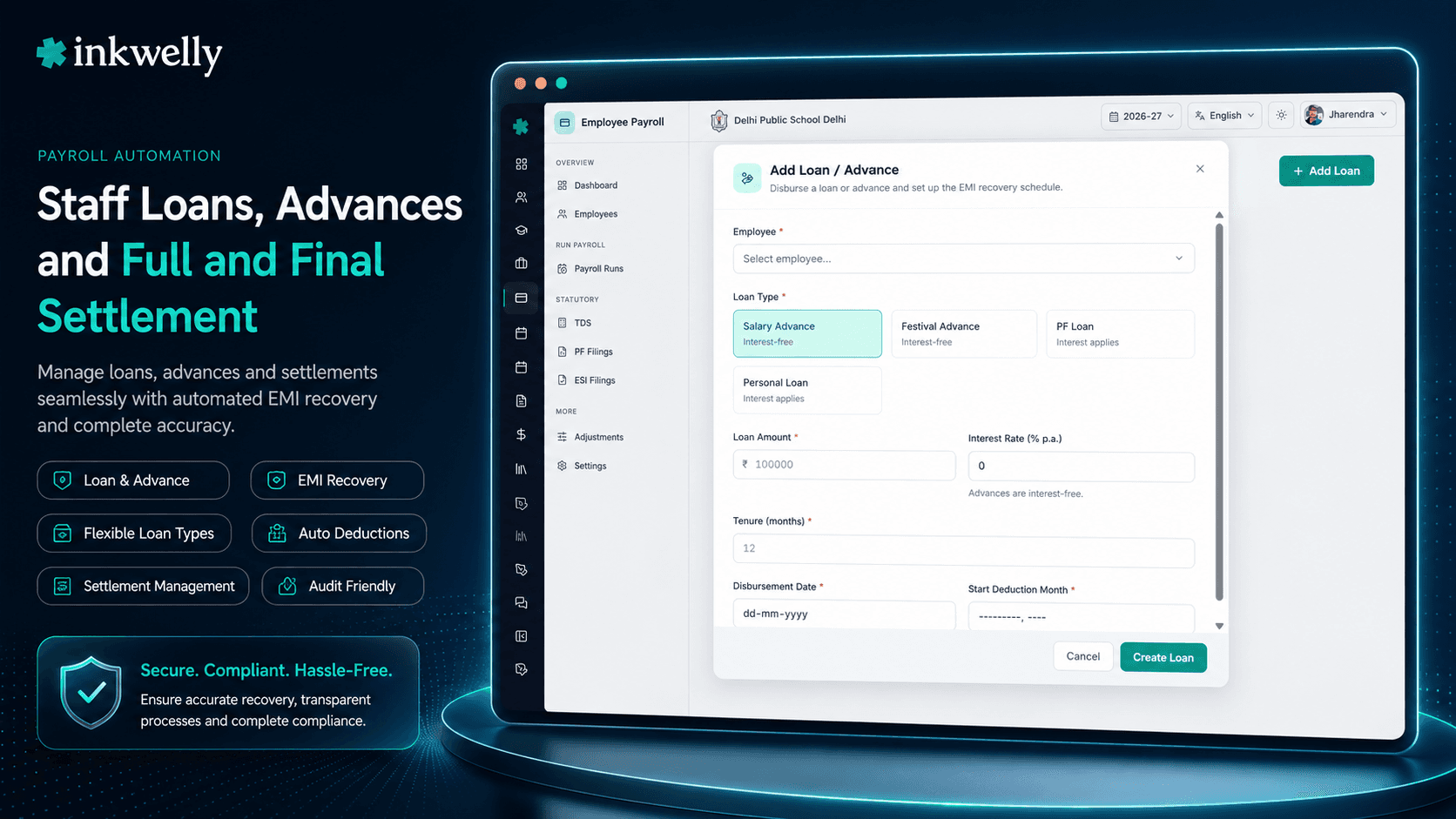
Accountant School → Employee Payroll → Loan & Advance open करता है और New Loan click करता है। Employee pick करता है, 4 loanType enums में से एक choose करता है — SALARY_ADVANCE, FESTIVAL_ADVANCE, PF_LOAN या PERSONAL_LOAN — loanAmount, interestRate (school की loan policy से validated; कुछ types by definition interest-free होते हैं), और tenure months में एंटर करता है। Inkwelly का calculateEMI() helper monthly EMI compute करता है, disbursement date दिखाता है और amortisation schedule principal के sign off से पहले display करता है। Approval पर approvedBy और approvedAt stamp हो जाते हैं; loan request state से ACTIVE हो जाता है।
अगले salary run से recovery automatically होती है। हर amortisation row Loan Recovery line item बनती है जिसका अपना emiNumber (1 of 12, 2 of 12, etc.) होता है, एक pay period से tied होती है, और SCHEDULED से शुरू होती है। जब payroll run process होता है, line DEDUCTED हो जाती है और teacher के payslip पर loan reference, EMI number और remaining balance के साथ दिखती है। अगर teacher long leave पर हो या payroll कई recovery month skip कर दे, line SKIPPED हो जाती है skipReason के साथ — system loan tenure auto-extend करता है या recovery reschedule करता है बिना manual recalculation।
Early repayment first-class flow है। अगर teacher mid-tenure lump sum pay करे, Inkwelly का calculateNewTenureAfterPrepayment() या तो remaining tenure recompute करता है या smaller EMI — school policy choose करती है। Final EMI के बाद remainingAmount और remainingEMIs zero हो जाते हैं, loan auto-close हो जाता है closedAt stamp के साथ और status CLOSED हो जाता है। अगर school किसी outstanding amount को write off करने का decision ले — teacher का निधन, F&F के दौरान बिना notice छोड़ना — management committee write-off approve करती है, status WRITTEN_OFF हो जाता है writtenOffAt और reason audit के लिए capture के साथ।
4 loan types जो Indian schools actually issue करते हैं
- Salary Advance — short-term, school policy पर अक्सर interest-bearing, salary से 1–6 months में recover; सबसे common request
- Festival Advance — typically interest-free, Diwali, Eid, Christmas या Holi के आसपास, 2–3 months में recover; aided schools में common festival-advance benefit से match करता है
- PF Loan — employee के provident fund balance के against, Employees' Provident Funds Act के तहत; interest EPF rules के मुताबिक और salary से recover
- Personal Loan — longer tenure, interest-bearing, full amortisation schedule के साथ; बड़े schools द्वारा staff welfare benefit के तौर पर offered
Auto-EMI calculation, कोई spreadsheet नहीं चाहिए
Accountant loanAmount, interestRate और tenure enter करता है — बाकी Inkwelly कर देता है। calculateEMI() helper monthly EMI, disbursement date और full amortisation schedule produce करता है approval से पहले। Festival Advance जैसे interest-free types के लिए EMI bas principal divided by tenure है। Interest-bearing PF या Personal Loans के लिए EMI standard reducing-balance formula use करता है। Schedule principal vs interest split per month दिखाता है, जो useful है जब school interest income अलग account करता है। Approval principal को exactly दिखाता है जो staff member month one से payslip पर देखेगा — बाद में कोई surprise नहीं।
हर payslip से linked salary recovery
हर EMI एक Loan Recovery row है। इसमें emiNumber, pay-period link, एक status (SCHEDULED → DEDUCTED या SKIPPED) और amount होता है। जब month का payroll run process होता है, scheduled recoveries DEDUCTED flip हो जाती हैं और payslip पर एक separate deduction के तौर पर दिखती हैं loan reference, EMI number और deduction के बाद remaining balance के साथ। DeductionSourceType LOAN_RECOVERY set होता है, इसलिए reports और Form 16 loan recovery को TDS, PF या ESI deductions से cleanly distinguish करते हैं। Teachers को हर month, हर payslip पर exactly दिखता है कि उनके loan पर कितना बाकी है। अब कोई "sir, kitna baki hai mera advance ka?" payday के बाद नहीं पूछता।
एक month skip करें, schedule खुद reschedule हो जाता है
3 months unpaid leave पर teacher की salary se EMI auto-deduct नहीं होनी चाहिए जब salary exist ही नहीं करती। जब payroll run किसी recovery month को skip करने के लिए configure हो — क्योंकि employee की zero salary है, LOSS_OF_PAY पर है, या management ने explicitly moratorium grant किया है — corresponding Loan Recovery row SKIPPED हो जाती है skipReason capture के साथ। Inkwelly remaining schedule auto-shift कर देता है; loan ACTIVE रहता है, अगले salary cycle recovery resume करता है। कोई manual rescheduling नहीं, किसी की notebook में छिपी हुई missed EMI नहीं।
Early repayment, policy choice के साथ
Teacher ₹15,000 cash le कर prepay करने आती हैं। Accountant उनका loan open करता है, Early Repayment click करता है, amount enter करता है, और Inkwelly का calculateNewTenureAfterPrepayment() दो options दिखाता है: EMI same रखें और tenure reduce करें, या tenure same रखें और EMI reduce करें। School की policy decide करती है कौन सा। Record होने के बाद recovery schedule re-align हो जाता है, audit log capture करता है कि किसने cash लिया और किस date पर, और अगली payslip नए remaining balance को reflect करती है। जब loan scheduled recoveries plus prepayments से fully pay off हो जाता है, status auto-flip होकर CLOSED हो जाता है closedAt stamp के साथ — कोई manual closure step नहीं।
“Pehle Festival Advance ke deduction main hi gadbad ho jata tha, kabhi double deduction kabhi miss. Ab Inkwelly khud salary se kaat leta hai, teacher ko payslip pe dikh jaata hai "3 of 6 EMI deducted, baki 3 baki hai". Ladai khatam.”
Real-world loan scenarios जो Inkwelly handle करता है
Scenario 1 — ₹45,000 salary advance, 6 months में। Teacher October में request करता है। Accountant SALARY_ADVANCE, ₹45,000, 6-month tenure, school policy interest rate create करता है। EMI = ₹7,500। Principal approve करते हैं, status ACTIVE। November payroll से ₹7,500 हर month automatically deduct होता है, payslip पर "EMI 1 of 6, balance ₹37,500" दिखता है। April salary run तक loan auto-close हो जाता है।
Scenario 2 — Festival Advance, early prepay। Music teacher October में ₹10,000 का FESTIVAL_ADVANCE लेती हैं, 2 months में recoverable, ₹5,000 EMI। November salary run में ₹5,000 deduct होता है। December में वो ₹5,000 cash le कर close करने आती हैं। Accountant prepayment record करता है; loan auto-close हो जाता है; December salary में कोई deduction नहीं। Audit log: created Oct 15, EMI 1 deducted Nov 30, prepayment ₹5,000 received Dec 12, status CLOSED।
Scenario 3 — Long leave के through chal raha loan। Lab assistant 24 months में ₹1,20,000 का PERSONAL_LOAN लेता है। 8 EMIs के बाद वो 4 months की unpaid medical leave पर जाता है। उन 4 months की recovery rows SKIPPED हो जाती हैं skipReason: LOSS_OF_PAY_LEAVE के साथ। वापस आने के बाद schedule EMI 9 से resume होता है; final EMI 4 months forward shift हो जाती है। Accountant को कोई manual recalculation नहीं करनी।
Scenario 4 — बिना notice resignation के बाद write-off। एक staff member abruptly mid-tenure leave करता है ₹18,000 outstanding के साथ। School का F&F flow (Full & Final Settlement) जितना recover कर सकता है recover करता है; management committee baki के लिए write-off approve करती है। Status WRITTEN_OFF, writeOffDate और reason capture। Loan amount active recoveries से drop out हो जाती है पर audit trail में हमेशा रहती है।
Loan workbench आपको क्या देता है
- Per-employee loan summary सभी active loans का — useful जब वही teacher दूसरा advance मांगे और आपको existing exposure देखनी हो
loanType, status, employee, session और tenure से filter करें — जैसे "इस quarter में close होने वाले सभी active Festival Advances"- Per-employee loan ledger export — हर recovery, हर prepayment, हर skip, dates, sources और approver के साथ
- Year-end loan deduction summary, Form 16 reconciliation के लिए ready — loan recovery को TDS और PF deductions से cleanly separate करता है
- Pay periods और payroll runs से loan recovery को auto-link ताकि किसी भी payslip से audit trails reconstructable हों
- F&F के दौरान outstanding loan settle करें — outstanding balance automatically Full & Final Settlement recoveries में flow होती है
- Permission separation —
payroll.loan.createऔरpayroll.loan.approveIAM में distinct हैं; एक ही person अपने colleague के request को self-approve नहीं कर सकता
Loans को payslips में automatically recover होते हुए देखिए
20-minute walkthrough एक real school dataset पर — loan issue करें, payroll run करें, early prepay करें, balance write off करें।
Limits, safety और small print
Loan ACTIVE reach करने के बाद edit नहीं हो सकता। अगर principal को approval के बाद amount या tenure change करनी हो, loan को close करना पड़ेगा (recovery schedule cleaned up के साथ) और एक नया issue करना पड़ेगा। ये guarantee करता है कि जो amortisation schedule staff member ने approval पर देखा था, वही schedule run हो।
Loan creation और loan approval Identity & Access Management में separate IAM permissions से govern होते हैं — payroll.loan.create और payroll.loan.approve। जो accountant loan request create करता है वो self-approve नहीं कर सकता; principal, treasurer या management committee member jiske paas approval rights hain वो करते हैं। Approval, write-off और closure सभी audit log में किसने-कब stamp करते हैं।
जब कोई employee school से exit करता है, हर active loan automatically उनकी Full & Final Settlement calculation में outstanding recovery के तौर पर surface होता है। Settlement preview दिखाता है कि क्या owed है, pending salary या leave encashment से क्या recover हो रहा है, और school क्या write off कर रहा है। कुछ भी cracks से नहीं गिरता। ACTIVE से CLOSED या WRITTEN_OFF state move final है — reopening के लिए नया loan record create करना पड़ेगा। ये statutory auditors और CBSE inspection teams की expectation से match करता है: closed loan closed ही रहता है।
Staff loans register के बिना issue कीजिए
Inkwelly Loans & Advances हर Employee Payroll subscription के साथ included है। Salary advances, festival advances, PF loans, personal loans — एक workbench।
किस मॉड्यूल का हिस्सा
1 moduleअक्सर पूछे गए सवाल
7 सवालक्या Inkwelly Indian schools में common interest-free Festival Advances support करता है?
हाँ। `loanType: FESTIVAL_ADVANCE` default में interest-free है और salary से 2-3 months में recover होता है। कुछ schools nominal interest charge करना choose करते हैं — field per loan configurable है, और EMI calculator दोनों cases handle करता है। Diwali, Eid, Holi और Christmas advances typical use हैं।
अगर staff member mid-tenure school से exit करे तो running loan का क्या होता है?
Outstanding balance auto-surface होता है उनकी Full & Final Settlement में `otherRecoveries` line के तौर पर। Settlement preview pending salary, leave encashment और gratuity से recovery दिखाता है। अगर F&F के बाद baki bachey, management committee write-off approve कर सकती है, जो loan को `WRITTEN_OFF` status पर le जाता है reason audit के लिए capture के साथ।
क्या मैं loan का एक हिस्सा prepay कर सकता हूँ और EMI reduce या tenure reduce में से choose कर सकता हूँ?
हाँ। Early-repayment dialog दोनों options `calculateNewTenureAfterPrepayment()` से calculate करता है और side-by-side दिखाता है। School की policy decide करती है कौन सा option लेना है — ज़्यादातर aided schools tenure reduce करते हैं ताकि staff member के monthly budget के लिए EMI predictable रहे।
Payslip और Form 16 पर loan recoveries कैसे दिखाई जाती हैं?
हर EMI payslip पर loan reference, EMI number (जैसे "3 of 12") और deduction के बाद remaining balance के साथ एक separate deduction line है। `DeductionSourceType` `LOAN_RECOVERY` set होता है, TDS, PF या ESI deductions से distinct। Form 16 reconciliation loan recovery को non-tax deduction के तौर पर handle करता है, taxable income को affect नहीं करता।
अगर payroll किसी EMI को skip करे — जैसे staff member उस month unpaid leave पर हो — तो क्या होगा?
उस month की recovery row `SKIPPED` हो जाती है `skipReason` (LOSS_OF_PAY_LEAVE, MORATORIUM, ZERO_NET_PAY, etc.) के साथ। Remaining schedule auto-shift होता है forward; loan `ACTIVE` रहता है और अगले pay period से recovery resume करता है। Accountant को amortisation manually rebuild नहीं करनी पड़ती।
क्या एक teacher दूसरा loan request कर सकते हैं जब एक अभी active हो?
हाँ — per employee multiple active loans support हैं। Employee Loan Summary सभी active loans का total outstanding plus monthly cumulative EMI दिखाता है। Principal नए request approve करने से पहले existing exposure देखते हैं, जो ज़्यादातर school management committees sanction से पहले ask करती हैं।
क्या loan approval workflow creation से separated है?
हाँ। `payroll.loan.create` और `payroll.loan.approve` distinct IAM permissions हैं। जो accountant loan request create करता है वो self-approve नहीं कर सकता; principal, treasurer या management committee member jiske paas approval rights हैं वो करते हैं। ये separation of duties ज़्यादातर internal audit frameworks के लिए required है।
आपको ये भी पसंद आ सकता है
3 लेखInkwelly आपके स्कूल पर — खुद देखें
30 मिनट का डेमो। आपके मौजूदा ERP को आपके साथ खोलकर, कॉल पर ही आपका डेटा Inkwelly में लोड करते हैं। कॉल ख़त्म होते-होते एक तय तारीख़ का गो-लाइव प्लान आपके हाथ में।