Pay arrears in the next salary run. DA, increment, promotion — calculated, approved, posted.
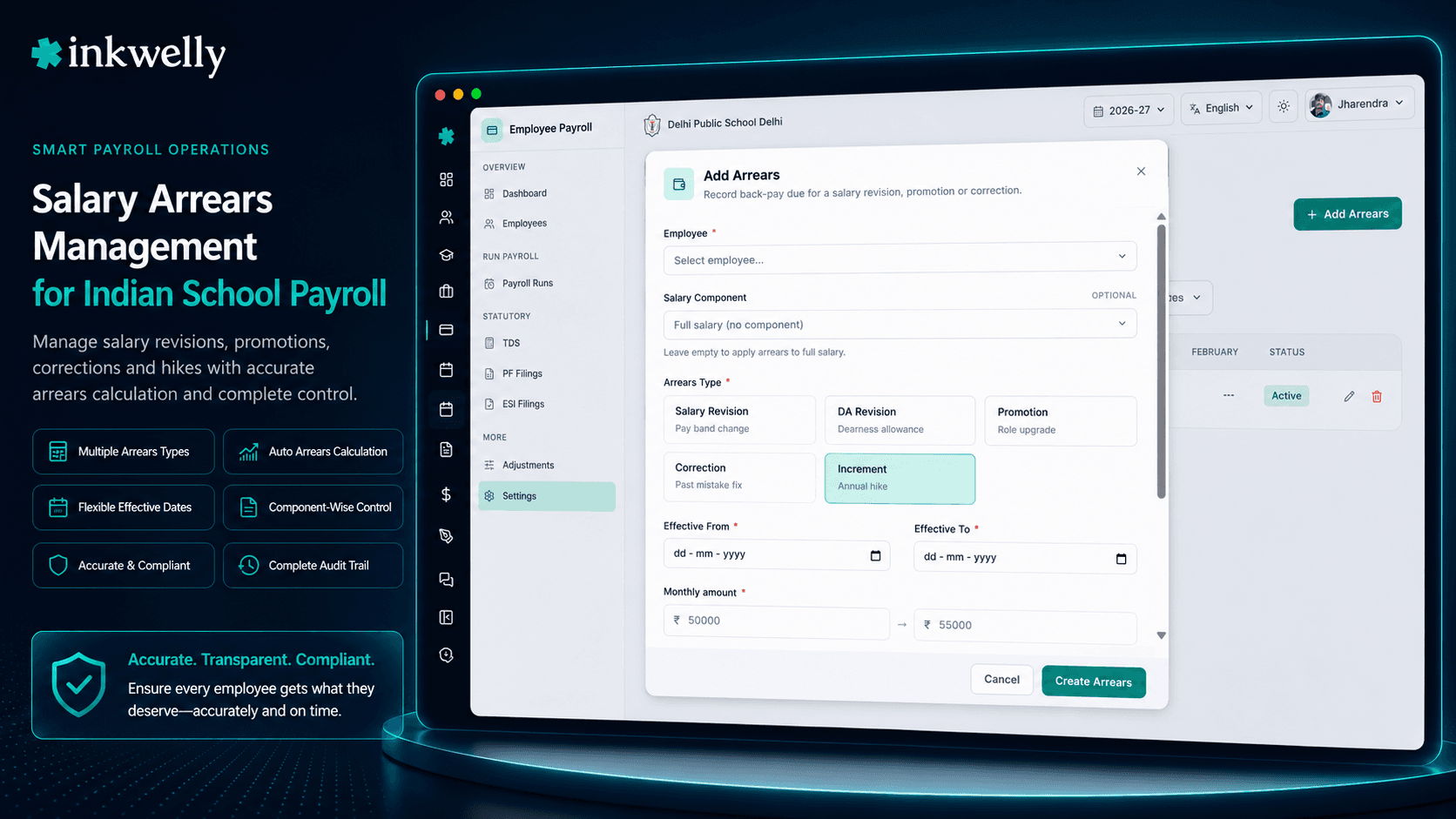
A clean arrears workbench for Indian schools — pick the employee, pick the salary component, enter the revised amount, and Inkwelly calculates the arrears across the affected months. Approved entries auto-flow into the next payroll run with PF and ESI applicability handled.
How most Indian schools handle salary arrears today
The state government notifies a 4% DA revision in March, effective from January. The principal of an aided CBSE school in Lucknow forwards the circular to her accountant. He opens last six months' salary registers in Excel, recalculates the revised basic for forty-one teachers, multiplies by the new DA percentage, subtracts what was already paid, and arrives at six different arrears figures per teacher — one for each month. He copies these into a fresh sheet titled DA-arrears-Jan-to-Jun-FINAL-v3.xlsx, prints it, gets the principal's counter-signature, and tries to remember to add it to next month's payslip without disturbing the loan deduction or the existing ESI calculation.
The music teacher's promotion order says her grade pay changed from 4200 to 4600 effective 1st February. The accountant promises to apply it from April salary. Two months later, her PF contribution mismatch shows up on the EPFO Member Portal because the ECR file uploaded the old basic. The TDS slab she falls in changed mid-year. Form 16 at the end of March will show one arrears row, but the employee insists she should claim Section 89(1) relief through Form 10E — and nobody at the school knows how to compute that.
Most schools live in this version of payroll. Inkwelly Arrears was built to end it.
How Inkwelly Salary Arrears works
The accountant opens School → Employee Payroll → Arrears for the running session and clicks Add Arrears. He picks the employee, picks one of five arrears types — SALARY_REVISION, DA_REVISION, PROMOTION, CORRECTION or INCREMENT — and selects the affected salary component (Basic, DA, HRA, Special Allowance, or any custom component defined in the Salary Structure). He enters the date range that the arrears covers (effectiveFrom and effectiveTo, validated so effectiveFrom ≤ effectiveTo) and the original-vs-revised amount. Inkwelly computes the months covered from the date range and the per-month arrears as revisedAmount − originalAmount.
The entry sits as PENDING until the principal or HR head approves it. On approval, approvedBy and approvedAt are stamped immutably; the entry becomes APPROVED and locks against edit. When the next payroll run is triggered with run-type ARREARS, every approved row is processed, the arrears amount is added to the payslip with a labelled component, PF and ESI applicability flags from the original component definition are honoured, and the row moves to PROCESSED. After bank disbursement the row finally moves to PAID. Rejection from PENDING requires a written remarks reason — captured for the audit trail and visible to the employee on their payslip portal.
Nothing about this workflow is generic HR software. Inkwelly Arrears understands DA revisions for state-aided schools, knows that Festival Advance arrears behave differently from a salary revision, and lets the accountant attach the original government order or principal's note as supporting evidence.
Five arrears types — each with its own calculation rules
- DA Revision — recalculate dearness allowance from the effective date with monthly breakdown; commonly triggered by 7th Pay Commission DA notifications for aided schools
- Salary Revision — handle revised basic pay for any reason: pay-band change, new contract, board-mandated increment after annual review
- Promotion — apply grade-pay differences from the promotion's effective date, common for PRT-to-TGT or TGT-to-PGT moves in CBSE/state board schools
- Correction — fix earlier under-payments or wrong component values without touching closed payroll runs or breaking ECR file history
- Increment — annual increment back-pay, typical for April or July cycles depending on school policy and board norms
DA Revision arrears, calculated month-by-month
When the state finance department notifies a DA hike — say from 38% to 42% of basic, effective from January — the accountant doesn't have to manually walk back six payslips. He selects DA Revision arrears, picks the affected employees, enters the new DA percentage, and Inkwelly recomputes the dearness allowance for every payroll month inside the effectiveFrom–effectiveTo window. The system reads each month's basic from the closed pay periods, applies the new percentage, subtracts what was actually paid, and stages the difference as the arrears amount. PF and ESI base values are recalculated correctly — the accountant doesn't have to remember whether the school's ESI applicability rule includes DA on arrears.
Promotion back-dates without breaking PF history
A TGT teacher gets promoted to PGT, effective the month she completed her qualifying service. The promotion order arrives two months late. Inkwelly handles the back-date cleanly: the accountant picks Promotion arrears, sets the effective date from the order, and Inkwelly stages the grade-pay differential for every affected month. Importantly, the original payroll runs and ECR files for those months stay untouched — historical truth is preserved. The arrears appear as a separate, labelled component in the next payroll run with processedInRun linked back so any auditor can trace the math. The Form 24Q quarterly TDS return picks the arrears in the quarter they were paid, which matches what TRACES expects.
Approval workflow with remarks and audit
No arrears entry leaves PENDING without an approver. The principal, vice-principal or HR head — whichever role has the payroll.arrears.approve permission in Identity & Access Management — reviews the staged entries, sees the original-vs-revised amounts, the months covered, and the supporting note, and either approves or rejects with remarks. Rejected entries return to the accountant for fix; approved entries lock and stamp approvedBy, approvedAt. The audit log captures every state transition, who triggered it and when, which becomes important when a teacher questions an arrears amount three years later or when an internal auditor reviews the salary register.
Posted into the next payroll run, not glued on top
Approved arrears are not appended manually to a payslip. They become first-class line items in the next payroll run, processed under run-type ARREARS. The payslip shows each arrears component with its own line, the total arrears block subtotal, and integrates correctly with TDS estimation, EPFO ECR file generation and ESI challan output. After processing, the row state advances to PROCESSED, and post-disbursement to PAID. The accountant can pull a year-end arrears report grouped by type to support Form 16 generation and to share with employees who want to file Form 10E for Section 89(1) tax relief on arrears.
“DA bahut delay se notify hota hai humein. Pehle 2-3 months ke arrears manually nikalte the, hamesha kuch teacher ka mismatch hota tha. Ab Inkwells pe approve karo, next payroll mein automatically chala jaata hai.”
Real-world arrears scenarios Inkwelly handles
Scenario 1 — 7th Pay Commission DA hike, applied retrospectively. State government notifies a 4% DA revision effective from a date six months ago. The accountant runs DA Revision arrears for all eligible teachers in one batch, with effectiveFrom set to the notification's effective date. Inkwelly stages 6 × 41 = 246 month-employee combinations, each with its own original vs revised amount. After approval, every teacher's next payslip has a clearly labelled DA arrears line.
Scenario 2 — Promotion order signed two months late. PRT to TGT promotion is dated April 1st but the order is signed June 15th. April and May payrolls are already closed. The HR head creates a Promotion arrears entry for that teacher, picks the Basic and DA components affected, and Inkwelly stages two months of grade-pay differential. PF/ESI bases are recalculated correctly without disturbing the closed April/May ECR submissions.
Scenario 3 — Lab assistant's Special Allowance was wrongly entered as ₹2,500 instead of ₹3,500 for three months. The accountant raises a Correction arrears entry, attaches the corrected appointment letter, the principal approves, and the differential is paid in the next salary run. The audit trail captures who entered, who approved and what the original mistake was.
Scenario 4 — Annual increment back-pay. School policy is April increment, but the management committee approves the increment list in June. June salary run includes April-May increment arrears for every applicable teacher with one click — pick Increment arrears, select the employees, choose the components, approve.
Common operations available out of the box
- Bulk-create arrears entries for many employees at once when a single notification covers them all (DA hike, mass promotion, board-mandated revision)
- Filter the workbench by status, arrears type, employee, salary component or session — pull exactly the slice you need to review
- Export approved arrears as a printable register with month-wise breakdown and signature lines for the principal
- Reject with mandatory
remarksso the accountant has a clear corrective action and the audit trail captures the reason - Year-end arrears summary by employee, ready to share with teachers who want to file Form 10E for Section 89(1) tax relief
- Per-employee arrears history across sessions, useful for retirement F&F calculations and gratuity audits
- Components flagged non-arrearable (one-time bonus, festival gift) automatically excluded from arrears entry
- Auto-link to the source pay period for every month covered, preserving the original payroll trail
See arrears flow into payroll, live
15-minute walkthrough on a real school dataset. We'll show DA arrears, promotion back-dates and Form 10E worksheet generation end-to-end.
Limits, safety and the small print
Arrears entries cannot be edited once they reach APPROVED — this is intentional. If an approved entry needs to change, the accountant must reject it (when still pending), or post a Correction arrears entry that nets out the wrong row. This guarantees that what the principal approved is what gets paid, and the audit log can never be silently rewritten.
Closed payroll runs are never retroactively modified. An arrears entry effective in a closed month does not reopen that month's payslip, ECR file or TDS return — it is paid in the next open run with the historical month attribution preserved on the payslip line. This matches what EPFO, ESIC and TRACES expect: monthly returns are immutable; differentials flow forward.
Salary components flagged as non-arrearable (one-time bonus, gift card, fuel reimbursement) do not appear in the arrears component picker. Components with PF and ESI applicability honour those flags during arrears processing. Approval permission is governed by IAM roles — payroll.arrears.approve is a separate permission from payroll.arrears.create, so the staff member who creates an entry cannot self-approve it. All this matters when CBSE renewal inspection or an internal audit asks for the salary register: every payment can be traced to an approval, an approver and a date.
Stop hand-calculating arrears at midnight
Inkwelly Arrears is included with every Employee Payroll subscription. No add-on, no surprise pricing.
Belongs to
1 moduleFrequently asked
7 questionsCan I post arrears for a closed payroll month without reopening that month?
Yes — that's the whole point. Approved arrears are paid in the next open payroll run with the historical month attribution preserved on the payslip line. Closed months, their EPFO ECR submissions and Form 24Q TDS returns stay untouched. This matches what EPFO, ESIC and TRACES expect: monthly returns are immutable, differentials flow forward.
How does Inkwelly handle Section 89(1) tax relief on arrears via Form 10E?
At year end, Inkwelly's arrears report breaks every employee's arrears by the year the arrears relate to — exactly the input shape Form 10E needs. The accountant hands the teacher a ready Form 10E worksheet without manual recomputation. The teacher attaches it when filing their income tax return to claim Section 89(1) relief.
Are PF and ESI bases recalculated correctly when arrears include Basic or DA?
Yes. Each salary component carries PF, ESI and Professional Tax applicability flags in the Salary Structure. When an arrears entry is processed, Inkwelly reads those flags and adds the arrears amount to the correct base for EPFO ECR file generation, ESIC challan computation and state PT slab application. No manual adjustments needed.
Can the same person create AND approve an arrears entry?
No. `payroll.arrears.create` and `payroll.arrears.approve` are separate IAM permissions. By default the accountant or HR coordinator can create entries; the principal, vice-principal or HR head approves. This separation of duties is required by most internal audit frameworks and by CBSE affiliation inspection norms.
What happens if a teacher questions an arrears amount three years later?
Every state transition (created, approved, rejected, processed, paid) is captured in the audit log with user, timestamp and reason. Pull the arrears entry's history and the original supporting document attached at creation. The original calculation, the approver and the source pay periods are all reconstructable.
Can I bulk-create DA arrears for all eligible teachers in one go?
Yes. When a single notification (a 4 percent DA hike, a board-mandated revision) affects many employees, the bulk-create flow stages every employee's monthly arrears entries in one screen. Each row can still be reviewed individually before approval — bulk does not mean unreviewed.
Does it work for state-aided schools running on the 6th or 7th Pay Commission?
Yes. DA revisions, grade-pay changes and pay-band shifts are first-class arrears types. State-aided CBSE and State Board schools — UP Board, Maharashtra Board, Karnataka, Tamil Nadu — that follow CG/SG DA notifications use this module to roll DA hikes into payroll within the next salary cycle.
You might also like
3 readsSee Inkwelly on your school
30-minute demo. We open your current ERP with you and load your data into Inkwelly on the call. Dated go-live plan by the end of it.