Exits को बिना calculator के settle कीजिए। Gratuity, leave encashment, notice recovery — calculated, approved, paid.
Resignations, retirements, terminations और death cases के लिए एक clean exit workflow। Inkwelly pending salary, gratuity (Payment of Gratuity Act 1972), leave encashment, notice-period recovery और estimated TDS compute करता है, HR को other recoveries या payments add करने देता है, और net को final-settlement payroll run में push करता है।
आज ज़्यादातर Indian schools exits कैसे settle करते हैं
Indore के एक CBSE school का head clerk principal के desk पर एक manila folder खोलता है। Andar senior PGT Maths teacher का resignation letter है, last month dated, last working day इस month के end पर। Clerk calculator उठाता है। उसे figure out करना है: इस saal कितने days की leave encash करने की entitled हैं? Gratuity कितनी होगी — वो 2009 में join हुई थीं, तो 16 saal हुए, पर क्या school Payment of Gratuity Act 1972 के तहत covered है या नहीं, और formula 16 को 16 round करता है या part-year alag treat करता है? Notice period 60 days था; उन्होंने 30 दिए — क्या एक month का basic recover करना चाहिए? उनका PF outstanding loan ₹12,000 है। Last month तक इस saal का TDS already deducted है — क्या lump sum settlement उन्हें higher slab में push करेगी? October का unrecovered Festival Advance है।
अगले 4 hours वो salary register, leave register, loan register, previous Form 16, school accountant की TDS spreadsheet और calculator के बीच toggle करता है। Number पर पहुँचता है, एक slip पर लिखता है, principal के पास ले जाता है। Principal पूछती हैं gratuity का figure कहाँ से आया। Clerk math explain करता है। Principal कहती हैं low लग रहा है; recheck करो। Teacher अगली सुबह settlement collect करने और keys hand करने आती हैं। Cheque ग़लत है। वो गुस्से में चली जाती हैं। 2 weeks बाद, उनके advocate का letter आ जाता है।
ज़्यादातर Indian schools में F&F ऐसा ही दिखता है। Inkwelly Full & Final Settlement इसलिए बना है कि आपके school में ऐसा कभी न हो।
Inkwelly Full & Final Settlement कैसे काम करता है
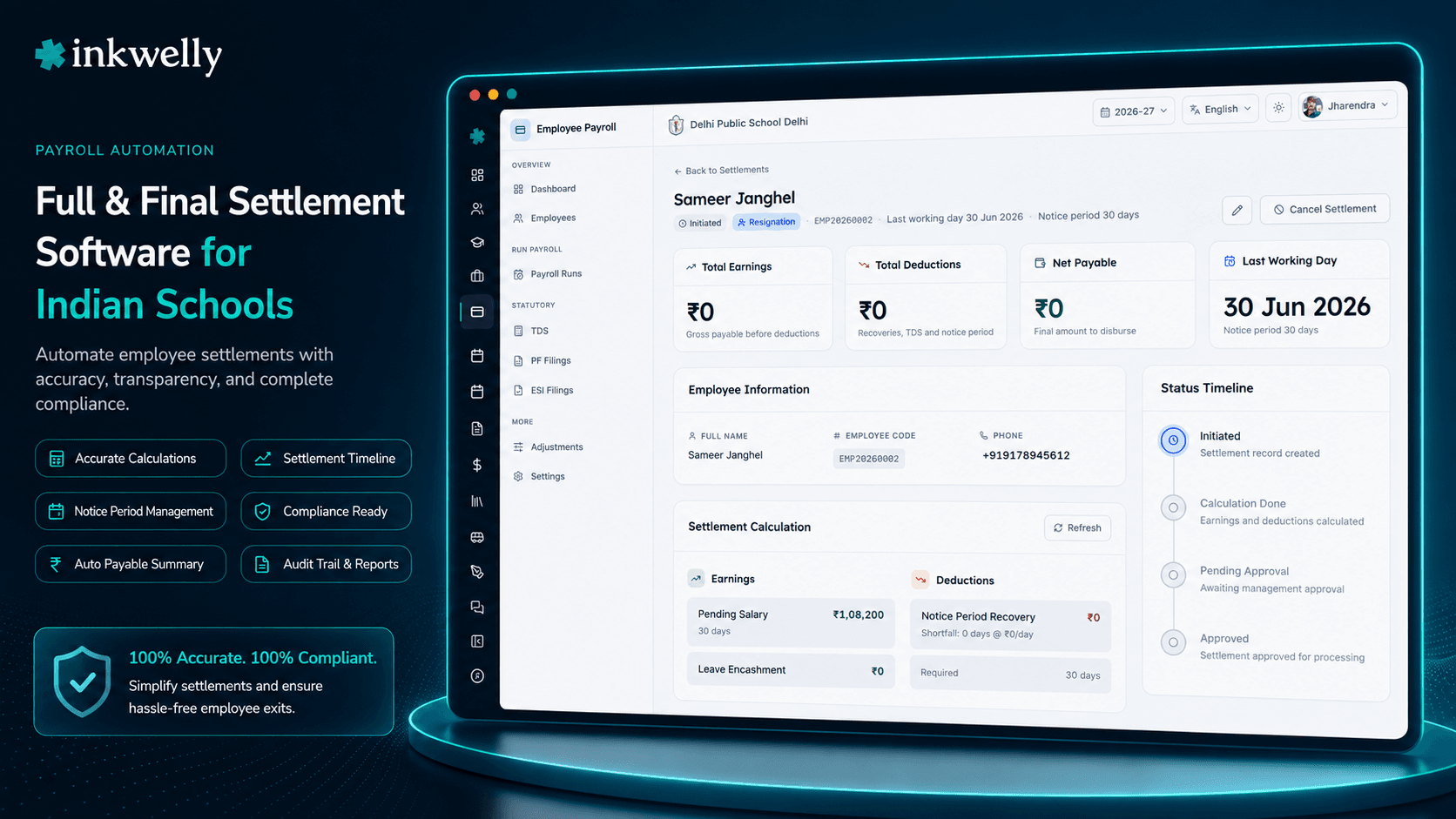
जब कोई staff member exit करता है, HR School → Employee Payroll → Full & Final Settlements open करती हैं और एक नया settlement create करती हैं। Employee pick करती हैं, 4 exitType enums में से एक choose करती हैं — RESIGNATION, TERMINATION, RETIREMENT या DEATH — exitDate और lastWorkingDate enter करती हैं (validated lastWorkingDate ≥ exitDate), और optionally contract से noticePeriodDays। Inkwelly का Settlement Preview engine हर component immediately calculate करता है: running pay period में actual days worked के आधार पर pending salary, Leave Management balance से leave encashment calculateLeaveEncashment() से, joining date से gratuity calculateGratuityAmount() और getEmployeeTenure() के through, और actual notice given में shortfall हो तो notice-period recovery calculateNoticePeriodRecovery() से।
Settlement 6 explicit states में progress करता है: INITIATED → CALCULATION_DONE → PENDING_APPROVAL → APPROVED → PROCESSED (और CANCELLED pre-approval state से cancellationReason capture के साथ reachable)। HR calculated breakdown review करती हैं, optional otherRecoveries add करती हैं (outstanding loan balance auto-flow होता है, plus custom items जैसे asset-not-returned, library-book-not-returned, mess advance) और otherPayments (pending reimbursement, management द्वारा authorised special bonus) JSON arrays of {description, amount} rows के तौर पर। Inkwelly recompute करता है grossSettlement = pendingSalary + leaveEncashmentAmount + gratuityAmount + sum(otherPayments) और totalDeductions = noticePeriodRecovery + sum(otherRecoveries) + estimatedTDS। netSettlement cheque amount है।
Approval पर (approvedBy और approvedAt stamp के साथ), settlement run-type FINAL_SETTLEMENT के साथ payroll run में process होता है। Payslip isFinalSettlement: true के साथ generate होती है, year के Form 16 के साथ integrate होती है, TDS reports में settlement components को regular salary से separate करती है, और किसी भी active staff loan को close या remaining balance को management approval के आधार पर write-off पर move करती है।
4 exit types जो Indian schools deal करते हैं
- Resignation — voluntary exit; notice-period adherence check करता है, shortfall recover करता है अगर हो, contract और statutory rules के per सभी components settle करता है
- Termination — employer-initiated exit; gratuity apply होगी या नहीं, cause और Payment of Gratuity Act 1972 provisions पर depend करता है
- Retirement — superannuation exit; gratuity Act के तहत mandatory है अगर school covered है, leave encashment usually maximised
- Death — nominee को settlement मिलती है; gratuity tenure irrespective specific Act provisions के तहत payable; income tax exemption rules अलग हैं
Payment of Gratuity Act 1972 के तहत calculated gratuity
हर Indian school जो Payment of Gratuity Act 1972 के तहत covered है, 5 saal की continuous service complete करने वाले staff को gratuity pay करनी होती है। Inkwelly का calculateGratuityAmount() joining date Employee Information record से पढ़ता है, tenure को day तक compute करता है, और statutory formula apply करता है: 15 days की last drawn wages × completed years (6+ months को completed year treat करके)। Cap current ceiling के per honour होता है। Death और disablement cases में 5-year continuous service requirement Act के per waive होती है। Result preview में line-by-line दिखता है — used tenure, used last-drawn wages, applied formula, capped amount।
Real leave balances से leave encashment
Leave encashment hand-calculated line item नहीं है। Inkwelly staff member का actual leave balance per leave type Leave Management module से पढ़ता है — earned leave, casual leave, sick leave — school की encashment policy apply करता है (kaun se leaves encashable हैं, kitne days policy या statutory ceiling पर capped) और salary structure के आधार पर per-day pay calculate करता है। Breakdown leave type, balance, encashable days, per-day rate और total दिखाता है। अब कोई dispute नहीं "sir mere account mein 25 EL bachi thi, sirf 18 ka encashment kyon mila?" — math screen पर है।
Notice-period recovery, सिर्फ shortfall होने पर
अगर contract 60 days notice require करता है और staff member ने 35 दिए, Inkwelly का calculateNoticePeriodRecovery() 25-day shortfall compute करता है और per-day rate use करके recovery में convert करता है। अगर staff member ने full notice serve किया, recovery zero है। HR head written reason के साथ recovery override कर सकती है — management retirement या compassionate cases में notice waive कर सकती हैं। Override audit log में capture होता है ताकि internal audit हमेशा देख सके कि किसने क्या waive किया। Notice-period recovery line otherRecoveries से separate है, इसलिए reports statutory recovery को policy-based recovery से distinguish कर सकती हैं।
Other recoveries और payments — कुछ cracks से नहीं गिरता
HR ज़रूरत के per custom recoveries और payments add करती हैं। Outstanding staff loans recoveries में remaining balance के साथ auto-flow होते हैं। Library book not returned, school-issued laptop not returned, mess advance, uniform deposit — हर एक description और amount के साथ labelled otherRecoveries row बनता है। Payment side पर pending reimbursement, sanctioned bonus, late-paid increment arrears — हर एक otherPayments row बनता है। Settlement totals live recompute होते हैं। Gross, total deductions, estimated TDS और net settlement हमेशा HR जो enter करती हैं उसके sync में रहते हैं।
“PGT teacher 18 saal pure kar ke retire hui. Pehle hum F&F mein paseena bahaate the. Ab Inkwelly pe gratuity, leave encashment sab apne aap calculate ho jaata hai, breakdown teacher ko bhi dikha sakte hain. Cheque dene se pehle dispute khatam.”
Real-world settlement scenarios जो Inkwelly handle करता है
Scenario 1 — PGT teacher 18 साल बाद retire होती हैं। HR RETIREMENT settlement create करती हैं। Inkwelly 18 saal tenure, last-drawn basic + DA, statutory formula और ceiling cap use करके gratuity calculate करता है। Leave encashment 90 days earned leave को last per-day pay पर (school policy के capped) use करता है। Pending salary partial month cover करती है। Estimated TDS compute होता है; gratuity exemption Section 10(10) के तहत apply होती है। Net settlement 4 days की जगह 24 hours में issue।
Scenario 2 — PRT short notice से resign करते हैं। Contract 60 days, notice diya 30 days। Inkwelly final pay से 30-day recovery auto-compute करता है। HR outstanding Festival Advance (₹5,000) को otherRecoveries add करती हैं। Library book not returned: ₹450। Pending medical bill reimbursement: ₹1,800 otherPayments में। Net settlement हर line reflect करती है। Teacher breakdown sign करते हैं, बाद में कोई surprise नहीं।
Scenario 3 — Lab assistant probation पर, performance के लिए terminated। TERMINATION settlement। Tenure < 5 years, gratuity Act के तहत payable नहीं। Pending salary, probation policy के per leave encashment, no notice recovery (school ने terminate किया)। Outstanding salary advance recovered। Settlement same payroll run में process; staff member partial year का Form 16 receive करता है।
Scenario 4 — Senior staff member की death; nominee settlement। DEATH exit type nominee details capture trigger करता है। Gratuity tenure irrespective Act की Section 4(1)(c) के तहत payable है। Leave encashment humanitarian policy के per maximised। Outstanding loan management committee approval के साथ written off। Settlement nominee को separate marked Form 16 के साथ issue होती है। Audit log हर decision capture करता है।
Settlement workbench आपको क्या देता है
- Settlement preview commit से पहले — हर line देखें,
otherRecoveriesऔरotherPaymentsedit करें, approval से पहले live recompute करें - 6 explicit states (INITIATED, CALCULATION_DONE, PENDING_APPROVAL, APPROVED, PROCESSED, CANCELLED) हर transition पर audit trail के साथ
cancellationReasonके साथ किसी भी pre-approval state से cancel करें — useful जब last working day से पहले exit reverse हो- Outstanding staff loans का auto-flow recoveries में, management committee के लिए one-click write-off option के साथ
- Payroll के लिए run-type
FINAL_SETTLEMENT— settlement payslips को regular monthly run से separate करता है clean reporting और Form 24Q quarterly returns के लिए - Sessions across per-employee settlement history — useful जब ex-staff वापस आए, या same management trust share करने वाले sister schools के लिए
- Permission separation —
payroll.settlement.create,payroll.settlement.approve,payroll.settlement.cancelIAM में distinct हैं
एक exit end-to-end settle होते हुए देखिए
20-minute walkthrough एक real school dataset पर — हम एक retirement, एक short notice resignation और एक termination case एक session में process करेंगे।
Limits, safety और small print
Settlement APPROVED reach करने के बाद edit नहीं हो सकती — अगर HR approval के बाद error find करे, settlement cancel करना पड़ेगा (सिर्फ pre-approval states से possible) और re-create करना पड़ेगा। Approved settlements जो PROCESSED पर move कर चुकी हैं final हैं; corrections को अगले payroll run में separate adjustment के तौर पर करना पड़ेगा। ये school को silently post-cheque approved exit packages rewrite से protect करता है।
Gratuity calculation Payment of Gratuity Act 1972 को respect करती है: 5-year continuous service threshold, 15-days-per-completed-year formula (6-month rounding rule के साथ), और statutory ceiling cap। Schools जो Act के तहत covered नहीं हैं, अगर school की अपनी gratuity policy defined है तो apply होगी; otherwise gratuity line calculate नहीं होगी। Death और disablement cases Act के special provisions use करते हैं। Section 10(10) के per income tax exemption gratuity component पर automatically apply होती है।
payroll.settlement.create, payroll.settlement.approve और payroll.settlement.cancel permissions Identity & Access Management में separate हैं। जो HR coordinator settlement create करती हैं वो self-approve नहीं कर सकतीं; principal या management committee member jiske paas approval rights hain वो करते हैं। Cancellation की अपनी permission है। Sare transitions timestamped, attributed और internal audit को visible हैं। CBSE renewal inspections, EPFO compliance audits और labour-department queries का जवाब separate documents के folder की जगह एक single workbench से दिया जा सकता है।
Exits cleanly settle कीजिए, हर बार
Inkwelly Full & Final Settlement हर Employee Payroll subscription के साथ included है। Resignation, retirement, termination, death — एक workflow।
किस मॉड्यूल का हिस्सा
1 moduleअक्सर पूछे गए सवाल
7 सवालInkwelly Payment of Gratuity Act 1972 के तहत gratuity कैसे calculate करता है?
`calculateGratuityAmount()` helper Employee Information से joining date पढ़ता है, `getEmployeeTenure()` के through tenure को day तक compute करता है, 15 days last-drawn wages × completed years apply करता है (Act के per 6+ months को completed year treat करके), और current statutory ceiling पर cap करता है। Death और disablement के लिए 5-year threshold Section 4(1)(c) के per waive होती है। Section 10(10) tax exemption automatically apply होती है।
जब leave types की अलग policies हों, क्या leave encashment सही handle करता है?
हाँ। Inkwelly Leave Management से actual leave balance per leave type पढ़ता है — earned leave, casual leave, sick leave — और school की encashment policy apply करता है (kaun se leave types encashable हैं, day caps policy या statutory limit पर)। Breakdown line by line math दिखाता है ताकि staff member exactly देख सके figure कैसे derived हुई।
क्या मैं settlement create करने के बाद पर approval से पहले cancel कर सकता हूँ?
हाँ। Cancellation `INITIATED`, `CALCULATION_DONE` और `PENDING_APPROVAL` states से reachable है captured `cancellationReason` के साथ। Approval के बाद settlement cancel नहीं हो सकती — corrections अगले payroll run में separate adjustment के तौर पर करनी होंगी। ये silently post-approval rewrites के खिलाव deliberate guardrail है।
जब employee exit करे तो outstanding staff loan का क्या होता है?
Outstanding balance settlement के `otherRecoveries` में auto-flow होता है। Preview pending salary, leave encashment और gratuity से recovery दिखाता है। अगर balance uncovered रहे, management committee loan का write-off approve कर सकती है, जो loan को `WRITTEN_OFF` status पर le जाता है reason audit के लिए capture के साथ। कुछ cracks से नहीं गिरता।
क्या settlement पर TDS regular monthly TDS से alag calculate होता है?
हाँ। Lump-sum settlements अक्सर exit year के लिए slab shift करते हैं। Inkwelly उसी engine से TDS estimate करता है जो Form 16 drive करता है, इसलिए year-end position settlement पर deducted के साथ match करती है। Section 10(10) के per gratuity exemption, retirement के लिए Section 10(10AA) के per leave encashment exemption, और death-case exemptions automatically सही components पर apply होती हैं।
क्या ये death cases के लिए काम करता है जिसमें nominee को settlement मिलती है?
हाँ। `exitType: DEATH` nominee details capture trigger करता है और special rules apply करता है: gratuity के लिए 5-year continuous service threshold waive होती है (Act Section 4(1)(c) के per); leave encashment typically maximised; income tax exemption rules अलग होते हैं। Outstanding loans usually management approval के साथ written off होते हैं। Settlement Form 16 accordingly mark होती है।
ये exit year के Form 16 के साथ कैसे integrate होता है?
Settlement payslip `isFinalSettlement: true` के साथ generate होती है, payroll run-type `FINAL_SETTLEMENT` के तहत run होती है, और separately-tagged settlement components के साथ Form 16 को feed करती है। Form 24Q quarterly TDS return settlement TDS को सही quarter में pick करती है। Staff member year के लिए single Form 16 receive करते हैं जो regular salary और settlement दोनों को cover करता है।
आपको ये भी पसंद आ सकता है
3 लेखInkwelly आपके स्कूल पर — खुद देखें
30 मिनट का डेमो। आपके मौजूदा ERP को आपके साथ खोलकर, कॉल पर ही आपका डेटा Inkwelly में लोड करते हैं। कॉल ख़त्म होते-होते एक तय तारीख़ का गो-लाइव प्लान आपके हाथ में।