How to send an invoice to a parent over WhatsApp, SMS or email
This guide is for the front-office clerk and accountant who follow up on unpaid fees every day. By the end you will have an Inkwelly invoice delivered to the parent on WhatsApp, SMS, email or the parent app — optionally with a one-tap UPI pay link attached — and the delivery logged against the student's profile.
To send a fee invoice to a parent in Inkwelly: open Student Fee → Invoices, click the invoice row, click Send to Parent on the top right, pick the channels (WhatsApp, SMS, Email, App Push), choose Details + Pay link to attach a UPI pay link, optionally add a personal note, and click Send. The parent receives the invoice within seconds and Inkwelly logs the delivery on the invoice timeline.
Sending the invoice digitally — not on paper — is what closes the collection loop in an Indian school. The RBI's UPI Statistics dashboard recorded 18.4 billion UPI transactions in May 2025 alone; parents now expect a pay link in the same message as the invoice. Inkwelly bundles four channels (WhatsApp Business, SMS, email, parent-app push) into one Send to Parent dialog so a 1,200-student school can clear an installment cycle in a single sitting instead of stuffing envelopes. The delivery, the channel, the share count and the pay link version are all stored on the invoice — auditable later when a parent says 'I never got the bill'.
1. Open the Invoices list in Student Fee
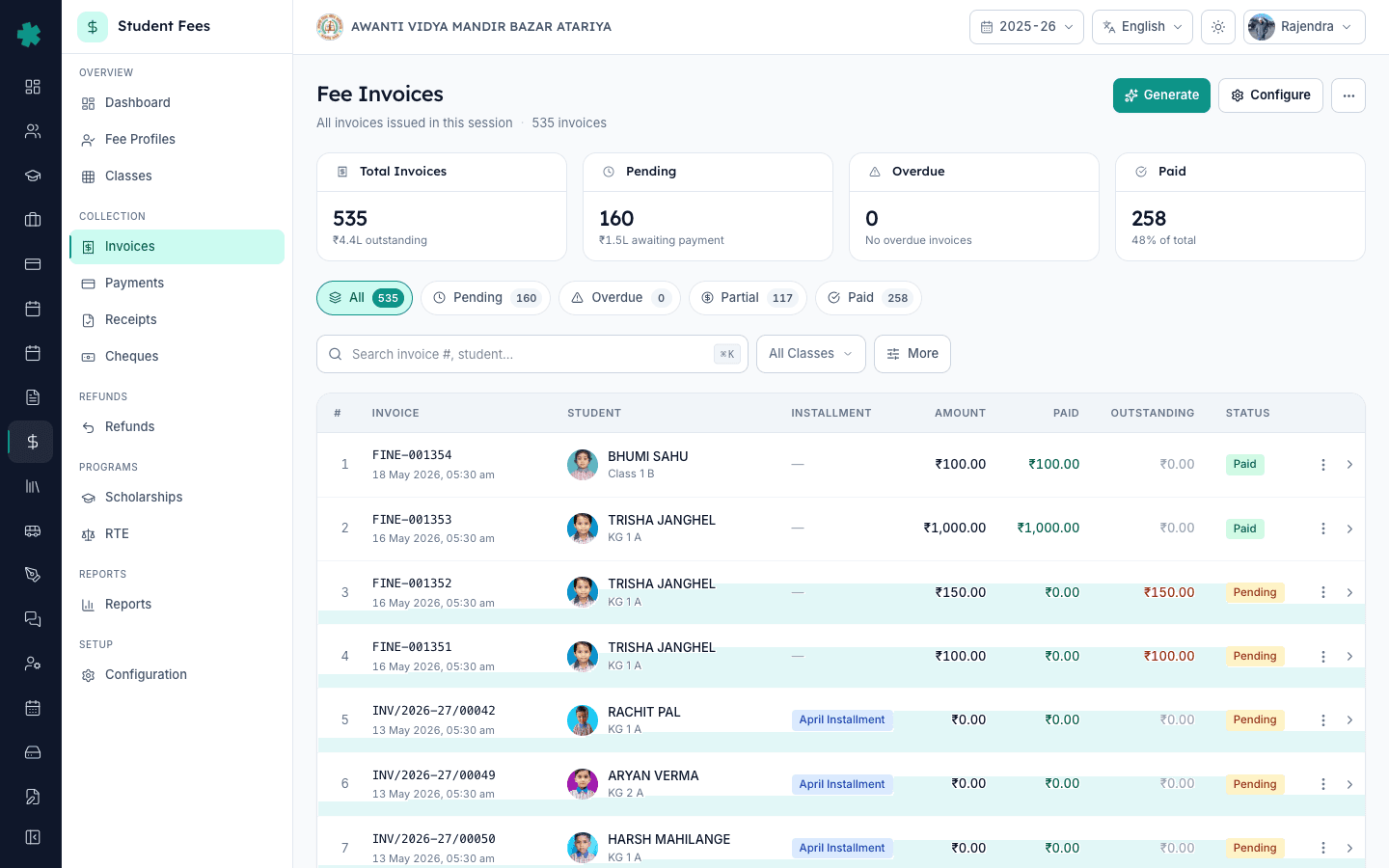
Open Inkwelly → Student Fee from the left sidebar, then click Invoices under the COLLECTION section. The list shows every invoice in the current session with status pills (Pending, Overdue, Partial, Paid) and KPIs for total, pending, overdue and paid counts on top. Use the Search bar or the All Classes filter to find the parent's invoice — search by student name, admission number or invoice number such as INV/2026-27/00140.
2. Open the invoice you want to send
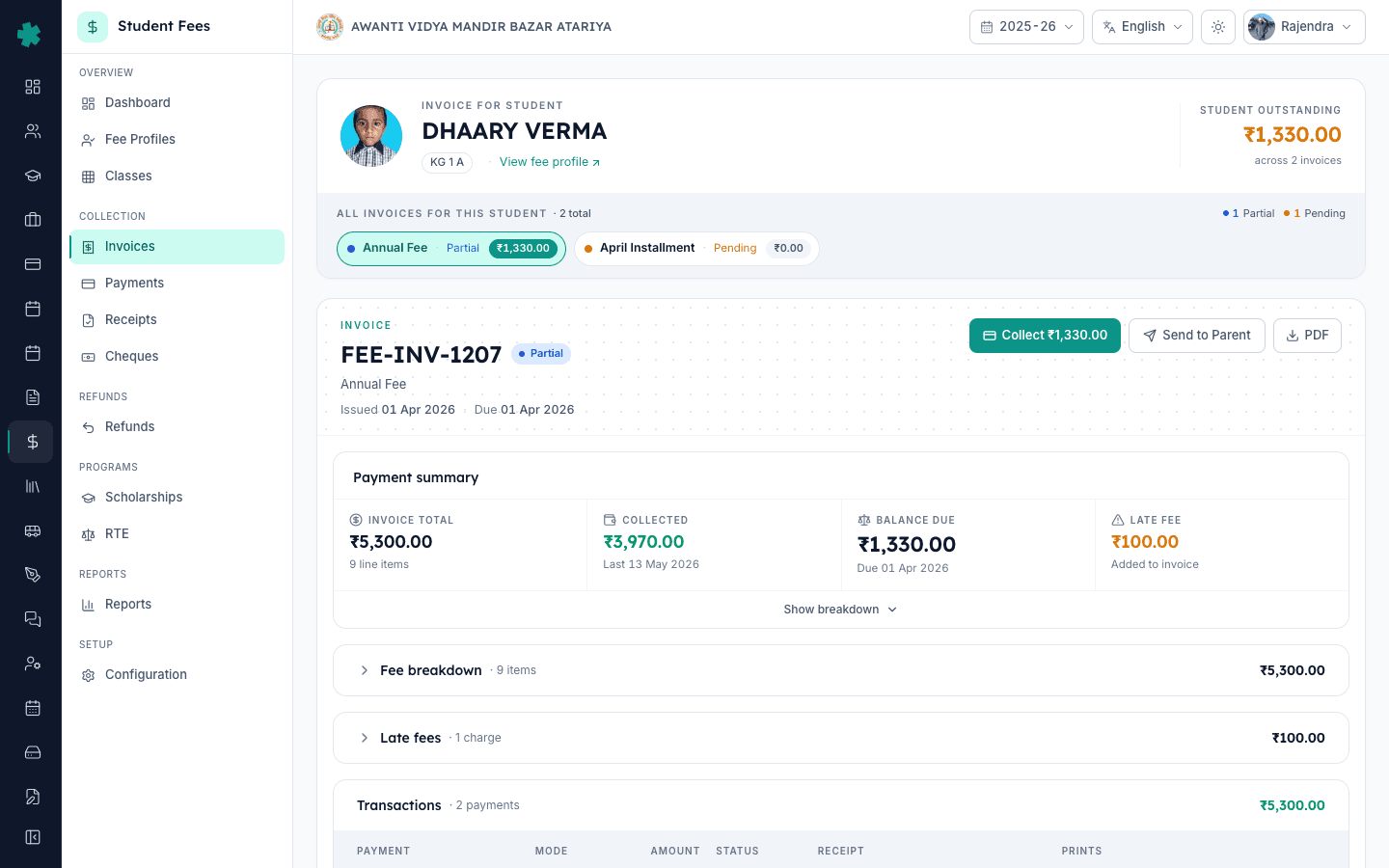
Click the invoice row. The invoice detail page opens with the line items, the Payment Summary card (Invoice Total, Collected, Balance Due, Late Fee) on the right and three buttons on the top right: Collect, Send to Parent and PDF. For partial-paid invoices the page also lists every payment recorded against it and any active payment link with its expiry.
3. Click Send to Parent on the top right
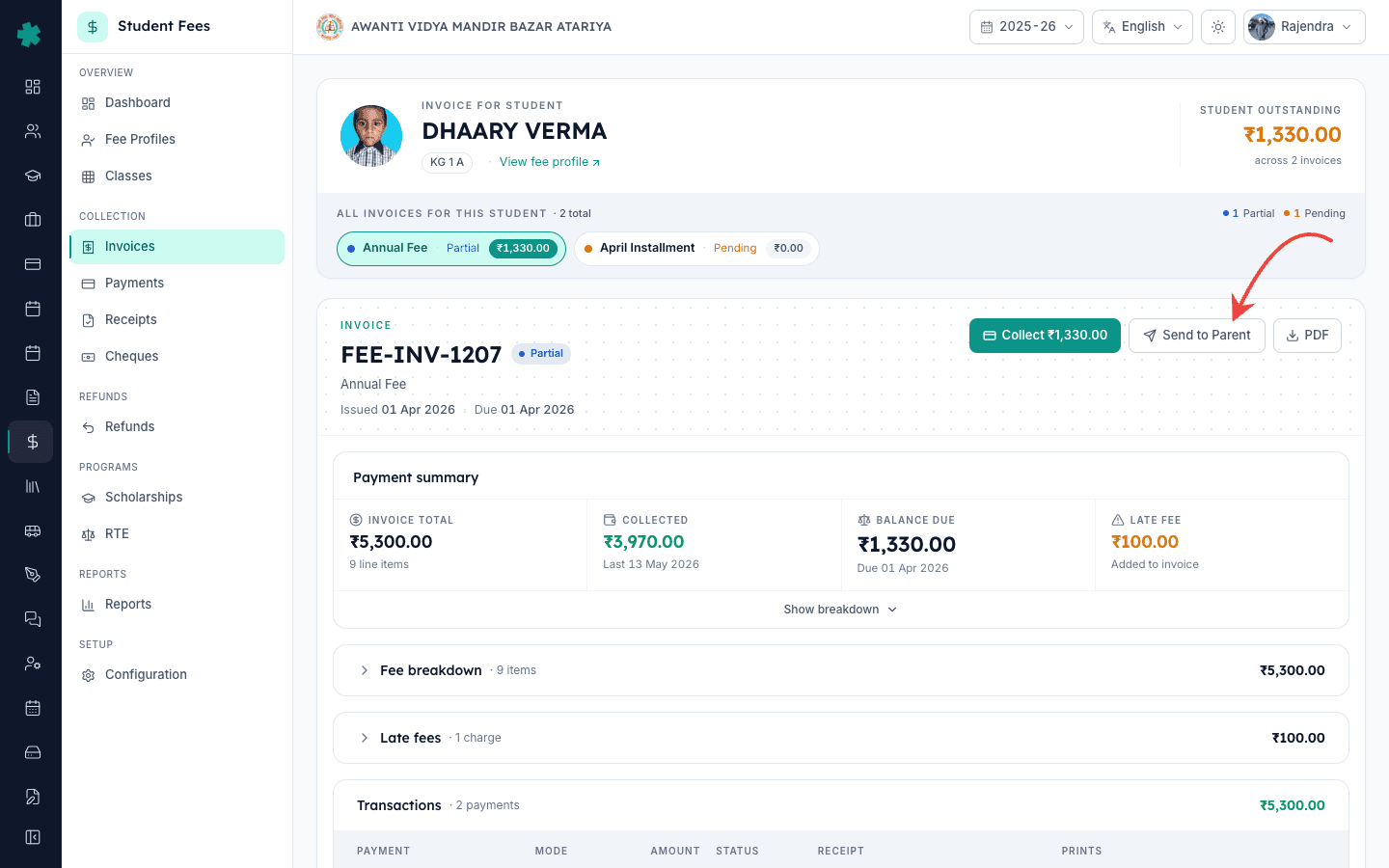
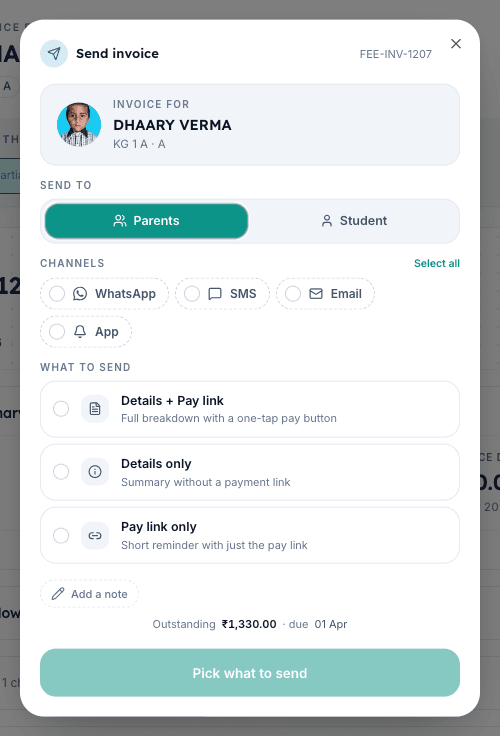
Click the Send to Parent button. Inkwelly opens the Send invoice dialog with the student's name, class and section pinned at the top so you can confirm you are sending the right invoice. The invoice number appears in the corner. Below the student card you will see the Send to toggle (Parents or Student), the Channels strip and the What to send picker.
4. Pick the channels and the recipient
Leave Send to on Parents — the default — unless the student is in Class 11 or 12 and you want the bill on the student's own phone. Tap the channel chips to select WhatsApp, SMS, Email or App Push; you can select more than one in the same send. WhatsApp is the most-read channel in Indian schools, but pair it with SMS for parents who have not opened a WhatsApp message in 30 days. Email is best when the invoice carries a long line-item breakdown — the PDF attachment renders cleanly on a laptop.
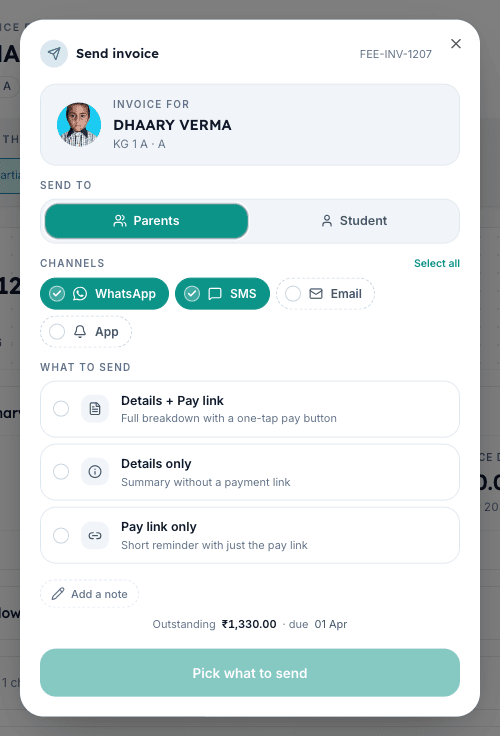
5. Choose what to send and attach a pay link
Under What to send, pick Details + Pay link if the invoice has an outstanding balance. Inkwelly will reuse the invoice's existing active payment link when one is current, or generate a fresh UPI pay link valid for 1 to 30 days. Pick Details only if the parent just wants a receipt-style summary. Pick Pay link only for a short reminder near the due date. Switch the link type between UPI (lowest fee) and All methods (cards, net banking, wallets) in the Options panel if you need to.
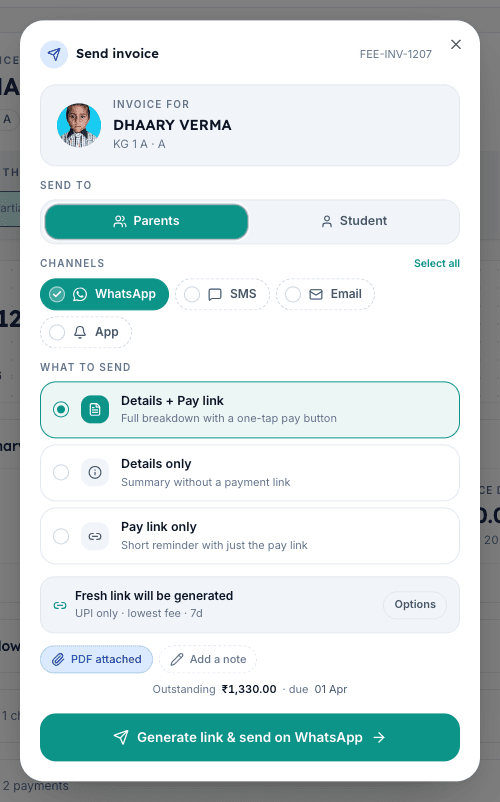
6. Add an optional note and review the PDF attachment
Click Add a note to type up to 500 characters of context — for example 'Q2 fees due 10 July, please clear by Friday to avoid the late fee'. The note appears above the invoice in the WhatsApp message and at the top of the email body. The PDF attached pill is on by default for email and WhatsApp; turn it off if the parent is on a 2G connection and you want the message to load fast. The dialog footer also shows the outstanding amount and due date so you can re-confirm at a glance.
7. Click Send and watch the confirmation
Click the big Send on WhatsApp & SMS button (the label updates with the channels and link mode you picked). Inkwelly fires every selected channel in parallel, generates the pay link if needed and shows a success toast — 'Invoice sent to parents'. The Send to Parent button on the invoice detail then carries a subtle 'Sent' marker, and the Communications strip below the line items records each message with its channel icon, the recipient phone or email, the delivery status pill (Sent, Delivered, Read, Failed) and the timestamp.
Next, read how to collect a cash, UPI, card or bank-transfer payment at the counter once the parent walks in with the receipt, or how to bulk-generate invoices for an installment if you have just rolled out a new installment cycle. If the parent never receives the message, open the invoice's Communications strip — the Failed pill there lets you retry on a different channel or download a fallback PDF. To turn off the message after a parent has already paid, follow how to reconcile an online payment from Razorpay.
See Inkwelly Student Fees in action
Frequently asked
7 questionsHow do I send a fee invoice to a parent on WhatsApp in Inkwelly?
Open Inkwelly → Student Fee → Invoices, click the invoice row, click Send to Parent on the top right, tick the WhatsApp chip in the Channels strip, pick Details + Pay link, and click Send. Inkwelly delivers the invoice to the parent's saved mobile number on the school's verified WhatsApp Business sender and logs the send on the invoice timeline.
Invoice parent ko WhatsApp par kaise bheje?
Student Fee menu kholiye, Invoices par jaiye, jis invoice ko bhejna hai us row par click kijiye. Top-right ke Send to Parent button par click kijiye, Channels strip me WhatsApp chip tick kijiye aur Details + Pay link select kijiye. Send dabate hi parent ko WhatsApp par invoice aur UPI pay link mil jaata hai.
SMS ya WhatsApp — fee invoice ke liye kaunsa channel better hai?
WhatsApp Indian schools me sabse zyada read hota hai aur pay link click karna easy hai, lekin un parents ke liye SMS rakhiye jinhone 30 din se WhatsApp na khola ho. Inkwelly dono channels ek hi Send to Parent dialog se parallel send karta hai. SMS DLT register sender ID se jaata hai isliye spam folder me nahi girta — annual upfront-payer reminder ke liye yeh combo sabse safe hai.
Can I attach a UPI pay link to the WhatsApp message in Inkwelly?
Yes. In the Send to Parent dialog pick Details + Pay link as the What to send option. Inkwelly reuses the invoice's existing active payment link when one is current, or generates a fresh UPI link valid for 1 to 30 days. The parent taps the link and pays directly through any UPI app — Google Pay, PhonePe, Paytm, BHIM or the bank app — without leaving WhatsApp.
Does the WhatsApp send count towards Meta's transactional message rate in Indian schools?
Yes. Fee invoices, receipts and pay reminders fall under Meta WhatsApp Business's utility category, which costs around 11 paise per message in India in 2025. Inkwelly groups all four channels into one Send to Parent action so the school sees one consolidated cost in the Communications usage report rather than per-clerk WhatsApp Web sessions, and every send is template-compliant so the school's Business number does not get rate-limited.
What happens if the parent's mobile number is wrong and the message fails?
The Communications strip on the invoice carries a red Failed pill against that channel and an inline Retry control. Click Retry to resend after correcting the number on the student's profile, or switch to a different channel — email or SMS — without re-typing the message. Failed sends do not consume the school's WhatsApp or SMS quota and Inkwelly keeps the failure reason for the audit log.
Can a Class 11 or 12 student receive the invoice on their own phone instead of the parent?
Yes. In the Send to Parent dialog flip the Send to toggle from Parents to Student. Inkwelly then delivers the invoice to the student's saved mobile number and email and labels the timeline entry with the student tag. Most CBSE and ICSE senior schools enable this once the student turns 18; younger students should keep the default Parents recipient so the bill reaches the fee-paying guardian.
You might also like
4 readsSources & references
- TRAI — Telecom Commercial Communications Customer Preference Regulations (DLT framework) · accessed 19 May 2026
Transactional SMS such as fee invoices and receipts must be sent through DLT-registered sender IDs and template IDs per the 2018 TRAI regulation; Inkwelly's SMS channel maps to this requirement.
- Meta WhatsApp Business — Pricing & Conversation Categories · accessed 19 May 2026
Fee invoices and reminders fall under the Utility conversation category for billing rates; Meta requires verified Business numbers and approved message templates for transactional school communications.
- Reserve Bank of India — UPI Statistics (May 2025) · accessed 19 May 2026
RBI's UPI statistics confirm 18.4 billion UPI transactions in May 2025, demonstrating that Indian parents now expect a UPI pay link inside the same channel as the fee invoice.
See Inkwelly on your school
30-minute demo. We open your current ERP with you and load your data into Inkwelly on the call. Dated go-live plan by the end of it.