Your marksheet, your design — no Excel-to-Word copy paste. Re-usable templates, school-branded, board-aware.
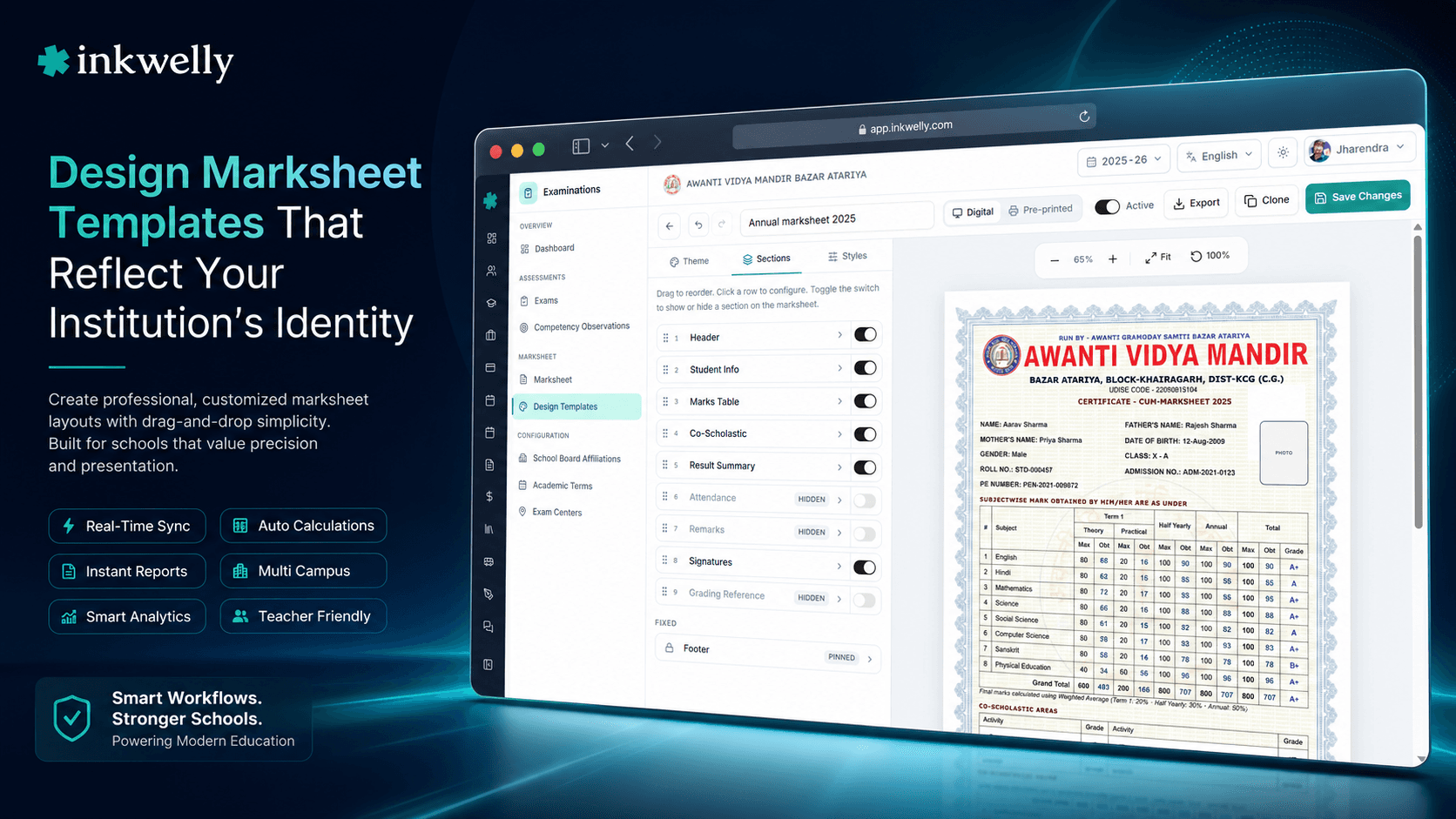
Design once, generate one thousand marksheets. Inkwelly's design templates support DIGITAL and PRE_PRINTED modes, every page size from A3 to Letter, school colour schemes and pre-loaded Devanagari fonts. Lock a template before publishing the term, clone to new affiliations, and ship board-aware layouts without shipping new code.
How most schools build their marksheet design today
It is the second week before term-end report card distribution. The principal of a Lucknow CBSE school has just realised that the marksheet design from last year does not match what the board is asking for in the current academic session. The school needs to add a new co-scholastic column, swap the school logo to the updated one, and switch the colour from a faded blue to the new brand teal. The MS Word file used last year was on a former office assistant's laptop and that laptop has been wiped. The Excel file with the formula for grade calculation broke when somebody clicked 'Update links' yesterday.
Two interns get pulled in. Three days are lost. The new design is finally ready 36 hours before parents expect their child's report card. Half the marksheets print with the wrong margins because nobody set 'scale to fit' correctly on the office printer. The principal apologises in the corridor again — this time for getting the design wrong instead of the marks.
Marksheet design is the visible artefact of the school's academic credibility. The grades inside it can be perfect, but if the design looks amateur, the parent's first reaction is to question everything inside. Inkwelly Marksheet Design Templates moves this from 'MS Word file passed around the office' to a proper design system: re-usable templates, version-controlled, locked before publishing, cloned for new boards, and ready to generate one thousand sheets in two minutes.
How Inkwelly Design Templates work
A template is a structured JSON document — not a blob, not a Word file — that captures every visual decision your school has made about how a marksheet should look. The editor surfaces every decision as a labelled control:
- Page geometry — page size (A4, A3, A5, LEGAL, LETTER, CUSTOM), orientation (portrait or landscape), and per-side margins in mm.
- Header configuration — school logo position, school name typography, board affiliation, address, academic year line.
- Footer configuration — principal signature line, exam co-ordinator signature, footer text, page numbering.
- Color scheme — primary, secondary, accent and surface colors as a four-color palette that recolors every divider, badge and section header on the sheet.
- Border configuration — section borders, table borders, watermark borders with thickness and style controls.
- Watermark configuration — text or image watermark, opacity, position, rotation. Used by schools whose paper carries a 'Specimen' or 'Originals' watermark.
- Font configuration — Latin font and Devanagari font, with size scale (small, regular, large) for each text role (heading, body, caption).
- Marks table style — column widths, header row style, alternating row shading, decimal precision per cell.
- Sections — which sections appear on the sheet (subject marks, co-scholastic, attendance, remarks, promotion status), their order, and per-section visibility rules.
- Field mappings — which student data fields map to which sections, with optional overrides per board affiliation.
Every change in the editor previews live. Save and you have a template ready to attach to a Marksheet Config. The Marksheet Config decides which template to use for which class and which exam — so one template can drive Class 10 board reports while another drives Class 1 nursery cards.
Configurable surfaces — every visual decision in one place
- Page sizes — A4 (default for CBSE/ICSE), A3 (for landscape co-scholastic charts), A5, Letter, Legal, or custom mm
- Orientation — portrait or landscape, with margins independently adjustable per side in millimetres
- Header config — school logo, name typography, board affiliation badge, academic year line, school address
- Footer config — principal signature line, exam coordinator signature, watermark text, page numbering
- Color scheme — primary, secondary, accent, surface; recolors every divider and section header automatically
- Border config — outer border, section borders, table borders with thickness and style controls
- Watermark — text or image, configurable opacity, rotation and position for school-specific paper stock
- Font config — separate Latin and Devanagari fonts, plus size scale per text role
- Marks table style — column widths, alternating row shading, decimal precision, sub-total visibility
- Sections and field mappings — which data lands where, with per-board affiliation overrides
Clone the template, customise the copy
A template that was perfect for last year's Class 10 board sheet is the right starting point for this year's Class 10 board sheet — even when you need a small change. Inkwelly's clone action duplicates the template fully, with a 'Copy' suffix, and lets you customise the copy without touching the original. The original stays locked, the copy starts fresh in DRAFT.
Schools also clone across affiliations: a CBSE template becomes the base for the IGCSE template at the same school. Or a primary-section template becomes the base for the secondary-section template. The clone preserves all the visual decisions and lets you edit only what is different. There is no 'save as' with a different name — clone is a first-class action with its own audit log.
Lock to freeze before the term ships
Marksheet generation is high-stakes. A subtle template change between two classes' generation runs — a different font size, a shifted margin, a tweaked colour — produces inconsistent marksheets within the same batch. Inkwelly's Lock action freezes a template completely: no field can be edited until an explicit Unlock with a documented reason.
The lock is permission-gated — only users with examinations:lock_design_template and examinations:unlock_design_template can change it. The lock badge is visible on every template card in the list. The lock metadata (who, when, why) is preserved across unlock-relock cycles so the audit trail survives across academic sessions.
PRE_PRINTED mode — for letterhead-printed schools
Some schools print their marksheets on pre-printed letterhead paper that already carries the school logo, address and exam coordinator signature. The data goes on top of the letterhead. Inkwelly's PRE_PRINTED template type is built for exactly this: the design suppresses the header, the school logo and the footer signature line — only the marks data, the QR and the student details print. The output aligns precisely to the letterhead's printable area.
Switching from DIGITAL to PRE_PRINTED is one toggle in the editor. Schools running a hybrid model — print-shop letterheads for board classes, digital PDFs for primary — keep two templates of the same base design, one in each type, and pick per class via the Marksheet Config.
Field mappings — one template, every board
The same template can serve a CBSE Class 10 marksheet and an IGCSE Class 10 marksheet by overriding only the field mapping for board-specific fields. CBSE wants 'Board Roll Number'; IGCSE wants 'Cambridge Candidate Number'. The Field Mappings panel lets you set a default field per slot AND a per-affiliation override that takes priority when generating for that affiliation.
This avoids template duplication for schools running multiple boards. One school we work with has CBSE, IB and Cambridge all under one roof — they ship one template with three affiliation-specific field overrides instead of maintaining three templates. When the IB board updates its candidate identifier next year, that override changes in one row — not in three template files.
Typical school workflows for design templates
Different sections of the school have different design requirements, and Inkwelly templates accommodate all of them without forcing one design to serve every age group.
KG and Nursery — colourful, parent-friendly. A KG marksheet is half visual: stickers, smiley grades, illustrations of the school's mascot. Inkwelly templates support full-colour design with image-based grade icons, optional bilingual labels and a softer typography scale. Parents do not want to see 'B+ in Numbers' — they want to see a confident drawing of a star and the teacher's term remark in a warm tone.
Primary section — structured but readable. Primary marksheets balance subject marks with co-scholastic Part 2 and a behavioural remark. Inkwelly's default primary template uses A4 portrait, a single-column layout, the school's brand colours and a watermark of the school crest at low opacity. Parents save these in a folder for the year — the design must look archival, not flashy.
Secondary section — board-aware, formal. Secondary marksheets are the input to college admissions, scholarship forms and counselling. They need to look like documents, not designs. Inkwelly's secondary template is closer to typeset stationery: formal serif heading, subdued colours, board affiliation badge prominent, percentage and grade points clearly tabulated. Marksheet number, QR and signature line are all present.
Board class — pre-board and final. A pre-board marksheet for Class 10 or 12 is the rehearsal for the board's own marksheet. The design intentionally mirrors what the actual board issues — same proportions, same field order, same wording for promotion status. Schools clone an Inkwelly base template and adjust to match the board's current-year format; when the board updates its format (rare, but it happens), schools update one template instead of touching every report card design across all five boards they run.
Scholarship and special certificates. A merit certificate or scholarship letter uses the same engine. The template type is set to certificate-mode, the marks section is replaced with a citation, and the school's premium letterhead loads automatically. One generation engine for marksheets and certificates means the school's branding stays consistent across every artefact a parent receives.
Common operations on design templates
- Create a new template for a new affiliation — typically takes 30 minutes for an experienced admin
- Clone an existing template to start a variant — keeps visual decisions, lets you edit only differences
- Edit an unlocked template — every change live-previewed before save
- Lock a template before term-end — prevents accidental edits during the high-stakes generation window
- Unlock with a documented reason — for the next term's tweaks
- Set per-class default — class-level config picks which template applies automatically
- Switch DIGITAL to PRE_PRINTED — one toggle, suppresses headers and footers for letterhead printing
- Change colour scheme across school's templates — swaps four colours, not 200 element styles
- Add a watermark to all locked sheets — single field on the template, applies to every render
- Export a template for backup — JSON file you can keep with your DPDP-mandated configuration archive
See your school's marksheet design on Inkwelly
Send us your current marksheet PDF or Word file. We will rebuild it as an Inkwelly Design Template, free, and show you a live render with your school's data.
Limits, safety, and the small print every design admin should ask about
Templates carry visual decisions that flow into thousands of marksheets. The protections below exist to prevent silent design drift across batches.
Locked templates are immutable. Once locked, no user — including the principal — can edit a locked template's fields. Changes require an explicit Unlock with a reason; the audit log preserves the lock-unlock chain. This is intentional: it is the system's way of saying 'you committed to this design for this term — don't change it midway through generation'.
System / built-in templates are protected. Inkwelly ships a set of board-aligned starter templates (CBSE Class 10, ICSE Class 10, IGCSE Class 10, NEP HPC, etc.). These cannot be deleted; they can only be cloned. The clone is yours to edit — the original stays as a recovery point if your custom edits ever go wrong.
Templates with active marksheets cannot be deleted. If a Marksheet Config references a template, the system blocks delete. The error message names the config so you know what to disconnect first. This stops accidentally orphaning thousands of generated sheets that depended on the template's design decisions.
Field mapping overrides are validated against the field catalog. You cannot map a non-existent field. If a future Inkwelly version renames a field, the migration auto-updates existing mappings; if no rename is possible, the upgrade is gated and you see a clear 'your template needs attention' prompt before generation breaks.
Export and import are JSON, not opaque. Templates can be exported as JSON for backup or for transfer between schools (with your permission). Importing validates the JSON against the current schema; mismatched fields are reported with line numbers, never silently dropped.
Belongs to
1 moduleFrequently asked
6 questionsCan multiple classes use the same design template?
Yes. The Marksheet Config layer maps templates to classes — one template can be used by every class in primary, or every class on the same board affiliation, or every class for a specific exam type. Schools commonly use one template per affiliation per section: for example, CBSE Primary, CBSE Secondary, IGCSE Secondary. The same template renders different content per student because the data flows in dynamically — the template just defines the visual decisions.
Can we ship a CBSE Class 10 marksheet template that matches the board's official format?
Yes. Inkwelly ships a starter CBSE Class 10 template that mirrors the board's current-year format — A4 portrait, board roll number, subject grade points, percentage, promotion status, the standard CBSE colour palette. Schools clone this template, replace the school logo and signatures, and they have a board-aligned marksheet in under an hour. The starter is updated when CBSE updates its official format.
Do PRE_PRINTED templates work with our existing letterhead stationery?
Yes. The PRE_PRINTED type suppresses the header (school logo, name, address) and the footer (signature lines), leaving only the data layer (marks, attendance, remarks, QR) to print on top of the letterhead. The printable region is configurable in millimetres so the data aligns precisely with the letterhead's blank space. Schools using pre-printed paper run a one-time alignment test; after that every batch prints aligned without further setup.
Which Hindi fonts are available, and do we need to buy a licence?
Inkwelly ships three Open-Font-Licensed Devanagari fonts: Mukta (the most common school choice for body text), Hind (a modern feel for headings), and Tiro Devanagari Hindi (the most readable for long-form board-style content). All three are bundled — the school does not buy a licence, install a font, or upload a font file. The font picker shows a Hindi sample so the principal can preview how their school name will render before selecting.
Are the templates print-safe for high-volume school printers?
Yes. Templates are PDF-vector with embedded fonts — they print at 600 DPI on any office or production printer without rasterising. The default colour palette uses CMYK-safe colours so what you see on screen is what prints. Schools that send marksheets to commercial print shops report no colour mismatch or font-substitution issues.
Can we export a template to use at another school in our chain?
Yes. The Export action produces a JSON file with all the design decisions, plus references to media files (logos, watermarks, etc.) that the destination school will need to upload. The destination school imports the JSON, the system validates against the current schema, and the template appears as a DRAFT ready for any local tweaks. School chains running 8-15 branches typically maintain one canonical template at the chain HQ and import it into each branch every academic session.
You might also like
1 readsSee Inkwelly on your school
30-minute demo. We open your current ERP with you and load your data into Inkwelly on the call. Dated go-live plan by the end of it.