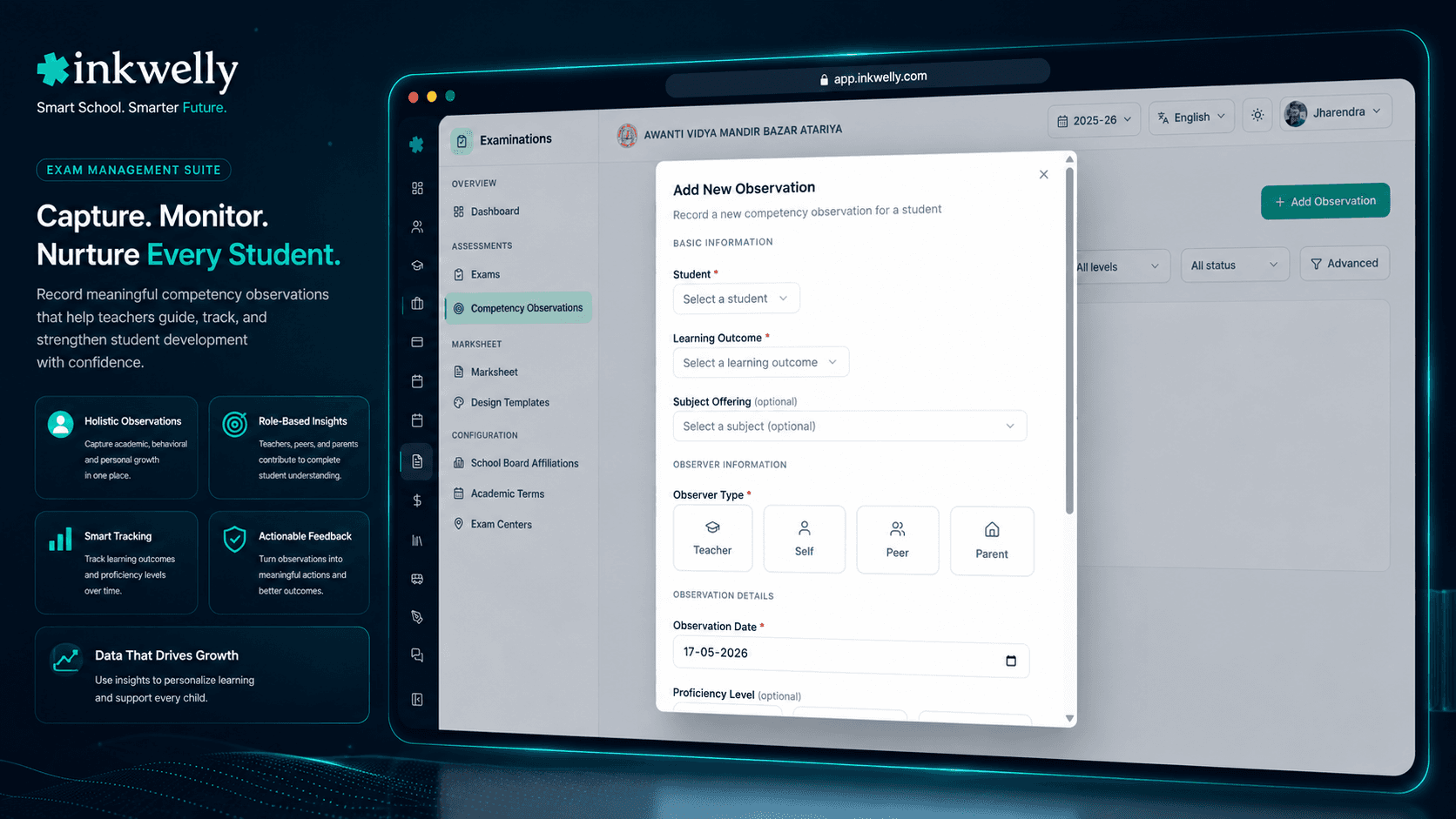
Capture every competency observation — without 12 notebooks. Teacher, peer, parent, self — one record per child.
Track NEP-aligned competency observations across four observer perspectives — teacher, self, peer and parent. Each observation carries a proficiency snapshot (BEGINNER, PROGRESSIVE, PROFICIENT), an optional learning-outcome link, and evidence attachments. CBSE/SQAA, IB Approaches to Learning and the NEP Holistic Progress Card all use the same structured record.
How most schools record competency observations today
It is a Wednesday in October at a CBSE school in Indore. The Class 5 teacher Mrs Verma has just finished a group activity where she asked the children to plan a class picnic together. She watched closely. Aanya led the planning, listened to others and drew a clear bus route on the board. Rohan kept interrupting but came up with the most creative idea. Three other children sat quietly through the whole exercise. Mrs Verma jots a few notes in the back of her diary, knowing she will struggle to recall any of it three months later when the half-yearly NEP Holistic Progress Card is due.
Across the school, eight other teachers have done similar observations across the same week. The art teacher noted who collaborated well in the mural project. The PE teacher noted who showed leadership in the relay. The music teacher noted who took initiative during the assembly rehearsal. None of these observations land in the same place. By December the diaries are mixed up, half are missing, and the school's NEP HPC submission to CBSE looks like a fiction written from memory. The principal apologises to the affiliation officer when the discrepancy is flagged.
NEP requires schools to capture competency observations as evidence, not as memory. CBSE/SQAA, IB Approaches to Learning, and every modern board are moving the same way. Inkwelly Competency Observations replaces the diary-and-WhatsApp pattern with one structured record per observation: who observed, who was observed, which competency, what proficiency level, when, with what evidence. Audit-ready, parent-visible, board-aligned.
How Inkwelly Competency Observations work
A competency observation is a single record that captures: which student, which competency, who observed, what proficiency level was demonstrated, on what date, with what optional notes and evidence. Every record carries this same structure regardless of who creates it.
Four observer perspectives are first-class:
- Teacher — the most common observer. The class teacher, subject teacher or co-curricular teacher records what they directly observed in class, on the playground, in the lab, or in a project.
- Self — the student themselves rates their own competency on age-appropriate items. Used for metacognitive skills (self-management, self-discipline, self-awareness).
- Peer — a classmate observes. Used carefully (with anonymity controls) for collaboration, communication and teamwork.
- Parent — a parent observes the child at home. Used for habits, responsibility, family involvement — things teachers cannot see directly.
Every observation captures a proficiency snapshot on the standard three-level scale: BEGINNER, PROGRESSIVE, PROFICIENT. The proficiency level can be linked to a specific NEP learning outcome (e.g. 'Demonstrates active listening in group discussions'). Evidence is optional but encouraged — a photo of the project, a video clip from the assembly, a worksheet scan, an audio file from the recital. Inkwelly stores the evidence in the school's media library and binds it to the observation forever.
When term-end comes, the marksheet pulls the latest proficiency snapshot per competency directly from this record set. The same record also feeds the NEP Holistic Progress Card, the parent portal view, and the principal's class-wide competency dashboard. One source, four artefacts.
What Inkwelly captures on every observation
- Student academic record — fully scoped to your school, class, and academic session
- Competency or learning outcome — picked from the school's NEP framework or custom rubric
- Observer type — TEACHER, SELF, PEER or PARENT, with conditional reference fields validated
- Observer identity — teacher employee, peer student, or parent profile, with full audit trail
- Proficiency snapshot — BEGINNER, PROGRESSIVE or PROFICIENT, on the standard three-level scale
- Observation date — ISO date stored, displayed in your locale's date format
- Activity context — short free-text up to 200 chars: 'Group picnic planning', 'Science fair', 'Annual day rehearsal'
- Observation notes — longer free-text where the teacher captures what specifically happened
- Evidence attachments — photo, video, document, audio or worksheet, stored in the school media library
- Subject offering link — optional link to a specific subject, useful for subject-specific competencies
Four observer perspectives — each with its own validation
A TEACHER observation requires a teacher employee reference. A SELF observation requires the student themselves to be the observer (which the system enforces via the logged-in user's profile). A PEER observation requires a peer student academic reference — and the system enforces that the peer is a classmate of the observed student, not a teacher or a different class. A PARENT observation requires a parent profile linked to the student's family record.
The DTO validators apply these rules with @ValidateIf per observer type — you cannot store a TEACHER observation without a teacher reference, and you cannot store a PEER observation with a teacher reference. The audit trail captures who observed (full name, employee ID or admission number) and when, so during a board review it is unambiguous who said what about whom.
Proficiency snapshots align with the CBSE three-level rubric
The NEP and CBSE/SQAA frameworks both use a three-level proficiency rubric: BEGINNER (the child is just starting to demonstrate the competency), PROGRESSIVE (the child can demonstrate it with support or in some contexts), PROFICIENT (the child consistently demonstrates it independently). Inkwelly bakes this scale into the observation record — not as free text, but as an enum that flows into reports.
When Inkwelly aggregates observations for a term, it picks the latest proficiency snapshot per competency per student. If a student moved from BEGINNER in August to PROGRESSIVE in October to PROFICIENT in December, the term-end report shows PROFICIENT — the trajectory is preserved in the audit log but the headline number reflects current ability. This matches how CBSE evaluates HPC reports: the latest demonstrated level is what counts.
Evidence attachments — photo, video, worksheet, audio
A proficiency level without evidence is an opinion. A proficiency level with a photo of the child's mural, a video clip from the assembly speech, an audio recording of the recital, or a worksheet scan from the project — that is a portfolio entry that survives a board affiliation review.
Inkwelly supports five evidence types: PHOTO, VIDEO, DOCUMENT, AUDIO, WORKSHEET. Each piece of evidence is uploaded to the school's media library, stored on Inkwelly's Mumbai servers, and bound to the observation by a permanent reference. Soft-deletes preserve evidence even if an observation is later corrected. Parents see the evidence on the parent portal (subject to the school's visibility rules), which is the single most powerful conversation starter at parent-teacher meetings.
Linking to learning outcomes — not just generic competencies
CBSE/SQAA's HPC reporting is increasingly granular: schools have to report not against generic 'collaboration' but against specific learning outcomes like 'Demonstrates active listening in group discussions' or 'Shows leadership in classroom activities'. Inkwelly carries an NEP learning-outcome catalogue per class that the school can edit, and each observation can be linked to a specific learning outcome.
The link unlocks two reporting layers: a competency view that aggregates across many learning outcomes (broad parent-facing reports) and a learning-outcome view that drills into the specific behaviours observed (board-facing HPC reports). Schools running both CBSE and IB use the same observation record with two parallel link sets — one for CBSE learning outcomes, one for IB Approaches to Learning. No double entry, no aligned reporting.
Where this actually pays off in your school year
Competency observations are not a separate workflow — they are a thread running through every term. Inkwelly's record set lights up in five recurring moments.
Portfolio assessment for the half-yearly. The class teacher reviews every child's observation set at the half-yearly mark. The Inkwelly observations dashboard shows, per child, every observation logged this term, by which observer, on which competency, with which proficiency level, and the evidence count. The teacher writes the term remark in 30 minutes instead of three days because the observations are already structured.
NEP Holistic Progress Card submission. When the school submits HPC data to CBSE/SQAA, the system pulls the latest proficiency per competency per student directly from the observation record set. There is no manual data entry into a CBSE template — the school exports the data in the schema CBSE expects. The data is verifiable from evidence in the same export.
Parent–teacher meeting. The parent walks in expecting an opinion. The teacher pulls up the child's observation timeline on a tablet, shows the parent the proficiency progression across the term, and plays a video evidence clip from the assembly speech. The conversation moves from defensive ('really, my child cannot speak in front of the class?') to constructive ('how do I support this at home?').
Learning-outcome reporting at term-end. The marksheet pulls a competency snapshot from the latest observations. The HPC pulls a learning-outcome view of the same data. Both ship from one record set.
Year-end review. At the end of the academic year, the school reviews the entire observation set per student to write the year-end report and to inform the next class teacher's onboarding. Continuity across years is built in — the new class teacher can see what the previous class teacher observed, with evidence, and start the year informed.
Day-to-day operations the team will actually use
- Record a single observation — student, competency, proficiency, optional evidence
- Bulk view observations for one class — filter by competency or observer type
- Filter by date range — 'show me everything observed this term'
- Filter by observer type — 'show me only peer observations of this student'
- Attach evidence — photo, video, worksheet, audio or document
- Edit a draft observation — before lock, with full audit trail
- Soft-delete with a reason — preserves the record, hides it from active reports
- Aggregate per term — latest proficiency snapshot per competency per student
- Export for HPC submission — CSV or schema-aligned format for CBSE/SQAA
- Bring up a child's full observation history — chronological timeline with evidence inline
See competency observations live on Inkwelly
Send us your school's NEP HPC template or CBSE/SQAA submission format. We will run a sample observation cycle for one class on Inkwelly, free, and walk you through the export.
Limits, safety, and the small print every school should ask about
Observation data is sensitive — it captures children's behaviour, abilities and growth. The protections below exist because audit reviewers, parents, and CBSE all have legitimate questions about how this data is handled.
Soft-delete preserves history, not just the field. When an observation is deleted, it is marked inactive but the record (and its evidence) remains in the database for audit purposes. Reports filter on isActive=true so deleted observations stop influencing aggregates. The principal can review the deleted set if a question arises during a board review.
Peer observations default to anonymity for parents. When a parent views their child's observations, peer observations show 'a classmate observed' instead of the peer's name. Schools that explicitly want named peer observations can override this, but the default protects the peer's privacy.
Evidence files are scoped to the school. A photo uploaded as evidence for one school's observations cannot be referenced by another school. Storage paths are scoped per organisation per school per session, so even an unauthorised access attempt cannot list across schools.
No retroactive proficiency edits without a paper trail. Every change to an observation — proficiency, notes, evidence — is timestamped and attributed. There is no way to silently raise a child's proficiency after the term-end report is published.
Observations are scoped to organisation, school and session. A change in academic session does not pollute the previous year's record set. Year-on-year comparison is possible because the records remain, but they cannot be silently merged across years — the academic session ID is part of every record.
Belongs to
1 moduleFrequently asked
6 questionsDoes this integrate with the NEP Holistic Progress Card (HPC) submission to CBSE/SQAA?
Yes. The NEP HPC asks for the latest proficiency level per competency per student, with linked learning outcomes and evidence count. Inkwelly stores every observation in this exact structure, so the HPC export is a direct query against the observation record set. Schools using Inkwelly's HPC export skip the manual data-entry step into CBSE's HPC form. The export is verifiable — reviewers can pull the source observation and the evidence with one click.
Can parents see all observations of their child, or only some?
Each observation has a visibility flag. By default, observations made by teachers or the parent themselves are parent-visible; peer observations are parent-visible but with peer-anonymity (the peer's name is hidden); restricted observations (typically sensitive behavioural notes) are staff-only. Schools can change the default per their parent-engagement philosophy. The visibility rule applies to evidence too — if an observation is hidden, its evidence is hidden.
Are peer observations safe? We worry about students bullying through ratings.
Inkwelly enforces several safeguards. Peer observations default to anonymity (the observed child does not see who rated them, the parent does not see who rated their child). Peer observations are gated by the teacher — they go into a 'pending review' queue and the class teacher decides whether to include them in the official record. Schools can disable peer observations entirely if they prefer; the system is designed for trust-rich classroom environments first.
What is the size limit for evidence files? Our teachers upload videos.
Single evidence files are capped at 50 MB by default — this comfortably covers a 1–2 minute video clip in standard quality. Schools that need more can request a per-school override (most do not). Evidence is uploaded to Inkwelly's Mumbai servers and stored long-term as part of the observation record. Inkwelly's media library auto-creates a folder hierarchy per class, per competency, so the school's media archive stays organised.
Can we export observations to a board's specific format?
Yes. Inkwelly's export endpoint produces JSON, CSV, or a board-specific schema (CBSE/SQAA HPC format, IB ATL skills format, IGCSE Personal & Social Education format). Schools running multiple boards run multiple exports from the same record set. The exports include observation, observer, proficiency, learning outcome, evidence count and timestamps — the board reviewer has everything they need without contacting the school.
Does this feed into the marksheet?
Yes. The marksheet's competency snapshot section pulls the latest proficiency level per competency per student directly from the observation record set. There is no separate data entry. If the school's marksheet design template includes the competency snapshot section (most CBSE/IB templates do), the marks for the term and the proficiency levels for the competencies sit on the same printed sheet. Parents see one document; the school maintains one record set.
You might also like
1 readsSee Inkwelly on your school
30-minute demo. We open your current ERP with you and load your data into Inkwelly on the call. Dated go-live plan by the end of it.