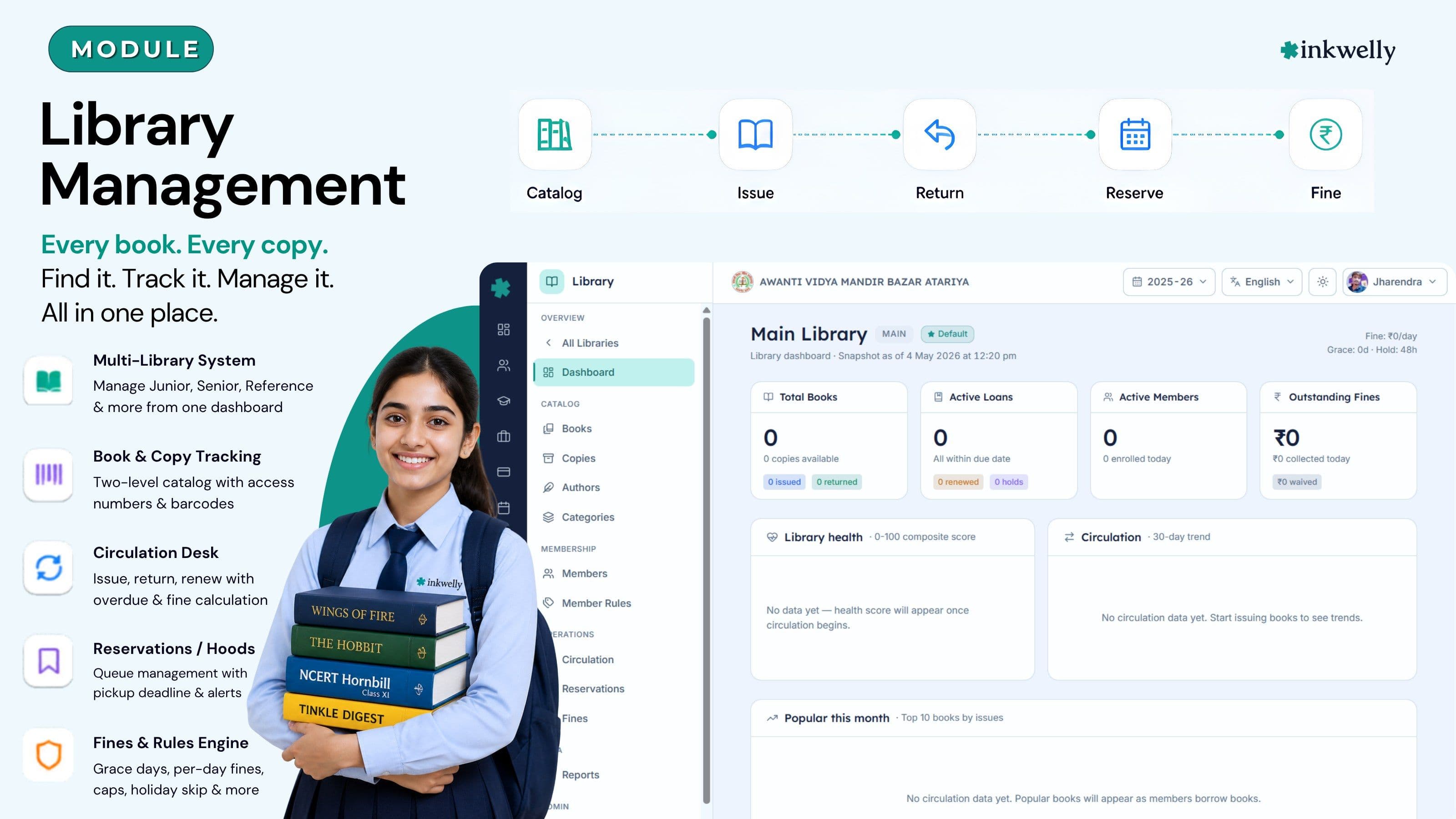
Run the school library without losing a single book. Catalog, issue, return, reserve, fine.
A multi-library system with copy-level accession, issue and return workflows, member categories with per-grade borrow rules, time-ordered reservations, holiday-aware fines and a dashboard with a library health score. Built for the way Indian schools actually run their reading rooms — CBSE, ICSE, IB, IGCSE and State Boards.
How most Indian schools run the library today
It is the third week of June in a CBSE senior-secondary school in Kanpur. Promotion is over, the new session has just opened, and the librarian has been pulled out of her room twice already this morning — once to find the missing copy of Wings of Fire that a Class 9 boy is asking for, and once to argue with a parent who is sure her daughter returned a book in February. The library register is a thick hardbound book with sticky tabs, the issue cards are kept in a wooden tray sorted by class, and the spreadsheet of donated books from last year's annual function never quite became part of the catalog. There are three copies of the new NCERT Hornbill that arrived in May still sitting in a sealed cardboard box because no accession number was assigned.
The cost is not just the librarian's time. A reading-period for Class 7 collapses because the English teacher cannot find which student has the Tinkle Digest she was planning to read aloud. The principal's office cannot answer when the CBSE inspection team asks for an inventory list with current status. Three fines from last year quietly become uncollectible because no one remembers when the books were due. A parent who was about to recommend the school to two friends instead complains in the WhatsApp PTA group about the fine claim. By the end of the term, the library is the part of the school that everyone agrees needs work and no one knows how to fix.
This page is for the principal, librarian or office head who has stopped pretending the existing register works. Inkwelly Library replaces the register, the wooden card tray and the donated-books Excel with one screen that knows where every book and every copy is, who borrowed it, when it is due and what the fine looks like — across one library or many.
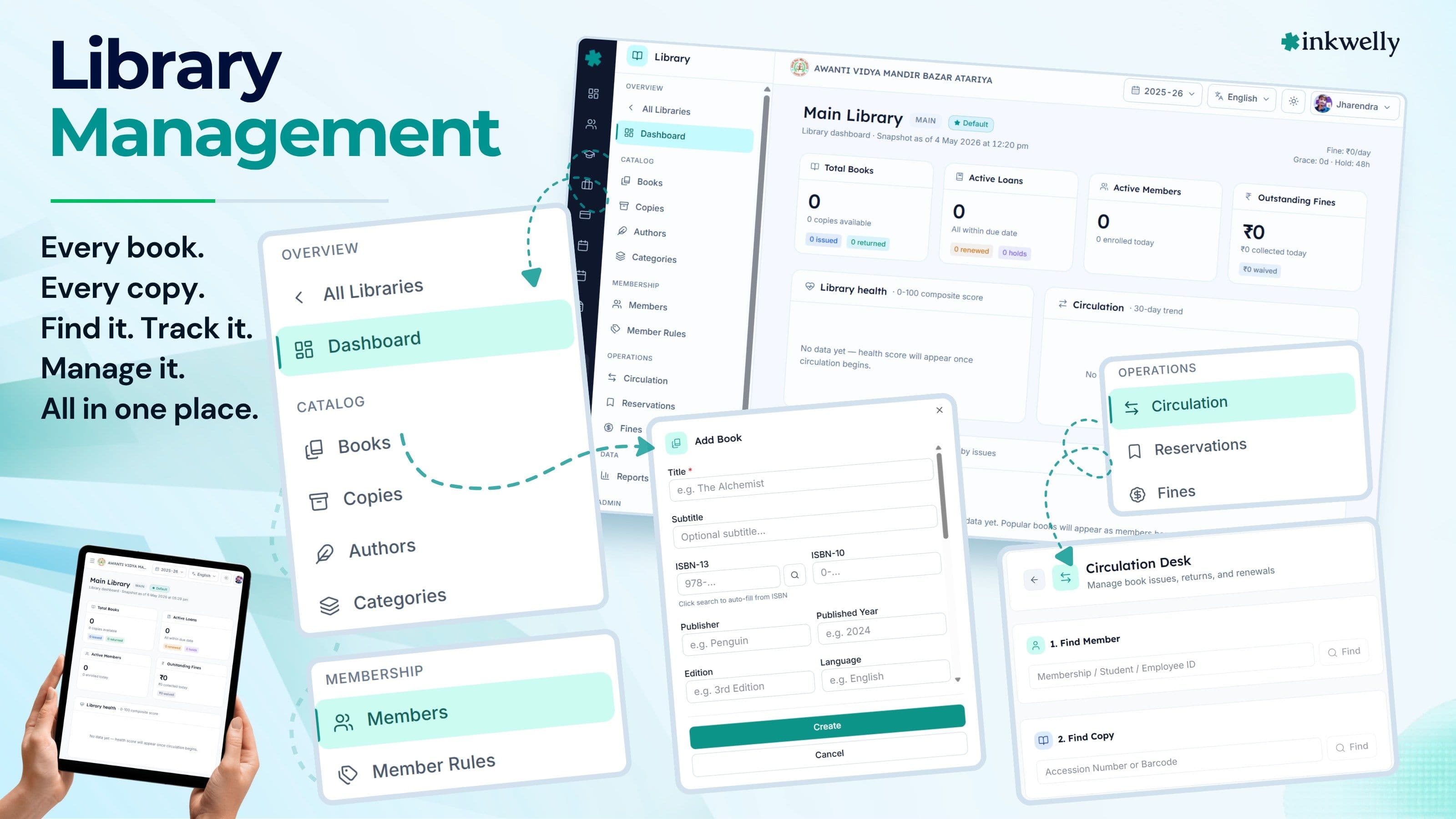
What we built instead
A library in an Indian school is not just one shelf — it is often a junior library, a senior library, a teacher reference room, sometimes a board-exam revision section, and a stack of donated books that nobody has accessioned yet. Inkwelly treats every one of those as a separate library with its own code, location, in-charge employee and circulation rules — but rolls them up into one school-level view so the principal can see the whole reading life of the school in a single dashboard.
Underneath, the design separates books (a title, with ISBN, publisher, language, format and authors) from copies (the physical items on the shelf, each with an accession number, barcode and condition). Three copies of NCERT Hornbill Class 11 are one book row and three copy rows. When the Class 11A teacher comes in for a 'reading period set', the system finds the available copies; when one is lost in the bus, only that copy is marked as lost while the other two stay in circulation. This is the difference between a register and an actual catalog — and it is the foundation on which every other workflow rests.
What's on the page from day one
- Multi-library structure — Junior, Senior, Reference, Board Revision, each with its own code, location, in-charge employee and rules
- Two-level catalog — books with ISBN-10, ISBN-13, publisher, language, format and edition; copies with accession number, barcode, condition and current status
- Hierarchical categories — Fiction → Indian Writing in English → R K Narayan, with display order and a books count per branch
- Author records with biography, nationality and a books count, reusable across libraries in the same school
- Member categories tied to a grade level (or to the staff pool) with their own maximum books, borrow duration, maximum renewals, daily fine and reservation quota
- Circulation desk — issue, return and renew on one screen, with a permanent overdue counter and accession-number lookup
- Time-ordered reservations with pickup deadlines, automatic expiry, a per-member quota and stale-hold alerts on the dashboard
- Holiday-aware fines with grace days, a daily rate, a maximum cap, lost-and-damage replacement multipliers and a renewal-block-on-fine toggle
- Auto-generated accession numbers with a configurable prefix and zero-padding (for example JLB-00001, JLB-00002)
- Bulk accession — add ten copies of a new NCERT title in one screen, each with the next accession number applied automatically
- Nine reports out of the box — defaulters, popular books, dead stock, circulation, member activity, accession register, lost-and-damaged, fine collection, overdue summary
- A live dashboard with a library health score, a circulation trend, a popular-books panel, a top-readers panel and an activity feed
- Audit trail on every issue, return, renewal, hold, fine collection and fine waiver, with the user and timestamp
- Soft-delete on books, copies, members and categories — nothing is lost in error
Everything an Indian school library actually needs
The grid below is the spine of the module. Each card maps to a real screen in the product — not a vision deck. If a feature is on this grid, it is shipping today; if it is not, it is on the roadmap, and you can ask in the demo. We deliberately kept the list to the workflows a CBSE / ICSE / State Board librarian runs in the first month, instead of a long list of features that look impressive in a sales pitch but never get used.
Capabilities at a glance
Multi-library setup
Run Junior, Senior, Reference and Board-Revision sections as separate libraries with their own code, location, in-charge employee and rules. One school-level dashboard rolls everything up.
Books and copies
Books store ISBN, publisher, language, format, edition and authors. Copies carry an accession number, barcode, condition and a status that moves between Available, Issued, Reserved, In Transit, Lost, Damaged, Under Repair and Withdrawn.
Hierarchical categories
Build the subject tree your school actually uses — Fiction, Hindi Sahitya, Bal Sahitya, Munshi Premchand. Reorder, rename, soft-delete. The books count rolls up automatically.
Member categories
Define rules per member group — Class 6-8 borrow two books for seven days with no renewals, Class 11-12 borrow three books for fourteen days with one renewal, teachers borrow five for thirty days. Mapped to grade levels.
Circulation desk
Issue, return and renew on one screen. Member name and accession-number lookup, due date computed from the member's category, and a permanent overdue counter that is always visible.
Reservations and holds
Students reserve a book that is currently issued. The hold goes into a time-ordered queue, the next member gets it as soon as a copy returns, and the hold auto-expires if not collected by the pickup deadline.
Holiday-aware fines
Daily rate, grace days, maximum cap, lost-replacement multiplier, damage multiplier, holiday-skip and renewal-block-on-fine — all per library. Fines collected, waived and outstanding are tracked separately.
Auto-accession numbers
Configure a prefix and padding once — JLB-00001 onwards. Every new copy gets the next number automatically. No 'where did we stop last year' confusion in June.
Bulk accession
When ten copies of a new NCERT title arrive, catalog the title once and create all ten copies in one screen — each with the next accession number, same purchase date, vendor and price applied across the batch.
Nine reports out of the box
Defaulters, popular books, dead stock, circulation by class, member activity, accession register, lost-and-damaged, fine collection, overdue summary — every report exportable as PDF or Excel for inspection files.
Cataloging — the layer everything else stands on
A catalog that is half-done is worse than no catalog. If a book is not in the system, a student cannot find it; if a copy is in the system but not on the shelf, the librarian gets blamed. Inkwelly's catalog is built so that every donation, every NCERT bulk order and every replacement copy ends up in the system the same day it arrives — without three forms and an Excel handoff. The two-level model (books and copies) is what makes this work in practice. You catalog Hornbill — NCERT Class 11 once; you accession three copies of it as JLB-00114, JLB-00115, JLB-00116. When a librarian searches for the title, she sees one row with 'available 1, issued 2'. When she looks up copy JLB-00115, she sees exactly which student has it and when it is due.
Books and copies — the distinction that scales
Most school registers conflate the two. Inkwelly does not. A book is the bibliographic record — title, sub-title, ISBN-10, ISBN-13, publisher, edition, year of publication, language, format and one or more authors. The format itself covers what an Indian school library actually has on its shelves — hardcover and paperback, journals and magazines, newspapers, reference works, ebooks and audiobooks, the occasional thesis, the CD or DVD that came with a textbook, and the map kept rolled in the back room. A copy is the physical item — accession number, barcode, condition, current status and the price the school paid for it.
When Class 11 needs three copies of Hornbill for a reading period, the librarian sees one book row and three copy rows. When one copy is lost in the bus, only that copy moves to Lost — the book stays in circulation. When the librarian needs to weed out a tattered copy, she marks it as Withdrawn; the book record is untouched. Without this separation, every workflow above this layer breaks.
Categories that match how Indian librarians think
Dewey Decimal is technically correct and practically nobody in an Indian school library uses it. Inkwelly lets you build the tree your reading-room actually uses. Fiction → Indian Writing in English → R K Narayan. Hindi Sahitya → Bal Sahitya → Munshi Premchand. Reference → Competitive → CDS / NDA / SSC. Periodicals → Magazines → Tinkle. Categories carry a parent, a display order, an optional code, an active flag and a books count that rolls up the children. You can soft-delete a branch and the books move to Uncategorised — never disappear. Books also carry a Dewey number if you want one for affiliation paperwork, but it is not what your librarian uses to find a book.
Reorder by drag, rename inline, archive the branch you no longer use. The categories panel is the same one the principal uses to print an inspection-friendly subject-wise inventory list — so the librarian and the inspection team are always looking at the same tree.
Circulation — the desk that runs the library
Issue, return, renew. Three verbs. The whole library lives on whether these three things take 10 seconds each or three minutes each. The circulation desk in Inkwelly is one screen — the Circulation Desk — built so that a Class 4 student handing over an Amar Chitra Katha and a Class 12 student returning NCERT Physics Part 1 both go through the same way. Pick the member, pick the copy, click Issue or Return; the due date is computed from the member's category, the overdue counter on the top of the page recounts, and the next student in line is already at the desk.
Issue: pick the copy, pick the member, done
The librarian looks up the copy by accession number or title (or scans the barcode where one is printed and the school's reader supports it). The screen shows the book and copy details, plus the last few transactions on this copy — useful when the same Class 8 boy borrows the same Premchand again. She picks the member by name or membership number; the system auto-fills the member's category, current outstanding loans against the maximum allowed, any unpaid fines, and the computed due date.
If the member already has three books out and the category cap is three, the system blocks the issue with an explicit message — not a silent allow. If the renewal-block-on-fine setting is on and the member has an outstanding fine, that block is also enforced here. The desk says yes only when the rules say yes.
Return and renewal: the same screen, two buttons
Return drops the copy back to Available, runs the fine calculation if the loan was overdue, and offers a waiver with a reason field. The librarian does not switch screens. Renewal extends the due date by the category's borrow duration, increments the renewal counter against the maximum allowed, and refuses cleanly if the cap is hit or the book has a pending reservation.
The overdue counter at the top of the page is permanent — every loan past its due date adds one, and one click filters the table to show only those. The librarian does not have to remember to check. The Class 6 girl who has been holding Matilda for 28 days surfaces on her own.
Members — borrow rules that match the way classes actually read
A Class 4 student should not borrow a 600-page reference book for 30 days. A teacher should not be capped at one book for 7 days. Inkwelly's member categories let you set borrow rules per cohort — maximum number of books, borrow duration in days, maximum renewals, daily fine and reservation quota — and tie them to a grade level (or to the staff pool for teachers and admin staff). When a Class 4 girl is enrolled in the library, she inherits the Junior Wing category's rules; when she promotes to Class 5, you move her to the next category in one screen and the rules update from the next issue.
Member categories — set once, reused for years
A typical Indian school sets up four to six member categories: Pre-Primary, Primary (1-5), Middle (6-8), Senior (9-10), Senior Secondary (11-12), Faculty. Each carries its own rules. A change to Senior Secondary — say, raising the maximum books from three to four in board-exam term — applies to every member tagged to it on the next issue.
Member status is a small but powerful field — Active, Suspended, Expired or Cancelled. A suspended member cannot issue but can still return. An expired-membership warning appears on the dashboard 14 days in advance. The librarian gets time to renew the cohort before the new term breaks.
Reservations and fines — the parts schools usually get wrong
Reservations and fines are where most school libraries silently break. Either reservations are tracked in a notebook that the next librarian cannot read, or fines are collected on whim. Inkwelly's reservation and fine logic is the same the librarian and the principal see — so disputes get resolved in 30 seconds with a screenshot, not in a 20-minute argument.
Reservations: the queue is visible
A student reserves a book that is currently issued. The hold goes into a queue ordered by reservation time. When a copy is returned, the system marks it as Reserved for the next member in the queue and starts the pickup deadline (default 48 hours, configurable).
If the student does not pick up the book in time, the hold expires automatically and the next student in the queue gets the allocation. A per-member reservation quota stops one over-eager Class 11 boy from queuing for everything. Stale holds — reservations that are sitting unfulfilled past their deadline — appear on the dashboard so the librarian can chase them in a single screen, not by going through the register page by page.
Fines: the policy is in the software, not in the librarian's head
Set the daily fine rate (₹2 is common for primary, ₹5 for senior), grace days (most schools use one to two), a maximum cap so the fine never crosses the book's MRP, and decide whether holidays count for fine accrual. For lost or damaged books, configure replacement multipliers against the recorded copy price — typical values are 2× for lost, 1.5× for damaged.
The renewal-block-on-fine toggle is the lever most schools forget. With it on, a member with an unpaid fine cannot renew — they have to clear the dues at the desk. Fines collected and fines waived are tracked separately, with reasons, so the principal sees the difference between paid and waived for genuine reasons.
Before and after Inkwelly Library
Inkwelly Library vs generic ERPs that 'also have a library module'
Built for the people who actually run the library
The librarian is one person. The library is used by a Class 5 student, a Class 12 board candidate, a science teacher, the principal and an inspecting officer — each with a different question to ask of the same data. Inkwelly Library is built so that each role gets the answer they need from their own login, without bothering the librarian for it.
The librarian — fewer interruptions, more reading-period support
Her day is the circulation desk in the morning, accessioning new arrivals between bells, handling reservations and fines in the afternoon, and answering inspection questions whenever they come. The desk is one screen. New arrivals get accession numbers automatically. Reservations queue themselves. Fines are computed from policy. The reports she used to spend Friday afternoons compiling are exportable from one button.
Most importantly — the next librarian who joins inherits the system, not a hardbound register only she could read. Continuity that survives staff turnover is the single biggest gain a school library can make.
The class teacher — reading-period setup in 30 seconds
A reading period in Class 7 used to mean walking to the library, asking the librarian to find five copies of something Class-7-friendly, and returning to the room with three. The class teacher now opens the catalog from her laptop, filters by language and category, sees which copies are available today, sends the librarian a one-line message ('5 copies of Wings of Fire, Class 7 reading period, period 4'), and has them ready when she walks in.
She also sees the top readers of her class on the dashboard — three students who have read 10 or more books this term. That ends up on the parent-teacher meeting slide. Praise that is grounded in data is the cheapest form of student motivation an Indian school has.
The principal — accountability without nagging
She does not want to be the person who chases the librarian for an inventory list. She opens the library dashboard once a week — sees the library health score (computed from on-time returns, copy availability, overdue percentage, fine collection rate and stale-hold count), the circulation trend over 30 days, and the top three alerts (long-overdue loans, expiring memberships, stale holds). If the score has dropped, she has a conversation; if it has held, she does not.
When the CBSE inspection visit happens, the inventory list, circulation report, fine summary and category-wise stock are exportable from her own login. She does not need to ask for them — she pulls them. The library finally answers the questions the principal is asked.
The member detail page — every transaction in one place
Open any student or staff member's record and you see their complete library history — current loans with due dates and days remaining, full transaction history (issue, return, renewal, lost, damaged), outstanding fines with payment and waiver history, reservation queue positions, and the audit trail of who did what when.
The Class 11 boy who has not returned his board-revision book is one click away from a conversation — with the data on screen, not in a register. A parent who walks in asking about a disputed fine sees the receipt-style transaction record. The dispute that used to take 20 minutes now closes in 30 seconds.
Integrations — the library is not a silo
A school library that does not know who the students are, who the teachers are and which classes are running is half a system. Inkwelly Library reads the student and employee directories from Student Information and the employee module, so when you enroll a new library member you pick from the existing roster instead of typing names again. Categories tie to grade levels from Academics, so when you set up a Junior Wing category for Class 1-5 the membership rules apply consistently across that grade range.
Security, privacy and audit
A library catalog reads like a small thing — until you remember that the borrowing record is a list of what a 14-year-old child has been reading. Inkwelly treats every read of that data as a privileged action. Role-based access is tied to Inkwelly's IAM — librarians see all members in their library; class teachers see only their class; the principal sees the school.
What we do for security
- Per-school tenant isolation — two schools on the same Inkwelly cluster never see each other's library data
- Role-based access — librarian, class teacher, principal and admin staff each with their own scope
- Audit log on every issue, return, renewal, hold, fine collection and fine waiver — with the user and timestamp
- Soft-delete on books, copies, members and categories — nothing is lost in error
- Configurable working days and holidays at the library level — holidays are excluded from overdue counting when you want
- Renewal audit log — every renewal stores the previous due date, the new due date, the renewing user and the timestamp
- Data stored on Indian servers, never offshored
- Daily encrypted backups with school-configurable retention
Migration — getting on Inkwelly without losing the August reading list
Most schools do not switch software in the middle of a term unless the migration is genuinely painless. Inkwelly's library import is built for the three real states a school's library data is usually in: paper register, Excel, or another ERP. There is a fourth state — donated-books-still-in-cardboard — and we have a workflow for that too.
From paper register or Excel
Download our import template — one sheet for books, one for copies, one for members. Fill in what you have (do not worry about the columns you do not have). Upload, review the auto-detected duplicates and accession-number conflicts, and click Import. A typical 4,000-book library imports in about 90 minutes including review time.
New donated copies that arrive after the import use the regular accession workflow. The system picks up from the next number. You do not have to wait for a clean state to start using Inkwelly — start with what is on the shelf today, accession the donations as they come.
From another ERP (Fedena, Entab, Tally Library, etc.)
Most generic ERPs export a partial CSV — book title, ISBN, copies. We map that to the books and copies tables; you fill in the missing fields (publisher, language, format, condition) on the catalog page over the first two weeks.
Member enrollment uses the school's main student register, which Inkwelly already has from Student Information. The librarian picks the students who should be library members and assigns each one a member category — names are not retyped. Migration time is dominated by review, not by data entry.
See the library run on a real Indian school dataset
30-minute walkthrough with a Class 1-12 catalog, four member categories and three weeks of circulation data. No sales pitch — we show, you ask.
“A school library is the cheapest, most under-used educational intervention an Indian school has. The software's only job is to stop being the thing that gets in the way.”
A normal week, end to end
The screenshots above show individual screens. The week below shows how they connect — the rhythm of how Inkwelly Library actually runs in a school. Read this carefully if you are evaluating the module against your current process — the test of a school ERP is not 'what features does it have' but 'does my Tuesday morning get easier'.
Inkwelly Library vs imported global tools (Koha, Destiny, etc.)
What's included with Library
- Multi-library setup with codes, locations, an in-charge employee, and a default-library flag
- Books with ISBN-10, ISBN-13, publisher, edition, year, language, format and one or more authors
- Copies with an accession number, barcode, condition and a status that moves between Available, Issued, Reserved, In Transit, Lost, Damaged, Under Repair and Withdrawn
- Hierarchical categories with parent, display order, code and a rolled-up books count
- Author records with biography, nationality and a books count
- Member categories tied to a grade level (or to the staff pool) with maximum books, borrow duration, maximum renewals, daily fine and reservation quota
- Members with status (Active, Suspended, Expired, Cancelled) and a complete transaction history
- Circulation desk — issue, return and renew on one screen with a permanent overdue counter
- Bulk accession — add many copies of a newly arrived title in one screen
- Reservations queue with pickup deadlines, expiry hours, a per-member quota and stale-hold alerts
- Holiday-aware fines with grace days, a daily rate, a maximum cap and lost-and-damage multipliers
- Auto-accession numbers with a configurable prefix and zero-padding
- Renewal audit log — every renewal stores the previous and new due date, the renewing user and the timestamp
- Nine reports out of the box — defaulters, popular books, dead stock, circulation, member activity, accession register, lost-and-damaged, fine collection, overdue summary
- Live dashboard — KPIs, library health score, hourly heatmap, popular books, top readers, alerts, activity feed
Stop running the library out of a hardbound register.
Book a 30-minute walkthrough. Bring your own questions — about CBSE inspection, donated books, board-exam revision, parent disputes. We'll answer on a real dataset.
Frequently asked
12 questionsCan we run multiple libraries in one school — Junior, Senior, Reference, Board Revision?
Yes. Each library has its own code, location, in-charge employee, accession-number prefix and circulation rules. The school-level dashboard rolls everything up into one view. You can run as many libraries as your school needs.
How does Inkwelly handle the difference between a book and a copy?
A book is the bibliographic record — title, ISBN, publisher, edition, language, format and one or more authors. A copy is the physical item on the shelf, with its own accession number, barcode, condition and current status. Three copies of the same NCERT title are one book row and three copy rows. The status on a copy moves between Available, Issued, Reserved, In Transit, Lost, Damaged, Under Repair and Withdrawn.
Are accession numbers generated automatically?
Yes. You configure a prefix (for example JLB for the Junior Library) and a zero-padding length (for example 5, giving JLB-00001) once. Every new copy gets the next number automatically. There is no 'where did we stop last year' confusion at the start of a new term.
Can we set different borrow rules for different classes?
Yes. Member categories let you set the maximum number of books, borrow duration, maximum renewals, daily fine and reservation quota per group, mapped to a grade level. Class 4-5, Class 6-8, Class 9-10, Class 11-12 and Faculty are typical groupings — you can have as many as you need.
How are fines calculated?
Per library you set a daily fine rate, grace days (a few days during which no fine accrues), a maximum cap so fines never cross the book's price, and choose whether holidays count for overdue. For lost or damaged books, configurable multipliers compute charges against the recorded copy price. There is also an option to block renewals while a fine is outstanding.
What reports can I pull from the library?
Nine reports ship out of the box: defaulters list, popular books, dead stock (books not borrowed in a chosen window), circulation statistics, member activity, accession register, lost-and-damaged register, fine collection summary and overdue summary. All of them are exportable for inspection files and trustee meetings.
Can students reserve a book that is currently issued?
Yes. Reservations are queued in time order. When a copy is returned the system marks it as reserved for the next member in the queue and starts the pickup deadline. If the member does not pick up the book in time, the hold expires automatically and the next member in the queue gets it. A per-member reservation quota stops the queue from being abused.
Does the system handle bulk accession when 50 NCERT copies arrive together?
Yes. Once you have catalogued the title (say, Hornbill Class 11), use the bulk-accession action to create as many copies as the carton contains in one screen. Each copy gets the next accession number automatically, with the same purchase date, vendor and price applied across the batch.
What happens to library member data when a student is promoted?
The student's record promotes via the Academics module; their library membership stays linked. The librarian moves the member to the next category (for example, from the Middle category to the Senior category) once — the borrow rules update from the next issue. Categories carry a grade-level link so this is a quick filter-and-update, not a re-entry.
How long does migration from a paper register or Excel take?
For a typical 3,000 to 5,000-book library, expect one to two hours including review. Download the import template (books, copies, members), fill in what you have, upload, review the auto-detected duplicates and accession-number conflicts, and confirm. Copies that arrive after migration use the regular accession flow.
Where is library data stored?
All Inkwelly data, including library borrowing history, is stored on Indian servers — never offshored. The platform is built for the DPDP Act 2023 — verifiable parental consent for minors, role-based access on every record, audit log on every transaction, and principal-level deletion with a logged reason. Borrowing history is private to the school.
Can the principal pull an inspection-ready inventory report any day?
Yes. Inventory by category, circulation by class, fines collected versus waived by month, copy-status breakdown, popular books, top readers and category-wise stock — all of them exportable as PDF or Excel from the principal's own login. No need to ask the librarian to compile them.
You might also like
3 readsSee Inkwelly on your school
30-minute demo. We open your current ERP with you and load your data into Inkwelly on the call. Dated go-live plan by the end of it.