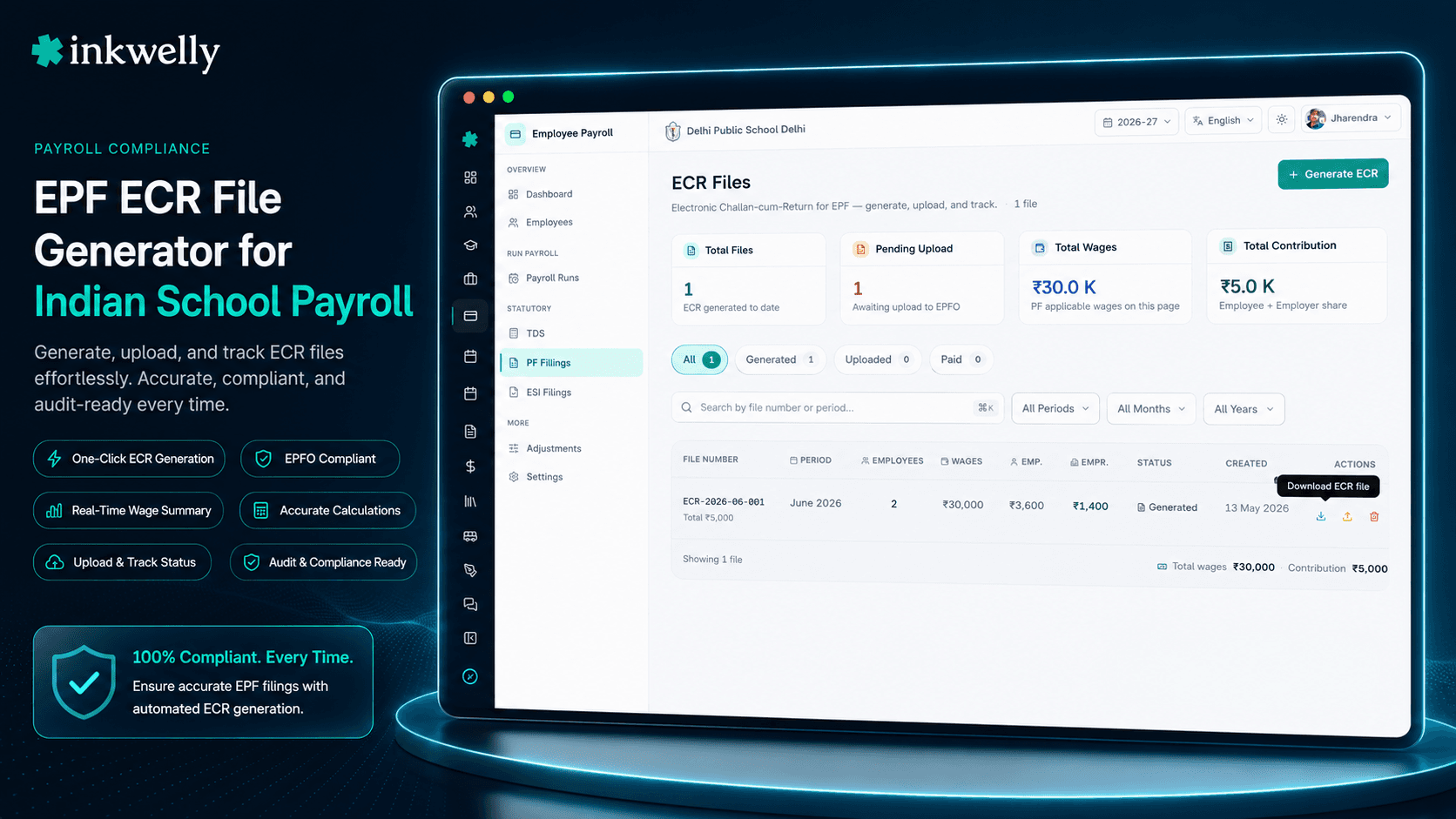
Har month का EPFO ECR drama यहाँ band। Generate, upload, pay — period-wise tracked।
Monthly disbursed payroll से EPFO-format ECR text file seconds में generate करें — UAN, EPF wages, EPS wages, EDLI wages, NCP days और employer share, सभी 11 columns जो EPFO Unified Portal expect करता है। हर ECR uploaded mark करें, TRRN और challan record करें, और कौन-सा month paid है वो कभी miss न हो।
हर 15 तारीख को होने वाला EPF panic, हर Indian school जानता है
15 May 2026, 11:47 AM। Bahraich के एक CBSE school का accountant EPFO Unified Portal के login screen को घूर रहा है। April की salaries 3 din late हो गई थीं — music teacher का UAN में extra space था, नया PRT 18 तारीख को join हुआ और उसकी EPF wages pro-rate करनी थीं, principal ने एक one-time bonus add करने को कहा जिसके बारे में accountant को confirm नहीं था कि वो EPF wages में count होगा या नहीं। ECR text file upload करने और challan pay करने का deadline 15 May है। आज रात 11:59 PM के बाद हर minute मतलब 12% per annum interest और EPF Act 1952 की section 14B के damages — वो notice जो 3 month बाद chairman की desk पर आता है जब किसी को याद नहीं रहता क्या हुआ था।
Accountant पुराने payroll software से ECR export करने की कोशिश करता है। File गलत delimiter के साथ generate होती है। Excel में open करता है, columns hand से fix करता है, text save करता है, portal पर upload करता है — error: 'Member ID format invalid in row 47'। Row 47 वही substitute teacher है जो 18 din leave-without-pay पर थी; उसका NCP days field blank है। Fix करता है। Re-upload — अलग error। 4 PM तक accountant ने EPFO consultant को WhatsApp पर 2 बार और principal को 1 बार call कर लिया है।
यह software problem नहीं है। यह 'India के अधिकतर schools में हर salary cycle ऐसे ही ख़त्म होता है' problem है। Inkwelly का Employee Payroll module इसी 4 PM के लिए built-in ECR File Generator के साथ आता है।
Inkwelly ECR file कैसे generate करता है
आपको कोई 'configure ECR' screen नहीं मिलेगा — है ही नहीं। Configuration एक बार होता है जब आप employee payroll setup करते हैं और हर employee को UAN के साथ tag करते हैं। उसके बाद ECR file सिर्फ एक button है।
Employee Payroll खोलें → ECR Files → Generate ECR click करें। Pay period चुनें — सिर्फ वही periods dropdown में आएँगे जिनका कम से कम एक payroll run disbursed हो चुका है, क्योंकि EPFO उन months के ECR uploads accept नहीं करता जिनकी salary actually pay नहीं हुई। System उस period के सारे disbursed payroll runs से PF contributions pull करता है, पहले से किसी ECR file में link की गई contributions को skip करता है, और EPFO-format pipe-delimited text file सभी 11 columns के साथ लिखता है: UAN, Member Name, Gross Wages, EPF Wages, EPS Wages, EDLI Wages, EPF Contribution (Employee), EPS Contribution (Employer), EPF Contribution (Employer), NCP Days, Refund of Advances।
Download ECR File click करें। Text file आपके laptop पर है। दूसरे tab में EPFO Unified Portal पर sign in करें, 'ECR Upload' के नीचे file upload करें, online challan generate करें, school के bank net banking से pay करें, EPFO जो TRRN return करता है उसे copy करें।
Inkwelly पर वापस आएँ। Mark as Uploaded click करें — file का status GENERATED से UPLOADED हो जाता है ताकि office को पता रहे portal step done है। Record Payment click करें, TRRN, challan date, EPFO ने bank से जो amount actually deduct किया, और payment date paste करें — status PAID हो जाता है, period lock हो जाती है।
3 buttons। एक pay period। Excel में clean-up करने के लिए कोई leftover columns नहीं।
EPFO Unified Portal जो हर column expect करता है, disbursed run से computed
- UAN — Universal Account Number, 12 digits, employee profile के against validated और missing या malformed होने पर surface होता है
- Member Name — EPFO के साथ registered full name, employee record से directly pull होता है
- Gross Wages — period की total earnings (basic + DA + HRA + allowances + उस month के bonus components)
- EPF Wages — wages जिन पर 12% PF calculate होता है, ₹15,000 पर capped जब तक school ने full basic पर contribute करने का option नहीं चुना
- EPS Wages — Employees' Pension Scheme contribution के लिए eligible wages, capped basic का 8.33%, employer द्वारा pay
- EDLI Wages — Employee Deposit Linked Insurance scheme के लिए eligible wages, EPF Act 1952 के per ₹15,000 पर capped
- EPF Contribution (Employee) — EPF Wages का 12% teacher की salary से deduct होता है, हर payslip पर explain की जाने वाली line
- EPS Contribution (Employer) — EPS Wages का 8.33%, school का share staff के pension corpus में route होता है
- EPF Contribution (Employer) — EPF Wages का 3.67%, school का share provident fund proper में route होता है
- NCP Days — Non-Contribution Period days, employee attendance register से computed, hand से कभी type नहीं होते
- Refund of Advances — refunded PF advances जब teacher ने पहले की withdrawal वापस की हो, relevant होने पर surface होता है
तीन statuses, एक source of truth
हर ECR file के exactly 3 states होते हैं। GENERATED मतलब file produce हो गई — office के पास downloadable text है upload के लिए ready। UPLOADED मतलब किसी ने EPFO Unified Portal पर submit करने के बाद 'Mark as Uploaded' click किया — office को पता है portal step done है। PAID मतलब TRRN, challan number, challan date, amount और payment date सब record पर हैं — period close है।
Principal month में एक बार table scroll करते हैं और green badges की row देखते हैं। Chairman पूछते हैं 'April PF paid है?' — answer screen पर है, WhatsApp scroll में नहीं, 'kal accountant से पूछता हूँ' में नहीं।
सिर्फ़ disbursed payroll runs वाली periods eligible हैं
Dropdown आपको May का ECR generate करने नहीं देगा अगर आपने actually May की salaries disburse नहीं की। यह intentional है। EPFO unpaid months के ECR uploads accept नहीं करता — contribution claim के पीछे कुछ नहीं होता। इसलिए Inkwelly वो periods hide कर देता है।
अगर system कहे 'No periods available', तो जवाब upstream है: pay period खोलें और payroll run disburse करें। एक बार उस period का कम से कम एक run DISBURSED state में आ जाए, तो period automatically ECR generator dropdown में आ जाती है। कोई 'enable EPFO submission for May' toggle नहीं, preconditions की कोई checklist नहीं — workflow ख़ुद को gate करता है।
NCP days attendance register से आते हैं, आपकी imagination से नहीं
Non-Contribution Period days — वो days जब employee leave-without-pay या absent था — आपके school के employee attendance records से computed होते हैं, manually enter नहीं। अगर substitute teacher ने 4 din unpaid leave लिया, तो उस month का NCP Days 4 है। अगर PRT 14 दिन medical leave पर था जिसे school ने paid treat किया, तो NCP Days 0 है।
यह matter करता है क्योंकि EPFO NCP Days से verify करता है कि EPF wages सही pro-rate हुए या नहीं। Mismatches 3 month बाद section 14B notice trigger करते हैं। Pichle accountant की Excel sheet में 'LWP' column था जिस पर कोई trust नहीं करता था और कोई update नहीं करता था; उस ECR file में NCP Days हमेशा 0 होते थे और चुपचाप audit invite करते थे। Inkwelly का NCP उस attendance से आता है जो office पहले से हर रोज़ maintain करता है — single source, no double entry।
TRRN वापस Inkwelly में आता है ताकि audit trail close हो
जब EPFO challan school के net banking से pay होता है, EPFO एक TRRN return करता है — Temporary Return Reference Number। Accountant historically यह Word doc में paste करता था, chairman को email करता था, और printout binder में file कर देता था। अगली बार जब कोई पूछता 'क्या हमारे पास April PF paid का proof है?' — binder storeroom में है और email 5 month की WhatsApp screenshots के नीचे buried।
Inkwelly में, Record Payment dialog एक screen पर challan number, challan date, amount और payment date capture करता है। Payment date validate होती है कि वो challan date के बाद या same हो — एक छोटा rule जो सबसे common copy-paste mistake पकड़ लेता है। Record होने के बाद period lock हो जाती है और audit trail उसी screen के अंदर close होता है जो office हर month use करता है।
“अगर school binder खोले बिना यह prove नहीं कर सकता कि April का PF challan paid था, तो binder ही system है।”
जब यह school का month बचाता है
Case 1: नया PRT mid-month join हुआ। एक नया Primary Teacher 18 April 2026 को join हुआ। उसकी EPF wages उसके 13 working days के लिए pro-rate करनी थीं। Excel में accountant हमेशा round करता था — कभी up, कभी down। EPFO का pro-rata formula (EPF wages × actual days / total days in month) अब उसके employee record की joining date और pay period dates से compute होता है। बाक़ी 17 days जब वो काम पर नहीं थी उनके NCP Days file में आते हैं। EPFO upload first try accept करता है।
Case 2: Music teacher का bonus। Principal ने office से कहा कि music teacher को सिर्फ April में ₹2,000 special allowance add करो। Salary structure में यह component 'Performance Bonus' के रूप में tag है with isPFApplicable=false — एक बार set, जब salary head create हुआ था। ECR generate होने पर ₹2,000 उसके EPF wages inflate नहीं करता, उसका EPF contribution inflate नहीं करता, EPS column में show नहीं होता। एक bonus, 4 columns सही handle, कोई manual fixup नहीं।
Case 3: March में leave हुई teacher का F&F। एक TGT March 2026 के end में resign कर गई। F&F April payroll run में disburse हुआ। उसका last contribution April ECR file में बाक़ी सबके साथ आता है, सही NCP Days और सही exit handling के साथ। Accountant को याद नहीं रखना पड़ता कि वो थी — system उसका contribution carry forward करता है, फिर May file में उसका UAN drop हो जाता है क्योंकि pay करने के लिए कुछ नहीं बचा।
Case 4: EPFO inspector audit। April के 3 months बाद, EPFO inspector school office में आता है और April ECR file, उसका challan, TRRN और payment date माँगता है। Inkwelly में: ECR Files खोलें → April 2026 → चारों facts एक screen पर, inspector के records के लिए PDF export-able। कोई binder नहीं, कोई panic नहीं, कोई consultant call नहीं।
ECR module की day-to-day operations
- किसी भी session की disbursed pay period के लिए ECR generate करें — दूसरे payroll tool से migrate करते समय historical months back-fill करें
- Payroll correction के बाद re-generate करें — पुरानी file history में move हो जाती है, contributions auto-relink, audit log दोनों versions रखता है
- EPFO-format pipe-delimited text file directly EPFO Unified Portal पर upload के लिए ready download करें
- Portal receipt confirm होने पर Mark as Uploaded करें — office और chairman WhatsApp updates के बिना status पर aligned रहते हैं
- एक Record Payment dialog में TRRN, challan number, challan date, amount और payment date — payment date challan date के against validate होती है
- Status (GENERATED, UPLOADED, PAID) से dashboard filter करें कि 15 तारीख से पहले इस week क्या pending है
- किसी भी ECR के अंदर per-employee line items देखें — हर member के लिए UAN, EPF wages, EPS wages, employer share, NCP days
- Inspectors, chairman reports, या year-end audit folders के लिए ECR file या उसका summary PDF के रूप में export करें
- Audit log capture करता है किसने generate, upload, pay किया — सिर्फ payroll permission वाले roles को visible
Real Indian school पर ECR generation देखें
20-minute walkthrough — हम sample April 2026 payroll का ECR generate करेंगे, EPFO Unified Portal upload walkthrough दिखाएँगे, और TRRN record करेंगे।
ECR generator जो NOT करता है
Inkwelly आपके लिए EPFO Unified Portal में login नहीं करता। Portal upload step — 'ECR Upload' choose करना, file select करना, online challan generate करना, net banking से pay करना — EPFO के site पर directly होता है। यह intentional है। EPFO sessions Aadhaar OTP, Establishment ID और password rotation require करते हैं; portal automate करना मतलब वो secrets store करना, जो DPDP Act 2023 के under security और compliance risk है। Accountant Inkwelly से file EPFO तक ले जाता है, फिर TRRN वापस लाता है। 2 minutes total। कोई automation theatre नहीं।
ECR file format release के time EPFO ने जो version publish किया उसे follow करता है। अगर EPFO नया column publish करे या delimiter change करे, Inkwelly उसी week एक What's New entry के अंदर format update ship करता है। Competitor ERPs के frozen versions पर schools को paid quarterly updates का wait करना पड़ता है — section 14B notice timeline पर लगाने वाली bet नहीं।
EDLI और admin-charge percentages (currently 0.5% और 0.5% respectively, EPF Act 1952 amendments के per) establishment level पर pre-configured हैं और सिर्फ़ SUPER_ADMIN द्वारा editable। अगर आपके school के पास custom EDLI exemption है, generate करने से पहले हमसे contact करें — हम एक बार configure करते हैं, और हर future ECR उसे honour करता है।
System EPF challan PDF produce नहीं करता — वो EPFO Unified Portal पर upload के बाद generate होता है। Inkwelly Record Payment row के अंदर challan number और reference store करता है। जिन schools को challan PDF की local copy चाहिए वो EPFO से download करके Inkwelly media library में attach करें — same Employee Payroll module से accessible।
किस मॉड्यूल का हिस्सा
1 moduleअक्सर पूछे गए सवाल
9 सवालECR file क्या है और EPFO हर month क्यों require करता है?
ECR का full form है Electronic Challan-cum-Return। यह pipe-delimited text file है जो EPFO के Unified Portal उस pay period के हर employee के PF और EPS contributions के monthly statement के रूप में accept करता है। 20 या उससे ज़्यादा employees वाले हर establishment को अगले month की 15 तारीख से पहले एक ECR upload करना, challan generate करना और pay करना mandatory है। Late filings पर section 7Q के under interest और EPF Act 1952 की section 14B के damages लगते हैं।
क्या Inkwelly ECR file automatically EPFO Unified Portal पर upload करता है?
नहीं, और intentionally। Unified Portal Aadhaar OTP, Establishment ID और password require करता है — automate करना मतलब Inkwelly को EPFO credentials store करने पड़ेंगे, जो DPDP Act 2023 compliance risk है। Inkwelly EPFO-format file 30 second में generate करता है; accountant portal पर 30 second में upload करता है और TRRN वापस लाता है। Portal interaction school के पास रहता है, जहाँ रहना चाहिए।
अगर employee का UAN missing या invalid है तो क्या होता है?
Generate ECR pre-validation pass run करता है। Missing या invalid UAN वाला कोई भी employee — 12 digits होने चाहिए, existing EPFO record format से match करने चाहिए — file create होने से पहले surface कर दिया जाता है। आप गलती से भी blank UAN row वाला ECR upload नहीं कर सकते, जो EPFO 'invalid Member ID' rejections का सबसे common cause है। Employee profile में UAN fix करें, regenerate, done।
क्या हम उस month का ECR generate कर सकते हैं जो disburse नहीं हुआ?
नहीं। Generate ECR dropdown सिर्फ़ वो pay periods दिखाता है जिनका कम से कम एक payroll run disbursed है। EPFO unpaid months के ECRs accept नहीं करता — contribution claim के पीछे कुछ नहीं होता। अगर आप जो period चाहते हैं वो dropdown में नहीं है, payroll run पर वापस जाएँ, उसे disburse करें, और period automatically dropdown में आ जाएगी।
अगर ECR generate होने के बाद लेकिन payment से पहले payroll correction करनी हो तो क्या?
Re-generate करें। पुरानी ECR file file history में move हो जाती है, underlying PF contributions नई ECR से auto-relink होती हैं, और नई file corrected numbers show करती है। अगर पुरानी file already EPFO portal पर UPLOADED mark थी, तो portal पर revised return file करना भी पड़ेगा — Inkwelly audit trail में regeneration log करता है ताकि आप track कर सकें कौन-सा version कब upload हुआ।
क्या system leave-without-pay से NCP Days correctly handle करता है?
हाँ। NCP Days आपके employee attendance records से computed होते हैं — pay period में जितने days leave-without-pay या absent mark हैं। अगर एक teacher ने April में 4 din unpaid leave लिया, तो April ECR में उस employee के NCP Days 4 हैं। EPF wages EPFO के standard formula से pro-rate होती हैं। कोई manual entry नहीं, कोई Excel column नहीं, कोई double counting नहीं।
क्या ECR file format CBSE, ICSE और state-board schools के लिए same है?
हाँ। EPFO का ECR format EPF Act 1952 के under registered सभी establishments के लिए universal है — यह board से vary नहीं करता। CBSE, ICSE, ISC, IB, IGCSE, NIOS, UP Board, Maharashtra Board, Karnataka PUC और हर दूसरे state-board school same 11-column file upload करता है। Inkwelly यह single format produce करता है; school के per जो vary करता है वो establishment ID है, जो onboarding में एक बार configure होती है।
Record Payment dialog actually क्या capture करता है?
4 fields: Challan Number (EPFO Unified Portal द्वारा challan generation के बाद issued TRRN), Challan Date (EPFO ने challan जिस date issue किया), Challan Amount (EPFO ने जो amount actually charge किया, total contribution के साथ pre-filled लेकिन editable अगर EPFO ने adjust किया), और Payment Date (school के bank ने actually जब pay किया — Challan Date या उसके बाद होनी चाहिए)। चारों mandatory हैं। Save होने के बाद ECR file का status PAID हो जाता है और period lock हो जाती है।
ECR data कहाँ store होता है, और क्या DPDP Act 2023 compliant है?
सारा ECR data — UANs, employee names, wages, contributions, TRRNs, challan numbers — Inkwelly के Mumbai servers पर store है, India से बाहर कभी नहीं जाता, और request पर purgeable है। UANs DPDP Act 2023 के under PII treat होते हैं और सिर्फ़ payroll permission वाले roles को visible हैं। पूरा audit trail capture करता है किसने generate, download, mark uploaded, और payment record किया हर ECR के लिए — किसी भी EPFO inspector visit के लिए sufficient evidence।
आपको ये भी पसंद आ सकता है
2 लेखInkwelly आपके स्कूल पर — खुद देखें
30 मिनट का डेमो। आपके मौजूदा ERP को आपके साथ खोलकर, कॉल पर ही आपका डेटा Inkwelly में लोड करते हैं। कॉल ख़त्म होते-होते एक तय तारीख़ का गो-लाइव प्लान आपके हाथ में।