A full image editor, built right into Inkwelly image editor
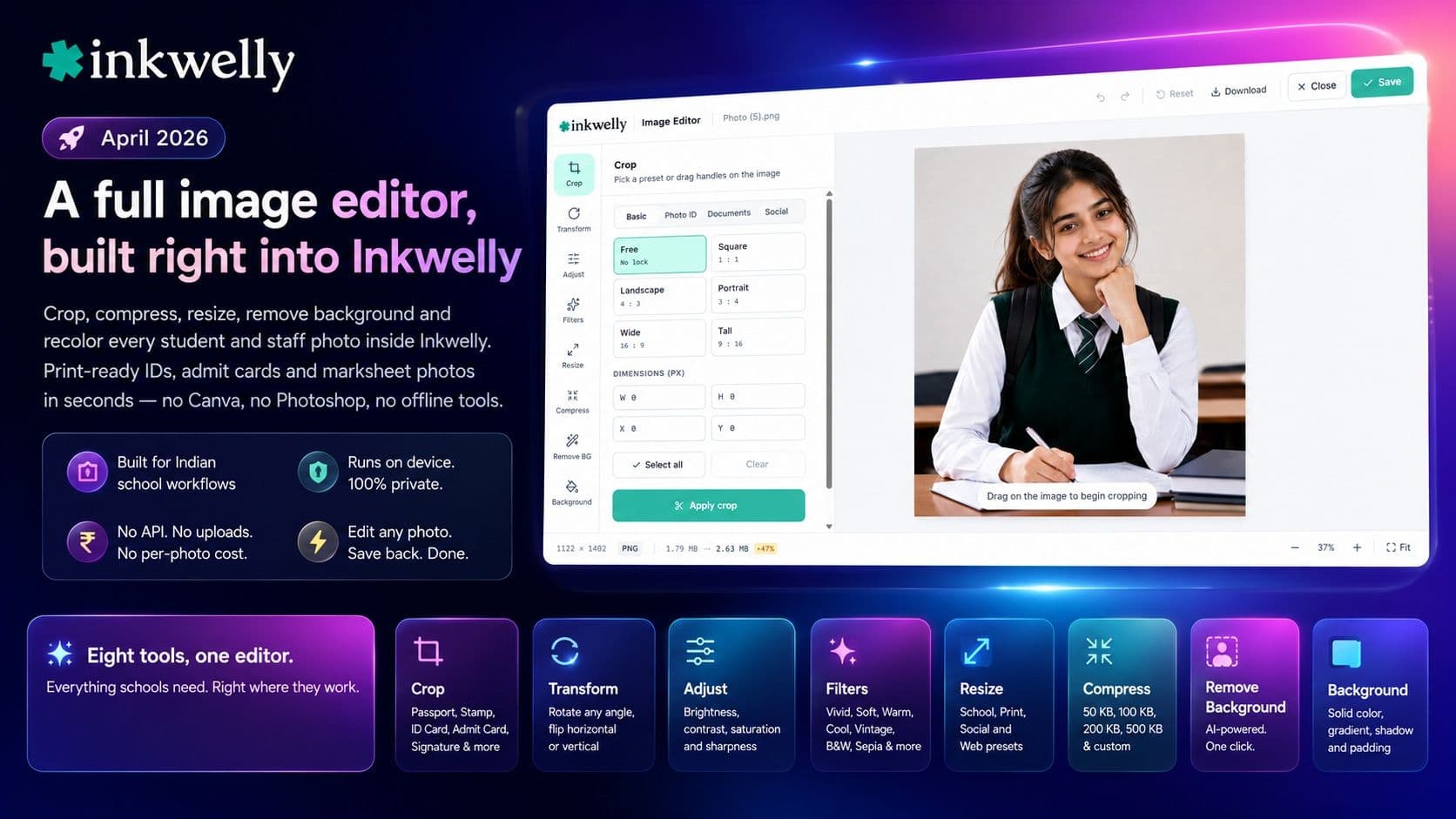
Crop, compress, resize, remove background and recolor every student and staff photo inside Inkwelly. Print-ready IDs, admit cards and marksheet photos in seconds — no Canva, no Photoshop, no offline tools.
What we shipped
Until now, schools had to leave Inkwelly to fix a photo. Cropping a passport-size shot for an admit card meant Canva. Reducing a 4 MB photo to under 100 KB for a WhatsApp share meant TinyPNG. Removing a messy classroom background from a student ID meant remove.bg or paying ₹500/month for Photoshop.
With this release, every one of those steps lives inside Inkwelly. Open any photo from a student profile, staff record or media library — click Edit image, and a full-screen editor opens with crop, transform, adjust, filters, resize, compress, background removal and background fill. Save back to the original or as a copy. Done.
The editor is built specifically for Indian schools — the presets are the sizes your office actually needs.
Eight tools, one editor
- Crop — free, square, 16:9, plus Indian school presets like Passport (35×45 mm), Stamp (20×25 mm), Student ID (25×30 mm), Staff Photo (30×40 mm), Admit Card and Signature, all auto-sized for 300 DPI print
- Transform — rotate any angle, flip horizontally or vertically
- Adjust — brightness, contrast, saturation and sharpness with live preview
- Filters — Vivid, Soft, Warm, Cool, Vintage, Dramatic, Black & White, Sepia
- Resize — School (Passport, Stamp, ID Card), Print (A4 / A5 / Letter at 150 or 300 DPI), Social (IG / FB / WhatsApp DP / YouTube thumbnail) and Web presets
- Compress — target file size (50 KB for ID cards, 100 KB for WhatsApp, 200 KB for email, 500 KB for web) with auto-quality search to hit it
- Remove background — AI-powered, one click, ideal for student and staff ID photos
- Background — solid colour, linear or radial gradient, drop shadow and padding once the background is removed
Built for Indian school workflows
- Passport, Stamp, Student ID, Staff Photo, Admit Card and Signature crop presets — every school office's daily checklist
- 300 DPI print-ready sizes for ID card printing — no quality loss when sent to the vendor
- A4 / A5 / Letter / Legal aspect locks for marksheets and certificates
- ID Card (CR80 — 85.6 × 54 mm) preset for plastic ID card printers
- Compress to 100 KB for WhatsApp parent sharing, 50 KB for low-bandwidth ERP uploads to State Board portals
- Works on every photo in Inkwelly — student profile, staff profile, marksheet, admit card, ID card, marketing media — same editor, same shortcuts (⌘Z to undo, Esc to close)
Where you'll see it
You will find the Edit image button on every image preview across Inkwelly — student and staff profile photos, marksheet photo crops, ID card photo uploads, admission form scans, and the school's media library. The editor opens in a full-screen dialog over whatever you were doing, saves, and returns you to the same place. No navigation, no lost work.
This was a long ask. We are very happy it's now in your hands.
See the new editor on your school's photos
Book a 20-minute walkthrough. We'll open the editor on real student photos from your school and show every tool live.
Covers modules
2 modulesFrequently asked
4 questionsDo staff need to install anything to use the image editor?
No. It runs entirely in the browser — Chrome, Edge, Safari and Firefox are all supported. The first time someone uses background removal, an AI model (about 45 MB) downloads once and is cached for every future use.
Will photos be uploaded to any third-party service for editing?
No. Crop, resize, compress, adjust, filters and even AI background removal all run on the user's own device. Photos never leave the school's computer during editing — important for DPDP-compliance with student data.
Can we print the cropped photos directly on plastic ID cards?
Yes. The Passport (35 × 45 mm), Student ID (25 × 30 mm), Staff (30 × 40 mm) and CR80 ID Card (85.6 × 54 mm) presets all save at 300 DPI — exactly what most ID card printing vendors ask for. No upscaling artefacts.
Does it replace the original photo or save a copy?
You choose at save time. Save as a copy keeps the original intact (good for marksheet photos that are referenced elsewhere). Replace original updates everywhere the photo appears — the editor warns you if the photo is referenced in multiple places before replacing.
You might also like
1 readsSee Inkwelly on your school
30-minute demo. We open your current ERP with you and load your data into Inkwelly on the call. Dated go-live plan by the end of it.