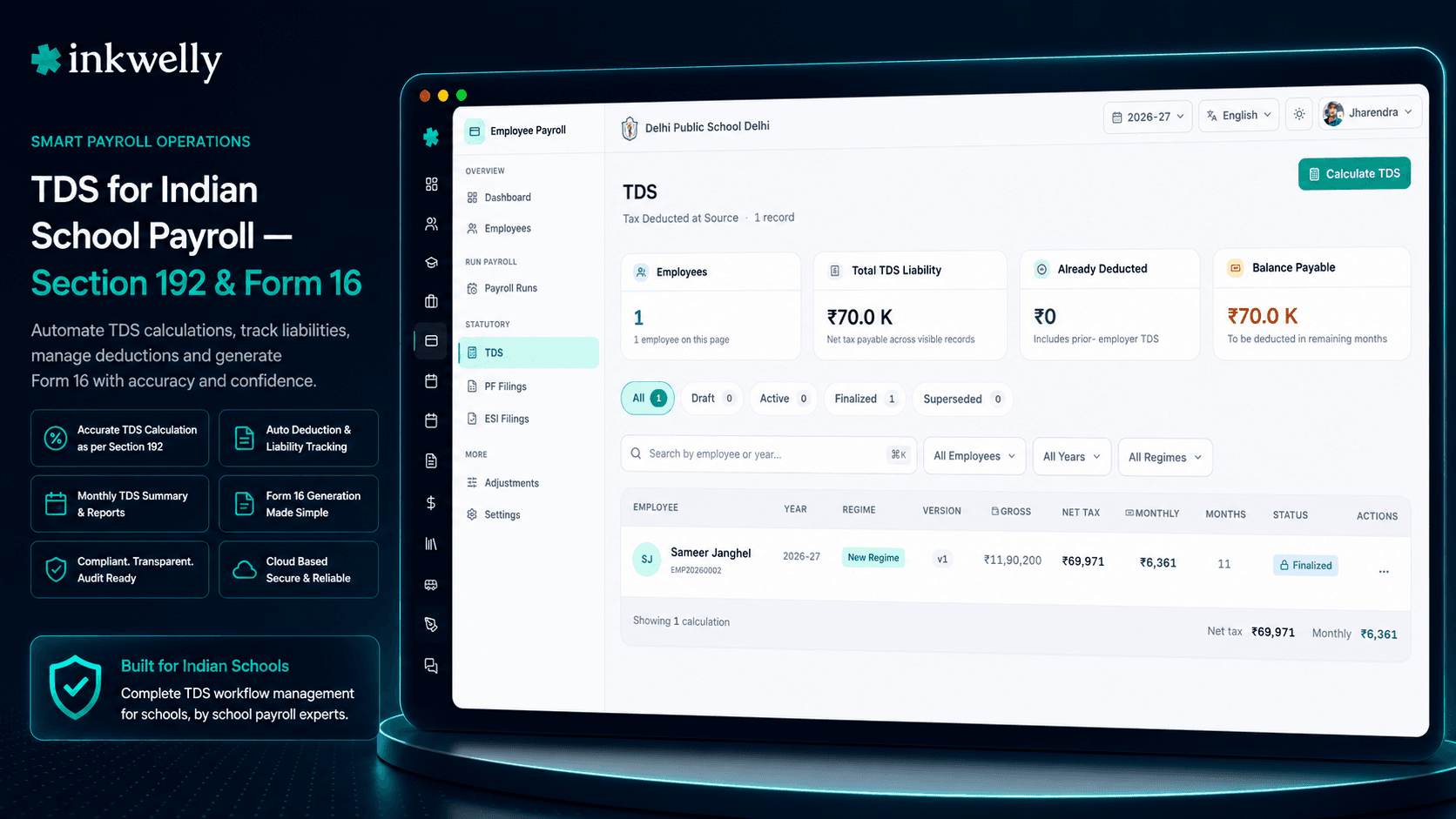
TDS done right, every salary. Section 192. Both regimes. Form 16 in one click.
Inkwelly computes TDS on salary for every teacher and staff member under Section 192 — applying the old or new tax regime each employee elects, the FY 2025-26 slabs, every applicable Section 80C/80D/24(b)/HRA deduction. Quarterly Form 24Q ready for TRACES. Year-end Form 16 in one click.
Why TDS goes wrong in most schools
It is the 7th of June, the year-end TDS deadline has passed, and the principal forwards an email from a teacher: 'Sir, my Form 16 shows ₹84,000 deducted, but Form 26AS on the income tax portal shows only ₹62,000. Please correct.' The accountant opens his Excel file. The TDS he calculated was based on the old regime — but the teacher had elected the new regime in April, mentioned it on a sticky note in February, and the sticky note moved offices when the cabin was repainted. The school's Form 24Q for Q4 was filed using the old regime numbers. Now the teacher cannot file her own ITR. The accountant cannot reconcile. The principal cannot answer.
This is how TDS goes wrong in most Indian schools — not because the rules are too complex, but because the rules live in three different places: the income tax portal, the school's payroll Excel, and the accountant's memory. When any one of them drifts, the school discovers it months later — usually through a teacher's complaint or a TRACES default notice.
The cost is not the calculation error. The cost is the Section 271C penalty, the interest under Section 201(1A), the teacher's lost trust, the reconciliation that takes the next three weekends, and the audit query that arrives in October about the May Form 16. We built TDS the way it should be built — every rule, every regime, every section, in one place that updates every time anything changes.
How Inkwelly computes TDS, every salary
Section 192 of the Income Tax Act 1961 requires the employer to deduct income tax on salary every month, computed against projected annual income. The employer estimates the employee's annual salary, applies the exemptions and deductions she has declared, computes annual tax under her chosen regime, and divides by the remaining months of the FY. The amount deducted in any one month depends on what has already been deducted in past months, what investments the employee has declared, and which regime is currently selected.
Inkwelly does this every payroll run, every month, every employee. When the accountant runs the November payroll, Inkwelly opens each teacher's record — current month's gross, year-to-date earnings, declared regime, declared investments, HRA exemption inputs, home loan interest, education loan interest, donations — applies the FY 2025-26 slabs (or the slabs of whichever FY the period belongs to), computes the projected annual tax, subtracts what has already been deducted in April through October, and produces the November TDS line. The payslip explains the math. The audit log records the inputs.
If the teacher updates her investment declaration in January, the next run automatically recomputes — the new declared investment reduces projected tax, the remaining months' TDS adjusts accordingly. No 'please send me the latest declaration' email chain. No spreadsheet rerun. No drift between what the school deducts and what Form 26AS will eventually reflect.
What Inkwelly's TDS engine handles
- Section 192 monthly TDS computation — projected annual income method, with year-to-date catch-up logic for any past adjustments and a March true-up against actual proofs.
- Old tax regime — slabs ₹2.5L / 5L / 10L, full Section 80C / 80D / 80E / 80G / 80TTA / 24(b) deductions, HRA exemption, LTA, standard deduction ₹50,000.
- New tax regime (default from FY 2023-24) — revised slabs, ₹75,000 standard deduction (FY 2024-25 onwards), only 80CCD(2), 80CCH and 80JJAA deductions allowed.
- Per-employee regime selection — every teacher elects through the employee portal at /e/id; the system applies the right one and recomputes when she switches.
- FY 2025-26 slabs and rebate under Section 87A applied automatically — including marginal relief at the new regime's ₹7 lakh rebate threshold.
- Section 89(1) relief on arrears — when DA or salary is back-paid for past assessment years, Rule 21A spread-tax computation is applied if the employee elects.
- Quarter-wise Form 24Q in TRACES-compatible format — Q1, Q2, Q3, Q4 with all challan details, deductee details, and the Salary Annexure for Q4.
- Form 16 Part B at year-end — ready to merge with Part A from TRACES, digitally signable or printed on school letterhead, emailed in bulk.
- Form 16A for non-salary TDS — contractor payments under Section 194C, professional fees under 194J, rent above the threshold under 194I.
- Year-end true-up — final TDS reconciliation in March, accounting for actual investment proofs versus declarations; refund or additional deduction handled in the March payslip.
Section 192 — the projected-income method
Section 192 of the Income Tax Act requires TDS on salary to be computed not on the month's earnings but on the projected annual income. The employer estimates total annual salary, adds taxable perquisites, subtracts exemptions and deductions the employee has declared, computes annual tax, and deducts a proportional share each month.
Inkwelly executes this exactly. The first month of the FY (April for most schools, or the joining month for new joiners) projects a full year ahead. Subsequent months reproject — if the teacher gets an increment in August, the projection re-runs from August with the new salary; the past months' TDS becomes year-to-date carry; the remaining months' TDS adjusts to true up. The math is deterministic, fully visible to the accountant, and mirrors what the income tax department expects to see in Form 24Q.
Old vs new regime — per employee, per FY
Since FY 2023-24, the new tax regime is the default. Every teacher and staff member can elect the old regime instead — typically those with significant Section 80C investments, home loan interest under Section 24(b), or HRA exemption that the new regime does not allow.
In Inkwelly, regime selection is per employee and per financial year. The teacher logs into her employee portal at /e/id, picks her regime, optionally enters projected investments. The accountant cannot lock or change this election — the employee owns it. When she switches mid-year (allowed once per FY for non-business income), TDS for the remaining months is recomputed using the new regime's logic, and the year-end Form 16 reflects whichever regime was finally elected.
Slabs, standard deduction (₹50,000 old / ₹75,000 new), rebate under Section 87A, and surcharge thresholds are all built in for FY 2025-26, ready to roll forward as the Finance Act updates them each year.
Investment declarations — digital, deadline-aware, revision-friendly
For TDS to match the eventual ITR, every employee declares her planned investments at the start of the FY — Section 80C (PPF, ELSS, LIC premiums, principal repayment, tuition fees, Sukanya Samriddhi), Section 80D (medical insurance for self and parents), Section 80E (education loan interest), Section 80G (donations), Section 80TTA (savings interest up to ₹10,000), Section 24(b) (home loan interest up to ₹2 lakh), HRA city tier with rent paid.
Inkwelly captures every declaration on the employee portal at /e/id. The teacher enters her declarations, uploads proofs (LIC premium receipt, PPF passbook page, rent agreement, medical insurance schedule), and the accountant reviews and approves. The TDS calculation immediately reflects the new declarations.
Before the 31st of January (the standard deadline for proof submission), automatic reminders push to every employee whose declared amount has no uploaded proof. After the deadline, undeclared investments are excluded from the year-end true-up — exactly as the income tax law requires. No 'sir, I forgot to give my LIC receipt' surprises in March.
Form 24Q — quarterly, TRACES-ready, no consultant
Every employer deducting TDS on salary must file Form 24Q quarterly with TRACES — Q1 (April-June) due 31 July, Q2 (July-September) due 31 October, Q3 (October-December) due 31 January, Q4 (January-March) due 31 May with the Salary Annexure attached. Most schools outsource this filing to a CA or use desktop software like Computax. Inkwelly produces Form 24Q natively, in the exact TRACES-compatible CSV format the FVU validator accepts.
Each return contains the school's TAN, the deductor details, the challan-wise TDS deposits, the deductee details (every teacher with TDS deducted, her PAN, gross salary, taxable salary, tax deducted), and for Q4 — the Salary Annexure with the full breakup of every employee's salary, exemptions, deductions and net tax. Run the validation, generate the .fvu file, and upload directly to TRACES. The compliance calendar on the dashboard shows the next due date and whether the return is ready, in progress, or overdue.
Form 16 — every teacher, by the 15th of June
Under Section 203, every employer who deducts TDS must issue Form 16 to every employee by the 15th of June of the next FY. Part A is the TRACES-generated certificate (download from the TRACES portal after Form 24Q is filed); Part B is the salary annexure — gross salary, exemptions, Chapter VI-A deductions, taxable income, tax computed, TDS deducted, refund or balance.
Inkwelly produces Form 16 Part B in the TRACES-compatible PDF format for every employee — pre-filled with her FY data, regime, deductions, and TDS history from every month's payroll run. The accountant downloads Part A from TRACES (one ZIP file per quarter), Inkwelly merges the two parts per employee, and the final PDF is ready to digitally sign or print on school letterhead.
Bulk email to all staff is one click — every teacher receives her Form 16 attachment to her registered email, with the school's covering note. No more 'sir, I have not received my Form 16' on the 14th of June. No more 'please print 47 Form 16s today' on the 31st of May.
Section 89(1) — arrears, taxed correctly
When DA is revised retrospectively, when 7th Pay Commission arrears land six months late, when an increment is back-dated, the entire back-pay is paid in one month — but for tax purposes, taxing it all in one month would push the employee into a higher slab and inflate her TDS unfairly. Section 89(1) lets the employee elect 'spread tax' — the arrears are notionally allocated to the past assessment years they relate to, recomputed at the slab rates of those years, and the relief (the difference between the inflated and notional tax) is given.
Inkwelly applies Section 89(1) automatically when the employee elects relief, computes the prior-year notional tax using the slabs of those years (we maintain a slab archive going back to FY 2017-18), produces Form 10E inputs for the employee to file with her ITR, and adjusts the school's TDS to reflect the relief. The arrears appear cleanly on the payslip — gross arrears, Section 89(1) relief, net TDS impact — and Form 24Q for the quarter shows the right numbers.
“Pichhle saal Form 16 mein DA arrears ka calculation galat tha — har teacher ko refund file karna pada. Is saal Inkwelly ne Section 89(1) automatically apply kar diya, sab ka Form 16 first time mein hi correct.”
Five real situations Inkwelly handles automatically
-
Mid-year regime switch. A PGT teacher elects the new regime in April, then changes her mind in October after buying a ₹1.5 lakh ELSS through her broker. She updates her declaration on the employee portal and switches to the old regime. Inkwelly recomputes the remaining months' TDS using the old regime, the year-end Form 16 reflects the old regime, Form 24Q for Q3 onwards shows the revised numbers. No accountant intervention required.
-
Increment in August. A TGT teacher's salary increases from ₹38,000 to ₹44,000 from August. Inkwelly reprojects her annual income, applies the new slab if she crosses one, computes the increased TDS for the remaining months. The August payslip shows both the salary increase and the consequent TDS change, with a clear note explaining why.
-
DA arrears for six months. Cabinet revises DA retrospectively from January, payable in July. Inkwelly recomputes January through June salaries with the revised DA, aggregates the arrears, applies Section 89(1) relief if the teacher elects, and adds the arrears to the July payslip with the relief shown. Form 24Q for Q2 reflects the arrears and the relief.
-
HRA proof submission deadline. A teacher claimed ₹2.4 lakh HRA exemption in her April declaration. Come 25 January, she has not uploaded her rent agreement or rent receipts. Inkwelly auto-reminds her on 20 January, again on 28 January. By 31 January no proof — the HRA exemption is revoked for the year-end true-up, the March payslip recoups the additional TDS, and Form 16 reflects the corrected exemption.
-
Resignation on the 17th. A teacher resigns on the 17th of November. Inkwelly's F&F workflow computes pro-rata salary for 17 days, leave encashment, gratuity if eligible, notice pay or recovery, and runs a final TDS true-up — adjusting for partial-year income, applying the right standard deduction, computing the final tax. The Form 16 issued at year-end (or earlier on request) reflects the F&F.
Daily, monthly and yearly TDS operations Inkwelly covers
- Generate the salary annexure for any pay period — gross, exempt, deductions, taxable income, tax, TDS — exportable to PDF for the accountant's records.
- Reconcile YTD TDS deducted with the school's TAN-wise challan deposits — flag any mismatch before Form 24Q filing.
- Bulk update PAN, declared regime, or declared investments by uploading a CSV — useful at the start of the FY.
- Drill into any teacher's TDS — see every monthly computation, every projected income figure, every applied exemption, with audit timestamps.
- Schedule Form 24Q reminders 7 days before each quarterly deadline — the accountant gets a calendar event with the file ready to download.
- Issue Form 16 to one employee on demand (e.g., for a home loan application) without waiting for the bulk year-end run.
- Re-issue a corrected Form 16 if a Q4 revision is filed — the system maintains versioned Form 16 PDFs with the latest reflecting the latest 24Q.
- Export the deductee detail file in TRACES-compatible CSV format for any quarter, ready to attach to a Form 24Q correction return.
- Track Form 16 acknowledgements — auto-record when each teacher opens her emailed Form 16 attachment.
- Show the school's total YTD TDS deposited, total deducted, total payable next quarter — so the principal knows the cash outflow before the run.
See your school's TDS, computed live in 20 minutes
Bring your last quarter's salary register, your Form 24Q, and one teacher's investment declaration. We will set up the regime, declarations and slabs during the call and run a live TDS computation against your real numbers.
Limits, safety and the small print
A few things every school accountant should know before going live with Inkwelly TDS.
Slab updates are version-controlled. When the Finance Act of any FY changes slabs, standard deduction, or surcharge thresholds, we publish the updated rules as a slab version effective from 1 April of that FY. Past pay periods continue using the slabs of their FY. There is no retroactive change unless the law itself is retroactive (rare).
Form 26AS reconciliation lives outside Inkwelly. Inkwelly produces Form 24Q and Form 16. Once the school files Form 24Q on TRACES, the deducted TDS appears in each employee's Form 26AS. We do not auto-reconcile against Form 26AS — that is something the employee herself checks before filing her ITR. We can flag mismatches if the school exports YTD figures and a CA cross-checks; we do not access TRACES directly on the school's behalf.
Section 87A rebate. Under both regimes, the rebate is applied automatically if the eligible employee's taxable income is within the threshold (₹5 lakh old / ₹7 lakh new). We do not over-apply: when income marginally crosses the threshold, the marginal-relief rule is applied per Finance Act 2023 amendments.
TDS on non-salary payments (Form 16A). Inkwelly handles TDS on rent paid above ₹2.4 lakh per year (Section 194I), contractor payments above the threshold (Section 194C), professional fees (Section 194J) — but only if these payments flow through the school's payroll module. For payments processed through Tally or another accounting tool, we provide an import flow at quarter-end so Form 16A can still be issued from Inkwelly.
Audit trail. Every TDS computation, every regime switch, every investment declaration update is timestamped, IP-logged, and tied to a user account. When a teacher disputes her Form 16 in October, the audit log answers 'who entered what, when' in seconds. When CBDT asks during an audit, the proof is on file.
TDS that ends every June 14th panic
Inkwelly turns Form 16 issue from a 3-week ordeal into a 30-second click. Section 192, both regimes, Form 24Q quarterly, Section 89(1) on arrears — all in one place that updates every payroll run.
Belongs to
1 moduleFrequently asked
8 questionsDoes Inkwelly compute TDS under both old and new tax regimes?
Yes. Section 192 TDS is computed monthly under both regimes for FY 2025-26 (and rolling forward as Finance Acts update). Each employee elects her regime through the employee portal at /e/id. The system applies the correct slabs, standard deduction (₹50,000 old / ₹75,000 new), and applicable Chapter VI-A deductions. Year-to-date computation ensures the right amount is deducted every month, with year-end true-up at Form 16 issue.
How does Inkwelly handle a regime change mid-year?
An employee can switch her regime once per FY (allowed for non-business income). When she switches in the employee portal, TDS for the remaining months automatically recomputes using the new regime. Past months' TDS becomes year-to-date carry. The year-end Form 16 reflects the regime in effect on 31 March.
Can it generate Form 24Q quarterly?
Yes — natively, in the exact TRACES-compatible CSV format. Every quarter (Q1 due 31 July, Q2 due 31 October, Q3 due 31 January, Q4 due 31 May), Inkwelly produces the deductor details, challan-wise deposits, deductee details, and for Q4 the Salary Annexure. Run the FVU validator, generate the .fvu file, and upload to TRACES.
How does Form 16 work? Do I have to merge Part A and Part B manually?
Inkwelly produces Form 16 Part B in the TRACES-compatible PDF format for every employee with TDS deducted in the FY. The accountant downloads Part A as a ZIP from TRACES after filing Q4. Inkwelly merges Part A and Part B per employee, applies the digital signature if configured, and emails the merged Form 16 in bulk to every staff member's registered email — usually a 30-second action by the 15th of June.
What is Section 89(1) relief and does Inkwelly apply it?
When salary arrears are paid for past assessment years (DA hike, 7th Pay Commission, retrospective increment), Section 89(1) lets the employee notionally allocate the arrears to the years they relate to and recompute tax at those years' slabs. The 'relief' is the tax saved. Inkwelly computes Section 89(1) relief automatically when the employee elects, maintains slabs going back to FY 2017-18, and produces Form 10E inputs for the employee to file with her ITR.
Can teachers see their own TDS computation?
Yes. Every employee has access at /e/id, where she can see every monthly payslip with the TDS line, her YTD TDS deducted, her current declared regime, her investment declarations, and her Form 16 once issued. Teachers see only their own data; access to others' salaries and TDS is restricted to the accountant and principal.
What happens to TDS YTD when we migrate from another payroll system?
We import YTD figures during onboarding — total taxable salary YTD, total TDS deducted YTD, regime, declared investments, HRA exemption inputs. The next month's run treats the migration date as the cut-off; April-through-migration TDS is carry-forward; migration-onwards TDS is computed by Inkwelly. Year-end Form 16 covers the entire FY (pre- and post-migration months) so each teacher receives one Form 16 for the year.
Does Inkwelly file Form 24Q on TRACES on our behalf?
Inkwelly produces the TRACES-compatible .fvu file ready for upload — but the actual filing on the TRACES portal is done by the school, since it requires the school's TAN, FVU validation, and the accountant or CA's TRACES login. Most schools complete the upload in under 10 minutes once Inkwelly has produced the file.
You might also like
2 readsSee Inkwelly on your school
30-minute demo. We open your current ERP with you and load your data into Inkwelly on the call. Dated go-live plan by the end of it.