Salary structures, not spreadsheets. structures.
Define one PGT structure, one TGT structure, one PRT structure, one non-teaching structure — with CTC bands, dependency-ordered components, statutory caps, and a flexible-pay component that absorbs the residual to land exactly on CTC. Assign to 50 teachers in 5 minutes, run April payroll in 90 seconds.
How Indian schools assemble payroll today
The HR head at an Indore CBSE school has 45 teaching staff: 12 PGTs, 18 TGTs, 9 PRTs, 4 office staff, 2 lab assistants. Every March, she opens the previous year's salary master, copies the PGT row's formula structure to the new senior PGT, breaks the PF cap, breaks the gratuity flag, and re-enters the increment. The new TGT gets HRA wrong because she copied a PGT's HRA percentage. By the time she's done assigning April CTCs, the structure for each persona has drifted from the official policy.
In October when the Vth Pay Commission revisions are announced for state-aided staff (the school has 6 grant-in-aid teachers on UP government scale), she has to find every affected employee, re-do the BASIC, re-do the DA percentage, and reconcile the difference into arrears. The structure was a copy-paste artefact, not a template. Form 16 in May next year is a 4-day reconciliation exercise.
A salary structure should be a template — one PGT structure, one TGT structure, one PRT structure, one non-teaching structure, optionally one for transport staff or part-time visiting faculty. Each template plugs in the salary components you've already defined, in the right calculation order, with the right caps and statutory mappings. Assign a teacher to a structure, set her CTC, and the system computes BASIC, DA, HRA, PF, ESI, PT, gratuity, TDS, and special allowance — to the rupee. Inkwelly's salary structures feature makes this declarative.
How Inkwelly's structure system works
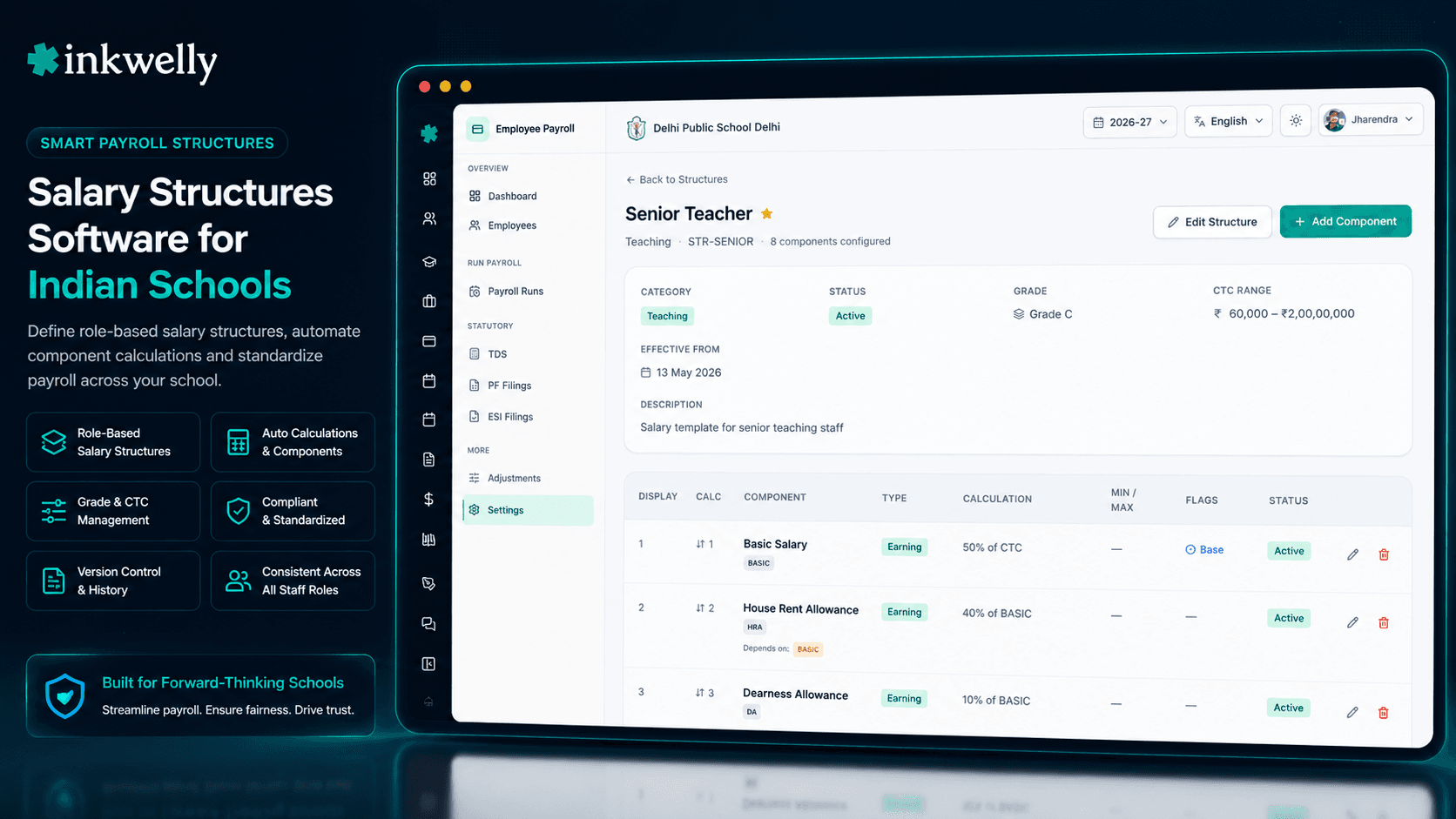
A salary structure is defined by 8 fields and an attached set of components. Open Employee Payroll → Settings → Salary Structures → New Structure.
1. Identity. Give it a name ('Senior Teacher', 'TGT Standard'), a code (STR-PGT-SR, STR-TGT), and an optional description. The code is uppercase, 2–50 chars, used in salary slips and audit logs.
2. Category. Pick from TEACHING, NON_TEACHING, ADMIN, SUPPORT, TRANSPORT, or PART_TIME. Categories drive default-structure resolution: when a new TGT joins, the system suggests the default TEACHING structure unless overridden.
3. Pay grade (optional). Link to a Salary Grade (PGT-Senior, TGT-Standard, PRT, etc.) for 6th/7th Pay Commission alignment in state-aided schools. The grade carries the pay-level matrix; the structure carries the component composition.
4. CTC band. Optional ctcRangeMin and ctcRangeMax enforce the band an employee's offered CTC must fit. Try to assign a TGT at ₹7L when the structure says ₹4L–₹6L, and the system warns. This catches mis-fitments before the offer letter goes out.
5. Effective dates. effectiveFrom is required (typically 1 April for the FY); effectiveTo is left empty for ongoing validity. When you revise a structure, you set effectiveTo on the old version and create a new structure from the revision date.
6. Default + active flags. One structure per category can be marked isDefault — it appears auto-selected when you assign a new employee. isActive retires structures without breaking historical payslips.
7. Attach components. Drill into the structure and click 'Add Component'. Pick from your component library, override the calculationType / base / value / caps for this structure, set calculationOrder (1 for BASIC, 2 for DA, 3 for HRA, 10 for PF, 20 for TDS), declare dependsOn (HRA depends on BASIC), mark isBase (one per structure, typically BASIC) and optionally isFlexible (one per structure, must be EARNING type — typically Special Allowance).
8. The flexible-pay closer. This is the magic. Mark one component (Special Allowance, Flexi Pay) as isFlexible: true. At payrun, after computing every other earning, the engine subtracts the gross from CTC and assigns the residual to this component. The total earnings always sum exactly to CTC — no off-by-one, no rounding drift, no manual reconciliation.
What's in a structure (the building blocks)
- Category enum — TEACHING, NON_TEACHING, ADMIN, SUPPORT, TRANSPORT, PART_TIME (6 values, drives default-structure resolution per persona)
- CTC range — enforces fitment band; PGT ₹6L–₹9L, TGT ₹4L–₹6L, PRT ₹3L–₹4.5L, non-teaching ₹2.4L–₹3.6L
- Pay grade link — optional FK to Salary Grade for 6th/7th Pay Commission pay-matrix alignment in state-aided schools
- Calculation order — positive integer; lower number = computed first. BASIC=1, DA=2, HRA=3 (after BASIC+DA), PF=10, ESI=11, PT=12, TDS=20, NET-residual=99
- Dependency declaration —
dependsOnis a string array of component codes; HRA's dependsOn=['BASIC'], PF's dependsOn=['BASIC','DA']. Validator catches CIRCULAR_DEPENDENCY at save time - isBase — one component per structure marked as the base (typically BASIC); formula expressions referencing
BASICresolve to this component's value - isFlexible — one component per structure marked as flexible (typically Special Allowance); absorbs CTC residual so total earnings = CTC exactly. Must be type EARNING
- Min / max caps per component — PF capped at ₹1,800/month (12% of EPFO ceiling ₹15,000), HRA capped at metro 50% of Basic, gratuity formula respects Basic+DA only
- Effective-date versioning — revising a structure creates a new version from the revision date; old payruns re-run with old version, new payruns use new version
- Audit-locked once used — a structure assigned to even one employee can't be hard-deleted; soft-delete preserves historical payslip integrity
- Default per category — one structure per category can be marked default; new TEACHING hires auto-suggest the default teaching structure
CTC fitment, enforced at the structure
Most ERPs don't enforce CTC fitment — you can offer a TGT at ₹7L when the TGT structure is meant for ₹4L–₹6L, and the system happily computes a structure that doesn't reflect the school's policy. Three months later, the auditor flags an outlier and the principal can't explain why a TGT is on a PGT structure.
Inkwelly's ctcRangeMin and ctcRangeMax enforce the band before assignment. Try to onboard a teacher at ₹7L on the TGT structure and the form warns: 'CTC outside structure band (₹4L–₹6L). Pick a different structure, override with explicit reason, or escalate.' Override is logged with the user, timestamp, and reason. The audit answer to 'why is this TGT on ₹7L?' is right there in the structure history.
Calculation order + dependsOn = correct payroll, every time
Real payroll has dependencies. HRA depends on BASIC (40% of BASIC). PF depends on BASIC+DA. ESI depends on GROSS (which depends on every earning). TDS depends on YTD taxable income (which depends on every taxable earning). Excel handles this by row order; spreadsheets break when you re-order.
Inkwelly enforces calculation order at the structure level. BASIC gets calcOrder=1, DA=2, HRA=3 (with dependsOn: ['BASIC']), PF=10 (with dependsOn: ['BASIC', 'DA']), TDS=20. The validator catches errors at save: try to set HRA to calcOrder=1 with dependsOn: ['BASIC'], and you get INVALID_CALCULATION_ORDER. Try a circular reference (HRA → DA → HRA) and you get CIRCULAR_DEPENDENCY. Payroll math survives audits.
Flexible pay — the magic that lands on CTC exactly
Indian payroll has a peculiar requirement: the total of all earnings must equal CTC. Basic + DA + HRA + PF (employer share) + medical + LTA + special allowance = CTC, to the rupee. Computing the special allowance manually for 50 teachers means subtracting six numbers from CTC for each — an exhausting, error-prone routine.
Inkwelly's isFlexible: true flag (allowed on exactly one EARNING component per structure) automates this. The payrun engine computes BASIC, DA, HRA, employer PF, medical, LTA — sums them — and assigns the residual (CTC − sum) to the flexible component. Try to mark a second component flexible and you get DUPLICATE_FLEXIBLE_COMPONENT. Try to mark a DEDUCTION as flexible and you get INVALID_FLEXIBLE_COMPONENT_TYPE. The math closes exactly, every time.
Versioning — the September policy revision, no rebuild
Government-aided schools see structure revisions every 2–3 years — 6th to 7th Pay Commission, DA revisions every 6 months, gratuity ceiling changes (₹20L to ₹25L is on the table). A school that can't version its structures has to migrate every employee, every payslip, every Form 16 — manually.
Inkwelly's effectiveFrom and effectiveTo dates make this declarative. When DA gets revised in September, you set effectiveTo: 2026-08-31 on the old TGT structure and create a new TGT structure from 2026-09-01. Payruns through August use the old version (5% DA); September onwards uses the new (7% DA). Form 16 next May aggregates both phases automatically. Re-running August's payrun reproduces August's numbers; running September's uses September's. No retroactive edits, no audit drift, no consultant call.
“PGT, TGT, PRT, non-teaching — char structure banaye, ek baar. Ab naye TGT ka April CTC enter kiya, structure assign kiya, payroll khud chal gayi. Pichle saal yeh kaam mein 3 din lagte the.”
Real-world use cases — five scenarios that actually happen
1. New school onboards from Excel with 4 personas. Indore CBSE school onboards March-2026 with 45 staff: 12 PGTs, 18 TGTs, 9 PRTs, 6 non-teaching. The HR head creates 4 structures in 25 minutes: STR-PGT-SR (TEACHING, CTC ₹6L–₹9L), STR-TGT (TEACHING, default, ₹4L–₹6L), STR-PRT (TEACHING, ₹3L–₹4.5L), STR-NTS (NON_TEACHING, ₹2.4L–₹3.6L). Assigns each teacher to her structure, enters CTC. April payrun runs in 90 seconds, all 45 payslips reconciled to CTC.
2. New TGT joins on ₹5.4L mid-year. November intake — a new TGT joins on ₹5.4L. Payroll picks up STR-TGT (default for TEACHING category), sees CTC inside the ₹4L–₹6L band, computes November payslip in 2 seconds. BASIC=40% of CTC, DA=10% of BASIC, HRA=40% of BASIC, PF capped at ₹1,800, special allowance absorbs the residual to ₹45,000 monthly. No Excel, no template-copy.
3. State-aided school applies 7th Pay Commission revision.
A UP state-aided school with 8 grant-in-aid teachers has to apply the UP-government 2026 DA revision from 36% to 38% for those 8 staff. The HR head opens STR-AIDED-PGT, sets effectiveTo: 2026-06-30, and creates STR-AIDED-PGT-V2 with DA at 38% effective 2026-07-01. Re-runs July payroll — 8 affected staff get the new DA. Generates arrears for April–June via the arrears module.
4. School chain expands and inherits structures. A school chain opens a Bengaluru branch in October. The Pune HQ already has 4 structures. Bengaluru adds Karnataka-specific PT, ESI, and slightly different HRA percentage. The HR head duplicates STR-TGT to STR-TGT-BLR, edits HRA from 40% (Pune metro) to 50% (Bengaluru also metro), and assigns Bengaluru staff. Pune structures remain untouched. Two cities, one consistent payroll engine.
5. Structure decommission — audit lockdown.
A structure used in 2024 for a since-departed visiting faculty cohort needs to be retired. The HR head sets isActive: false. Newly assigned employees no longer see this structure in dropdowns. Payslips from 2024 still reference it (audit-correct). Hard-delete is blocked because of FK references. The auditor in 2027 can still drill from a 2024 payslip into the structure that produced it.
Common operations the HR office runs
- Create a new structure — dialog with name, code, category, grade, CTC band, dates, default/active toggles
- Drill into structure detail — attached components in calculation order with caps, dependsOn, formulas
- Add a component to a structure — pick from library, override calc type / base / value / caps / order / dependsOn / isBase / isFlexible
- Reorder components by
calculationOrder— drag to update; validator catches dependency conflicts - Duplicate a structure — right-click → Duplicate → edit the differences (perfect for state-specific variants)
- Mark
isDefault: truefor a category — new hires auto-resolve to this structure - Soft-delete a structure (
isActive: false) — retires it from new assignments, preserves historical payslips - Search by structure name (
'Senior Teacher') or code (STR-PGT-SR) - Filter by category (TEACHING / NON_TEACHING / ADMIN / SUPPORT / TRANSPORT / PART_TIME)
- View 'Used by N employees' on each structure — click to see the assignment list
- Export structure + components as JSON for a backup or for migration to a different org
- View version history of a structure — see who edited what, when
See your school's structures built in 30 minutes
We pre-build PGT, TGT, PRT, non-teaching, and (if you're state-aided) a 7th Pay Commission grade-aligned structure in the demo. You see April payroll for 50 staff in 90 seconds.
Limits, safety, and the small print
Structures are org-scoped for the definitions but school-resolved at payrun time. A school chain with 4 branches uses the same structure library; each branch's payrun reads the school's registered state, applies the right PT slab, and uses the structure assigned to each employee. Per-school structure variations (Bengaluru-specific HRA, Mumbai-specific LWF) are handled by creating separate structures (STR-TGT-BLR, STR-TGT-MUM) rather than per-school overrides on the same structure.
Structures use strict effective-date versioning. When a structure is revised, you don't edit the existing record — you set effectiveTo and create a new version. Payruns always read the structure version whose effective period contains the payrun's payDate. This is the audit-correctness contract: re-running last June's payrun should reproduce last June's numbers, not today's.
The isBase flag is unique per structure, not per org. Each structure has exactly one base component (typically BASIC), and formula expressions referencing BASIC inside that structure resolve to the structure's base. The system enforces DUPLICATE_BASE_COMPONENT if you try a second.
The isFlexible flag is unique per structure, must be on a component of type EARNING, and triggers the 'absorb residual to land on CTC' logic at payrun time. Try to mark a DEDUCTION as flexible and you get INVALID_FLEXIBLE_COMPONENT_TYPE. Try to mark a second component flexible and you get DUPLICATE_FLEXIBLE_COMPONENT. Without a flexible component, the structure must hand-balance to CTC, which is brittle — always include one.
The dependsOn array on each structure component is enforced at save time. Components must exist in the structure (INVALID_DEPENDS_ON if not). Calculation order must be greater than every dependency's order (INVALID_CALCULATION_ORDER if not). Circular dependencies are rejected immediately (CIRCULAR_DEPENDENCY). This is intentionally aggressive validation — silent dependency bugs ruin payroll faster than any other class of error.
A structure assigned to even one employee — ever — cannot be hard-deleted. The backend returns a soft-delete (isActive: false) and preserves history. This is enforced by FK constraints on payroll.employeeSalary.structureId and on payslip.structureVersionSnapshot. The auditor in 2027 looking at a 2024 payslip will always see the exact structure that produced it.
For schools with less than 10 employees, a single structure may be enough. The 4-structure model (PGT/TGT/PRT/non-teaching) is the optimum for schools with 30–300 staff. Above 300, consider 6–8 structures (split TEACHING by class group, ADMIN by function) so each is genuinely a band-of-band rather than a one-size-fits-all.
Belongs to
1 moduleFrequently asked
8 questionsHow many salary structures does a typical Indian school need?
Most schools land on 4 structures: PGT (Senior Teaching), TGT (Trained Graduate Teaching), PRT (Primary Teaching), and Non-Teaching. Add a 5th for transport staff if you have buses, a 6th for part-time visiting faculty if you have them. State-aided schools with grant-in-aid staff add 1–2 more for the government pay-matrix.
What is a 'flexible component' and why do I need one?
Indian payroll requires total earnings to equal CTC, to the rupee. A flexible component (typically Special Allowance) absorbs the residual after every other earning is computed, so the math closes exactly. Each structure can have exactly one component marked `isFlexible: true`, and it must be of type EARNING. Without it, you'd hand-balance every payslip to CTC — brittle, error-prone, audit-vulnerable.
How does Inkwelly enforce calculation order and dependencies?
Each structure component has a `calculationOrder` (positive integer) and an optional `dependsOn` array of component codes. The validator enforces three rules at save time: every dependency must exist in the structure (`INVALID_DEPENDS_ON`), order must be greater than every dependency's order (`INVALID_CALCULATION_ORDER`), and the dependency graph must be acyclic (`CIRCULAR_DEPENDENCY`). At payrun time, the engine topologically sorts components and evaluates them in the right order.
Can a structure be revised mid-year for a Pay Commission update?
Yes, via effective-date versioning. Set `effectiveTo` on the old structure to the day before the revision, and create a new structure from the revision date. Payruns always read the structure version whose effective period contains the payrun's payDate. Re-running an old payrun reproduces old numbers; new payruns use new numbers. No retroactive edits.
Can I share salary structures across multiple schools in my organisation?
Structures are org-scoped — the library is shared. Each school's payrun reads the structure assigned to each employee. State-specific variations (Bengaluru HRA percentage, Mumbai LWF) are handled by creating separate structures (STR-TGT-BLR, STR-TGT-MUM) rather than per-school overrides on the same structure.
What is a Salary Grade and when do I need to link to one?
Salary Grades carry the pay-matrix levels (PGT-Senior Level 9, TGT-Standard Level 7) used in 6th/7th Pay Commission alignment. State-aided schools with grant-in-aid teachers should link their structures to the right grade so the pay-matrix progression is auto-applied. Pure private schools can ignore the grade field.
What happens if I try to delete a structure already used in payroll?
The backend blocks hard-delete and performs a soft-delete (`isActive: false`). The structure stops appearing in new assignment dropdowns, but remains visible on every payslip that referenced it. The audit trail is preserved — a 2027 auditor looking at a 2024 payslip can still drill into the exact structure that produced it.
How does the system handle CTC fitment outside a structure's band?
The form warns: *'CTC outside structure band'*. You can override with an explicit reason (logged), pick a different structure, or escalate. Soft-blocking rather than hard-blocking is intentional — schools occasionally make exceptions for star teachers — but every override is timestamped and attributable.
You might also like
2 readsSee Inkwelly on your school
30-minute demo. We open your current ERP with you and load your data into Inkwelly on the call. Dated go-live plan by the end of it.