Your School's Website, Run by Your Office Staff No developer. No delay. Updated the same day.
Publish news, events, circulars, photo galleries, and fee notices to parents the same afternoon they happen — from a simple dashboard your office assistant can operate without any training.
The website that never gets updated
Every Indian school has a website. Most of them show events from three years ago, a calendar last updated in April, and a phone number that no longer works. When a parent visits to check the exam schedule, they find stale news and leave to WhatsApp the class teacher instead.
The reason is almost never laziness. It is that updating the website means calling a developer or logging into a confusing CMS that requires IT knowledge. The principal has fifteen more urgent things to do. The office assistant does not have the access. The developer replies in two days. By then the event has passed.
If your school's website does not reflect today's school, it is not a communications channel — it is a liability. Parents form their first impression of your institution from what they find online. A stale site signals a disorganised school. You know that is not what you are.
What we built instead
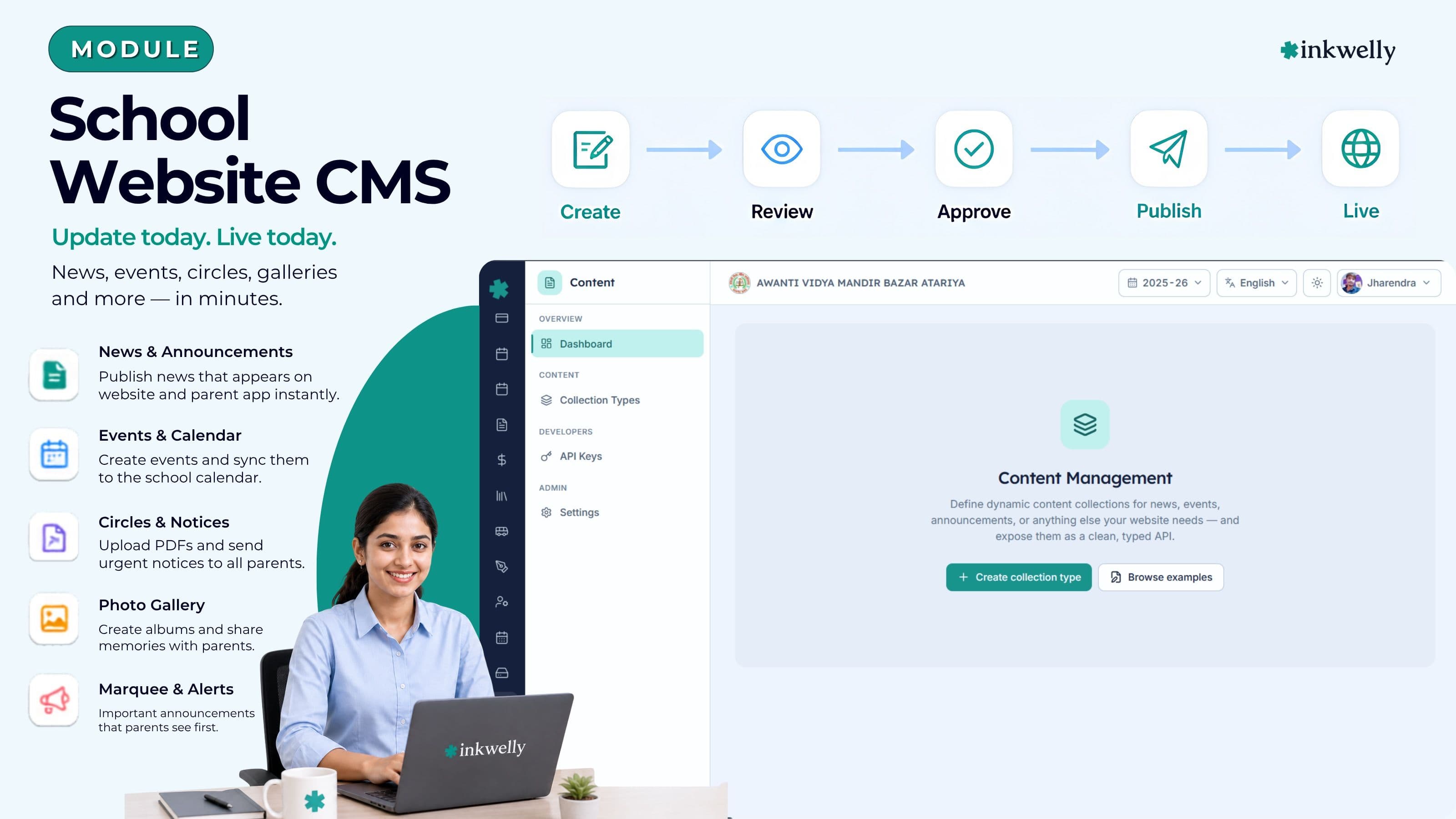
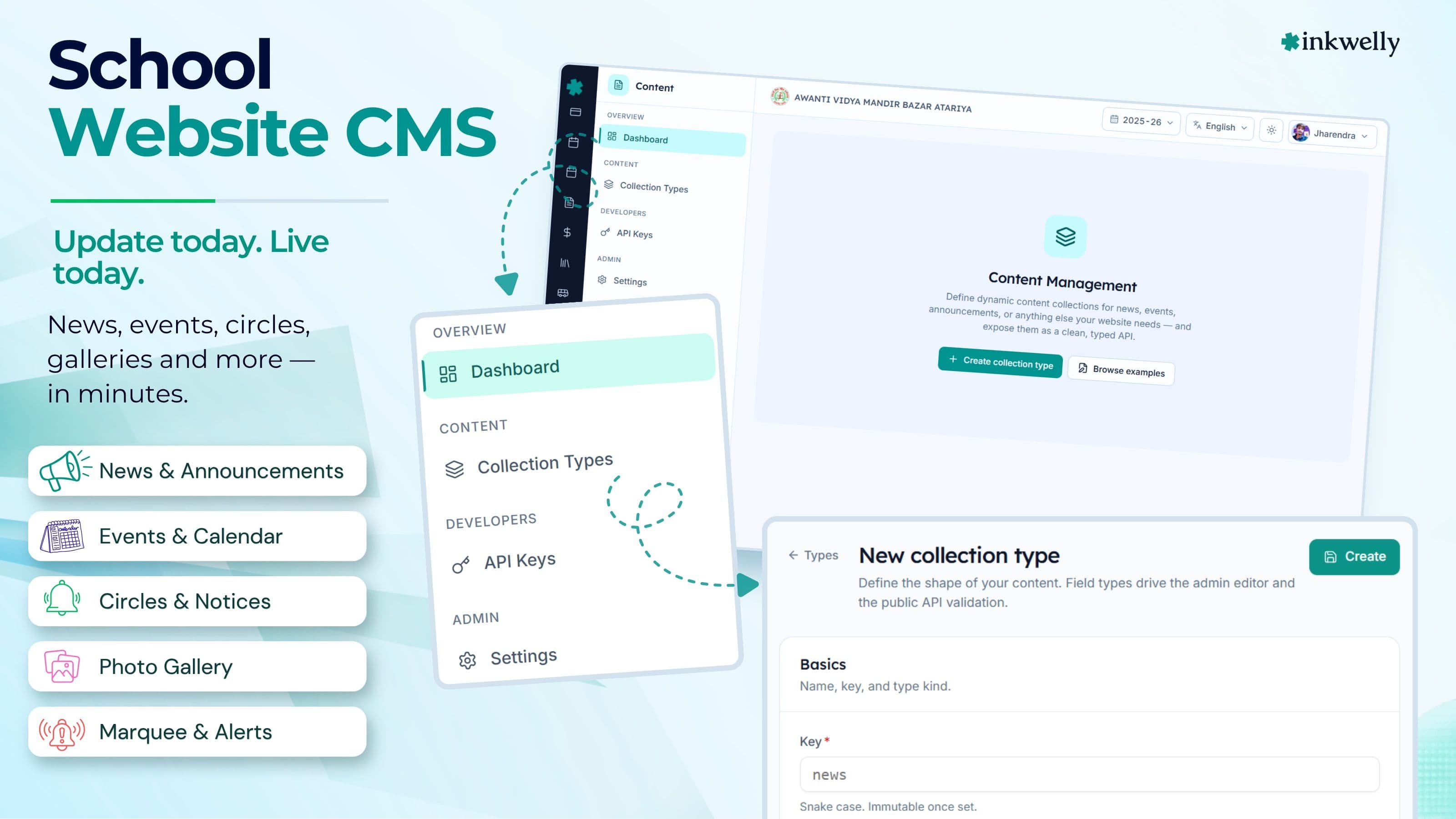
Inkwelly's School Website CMS puts every content type — news, events, circulars, photo galleries, fee notices, holiday lists — inside a single dashboard that any office staff member can use without training. There is no HTML, no FTP, no developer involved. If your staff can use WhatsApp, they can publish to your school website.
Each school gets an isolated CMS space. The principal can see and approve content before it goes live, or delegate publishing rights to the office assistant directly. Content goes live instantly, appears in the Inkwelly parent app and on your school's public page simultaneously — one upload, two surfaces covered.
Everything your school communicates, in one place
- News articles — text, images, date, author — publishes to website and parent app at once
- Events with date, time, venue, RSVP optional — auto-appears in parent calendar
- Circulars and PDF notices — upload once, visible to all parents in the app immediately
- Photo gallery — create albums per event, class, or activity with bulk upload
- Holiday and exam schedule — structured list with date and description, auto-synced to school calendar
- Fee notices — linked to the fee module; parents see the notice and can pay in the same app
- Marquee and banner announcements — urgent notices that appear at the top of every parent's home screen
- School profile — address, board, affiliation number, principal name, always accurate and editable
- Role-based access — principal approves, office staff drafts, no accidental live mistakes
- Academic year scoped — all content is scoped to the correct session; old content archives automatically
Every content type your school produces
School communication is not one thing. A Monday morning means a different kind of update than an exam result day or a sports day. Inkwelly CMS has purpose-built content types for each of these moments — not a generic blog that you force into every use case.
Content types built for schools
News & Announcements
Rich-text news articles with cover image, author attribution and publish date. Auto-appears in the parent app newsfeed and school website simultaneously. Drafts saved before publishing.
Events & School Calendar
Create events with date, time, venue and an optional PDF circular attachment. Events sync to the parent app calendar automatically — parents never miss a PTM or sports day.
Circulars & Notices
Upload PDF circulars directly. Visible to all parents in the Inkwelly parent app the moment you publish. Optional marquee flag for urgent notices that need instant attention.
Photo & Video Gallery
Create per-event or per-class albums. Bulk upload up to 50 photos at a time. Parents view the gallery in the app and can download their child's photos — no third-party sharing needed.
Marquee Announcements
Urgent, time-sensitive notices that appear as a scrolling banner at the top of every parent's app home screen. Used for sudden holidays, exam schedule changes, emergency closures.
Holiday & Exam Schedule
Structured schedule lists for holidays, exams, and working Saturdays. Displayed as a clean table in the parent app. Edit any entry without republishing the entire list.
Fee Notices (Linked)
Fee-related notices are linked to the Inkwelly Fee Management module. A fee circular automatically shows a Pay Now button in the parent app — reducing time from notice to collection.
School Profile Page
Affiliation number, board, principal name, address, contact details — all editable without a developer. Shown on your school's public Inkwelly page and synced to Google Business Profile.
How the publish workflow works
Inkwelly's CMS is designed around how actual Indian school offices work — with role separation, approval steps, and zero technical dependency.
Draft and approve in seconds
Any staff member with CMS access can create a draft — type the news article, attach an image, add the event details. The draft sits in the Pending queue until the principal or admin head approves it with one click. Nothing goes live accidentally.
This means you can give five office staff members CMS access without worrying about an unreviewed notice appearing on the parent app. The principal sees everything before it publishes, and can edit in-line without going back and forth on WhatsApp.
One publish, two surfaces
When a news article or event goes live in the Inkwelly CMS, it appears in two places at once — the school's public website page and inside the Inkwelly parent app for all enrolled parents.
You do not need to post separately to WhatsApp groups, email chains, or any other channel. The parent app sends a push notification to every parent automatically when a new notice or circular is published. Communication that used to take 30 minutes of manual broadcasting takes 90 seconds.
Academic year scoping — zero confusion
Every piece of content in the Inkwelly CMS is scoped to an academic year (e.g., 2025–26). When the year changes, the old content archives automatically. Parents and staff always see the current year's news, events and circulars without the admin doing anything.
This solves the perennial problem of January 2024 events appearing in the 2025–26 feed. It also means your annual reports, sports day photos, and exam schedules stay organised by year — searchable later when you need them for CBSE or ICSE compliance documentation.
Bilingual content — Hindi and English in one form
For CBSE and state board schools in UP, Bihar, MP, Rajasthan, and Haryana, parents often read Hindi more comfortably than English. Inkwelly CMS lets you write news articles and circulars in both Hindi and English in the same form.
Parents who have their language set to Hindi in the app will see the Hindi version automatically. English-preference parents see the English version. One submission, two audiences served — without managing two separate posts or sending different WhatsApp blasts to different groups.
Photo gallery that parents actually use
After every sports day, annual function, or science exhibition, the school has 200 photos and a WhatsApp group that can hold maybe 50. The rest never reach parents. Staff spend three hours selecting, resizing, and blasting.
Inkwelly's gallery feature solves this in one upload. Bulk upload up to 50 photos to a named album — Annual Sports Day 2026, Republic Day Function, Class 10 Board Farewell. Parents open the album, view full-resolution photos, and can download their child's photos directly. No third-party tools. No storage limits. No quality reduction.
Circulars and PDF notices — without the printer
Most Indian schools still print and send physical circulars home with students. The circular arrives crumpled on day 3, or not at all. Parents miss the fee deadline or the PTM date.
With Inkwelly, you upload the PDF circular once. Every parent receives a push notification immediately and can view or download the circular from their app for the next 30 days. If the circular has a fee component, the Pay Now link appears beside it automatically. Paper consumption drops. Missed-notice complaints drop. Fee collection improves on the same day.
Marquee alerts for urgent situations
A sudden school holiday due to weather. An exam schedule change two days before. A water supply disruption. These moments need parents to know in under 10 minutes, not after the WhatsApp group admin wakes up.
Inkwelly's marquee announcement appears as a scrolling banner at the top of every parent's app home screen the moment you publish it. No dependency on a WhatsApp admin. No risk of the message being buried in a 300-member group. Every parent who opens the app sees it. For parents who have notifications enabled, it arrives as a push alert within 30 seconds.
Role-based access — no accidental publishing
Every school has a different internal publishing structure. Some principals review every circular before it goes out. Some delegate fully to the office coordinator. Inkwelly CMS supports both.
You can assign CMS roles separately from the main admin roles. An office assistant can have CMS Draft access but not CMS Publish. A department coordinator can publish for their section only. The principal retains the ability to approve, edit, or retract anything already live. Access changes take effect immediately — no need to call the software vendor.
Why this matters more than a school website alone
A standalone school website updated by a developer is a one-way broadcast channel. It tells parents something happened — it does not help them act on it. Inkwelly's CMS is different because it is connected to the fee module, the attendance module, and the parent app.
When you publish a fee circular, the Pay Now button is already there. When you publish the exam schedule, it auto-syncs to the student timetable. When you upload the sports day photos, parents tagged to that class see a notification in the same app they use to check attendance and pay fees. Content is not just content — it is a trigger for action.
This is the difference between a school that communicates and a school that converts communication into outcomes.
Before and after Inkwelly School CMS
Who uses the School CMS and how
Different roles inside a school use the CMS differently. Inkwelly is designed to serve all of them without making any role wait on the others.
Principal and School Owner
The principal needs to know that every public-facing communication is accurate and approved before it reaches parents. With Inkwelly, they log in once in the morning, see the draft queue, approve or edit, and move on. They can also post directly when an announcement is urgent — the draft step is their choice, not a system restriction.
More importantly, the principal can see the analytics: which news articles were read by how many parents, which circulars had zero engagement signalling a parent app adoption problem to fix, and which events had the most gallery downloads. Communication data, not just communication.
Office Assistant and Administrative Staff
This is the person who actually updates the school website in most schools — if they have access. With legacy school CMSes, they often do not, because the CMS is too technical and the liability too high.
Inkwelly's CMS is designed for this role. The interface shows only what is relevant: create news, create event, upload circular, upload photos. No settings menus. No HTML. No risk of accidentally breaking the site layout. The office assistant can have the Monday morning news post live before the first bell rings — without calling anyone.
Parents — the end audience
Parents in India — especially in Tier-2 and Tier-3 cities — have three habits when it comes to school information: check the school's WhatsApp group, call the class teacher, or visit the school in person. None of these scale when the school has 800 students.
Inkwelly changes the habit to: open the parent app. The app is where fees are paid, attendance is checked, report cards are downloaded, and now — news, events and circulars are read. A single app, trained once, replaces the WhatsApp group, the phone call, and the in-person visit for 90% of communication events.
Department Teachers and Coordinators
A PT teacher managing sports day needs to post the schedule and photos without asking the principal to do it for them. A class teacher needs to post a class-specific notice without it going to the entire school.
Inkwelly CMS supports section-level publishing. A teacher with CMS access for Class 9A can post a notice or gallery that is visible only to Class 9A parents. This prevents 800 parents from receiving a circular meant for 30. Department coordinators can publish to their department parents only. Granular, without being complicated.
Inkwelly School CMS vs. generic website platforms
Security, data residency, and DPDP compliance
School communication includes student names, class photos, home addresses in some notices, and fee amounts. This data belongs in India, stored under Indian data protection law, accessible only to the school's authorised staff and the relevant parents.
Built for India's data laws
- All CMS data stored on servers in India — no cross-border transfer
- Parent access is scoped to their own children's content only
- Photo galleries are private — only parents with enrolled children in that class can view
- Every content action (publish, edit, retract) is logged with timestamp and user
- DPDP Act 2023 compliant — parental consent recorded at onboarding
- TLS 1.3 encryption in transit; AES-256 at rest
- Soft-delete for all content — nothing permanently removed without 30-day grace period
- School admin can revoke any staff CMS access instantly; changes take effect within 60 seconds
Migration — switching from your existing setup
Most schools switching to Inkwelly CMS come from one of three situations: a developer-maintained website they can no longer afford to update frequently, a generic CMS like WordPress that their staff cannot use, or no website at all — just a WhatsApp group.
From a developer-maintained website
If your school currently pays a developer between ₹500 and ₹3,000 per update or per month to keep the website current, migrating to Inkwelly CMS eliminates that cost entirely. Your existing website can continue to live at its domain — Inkwelly does not require you to replace it. You can run both in parallel while your staff gets comfortable, then make the CMS the primary communication channel.
Your old website content (news archives, event photos) stays where it is. There is nothing to import — Inkwelly starts fresh with the current academic year.
From WhatsApp-only communication
Schools that rely entirely on WhatsApp groups face three recurring problems: the admin loses access or leaves, messages from parents drown out official notices, and there is no archive — anything older than 30 days is gone.
Inkwelly CMS does not replace WhatsApp entirely — many schools continue to use it for informal communication. What it replaces is the official communication: circulars, schedules, events, results. Staff spend 15 minutes getting the CMS configured, publish their first news post, and from that point on, official notices live in the app. The WhatsApp group handles conversation; Inkwelly handles information.
From WordPress or a generic CMS
WordPress is powerful but over-engineered for school communication. Most school admins who use it log in once a month, forget the password, and end up calling the IT teacher. Plugin updates break layouts. Hosting costs money. Mobile experience is inconsistent.
Inkwelly CMS is not a website builder — it is a school communication tool. You do not get infinite flexibility. You get the 8 content types Indian schools actually need, a mobile-first interface, and automatic parent notification. The tradeoff is intentional: less flexibility, far more actual usage.
See the School CMS live on your school's data
20-minute demo using a real school dataset. We'll publish a news article, create an event, and show you the parent app receiving the notification — live.
What's included with School Website CMS
- News and announcements with rich text editor and image upload
- Events with date, time, venue and attached circular PDF
- Photo and video gallery with per-class and per-event albums
- Circulars and notices with PDF upload and push notification
- Holiday and exam schedule management
- Marquee urgent announcements
- Fee notice with Pay Now button integration
- School profile page management
- Role-based CMS access (Draft, Publish, Approve)
- Section and class-level content targeting
- Hindi and English bilingual content in one form
- Academic year scoping with auto-archive
- Content analytics — views, reads, downloads per item
- DPDP Act 2023 compliant data handling
- Audit log — every publish, edit, retract with timestamp and user
Inkwelly on your school in 20 minutes
Setup takes one afternoon. Staff training takes 10 minutes. Parents start receiving notifications the same day.
Frequently asked
10 questionsCan the office staff really publish without any technical training?
Yes. Inkwelly CMS has no HTML, no FTP, and no developer login. The interface shows only: create news, create event, upload circular, upload photos. If your staff member can use WhatsApp, they can use Inkwelly CMS. Most schools report their first news post going live within 10 minutes of the demo.
Does Inkwelly replace our existing school website?
No — unless you want it to. Inkwelly gives every school a public profile page that shows your school's news, events, gallery and profile. This can serve as your primary web presence, or it can run alongside your existing website. Many schools use both in parallel — the existing website stays for SEO, Inkwelly handles active communication.
Will parents actually see the content or do we have to keep reminding them?
Every publish triggers an automatic push notification to all enrolled parents' phones. For events, the notification is sent once at publish and again 24 hours before the event. Schools that onboard parents onto the Inkwelly app at the start of term see over 80% open rates on notices within 6 hours of publishing.
Can we publish content in Hindi for our UP Board or state board parents?
Yes. Every content type — news, events, circulars, event descriptions — supports bilingual input. You write both Hindi and English versions in the same form. Parents who have set their language to Hindi in the app automatically see the Hindi version. No separate posts. No double work.
How do academic year archives work? Will last year's content disappear?
Content is scoped per academic year (e.g., 2025–26). When you start a new year, you open the 2026–27 session. Old content from 2025–26 is archived but remains accessible — you can search and export it. It just does not appear in the current-year feed. No data is ever deleted; it is only moved out of the active view.
Is the photo gallery DPDP Act compliant? We cannot put student photos on a public website.
Correct — and Inkwelly handles this correctly. Photo galleries are private: only parents of students enrolled in the relevant class can view them. They are not indexed by Google or accessible to the open web. The school profile page and news section are public, but these never include personally identifiable student data.
What happens if a staff member accidentally publishes something wrong?
Any content can be retracted in one click from the CMS dashboard. The item disappears from the parent app feed immediately. The action is logged in the audit trail. If you use the draft-approval workflow, the principal reviews before anything goes live and this situation cannot arise.
Can different teachers publish for their own classes without seeing other classes content?
Yes. Inkwelly CMS supports section-level access. A Class 9A teacher with CMS access can create and publish content targeted at Class 9A parents only. They cannot see or modify content created for Class 10 or another section.
How much does the School Website CMS cost?
The School Website CMS is included in all Inkwelly plans — there is no separate charge. Pricing is per school per year, covering all modules including CMS, Fee Management, Attendance, Academics, and more. Book a demo for a pricing conversation specific to your school's size.
How long does setup take?
Initial setup — school profile, first news post, first gallery — takes about 20 minutes. Staff training takes another 10 minutes. Parent onboarding (sending the app download link) is done over 1–2 days at the start of term via a WhatsApp blast and notice home.
You might also like
3 readsSee Inkwelly on your school
30-minute demo. We open your current ERP with you and load your data into Inkwelly on the call. Dated go-live plan by the end of it.